
1. Uvod
Thank you for choosing the ACEMAGIC LX16PRO Gaming Laptop. This manual provides essential information for setting up, operating, maintaining, and troubleshooting your new device. The LX16PRO is designed for performance and productivity, featuring an AMD Ryzen 7 7730U processor, a 16-inch IPS display, 16GB DDR4 RAM, and a 512GB NVMe SSD, running on Windows 11 Pro.

Slika: Konecview of the ACEMAGIC LX16PRO laptop, highlighting its AMD Ryzen 7 7730U processor, AMD Radeon Graphics, 16-inch FHD IPS display, up to 64GB DDR4 RAM, up to 4TB NVMe SSD, WiFi 6, and backlit keyboard.
2. Nastavitev
2.1 Začetni vklop
- Razpakiraj: Previdno vzemite prenosnik in vso dodatno opremo iz embalaže.
- Priključite napajanje: Plug the power adapter into the DC jack on the laptop and then into a power outlet.
- Vklop: Odprite pokrov prenosnika in pritisnite gumb za vklop, ki se običajno nahaja na tipkovnici.
- Namestitev sistema Windows: Sledite navodilom na zaslonu, da dokončate začetno namestitev sistema Windows 11 Pro, vključno z jezikom, regijo, omrežno povezavo in ustvarjanjem uporabniškega računa.
2.2 Priključitev zunanjih naprav
The LX16PRO offers various ports for connecting external devices:
- USB 3.2: Priključite naprave USB, kot so miške, tipkovnice ali zunanji pogoni za shranjevanje.
- Type-C (Full Function): Use for data transfer, video output, or charging compatible devices.
- HDMI: Za podaljšan prikaz se povežite z zunanjimi monitorji ali televizorji.
- 3.5 mm priključek za slušalke: Priključite slušalke ali zunanje zvočnike.
- Vtičnica za kartico TF: Za dodatno shranjevanje ali prenos podatkov vstavite kartico TF (microSD).

Slika: Desna stran view of the laptop, displaying the DC power input, a full-function Type-C port, an HDMI port, and a USB 3.2 port.
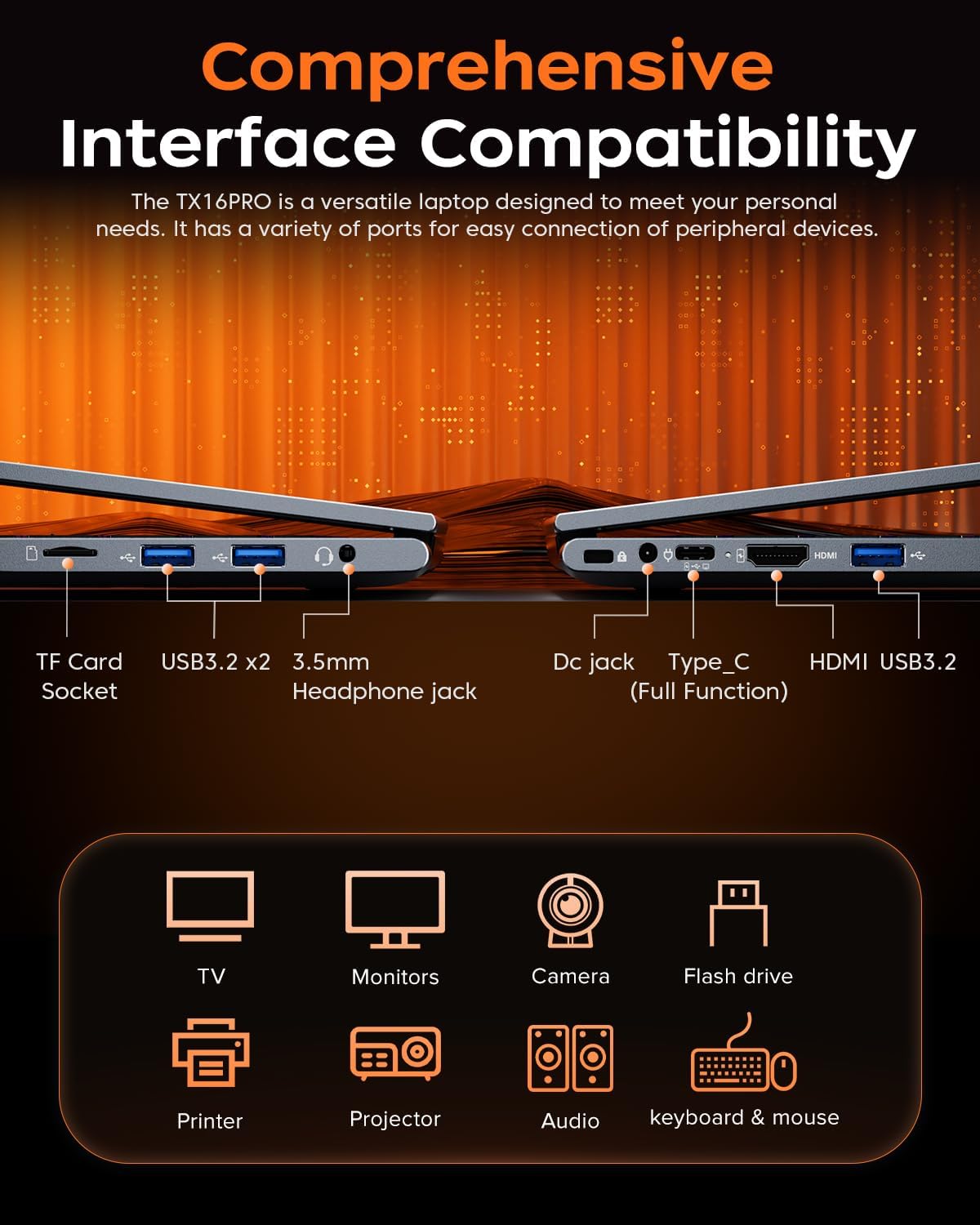
Slika: Leva stran view of the laptop, showing the TF card socket, two USB 3.2 ports, and the 3.5mm headphone jack.
3. Navodila za uporabo
3.1 Tipkovnica in sledilna ploščica
The laptop features a backlit keyboard and a responsive touchpad with multi-touch capabilities. The backlit keyboard enhances visibility in low-light conditions, and the numeric keypad provides convenience for data entry.
- Nadzor osvetlitve ozadja: Use the dedicated function keys (e.g., Fn + Fx) to adjust keyboard backlight brightness or toggle it on/off.
- Poteze sledilne ploščice: Utilize multi-touch gestures for navigation, zooming, and other functions within Windows 11 Pro.

Image: Close-up of the laptop's backlit keyboard and large touchpad, illustrating its design and functionality.
3.2 Zaslon
The 16-inch IPS display offers Full HD (1920x1200) resolution for clear and vibrant visuals. Adjust display settings through Windows settings for optimal viewizkušnje.

Image: The laptop screen showcasing vivid graphics, emphasizing the 16-inch display with Full HD (1920x1200) resolution and IPS technology.
3.3 Brezžična povezljivost
The LX16PRO supports WiFi 6 and Bluetooth 5.2 for fast and reliable wireless connections.
- WiFi 6: Connect to high-speed wireless networks for internet access and online activities.
- Bluetooth 5.2: Pair with Bluetooth-enabled devices such as headphones, speakers, or other peripherals.

Image: A visual comparison demonstrating the improved transfer speeds and reduced latency of WiFi 6 over WiFi 5, beneficial for gaming and streaming.
3.4 Načini napajanja
Optimize performance and battery life by adjusting power modes in Windows settings (Settings > System > Power & battery).
- Najboljša izvedba: Maximizes system speed for demanding tasks like gaming.
- Uravnotežen: Offers a good compromise between performance and power efficiency for everyday use.
- Best Power Efficiency: Conserves battery life for extended usage, suitable for light tasks.

Image: The laptop displayed alongside three power modes, indicating their respective performance levels and recommended uses for gaming, work, and extended battery life.
4. Vzdrževanje
4.1 Skrb za baterije
- Izogibajte se pogostemu popolnemu praznjenju baterije.
- Prenosnik shranjujte na hladnem in suhem mestu, ko ga dlje časa ne uporabljate.
- Za optimalno življenjsko dobo baterije se izogibajte izpostavljanju prenosnika ekstremnim temperaturam.

Slika: Notranji view of the laptop highlighting the 54Wh battery, indicating its capacity for extended use.
4.2 Upravljanje shranjevanja
- Redno čistite nepotrebno files and applications to maintain optimal performance of the 512GB NVMe SSD.
- Consider external storage or cloud services for large files to free up internal drive space.

Image: A visual representation of the laptop's memory (16GB DDR4 RAM, upgradable to 64GB) and storage (512GB NVMe SSD, upgradable to 4TB) capabilities.
4.3 Čiščenje
- Za čiščenje zaslona in zunanjih površin uporabite mehko krpo, ki ne pušča vlaken.
- Izogibajte se agresivnim kemikalijam ali abrazivnim materialom.
- Periodically clean the cooling vents to ensure proper airflow and prevent overheating.

Image: An illustration of the laptop's internal cooling system, featuring dual copper pipes and a dedicated fan designed to maintain low temperatures during operation.
5. Odpravljanje težav
If you encounter issues with your ACEMAGIC LX16PRO laptop, refer to the following common solutions:
- Brez napajanja: Prepričajte se, da je napajalnik varno priključen na prenosnik in delujočo električno vtičnico. Preverite lučko indikatorja napajanja.
- Težave s prikazom: If the screen is blank, try connecting an external monitor via HDMI to check if the issue is with the laptop's display or graphics output. Adjust display settings in Windows.
- Težave s povezljivostjo: For WiFi issues, restart your router and the laptop. For Bluetooth, ensure the device is discoverable and within range.
- Počasno delovanje: Close unnecessary applications, check for background processes, and ensure your system is up to date. Consider running a disk cleanup.
- Zamrznitev sistema: If the system becomes unresponsive, press and hold the power button for 10-15 seconds to force a shutdown. Restart the laptop.
For further assistance, please contact ACEMAGIC customer support.
6. Specifikacije
Below are the detailed specifications for the ACEMAGIC LX16PRO Gaming Laptop:
| Funkcija | Podrobnost |
|---|---|
| Ime modela | LX16PRO |
| Procesor | AMD Ryzen 7 7730U (8 jeder, 16 niti, do 4.5 GHz) |
| Grafika | Grafika AMD Radeon ™ |
| RAM | 16GB DDR4 (2666 MHz), Max 64GB |
| Shranjevanje | 512GB NVMe SSD (PCIE x 4), Max 4TB |
| Zaslon | 16-inch IPS, 1920x1200 (FHD), 60 Hz |
| Operacijski sistem | Windows 11 Pro |
| Povezljivost | Wi-Fi 6 (802.11ax), Bluetooth 5.2 |
| Pristanišča | 1x HDMI, 1x Type-C (Full Function), 3x USB 3.2, 1x 3.5mm Audio Jack, 1x TF Card Socket, 1x DC Jack |
| Tipkovnica | Backlit Keypad, QWERTY Layout |
| Sledilna ploščica | Multi-touch |
| Webcam | Yes (Front) |
| Baterija | 1 Lithium Ion, 55 Watt Hours (approx. 4 hours life) |
| Dimenzije | 35.73 x 22.86 x 1.67 cm |
| Teža | 1.78 kg |
7. Garancija in podpora
ACEMAGIC provides customers with a one-year limited warranty and 30-day returns. Lifetime technical support and offline maintenance are also available. For any issues or inquiries, please feel free to contact ACEMAGIC customer support.
8. Izdelek je končanview Video
Video: Kratek pregledview of the ACEMAGIC TX16PRO Laptop, showcasing its 16-inch FHD display, 180-degree hinge, backlit keyboard, and various connectivity ports including DC jack, Type-C, HDMI, USB 3.2, TF card socket, and 3.5mm headphone jack. This video highlights the physical features and design of the laptop.


