
1. Uvod
The EPOMAKER TH108 V2 PRO is a full-size mechanical keyboard designed for versatility and performance. It features multi-mode connectivity (Bluetooth, 2.4GHz wireless, and wired USB-C), a customizable screen and knob, hot-swappable switches, RGB lighting, and a gasket-mounted design for a comfortable typing experience. This manual provides instructions for setting up, operating, maintaining, and troubleshooting your keyboard.
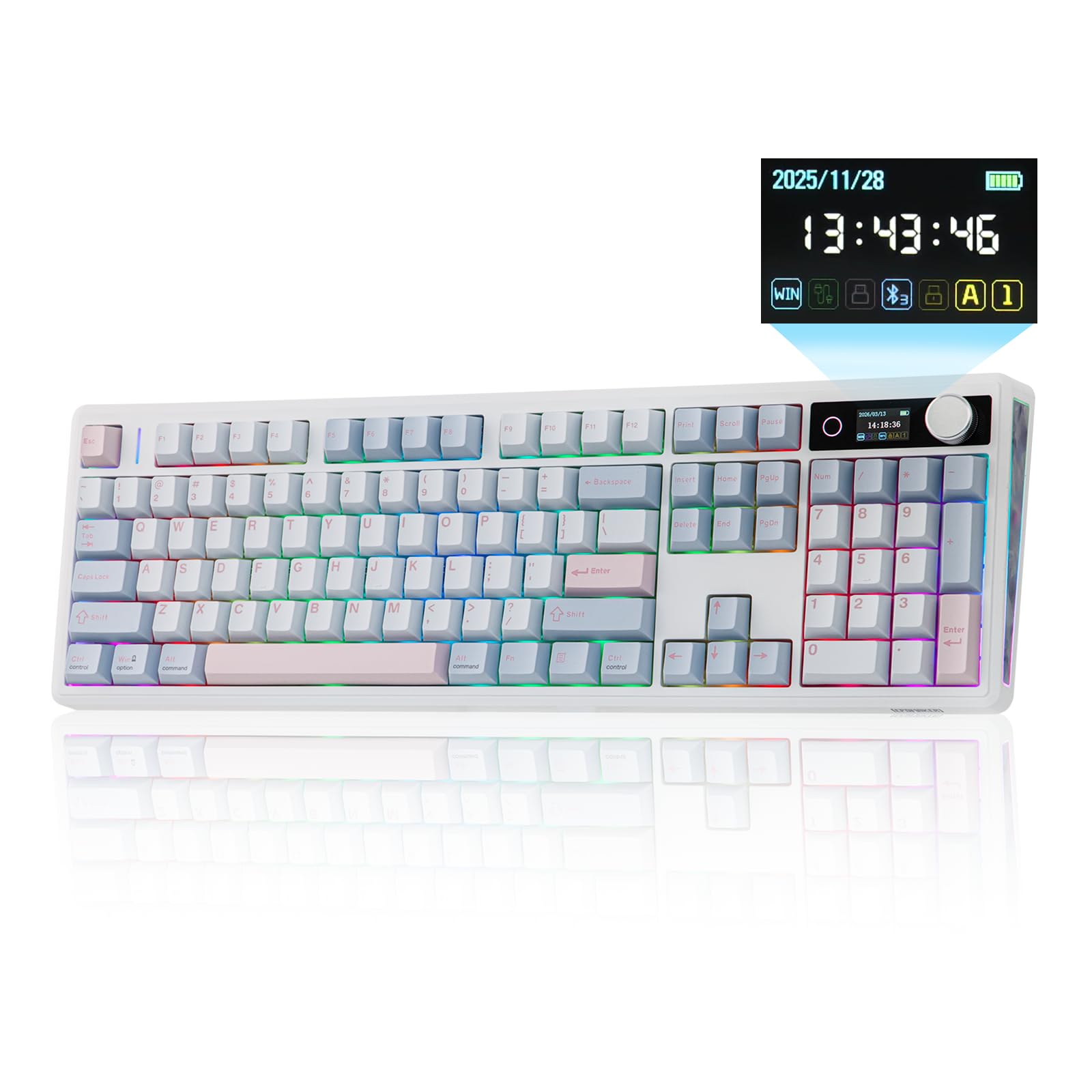
Figure 1.1: EPOMAKER TH108 V2 PRO Mechanical Keyboard
2. Kaj je v škatli
- EPOMAKER TH108 V2 PRO Full-Sized Gaming Keyboard
- Detachable USB A-to-C Cable
- Wireless 2.4Ghz Receiver (stored under the left kick-stand)
- Extra Switch
- 2-v-1 snemalec stikal in tipk
- Summarized Multilingual Manual and Product Card

Figure 2.1: Location of the 2.4Ghz Wireless Receiver
3. Izdelek je končanview
The TH108 V2 PRO keyboard integrates several features for enhanced user experience:
- Večmodalna povezljivost: Supports Bluetooth, 2.4GHz wireless, and wired USB-C connections.
- Customizable Screen & Knob: A 1.06-inch functional glass screen displays real-time keyboard information, backlight settings, and supports custom GIFs or images. The rotary knob controls volume and screen pages, and is customizable.
- Stikala z možnostjo vroče menjave: Omogoča enostavno zamenjavo mehanskih stikal brez spajkanja.
- Zasnova tesnila: Multiple layers of sound-dampening materials (PORON, latex, IXPE, silicone, foams) provide a soft, bouncy typing feel and a deep acoustic profile.
- RGB osvetlitev: Features per-key adjustable south-facing LEDs, an integrated light bar, and a custom decor panel for vibrant lighting effects.
- Dolga življenjska doba baterije: Equipped with a 10000mAh battery, providing up to 200 hours of continuous use.
- Združljivost z Macom/Windowsom: Includes dedicated Mac modifier keycaps for seamless switching between operating systems.

Figure 3.1: Cushioned Gasket Structure

Figure 3.2: Pre-Lubed Linear Switches

Figure 3.3: Mac Modifier PBT Keycaps

Figure 3.4: Vibrant RGB Lighting
Video posnetki izdelkov
Video 3.1: Comparison between TH108 PRO and TH108 V2 PRO, highlighting key differences and improvements.
Video 3.2: Demonstrates the typing sound and feel of Creamy Jade and Sea Salt Silent V2 switches on the TH108 V2 PRO.
Video 3.3: Provides close-up views of various components and design elements of the TH108 V2 PRO keyboard.
4. Nastavitev
4.1 Možnosti povezljivosti
The TH108 V2 PRO supports three connection modes:
- Žični način: Connect the keyboard to your device using the provided USB A-to-C cable.
- 2.4 GHz brezžični način: Insert the 2.4GHz USB receiver (found under the left kick-stand) into your device's USB port. Switch the keyboard's mode selector to 2.4G.
- Način Bluetooth: Switch the keyboard's mode selector to BT. Press FN + Q/W/E za izbiro kanala Bluetooth. Indikatorska lučka bo utripala, kar označuje način seznanjanja. Iskanje "TH108 V2 PRO" on your device and connect.
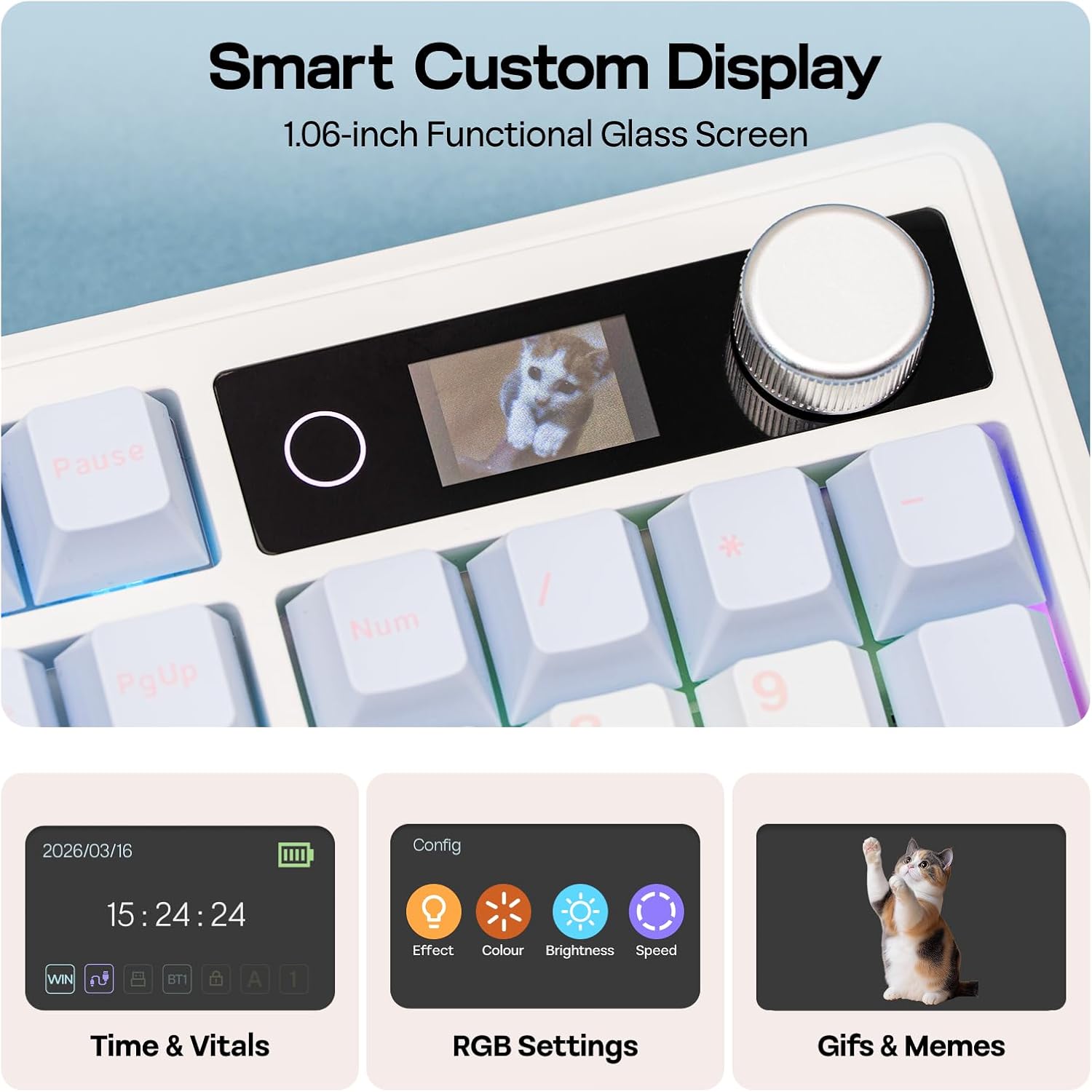
Figure 4.1: Connection Hub and Mode Switches
4.2 Preklop operacijskega sistema
Use the dedicated switch on the keyboard to toggle between Windows (WIN) and Mac operating system layouts. This ensures correct key mapping for your system.
4.3 Začetna polnitev
Before first use, it is recommended to fully charge the keyboard using the provided USB-C cable. The screen will indicate charging status.
Video 4.2: An unboxing video of the TH108 V2 PRO, showing initial setup components.
5. Navodila za uporabo
5.1 Screen and Knob Functions
The 1.06-inch screen displays various information and settings. The rotary knob allows for quick adjustments:
- Default Knob Function: Zavrtite za nastavitev glasnosti. Pritisnite za utišanje/vklop zvoka.
- FN + Knob: Toggles between screen pages (e.g., time, battery, connection status, RGB settings).
- Prilagajanje: The screen can display custom GIFs, drawings, or photos. This is managed via the web-compatible software.

Figure 5.1: Smart Custom Display and Knob
5.2 Nadzor osvetlitve RGB
The keyboard features customizable RGB backlighting. You can adjust effects, colors, brightness, and speed using:
- Integrated Knob and Screen: Use FN + Knob to navigate to RGB settings on the screen, then use the knob to adjust.
- Bližnjice na tipkovnici: Refer to the included quick guide for specific FN key combinations to change RGB modes.
- Web-Based Software: For advanced customization, including per-key lighting and custom effects.
5.3 Programabilna programska oprema
The TH108 V2 PRO utilizes a web-compatible software for advanced customization. This software allows you to:
- Prerazporedite tipke
- Snemanje makrov
- Customize RGB lighting
- Adjust keyboard settings
- Upload GIFs or images to the screen
Access the software via the official EPOMAKER website. It is compatible across various devices and operating systems.
Video 5.2: A guide on how to customize your TH108 V2 PRO using the available software and features.
6. Vzdrževanje
6.1 Čiščenje
- Pred čiščenjem tipkovnico izključite iz vseh virov napajanja.
- Uporabite mehko krpo, ki ne pušča vlaken, dampz vodo ali blago čistilno raztopino obrišite tipke in ohišje.
- Za prah in umazanijo med tipkami uporabite stisnjen zrak ali majhno krtačo.
- Izogibajte se agresivnim kemikalijam, abrazivnim sredstvom ali prekomerni vlagi.
6.2 Zamenjava tipk in stikal
The TH108 V2 PRO features hot-swappable switches, allowing for easy replacement without soldering.
- Use the provided 2-in-1 switch-and-keycap puller.
- To remove a keycap, gently pull it upwards with the keycap puller.
- To remove a switch, use the switch puller to grasp the top and bottom clips of the switch and pull straight upwards.
- When inserting a new switch, ensure the pins are straight and align with the PCB sockets. Press firmly until it clicks into place.
- When replacing keycaps, align them with the switch stem and press down gently.
7. Odpravljanje težav
- Tipkovnica se ne odziva:
- Prepričajte se, da je tipkovnica napolnjena.
- Check the connection mode switch (wired, 2.4GHz, Bluetooth) matches your setup.
- For 2.4GHz, ensure the receiver is properly inserted.
- Za Bluetooth ponovno seznanite napravo.
- Poskusite se povezati prek kabla USB-C, da izključite težave z brezžično povezavo.
- RGB osvetlitev ne deluje/je napačna:
- Check RGB settings via the screen or software.
- Ensure brightness is not set to zero.
- Posodobite vdelano programsko opremo tipkovnice, če je na voljo.
- Ključi se ne registrirajo:
- Če določena tipka ne deluje, poskusite odstraniti in ponovno vstaviti njeno stikalo.
- Ensure the switch pins are not bent.
- Test with a different switch if available.
- Težave s programsko opremo:
- Ensure you are using a compatible browser (e.g., Chrome) for the web-programska oprema.
- Počistite predpomnilnik brskalnika ali poskusite z drugim brskalnikom.
- Refer to the EPOMAKER support website for software-specific FAQs.
8. Specifikacije
| Znamka | EPOMAKER |
| Ime modela | TH108 V2 PRO |
| Tehnologija povezljivosti | 2.4Ghz Wireless, Bluetooth, USB Cable |
| Opis tipkovnice | Mehanski |
| Število ključev | 104 |
| Razporeditev tipkovnice | QWERTY |
| Tip stikala | Linear, Linear Silent (depending on variant) |
| Posebne lastnosti | Backlit, Ergonomic, Hot-Swappable, Programmable Keys, Volume Roller, Screen |
| Osvetlitev tipkovnice | RGB |
| Vir napajanja | Napajanje z baterijo (10000 mAh) |
| Material | Plastic (Enclosure), Polycarbonate (Plate) |
| Združljive naprave | Igralna konzola, prenosnik, računalnik, pametni telefon, tablica |
| Združljiv OS | Android, Windows, Mac OS 11 Big Sur and above |
| Stopnja anketiranja (žično) | 1000Hz |
| Latency (Wired) | 2ms |
9. Garancija in podpora
The EPOMAKER TH108 V2 PRO Mechanical Keyboard comes with a 1-letna garancija od datuma nakupa.
For technical support, warranty claims, or additional information, please visit the official EPOMAKER website or contact their customer service directly. You can also find more resources and product information on the Trgovina EPOMAKER na Amazonu.