
Uvod
This manual provides instructions for the proper use and maintenance of your SBS TWS Twin Spike Earphones with Charging Case. Please read this manual thoroughly before using the product to ensure optimal performance and longevity.
Vsebina paketa
Preverite, ali so v paketu prisotni vsi elementi:
- SBS TWS Twin Spike Earphones (Left and Right)
- etui za polnjenje
- Polnilni kabel USB-C
- Uporabniški priročnik (ta dokument)
Konec izdelkaview
The SBS TWS Twin Spike earphones are designed for wireless audio playback and hands-free calling. They feature an in-ear design for comfort and stability, touch controls, and a portable charging case.
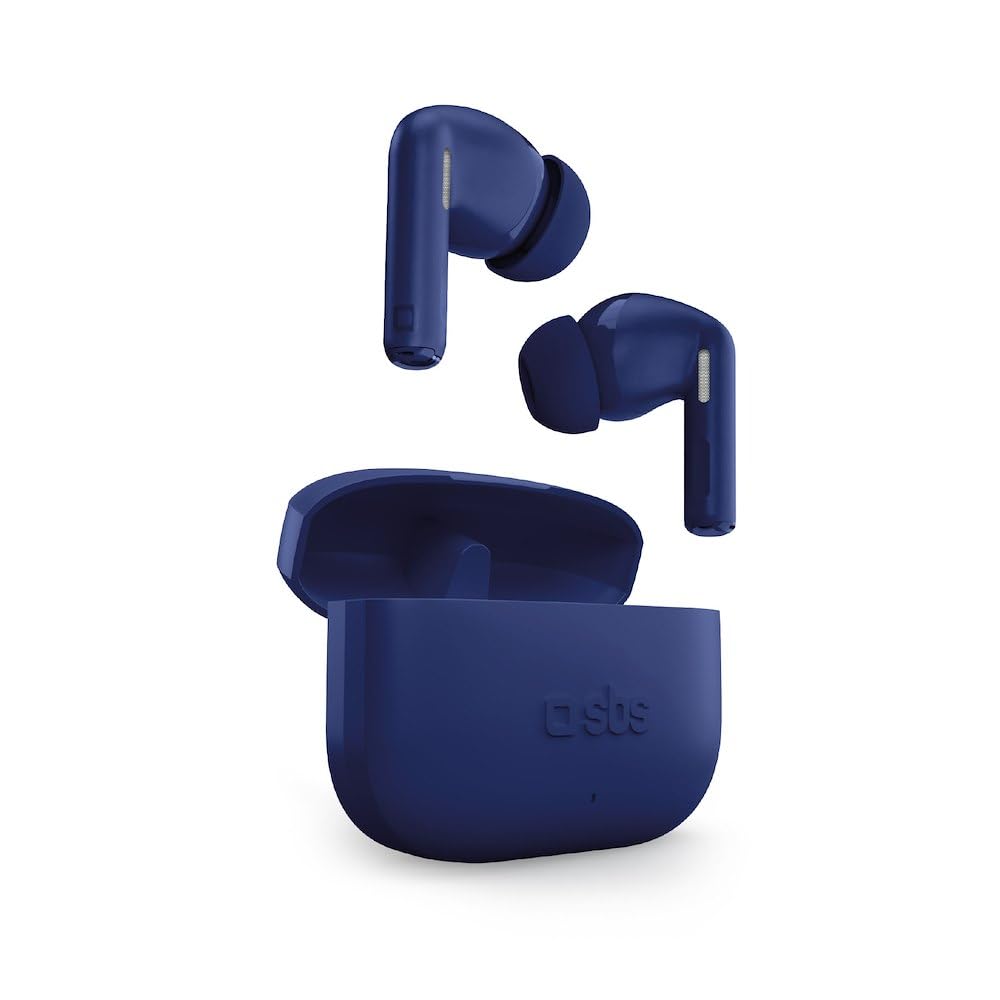
Image: SBS TWS Twin Spike Earphones and Charging Case. This image displays the compact charging case and the two in-ear earphones.
Sestavine:
- Ušesna sredstva: Left and Right, each with touch control surface and audio output.
- Polnilna torbica: Stores and recharges the earbuds. Features a USB-C port for charging the case itself.
- LED indikatorji: On both earbuds and charging case, indicating power, charging status, and pairing.
Nastavitev
1. Polnjenje polnilne torbice
Before initial use, fully charge the charging case. Connect the provided USB-C cable to the charging port on the case and the other end to a USB power source (e.g., computer, wall adapter). The LED indicator on the case will show charging status and turn off or change color when fully charged.
2. Polnjenje slušalk
Place the earphones into the charging case. Ensure they are correctly seated in their respective slots. The earphones will begin charging automatically. LED indicators on the earphones will show their charging status. They will turn off or change color when fully charged.
3. Initial Pairing with a Device
- Prepričajte se, da so slušalke napolnjene.
- Open the charging case. The earphones will automatically power on and enter pairing mode (indicated by flashing LEDs).
- Na pametnem telefonu ali napravi, ki podpira Bluetooth, pojdite v nastavitve Bluetooth.
- Iskanje available devices and select "SBS TWS Twin Spike" (or similar name).
- Once connected, a voice prompt will confirm successful pairing, and the earphone LEDs will stop flashing.
Opomba: The earphones feature a Hall Switch system for instant connection. After the first pairing, simply opening the case will automatically connect them to your previously paired device if Bluetooth is enabled on that device.
Navodila za uporabo
Dotaknite se kontrolnikov
The SBS TWS Twin Spike earphones feature intuitive touch controls on the outer surface of each earbud. Functions may vary slightly depending on the device and application.
- Predvajanje/pavza: Enkratni dotik na obeh ušesnih čepkih.
- Naslednja skladba: Dvakrat tapnite desno slušalko.
- Prejšnja skladba: Dvakrat tapnite levo slušalko.
- Sprejmi/končaj klic: Med dohodnim ali aktivnim klicem enkrat pritisnite katero koli slušalko.
- Zavrni klic: Med dohodnim klicem pritisnite in držite katero koli slušalko približno 2 sekundi.
- Aktiviranje glasovnega pomočnika: Trikrat tapnite katero koli slušalko (npr. Siri, Google Assistant).
Opomba: Volume control is typically managed directly from your connected device.
Vzdrževanje
- Čiščenje: Za čiščenje slušalk in polnilnega ohišja uporabljajte mehko, suho krpo, ki ne pušča vlaken. Ne uporabljajte abrazivnih čistil ali topil.
- Shranjevanje: Ko slušalk ne uporabljate, jih shranite v polnilno škatlico, da jih zaščitite in ohranite napolnjene.
- Izpostavljenost vodi: These earphones are not waterproof. Avoid exposure to water, moisture, or extreme temperatures.
- Vzdrževanje baterije: Za podaljšanje življenjske dobe baterije se izogibajte pogostemu popolnemu praznjenju slušalk in polnilnega ohišja. Redno jih polnite.
Odpravljanje težav
Slušalke se ne seznanijo ali ne povežejo:
- Prepričajte se, da sta obe slušalki napolnjeni.
- Prepričajte se, da je Bluetooth v vaši napravi omogočen.
- Place the earphones back into the charging case, close the lid, wait a few seconds, then open it again to re-initiate pairing mode.
- Forget the device ("SBS TWS Twin Spike") from your device's Bluetooth settings and attempt to pair again.
- Ensure the earphones are within the Bluetooth range of your device (typically 10 meters).
Deluje samo ena slušalka:
- Check the battery level of the non-working earphone.
- Obe slušalki vstavite nazaj v polnilno ohišje, zaprite pokrov in ga nato ponovno odprite. To ju pogosto ponovno sinhronizira.
- Try resetting the earphones (refer to specific reset instructions if available, otherwise, a full charge and re-pairing often resolves this).
Slaba kakovost zvoka ali prekinitve povezave:
- Ensure there are no obstructions between your device and the earphones.
- Premaknite se bližje povezani napravi.
- Izogibajte se okoljem z močnimi motnjami omrežja Wi-Fi ali drugimi brezžičnimi signali.
- Check if the earphones or your device require a software update.
Specifikacije
| Funkcija | Podrobnost |
|---|---|
| Znamka | SBS |
| Številka modela | Stereo |
| Tehnologija povezljivosti | Brezžično (Bluetooth) |
| Vrsta slušalke | V ušesu |
| Življenjska doba baterije (slušalke) | Do 4 ur polnjenja |
| Skupna življenjska doba baterije (z ohišjem) | Do 16 ur |
| Zmogljivost polnilnega ohišja | 200 mAh |
| Vrata za polnjenje | USB-C |
| Vrsta nadzora | Nadzor na dotik |
| Teža | 50 Grams (item weight) |
| Frekvenčno območje | 20 Hz - 20,000 Hz |
| Material | Plastika |
| GTIN | 08018417513473 |
Garancija in podpora
Specific warranty information for SBS products is typically provided with the product packaging or available on the official SBS website. Please refer to the documentation included with your purchase for detailed warranty terms and conditions.
For technical support or customer service, please visit the official SBS website or contact their customer support channels. Keep your proof of purchase for any warranty claims.