
1. Uvod
1.1 izdelkov konecview
The Hikvision DS-7108HGHI-M1/T is an 8-channel Turbo HD DVR designed for reliable surveillance recording in various environments. This digital video recorder supports 1080p Lite recording, providing clear video footage. It incorporates H.265 Pro+ compression technology for efficient storage and video quality. Features include Motion Detection 2.0 for intelligent event identification, 2-way audio support for communication, and HDMI/VGA output options for display connectivity. Remote viewing is available via the Hik-Connect application.
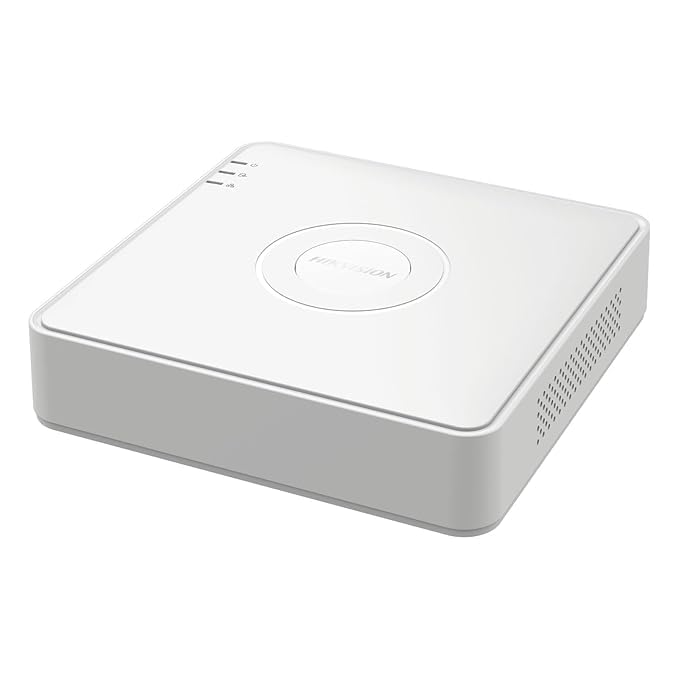
Slika 1: Zgornji del view of the Hikvision DS-7108HGHI-M1/T DVR. This image displays the device's compact white casing with the Hikvision brand logo centrally located. Indicator lights for power, hard drive activity, and network status are visible on the left side of the top panel.
1.2 Ključne lastnosti
- 8-Channel Turbo HD DVR: Supports up to 8 analog cameras with 1080p Lite recording resolution.
- Napredno stiskanje: Utilizes H.265 Pro+ video compression for reduced bandwidth and storage while maintaining video quality.
- Two-Way Audio Support: Enables real-time communication through connected cameras via built-in audio input and output.
- Zaznavanje gibanja 2.0: Intelligent motion detection technology for improved accuracy and reduced false alarms.
- Prilagodljiva povezljivost: Equipped with HDMI and VGA outputs, a network port for remote viewing via Hik-Connect, and USB ports for data backup.
1.3 Vsebina paketa
Preverite, ali so v paketu prisotni vsi elementi:
- 1 x 4 Channel DVR Recorder (Note: Product title indicates 8-channel, but package content lists 4-channel. Please verify actual product received.)
- 2 x 2MP ColorVu Dome Cameras
- 2 x 2MP ColorVu Bullet Cameras
- 1 x 1TB Surveillance Hard Disk Drive
- 1 x 4 Channel SMPS Power Supply
- 8 x BNC Connectors
- 4 x DC Power Connectors
- 1 x HDMI kabel
- 1 x USB miška
- 1 x Power Adapter for DVR
- 1 x Cable Roll (90 Metres)
- 6 x pritrdilni vijaki
- Dodatki za namestitev
2. Nastavitev
2.1 Fizična namestitev
Before connecting, ensure the DVR is placed on a stable, flat surface with adequate ventilation. Avoid direct sunlight, heat sources, and areas with high humidity or dust.
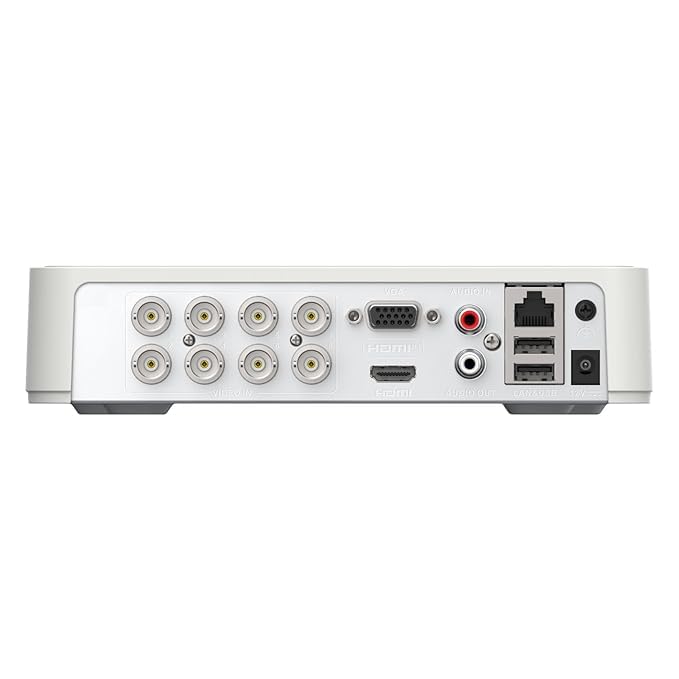
Figure 2: Rear panel of the Hikvision DS-7108HGHI-M1/T DVR. This image illustrates the various connectivity ports available on the back of the device, including multiple BNC connectors for camera inputs, VGA and HDMI outputs for display, audio input and output jacks, an Ethernet port for network connection, USB ports for peripherals, and the DC power input.
2.2 Priključitev DVR-ja
- Povežite kamere: Attach your analog cameras to the BNC video input ports on the rear panel (refer to Figure 2).
- Povežite monitor: Monitor priključite na DVR z izhodom HDMI ali VGA.
- Poveži omrežje: Za daljinsko viewing and network access, connect an Ethernet cable from the DVR's LAN port to your router or network switch.
- Priključite USB naprave: Plug the included USB mouse into one of the USB ports for navigation. Additional USB ports can be used for external storage for backup.
- Priključite zvok (izbirno): If using cameras with audio or an external microphone, connect to the Audio In port. Connect speakers to the Audio Out port for two-way audio communication.
- Priključite napajanje: Connect the provided power adapter to the DVR's power input and then to a power outlet.
2.3 Začetni vklop in konfiguracija
After connecting all necessary cables, power on the DVR. The system will boot up, and you will be guided through an initial setup wizard on the connected monitor. Follow the on-screen prompts to set up basic parameters such as language, date/time, network settings, and administrator password. It is crucial to set a strong password for security.
3. Navodila za uporabo
3.1 V živo View
Once the DVR is powered on and cameras are connected, the live view of all connected cameras will be displayed on the monitor. You can switch between single-camera view, mreža z več kamerami view, and sequence display using the on-screen controls or the USB mouse.
3.2 Snemanje
DVR podpira različne načine snemanja:
- Nenehno snemanje: Zapisi 24/7.
- Predvideno snemanje: Zapisi v določenih časovnih obdobjih.
- Snemanje s sprožitvijo gibanja: Snema samo, ko je zaznano gibanje.
- Snemanje dogodka: Records based on other events like alarm input.
Configure recording schedules and parameters through the DVR's menu system. The H.265 Pro+ compression technology optimizes storage space while maintaining video quality.
3.3 Predvajanje
Za ponovnoview posnet footage:
- Do menija »Predvajanje« dostopite iz glavnega vmesnika.
- Izberite želeno kamero (kamere) in datumsko/časovno obdobje.
- Use the timeline to navigate through recordings. Playback controls (play, pause, fast forward, rewind) are available.
3.4 Daljinski upravljalnik Viewing via Hik-Connect
The Hik-Connect application allows remote access to your DVR from a smartphone or computer. To set up:
- Prepričajte se, da je DVR povezan z internetom.
- Download and install the Hik-Connect app on your mobile device.
- Create a Hik-Connect account and add your DVR by scanning the QR code or manually entering the serial number.
- Follow the app's instructions to view live feeds, play back recordings, and receive notifications remotely.
3.5 Motion Detection 2.0
Motion Detection 2.0 is an advanced feature that intelligently identifies movement, reducing false alarms caused by environmental factors. Configure motion detection zones and sensitivity settings in the DVR's menu. When motion is detected, the DVR can trigger recording, send notifications, or activate alarms.
3.6 Dvosmerni zvok
If your cameras support audio and are connected to the DVR's audio input/output, you can use the two-way audio feature. This allows you to listen to audio from the camera's location and speak through a connected speaker, enabling interactive communication.
4. Vzdrževanje
4.1 Splošno vzdrževanje
- Čiščenje: Regularly clean the DVR's exterior with a soft, dry cloth. Do not use liquid or aerosol cleaners.
- Prezračevanje: Ensure the DVR's ventilation openings are clear and not obstructed to prevent overheating.
- Posodobitve vdelane programske opreme: Občasno preverite proizvajalčeve webspletno mesto za posodobitve vdelane programske opreme za zagotovitev optimalne zmogljivosti in varnosti.
4.2 Upravljanje shranjevanja
- Zdravje trdega diska: Monitor the health status of the internal hard drive through the DVR's system information menu.
- Varnostno kopiranje podatkov: Redno varnostno kopirajte pomembne posnetke na zunanji pogon USB ali omrežno shrambo, da preprečite izgubo podatkov.
- Način prepisovanja: Configure the DVR to overwrite older recordings when the hard drive is full, or set it to stop recording.
5. Odpravljanje težav
5.1 Pogoste težave in rešitve
- Brez video prikaza:
- Check power connections to the DVR and monitor.
- Verify HDMI/VGA cable connections.
- Ensure the correct input source is selected on the monitor.
- Brez slike kamere:
- Check camera power supply.
- Verify BNC cable connections between camera and DVR.
- Ensure camera is compatible with the DVR's technology (e.g., TVI, CVI, AHD, CVBS).
- Daljinsko ViewNe deluje:
- Confirm the DVR is connected to the internet (check network cable and router status).
- Verify network settings on the DVR.
- Ensure the Hik-Connect app is correctly configured and the DVR is added.
- Brez snemanja:
- Check if the hard drive is installed and initialized.
- Preverite urnike in nastavitve snemanja.
- Check hard drive health status.
6. Specifikacije
6.1 Tehnične specifikacije
| Funkcija | Podrobnost |
|---|---|
| Številka modela | DS-7108HGHI-M1/T |
| Znamka | HIKONECT (Manufacturer: Hikvision) |
| Število kanalov | 8 |
| Tehnologija povezljivosti | Ethernet, HDMI, USB, VGA |
| Združljive naprave | Kamera |
| Mere izdelka (D x Š x V) | 12 D x 14 Š x 5 V centimetrov |
| Teža predmeta | 750 gramov |
| Ime vrste predmeta | DVR |
7. Garancija in podpora
7.1 Informacije o garanciji
Ta izdelek je opremljen z 2-letna garancija proizvajalca. Please retain your proof of purchase for warranty claims. The warranty covers defects in materials and workmanship under normal use. It does not cover damage caused by misuse, accidents, unauthorized modifications, or improper installation.
7.2 Podpora strankam
For technical assistance, troubleshooting, or warranty inquiries, please contact your retailer or the manufacturer's customer support. Refer to the contact information provided with your purchase or visit the official Hikvision webmesto za podporne vire.


