
Uvod
This manual provides detailed instructions for the setup, operation, and maintenance of your AT&T DECT 6.0 Cordless Phone, model BL108-3. Please read this guide thoroughly to ensure proper use and to take full advantage of all features, including Smart Call Blocker, Bluetooth Connect to Cell, and the digital answering machine.
Vsebina paketa
Preverite, ali vaš paket vsebuje naslednje elemente:
- Osnovna enota
- 3 brezžični slušalki
- 3 napajalnika
- 2 polnilniki (za dodatne slušalke)
- Telefonski kabel
- 6 baterijskih celic
- Vodnik za hiter začetek
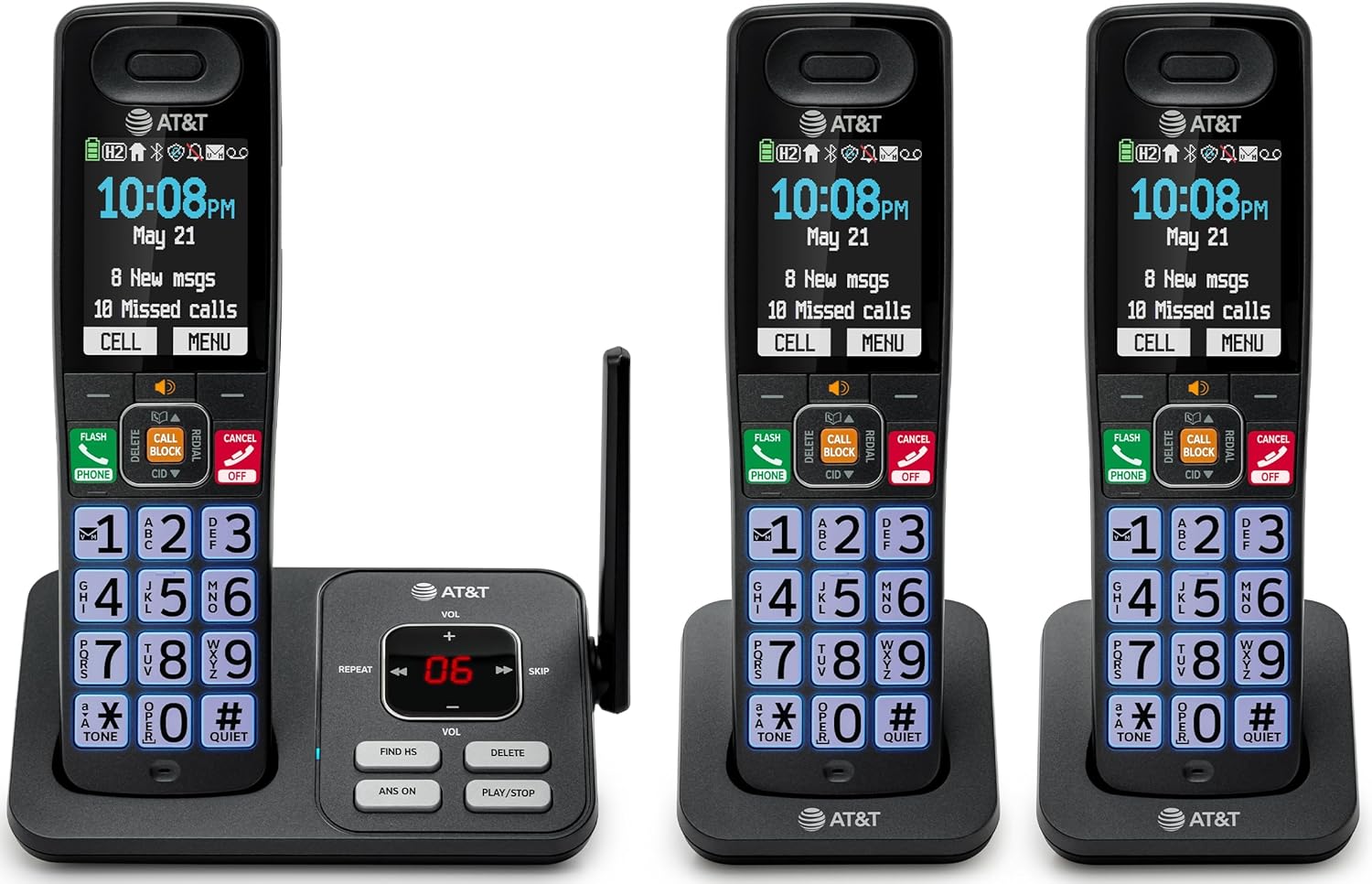
Image: The complete AT&T BL108-3 cordless phone system, showing the base unit and three handsets.
Nastavitev
1. Base Unit and Power Connection
- Postavite osnovno enoto na ravno, stabilno površino.
- En konec telefonskega kabla priključite v vtičnico TEL LINE na osnovni enoti.
- Drugi konec telefonskega kabla priključite v telefonsko stensko vtičnico.
- Plug one power adapter into the POWER jack on the base unit.
- Plug the other end of the power adapter into an electrical outlet not controlled by a wall switch.
2. Vstavljanje in polnjenje baterije slušalke
- Odprite pokrov predalčka za baterije na hrbtni strani vsake slušalke.
- Insert the provided battery cells, ensuring correct polarity (+ and -).
- Zaprite pokrov prostora za baterije.
- Place each handset in its respective charger or the base unit cradle. The CHARGE light on the handset will illuminate.
- Pred prvo uporabo pustite, da se slušalke polnijo vsaj 10 ur.
3. Additional Charger Setup
- Plug the power adapters for the additional chargers into electrical outlets not controlled by a wall switch.
- Place the additional handsets into these chargers to charge.
Navodila za uporabo
Klicanje in sprejemanje klicev
- To make a call: Press TELEFON, nato pa pokličite številko.
- To answer a call: Press TELEFON ali katero koli klicno tipko.
- Končanje klica: Pritisnite IZKLOP/PREKLIC ali postavite slušalko v odlagalno enoto.
Pametni blokator klicev
The Smart Call Blocker feature automatically filters out robocalls. You can also manually block unwanted numbers.
- To block a number during a call: Press the dedicated KLIC ZA KLIC ključ.
- The block directory can store up to 1,000 entries.

Image: A close-up of the handset displaying the "Smart Call Block" screen, with the "CALL BLOCK" button highlighted on the base unit.
Povezava Bluetooth z mobilno napravo
Pair your smartphone with the BL108-3 system to make and receive mobile calls through any of the cordless handsets.
- Na osnovni enoti pritisnite MENI, then navigate to "Bluetooth" and select "Pair Cell".
- V pametnem telefonu omogočite Bluetooth in poiščite razpoložljive naprave.
- Select the AT&T phone from the list on your smartphone to pair.
- Once paired, mobile calls can be made and received using the cordless handsets.

Image: A visual representation of the "Connect to Cell" feature, showing a handset on a nightstand wirelessly connected to a smartphone.
Video: Demonstrates the seamless Bluetooth connection to a cell phone, allowing calls to be made and received through the AT&T cordless handset.
Digitalni odzivnik
The integrated digital answering system records up to 22 minutes of messages.
- To play messages: Press PREDVAJAJ/USTAVI on the base unit or handset.
- To skip messages: Press PRESKOČI.
- To delete messages: Press IZBRIŠI.

Image: The phone's base unit and handset displaying an incoming message on the answering system, with a visual of a message being left.
Oglas za identifikacijo klicatelja
The handset speaks the caller's name aloud, allowing you to screen calls without picking up the phone.
- Prepričajte se, da je storitev identifikacije klicatelja naročena pri vašem ponudniku telefonskih storitev.
- The feature is active by default.

Image: The handset and base unit showing a call coming in, with a speech bubble indicating "Call from Johnson" to illustrate the Caller ID Announce feature.
Interkom med slušalkami
You can use the handsets to communicate with each other, or transfer calls.
- To initiate an intercom call: Press INTERKOM on a handset, then select the desired handset number.
- To transfer a call: During an external call, press INTERKOM, select the handset, and then hang up after the other handset answers.

Image: Two handsets, one on the base and one on a charger, with arrows indicating communication between them, illustrating the intercom feature.
Imenik telefonskega imenika
V telefonski imenik shranite do 1500 imen in številk za hitro klicanje.
- To add an entry: Press MENI, navigate to "Phonebook", then "Add New Entry".
- To dial from phonebook: Press TELEFON, potem DIR, select the entry, and press TELEFON znova.

Image: The handset screen showing a phonebook list with alphabetical navigation, demonstrating the phonebook directory feature.
Polnodupleksni zvočnik za slušalko
Allows both parties to speak and be heard simultaneously during a speakerphone call.
- To activate speakerphone during a call: Press ZVOČNIK.
- To switch back to handset mode: Press TELEFON.

Image: A person using the handset in speakerphone mode while working on a laptop, with speech bubbles indicating a two-way conversation.
Tihi način
Temporarily silences all handset and base unit ringers for a set period.
- To activate: Press and hold #TIH na slušalki.
- Za deaktivacijo: Pritisnite in držite #TIH znova.

Image: The handset screen showing "Quiet mode on" with a sleeping person in the background, illustrating the Quiet Mode feature.
ECO način
Reduces power consumption for optimal battery performance.
- ECO mode is typically enabled by default to conserve energy.
- Refer to the full user manual for options to adjust or disable this feature if needed.

Image: The handset and base unit in a setting with wind turbines in the background, and the screen showing "ECO mode", symbolizing energy efficiency.
Vgrajena svetilka
For safety at night or in emergencies, the handset includes a built-in flashlight.
- To activate the flashlight: Locate the flashlight button on the side of the handset and press it.

Image: A close-up of the handset's side, showing the flashlight beam and the "FLASHLIGHT" label, indicating its location and function.
Vzdrževanje
- Čiščenje: Telefon in osnovno enoto očistite z mehko krpoamp krpo. Ne uporabljajte čistilnih razpršil ali agresivnih kemikalij.
- Vzdrževanje baterije: For optimal battery life, fully charge the handsets for 10 hours before first use. If the phone will be unused for an extended period, remove the batteries.
- Okoljski pogoji: Izogibajte se izpostavljanju telefona ekstremnim temperaturam, neposredni sončni svetlobi ali vlagi.
Odpravljanje težav
| Težava | rešitev |
|---|---|
| Ni znaka centrale |
|
| Slušalka se ne polni |
|
| Slaba kakovost klica ali statični zvoki |
|
| Cannot make/receive Bluetooth calls |
|
Specifikacije
| Funkcija | Podrobnost |
|---|---|
| Znamka | AT&T |
| Številka modela | BL108-3 |
| Vrsta telefona | Brezžično (DECT 6.0) |
| barva | Črna |
| Handsets Included | 3 |
| Zaslon | 2.4" Color Backlit Display |
| Vrsta telefonskega odzivnika | Digitalno (do 22 minut snemanja) |
| Blokator klicev | Smart Call Blocker (up to 1,000 entries) |
| Bluetooth | Connect to Cell (smartphone pairing) |
| Čas pripravljenosti telefona | 6 dni |
| ID klicatelja | Yes, with Announce feature |
| Kapaciteta imenika | Do 1500 imen in številk |
| Zvočnik | Polnodupleksni zvočnik za slušalko |
| Dimenzije (osnovna enota) | 5.63 x 2.99 x 7.4 palcev (D x Š x V) |
| Vir napajanja | Električni na kabel |
| Material | Plastika |
| UPC | 650530034121 |

Image: Diagram showing the dimensions of the AT&T BL108-3 base unit and a handset.
Informacije o garanciji
Your AT&T BL108-3 Cordless Phone comes with a 1-letna omejena garancija. Please retain your purchase receipt as proof of purchase. For detailed warranty terms and conditions, refer to the full user manual or contact AT&T customer support.
Podpora
For further assistance, technical support, or to order replacement parts, please visit the official AT&T support website or contact their customer service. You can often find FAQs and additional resources online.
- Spletna podpora: Obisk AT&T Wireless Support (or search for AT&T Landline Phone Support).
- Storitev za stranke: Refer to your Quick Start Guide for specific contact numbers.


