
1. Uvod
This manual provides essential information for setting up, operating, maintaining, and troubleshooting your GMKtec K15 AI Mini PC. The K15 is a compact, high-performance barebone mini computer featuring an Intel Ultra 5 125U processor, designed for a wide range of applications from home entertainment to professional workloads.
Pred uporabo naprave natančno preberite ta priročnik, da zagotovite pravilno delovanje in podaljšate njeno življenjsko dobo.
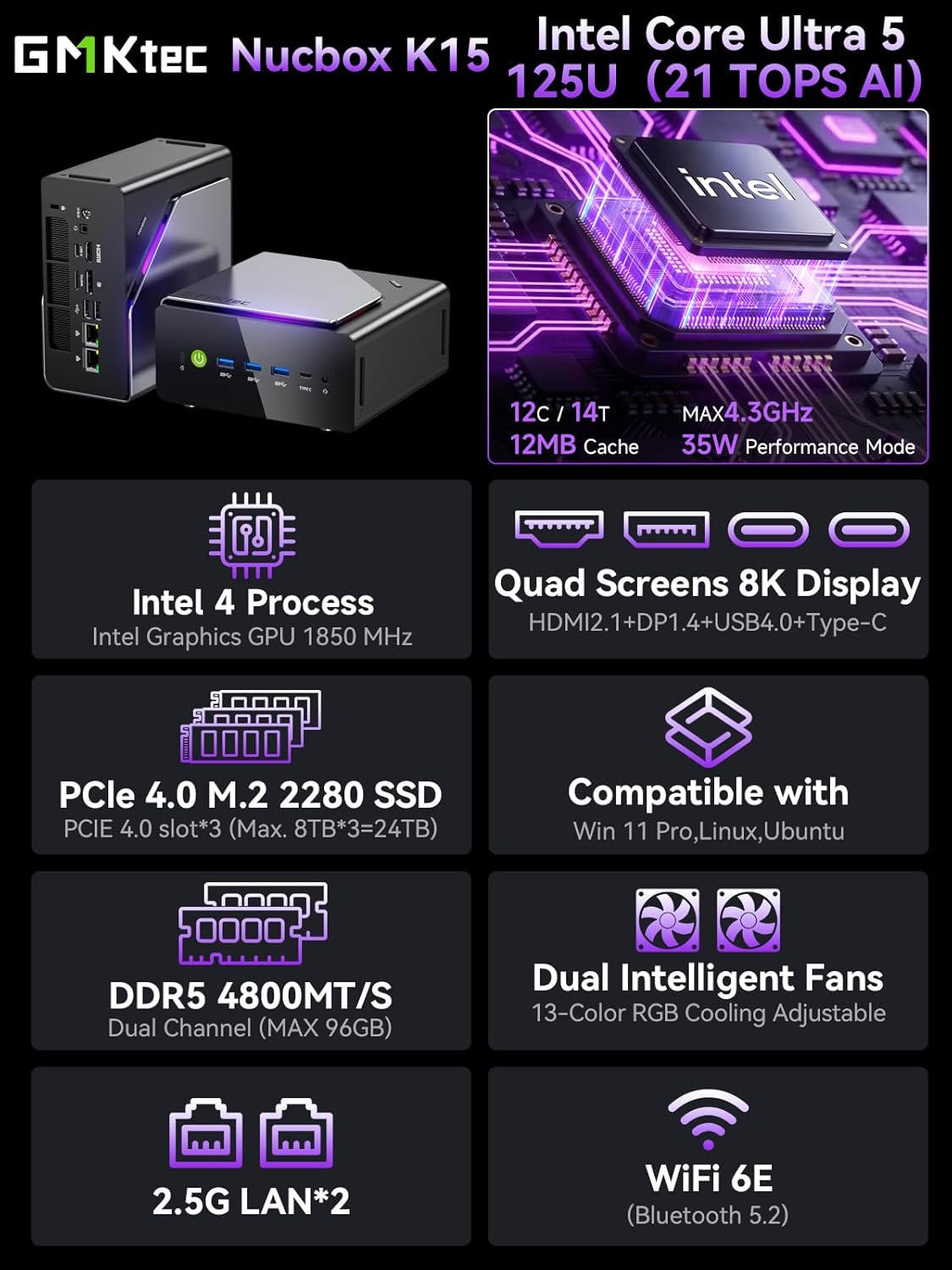
Slika 1.1: Konecview of GMKtec K15 Mini PC features, including Intel Ultra 5 125U CPU, 8K display support, PCIe 4.0 SSD, DDR5 RAM, dual intelligent fans, 2.5G LAN, and WiFi 6E.
2. Vsebina paketa
Preverite, ali so v paketu prisotni vsi elementi:
- 1 x GMKtec Nucbox K15 Mini PC
- 1 x napajalnik
- 1 x VESA nosilec z vijaki
- 1 x HDMI kabel
- 1 x Uporabniški priročnik (ta dokument)
3. Fizični overview
Familiarize yourself with the ports and components of your GMKtec K15 Mini PC.

Image 3.1: Detailed diagram showing the front and rear I/O ports of the GMKtec K15 Mini PC.
Sprednja plošča
- Gumb za vklop: Za vklop ali izklop naprave.
- USB 3.2 Gen2 Ports (x3): Za priklop visokohitrostnih USB naprav.
- Full-Function Type-C Port (USB4): Supports data transfer, video output (DP1.4), and power delivery (PD3.0).
- 3.5 mm avdio priključek: Za slušalke ali zvočnike.
- Gumb za ponastavitev: For system reset (use a pin).
Zadnja plošča
- Vhod DC moči: Priključite priloženi napajalnik.
- Reža za ključavnico Kensington: Za varnostno zaklepanje.
- 3.5 mm avdio priključek: Za avdio izhod.
- Vrata USB4: Supports data transfer and video output.
- HDMI Port (2.1): Za povezavo z zaslonom.
- OCuLink Port: High-speed direct connection for external graphics or 10G NICs.
- DisplayPort (1.4): Za povezavo z zaslonom.
- Vrata USB 2.0 (x2): Za priklop standardnih USB naprav.
- 2.5G Ethernet Ports (x2): Za visokohitrostne žične omrežne povezave.
- Gumb za ventilatorski način: To adjust fan speed/mode.

Image 3.2: The OCuLink port on the GMKtec K15 Mini PC, designed for high-speed external graphics card connections.
4. Navodila za namestitev
The GMKtec K15 is a barebone system, meaning RAM, SSD, and operating system are not pre-installed. Follow these steps to prepare your Mini PC for first use.
4.1 Installing RAM and SSD
The K15 supports dual-channel DDR5-4800MHz RAM (up to 128GB) and three PCIe 4.0 x4 M.2 2280 SSDs (up to 24TB total storage).
- Ugasniti: Prepričajte se, da je mini računalnik izklopljen in odklopljen od napajalnika.
- Odprto podvozje: Carefully open the Mini PC chassis. Refer to the specific instructions provided with your device for opening the case.
- Namestitev RAM-a: Locate the DDR5 SO-DIMM slots. Align the RAM module notch with the slot key and insert it firmly at a 45-degree angle. Push down until the clips on both sides lock the module in place.
- Namestitev SSD-ja: Locate the M.2 2280 PCIe 4.0 x4 slots. Insert the M.2 SSD into the slot at a slight angle, then gently push it down and secure it with the provided screw.
- Zapri šasijo: Carefully close the Mini PC chassis, ensuring all connections are secure.

Image 4.1: Internal layout of the GMKtec K15 Mini PC, illustrating the locations for DDR5 RAM and three M.2 2280 PCIe 4.0 x4 SSDs.
4.2 Priključitev zunanjih naprav
- Zaslon: Connect your monitor(s) to the HDMI, DisplayPort, or USB4 Type-C ports using appropriate cables. The K15 supports up to four displays simultaneously.
- Tipkovnica in miška: Priključite tipkovnico in miško USB na vsa razpoložljiva vrata USB.
- Omrežje: For wired internet, connect an Ethernet cable to one of the 2.5G LAN ports. For wireless, ensure your WiFi 6E router is configured.
- moč: Connect the power adapter to the DC Power Input port on the rear panel, then plug the adapter into a power outlet.
4.3 Namestitev operacijskega sistema
Since the K15 is a barebone system, an operating system (OS) is not included. You will need to install your preferred OS (e.g., Windows 11 Pro, Linux, Ubuntu) from a bootable USB drive. Refer to the OS manufacturer's instructions for installation.
5. Delovanje
5.1 Vklop/izklop
- Vklop: Pritisnite gumb za vklop na sprednji plošči.
- Ugasniti: From within your operating system, select the shutdown option. Alternatively, press and hold the power button for 5 seconds to force a shutdown (use only when necessary).
5.2 Konfiguracija zaslona
The K15 supports up to four simultaneous displays via HDMI 2.1 (8K@60Hz), DisplayPort 1.4 (8K@30Hz), and dual USB4 Type-C ports (DP1.4/PD3.0). Configure your display settings within your operating system to extend, duplicate, or use only one screen.

Image 5.1: A GMKtec K15 Mini PC setup demonstrating connection to multiple 4K/8K displays for enhanced multitasking.
5.3 Omrežna povezljivost
- Žično: The dual 2.5GbE LAN ports provide high-speed wired network access.
- Brezžično: Integrated Wi-Fi 6E offers fast and stable wireless connectivity. Configure Wi-Fi settings through your operating system.
- Bluetooth: Bluetooth 5.2 allows connection to wireless peripherals such as keyboards, mice, and audio devices.
5.4 AI Processing with NPU
The Intel Ultra 5 125U processor includes a dedicated Neural Processing Unit (NPU) for accelerating AI tasks. This NPU enhances performance for machine learning applications, real-time analytics, and AI-driven creative workloads, reducing CPU load and improving efficiency.

Image 5.2: Visual representation of the K15's Intel AI Boost with Dedicated NPU, highlighting its benefits for AI-enhanced creativity and efficient computing.
6. Vzdrževanje
- Čiščenje: Regularly clean the exterior of the Mini PC with a soft, dry cloth. Use compressed air to clear dust from vents and ports. Ensure the device is powered off before cleaning.
- Posodobitve programske opreme: Keep your operating system, drivers, and applications updated to ensure optimal performance and security.
- Prezračevanje: Poskrbite, da bo mini računalnik nameščen v dobro prezračevanem prostoru, da preprečite pregrevanje. Ne blokirajte prezračevalnih odprtin.
7. Odpravljanje težav
If you encounter issues with your GMKtec K15 Mini PC, refer to the following common solutions:
| Težava | Možna rešitev |
|---|---|
| No power / Device does not turn on | Check power adapter connection. Ensure the power outlet is functional. Press the power button firmly. |
| Brez izhoda na zaslonu | Verify monitor connection and input source. Try a different HDMI/DP cable or port. Ensure RAM and SSD are correctly installed. |
| Počasno delovanje | Check for background processes. Ensure sufficient RAM and SSD space. Update drivers. Monitor system temperature. |
| Težave z omrežno povezljivostjo | For wired: Check Ethernet cable and router. For wireless: Verify Wi-Fi password, router status, and signal strength. Update network drivers. |
| Periferna naprava ni prepoznana | Try a different USB port. Reinstall device drivers. Restart the Mini PC. |
Če težava ne izgine, se obrnite na podporo strankam.
8. Specifikacije
Detailed technical specifications for the GMKtec K15 AI Mini PC:
| Funkcija | Podrobnost |
|---|---|
| Znamka | GMKtec |
| Ime modela | K15 |
| Model procesorja | Intel Core Ultra 5 125U (12 Cores/14 Threads) |
| Hitrost procesorja | Do 4.3 GHz |
| Grafika | Integrated Intel Graphics GPU (Max 1.85GHz) |
| Vrsta RAM-a | DDR5 RAM (Dual-channel, 4800 MHz) |
| Največja kapaciteta RAM-a | 128 GB |
| Shranjevanje | 3x M.2 2280 PCIe 4.0 x4 SSD slots (Max 24TB total) |
| Video izhod | HDMI 2.1 (8K@60Hz), DisplayPort 1.4 (8K@30Hz), 2x USB4 Type-C (DP1.4/PD3.0) |
| Omrežje | 2x 2.5GbE LAN, Wi-Fi 6E, Bluetooth 5.2 |
| Vrata USB | 3x USB 3.2 Gen2, 2x USB 2.0, 2x USB4 Type-C |
| Druga pristanišča | OCuLink, 2x 3.5mm Audio Jack, Kensington Lock |
| Operacijski sistem | None (Barebone) |
| barva | Železno siva |
9. Informacije o garanciji
The GMKtec K15 AI Mini PC comes with a 1-letna garancija from the date of purchase. This warranty covers manufacturing defects and hardware malfunctions under normal use. It does not cover damage caused by misuse, accidents, unauthorized modifications, or improper installation of components.
Za garancijske zahtevke shranite dokazilo o nakupu.
10. Podpora strankam
For technical assistance, warranty claims, or any questions regarding your GMKtec K15 AI Mini PC, please contact our support team:
- Podpora po e-pošti: support@gmktec.com (Na voljo 24 ur na dan, 7 dni v tednu)
- Amazonova podpora: For purchases made on Amazon, you can also contact support through your Amazon account. Navigate to "Your Orders" and select "Ask Product Question" for the GMKtec K15.
11. Videoposnetek izdelka
Za vizualni vtis si oglejte ta uradni videoposnetekview of the GMKtec K15 AI Mini PC, highlighting its features and capabilities.
Video 11.1: Uradni videoposnetek izdelkaasing the GMKtec K15 AI Mini PC Intel Ultra 5 125U with Oculink port and other features.