
1. Uvod
The VIDCASTIVE 4K Mini Body Camera L20 is a compact, wearable camera designed for capturing high-quality point-of-view (POV) video and photos. Its small size, magnetic and clip mounts, and 4K resolution make it suitable for various activities, including outdoor sports, daily vlogging, and personal recording. This manual provides essential information for setting up, operating, maintaining, and troubleshooting your camera.

Image: The VIDCASTIVE 4K Mini Body Camera L20.
2. Kaj je v škatli
Preverite, ali so v paketu vsi elementi:
- Kamera
- USB-C kabel
- 12-Piece Accessory Kit (various mounts and clips)
- Uporabniški priročnik
- Memory Card (64GB V30-rated, pre-installed)

Image: All included accessories for the VIDCASTIVE 4K Mini Body Camera L20.
3. Izdelek je končanview
The VIDCASTIVE L20 features a compact design with a 1.47-inch display for real-time viewing and playback. It records in 4K/30fps and includes a 750mAh rechargeable battery for up to 150 minutes of continuous recording.
Komponente kamere
- Objektiv: Main camera lens for capturing video and photos.
- 1.47-palčni zaslon: Za navigacijo po menijih, v živo view, and playback.
- Gumb za vklop: To turn the camera on/off and confirm selections.
- Gumb za način: To switch between video, photo, and playback modes, and navigate menus.
- Vrata USB-C: Za polnjenje in prenos podatkov.
- Reža za mikro SD kartico: Za vstavljanje pomnilniške kartice.
- Mikrofon: For audio recording.
4. Nastavitev
4.1 Polnjenje fotoaparata
Before first use, fully charge the camera. Connect the provided USB-C cable to the camera's USB-C port and the other end to a USB power adapter (not included) or a computer's USB port. The camera supports recording while charging.

Image: The camera connected to a power source via USB-C cable for charging.
4.2 Vstavljanje pomnilniške kartice
The camera comes with a pre-installed 64GB V30-rated high-speed Micro SD card. If you need to insert or replace the card, ensure the camera is powered off. Open the Micro SD card slot cover and gently insert the card with the gold contacts facing the front of the camera until it clicks into place. Close the cover securely.

Image: A Micro SD card being inserted into the camera's slot.
4.3 Vklop/izklop
- Za vklop: Pritisnite in držite gumb za vklop nekaj sekund, dokler se zaslon ne prižge.
- Za izklop: Pritisnite in držite gumb za vklop nekaj sekund, dokler se zaslon ne izklopi.
4.4 Začetne nastavitve
Upon first power-on or after a reset, you may need to set the date, time, and language. Use the Mode button to navigate through options and the Power button to confirm selections on the 1.47-inch display.
5. Navodila za uporabo
5.1 Snemanje videa
From the main menu, select 'Video Record'. Press the Power button to start recording. A red indicator light will flash, and a timer will appear on the screen. Press the Power button again to stop recording. Videos are saved to the Micro SD card in MP4 format.
5.2 Fotografiranje
From the main menu, select 'Photo Shot'. Press the Power button to capture a photo. Photos are saved to the Micro SD card.
5.3 Predvajanje
From the main menu, select 'Playback'. Use the Mode button to navigate through your recorded videos and photos. Press the Power button to view izbrani file.
5.4 Povezljivost WiFi in uporaba aplikacij
The camera features built-in WiFi for connecting to your smartphone via a dedicated companion app. This allows for live preview, wireless video transfer, and direct sharing. Refer to the app's instructions for detailed pairing and usage.

Image: The camera displaying WiFi connection information, with a smartphone showing the companion app interface.
5.5 Možnosti namestitve
The camera is designed for versatile mounting with its magnetic body and included accessory kit. Common mounting methods include:
- Magnetni nosilec: Attach directly to metallic surfaces or use with the magnetic necklace mount for hands-free recording on clothing.
- Nosilec sponke: Securely attach to shirt pockets, backpack straps, or other fabric edges.
- Nosilec za čelado: Use the helmet adapter for POV recording during cycling or other activities.
- Nosilec za kolo: Attach to bicycle handlebars for stable recording.
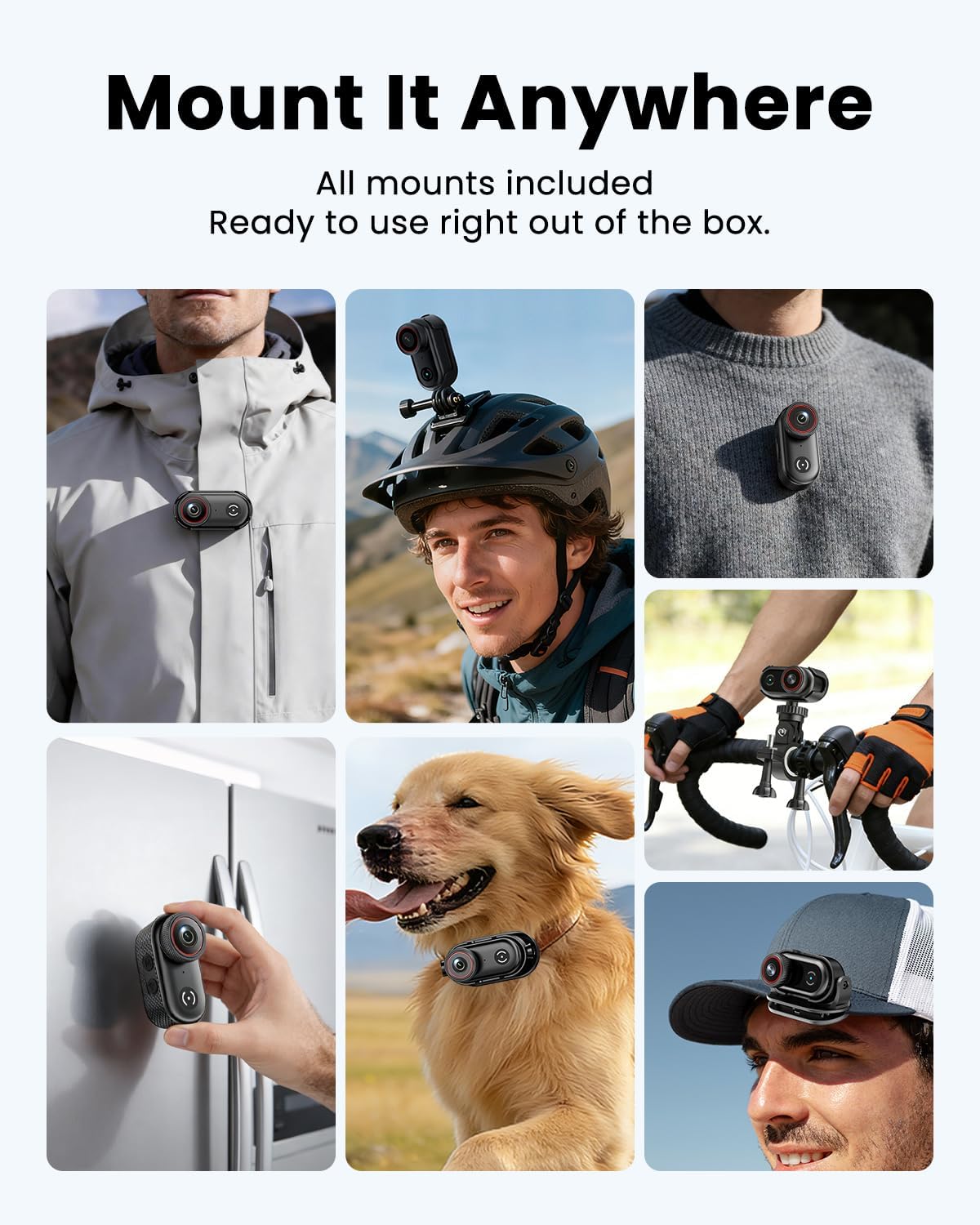
Image: The camera clipped onto a shirt for wearable recording.

Image: The camera mounted on a bicycle helmet.

Image: The camera mounted on bicycle handlebars.
6. Vzdrževanje
6.1 Čiščenje
Use a soft, dry cloth to clean the camera body. For the lens, use a specialized lens cleaning cloth and solution. Avoid using harsh chemicals or abrasive materials.
6.2 Shranjevanje
Store the camera in a cool, dry place away from direct sunlight and extreme temperatures. Ensure the battery is partially charged (around 50%) if storing for extended periods to prolong battery life.
6.3 Upravljanje pomnilniških kartic
Redno varnostno kopirajte svoj footage and format the Micro SD card in the camera's settings to maintain optimal performance and prevent data corruption. A V30-rated card is recommended for 4K recording.
7. Odpravljanje težav
If you encounter issues with your VIDCASTIVE L20 camera, refer to the following common solutions:
- Kamera se ne vklopi: Prepričajte se, da je baterija napolnjena. Priključite fotoaparat na vir napajanja in poskusite znova.
- "Please plug in SD card" message: Verify that the Micro SD card is correctly inserted. Try re-inserting the card or using a different compatible V30-rated card. Ensure the card is not damaged.
- Slaba kakovost videa/fotografij: Ensure the lens is clean. Check the recording resolution settings. Ensure sufficient lighting.
- Slaba kakovost zvoka: Prepričajte se, da mikrofon ni oviran.
- Camera freezing or unresponsive: Press and hold the Power button for 10-15 seconds to force a restart. If the issue persists, perform a factory reset via the camera's settings menu (note: this will erase custom settings).
- Težave z brezžično povezavo: Ensure the camera's WiFi is enabled and your smartphone is within range. Restart both the camera and your phone. Reinstall the companion app if necessary.
Če težave po poskusu teh korakov ne izginejo, se obrnite na podporo strankam.
8. Specifikacije
| Funkcija | Specifikacija |
|---|---|
| Znamka | VIDCASTIVE |
| Številka modela | L20 |
| Ločljivost zajema videa | 4K |
| Format za zajem videa | MP4 |
| Velikost zaslona | 1.47 palcev |
| Povprečna življenjska doba baterije | 2.5 Hours (150 minutes) |
| Velikost nameščenega bliskovnega pomnilnika | 64 GB (V30-rated) |
| Tehnologija povezljivosti | USB, WiFi |
| Tehnologija foto senzorja | CMOS |
| Največja zaslonka | 2.8 f |
| Stopnja vodoodpornosti | Ni vodoodporen |
| Stabilizacija slike | Anti-Shake (Digital) |
| Teža predmeta | 0.37 Kilograms (approx. 1.59 oz / 45g) |
9. Garancija in podpora
9.1 Informacije o garanciji
The VIDCASTIVE 4K Mini Body Camera L20 comes with a 1-letna garancija proizvajalcaTa garancija krije napake v materialu in izdelavi pri normalni uporabi. Za uveljavljanje garancije shranite dokazilo o nakupu.
9.2 Podpora strankam
For technical assistance, warranty claims, or any questions regarding your product, please contact VIDCASTIVE customer support through the retailer's platform or the official VIDCASTIVE website. Provide your model number (L20) and a detailed description of the issue for faster service.