
1. Uvod
Hvala za nakupasing the Sharp PS-916 Bluetooth Party Speaker System. This system includes two identical portable Bluetooth speakers designed to deliver powerful audio with versatile connectivity options. Please read this manual carefully before using the product to ensure proper operation and to maximize your listening experience.
Vsebina paketa:
- 2 x Sharp PS-916 Party Speakers
- 1 x polnilni kabel
- 1 x daljinski upravljalnik
- 1 x uporabniški priročnik

Image: The Sharp PS-916 system includes two speakers for a complete stereo experience.
2. Nastavitev
2.1 Charging the Speakers
The PS-916 speakers are equipped with rechargeable batteries, providing up to 12 hours of playback. Before initial use, fully charge both speakers.
- Connect the charging cable to the DC IN port on the rear of each speaker.
- Plug the other end of the charging cable into a suitable power adapter (not included) or USB power source.
- The charging indicator light will illuminate. It will change color or turn off once charging is complete.
2.2 Vklop/izklop
To power on or off each speaker, press and hold the ON/STAND BY INPUT gumb, ki se nahaja na nadzorni plošči.
2.3 Združevanje Bluetooth (en zvočnik)
- Ensure the speaker is powered on and in Bluetooth mode. The Bluetooth indicator will flash, indicating it is ready for pairing.
- V mobilni napravi omogočite Bluetooth in poiščite razpoložljive naprave.
- Select "Sharp PS-916" from the list of devices.
- Ko je povezava vzpostavljena, bo indikator Bluetooth prenehal utripati in bo ostal neprekinjeno svetil.
2.4 Združevanje s pravim brezžičnim stereo sistemom (TWS) (dva zvočnika)
TWS allows you to connect two PS-916 speakers wirelessly for a stereo sound experience.
- Power on both PS-916 speakers.
- Ensure neither speaker is currently connected to a Bluetooth device.
- Na enem od zvočnikov (to bo glavni zvočnik) pritisnite TWS button. The speaker will enter TWS pairing mode.
- The primary speaker will automatically search for the secondary speaker. Once connected, you will hear an audible confirmation, and the TWS indicator lights on both speakers will illuminate.
- Zdaj povežite svojo mobilno napravo s primarnim zvočnikom prek povezave Bluetooth, kot je opisano v poglavju 2.3. Zvok se bo predvajal prek obeh zvočnikov v stereo načinu.
3. Delovanje
3.1 Konec nadzorne ploščeview

Image: Main control panel for the Sharp PS-916 speaker.
- ON/STAND BY INPUT: Power on/off, switch input modes (Bluetooth, USB, TF, AUX, FM).
- PLAY/PAUSE (►/∕∕): Predvajanje ali začasna ustavitev predvajanja zvoka.
- PREVIOUS (◀◀): Preskoči na prejšnjo skladbo.
- NEXT (▶▶): Preskoči na naslednjo skladbo.
- VOLONSKI GUMB: Zavrtite za nastavitev glavne glasnosti.
- TWS: Initiate or disconnect True Wireless Stereo pairing.
- EKVALIZATOR: Cycle through preset equalizer modes.
- BAS: Activate or deactivate bass boost.
- SVETLOBA: Change or turn off the LED light effects.
- MIC CONTROL: Adjust microphone volume or echo (if applicable).
3.2 Vhodna vrata
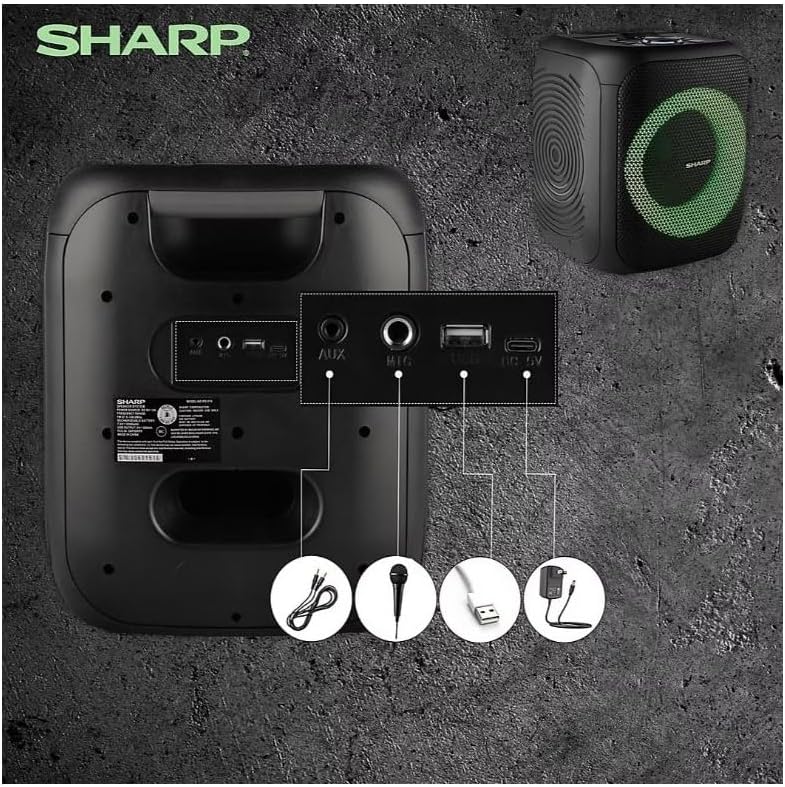
Image: Rear panel with various input and charging ports.
- AUX IN: Zunanje zvočne naprave priključite s 3.5 mm avdio kablom.
- MIK IN: Connect a microphone (sold separately) for karaoke or announcements.
- USB: Za predvajanje zvoka vstavite USB-ključek.
- TF KARTICA: Za predvajanje zvoka vstavite kartico TF (microSD).
- DC IN: Connect the charging cable to power and charge the speaker.
3.3 Playing Audio from USB/TF Card
- Insert a USB flash drive or TF card into the corresponding port.
- Pritisnite ON/STAND BY INPUT button repeatedly until the display shows the USB or TF mode.
- Predvajanje se bo začelo samodejno. Uporabite PREDVAJAJ/PAVZA, PREJŠNJA, in NASLEDNJI gumbi za nadzor predvajanja.
3.4 Uporaba vhoda AUX
- Connect one end of a 3.5mm audio cable to the AUX IN port on the speaker.
- Drugi konec priključite na vtičnico za slušalke ali zvočni izhod zunanje naprave.
- Pritisnite ON/STAND BY INPUT button repeatedly until the display shows AUX mode.
- Predvajanje in glasnost lahko upravljate z zunanje naprave.
3.5 Delovanje FM-radia

Image: The PS-916 features an integrated FM Tuner.
- Pritisnite ON/STAND BY INPUT button repeatedly until the display shows FM mode.
- Pritisnite in držite PREDVAJAJ/PAVZA za samodejno iskanje in shranjevanje razpoložljivih FM postaj.
- Uporabite PREJŠNJA in NASLEDNJI gumbe za navigacijo med shranjenimi postajami.
3.6 LED svetlobni učinki
Pritisnite SVETLOBA button to cycle through different LED light modes or to turn the lights off.
4. Vzdrževanje
4.1 Čiščenje
- Pred čiščenjem vedno izklopite zvočnik in ga odklopite iz vira napajanja.
- Za brisanje zunanjih površin uporabite mehko, suho krpo.
- Ne uporabljajte tekočih čistil, aerosolov ali topil, saj lahko poškodujejo površino ali notranje komponente.
4.2 Shranjevanje
- Zvočnike shranjujte na hladnem in suhem mestu, stran od neposredne sončne svetlobe in ekstremnih temperatur.
- Če baterijo shranjujete dlje časa, jo napolnite vsakih nekaj mesecev do približno 50 %, da ohranite njeno zmogljivost.
5. Odpravljanje težav
If you encounter issues with your Sharp PS-916 speakers, please refer to the following common problems and solutions:
| Težava | Možna rešitev |
|---|---|
| Zvočnik se ne vklopi. | Prepričajte se, da je baterija napolnjena. Priključite polnilni kabel in poskusite znova. |
| Brez zvoka iz zvočnika. | Preverite glasnost zvočnika in priključene naprave. Prepričajte se, da je izbran pravilen vhodni način. |
| Naprave Bluetooth ni mogoče seznaniti. | Ensure the speaker is in Bluetooth pairing mode (indicator flashing). Move your device closer to the speaker. Disconnect from other Bluetooth devices. |
| Seznanjanje s TWS ni uspelo. | Ensure both speakers are powered on and not connected to any other Bluetooth devices. Try initiating TWS pairing again. |
| Popačen zvok. | Reduce the volume on both the speaker and your connected device. Ensure the audio source is not distorted. |
6. Specifikacije
| Funkcija | Podrobnost |
|---|---|
| Znamka | Ostra |
| Ime modela | PS-916 |
| Konfiguracija zvočnikov | 8" Woofer, 1" Tweeter (per speaker) |
| Največja izhodna moč | 400 W (na zvočnik) |
| RMS izhodna moč | 40 W (na zvočnik) |
| Tehnologija povezljivosti | Bluetooth |
| Dodatni vhodi | USB, TF Card, 3.5mm AUX, Microphone Input |
| Življenjska doba baterije | Do 12 uri |
| Posebne lastnosti | True Wireless Stereo (TWS) Pairing, Bass Boost, LED Light Effects, FM Tuner |
| barva | Črna |
| Teža predmeta | 6.5 funtov (na zvočnik) |
| UPC | 728434122111 |
| GTIN | 728434122111 |
7. Garancija in podpora
7.1 Informacije o garanciji
This Sharp PS-916 product comes with a 90-day limited warranty. This warranty covers manufacturing defects under normal use. It does not cover damage caused by misuse, accidents, unauthorized modifications, or normal wear and tear.
7.2 Podpora strankam
For technical assistance, warranty claims, or further inquiries, please refer to the contact information provided with your purchase documentation or visit the official Sharp support webmesto.