
1. Uvod
Thank you for choosing the TOPTRO TP3 4K Google TV Portable Projector. This manual provides essential information for setting up, operating, and maintaining your projector. Please read it thoroughly before use to ensure optimal performance and safety.
The TOPTRO TP3 is designed to deliver a versatile and immersive viewing experience, featuring integrated Google TV, AI-powered image adjustments, and comprehensive connectivity options. Enjoy your content at home, outdoors, or on the go.
2. Izdelek je končanview
2.1 Ključne lastnosti
- Integrated Google TV: Access over 10,000 official streaming applications, including Netflix, Prime Video, and YouTube, without additional devices.
- Glasovno upravljanje Google: Use the remote control's voice assistant button to search for content, adjust settings, and control playback hands-free.
- AI-Powered Image Adjustment: Features automatic focus, automatic keystone correction, obstacle avoidance, and automatic screen adjustment for a perfectly aligned and clear image within seconds.
- Native 1080P Resolution with 4K Decoding: Delivers sharp, detailed images and natural colors, supporting 4K video decoding.
- Razmerje kratke projiciranja (0.8:1): Projects a 60-inch image from just one meter distance, ideal for small spaces.
- 90-Degree Rotating Stand: Allows for flexible projection angles, including ceiling projection.
- Napredna povezljivost: Equipped with dual-band WiFi 6, Bluetooth 5.3, HDMI ARC, USB, and a 3.5mm audio jack for wide device compatibility.
- Prenosna zasnova: Weighing only 1.2 kg (2.6 lbs) with a hidden carry handle, making it easy to transport.
2.2 Vsebina paketa
Prepričajte se, da so v paketu prisotni vsi elementi:
- Projektor TOPTRO TP3
- Daljinski upravljalnik
- HDMI kabel
- Napajalni adapter
- Uporabniški priročnik
3. Nastavitev
3.1 Začetna namestitev
Place the projector on a stable, flat surface. The 90-degree rotating stand allows for various projection angles, including wall, ceiling, or tabletop. For optimal image quality, ensure the projection surface is smooth and light-colored.

Image: The TOPTRO TP3 projector can be used in diverse environments, from living rooms to outdoor camping, razstavaasing njegovo prilagodljivost.
3.2 Napajalni priključek
- Connect the power adapter to the projector's power input.
- Plug the power adapter into a suitable electrical outlet (220V).
- Pritisnite gumb za vklop na projektorju ali daljinskem upravljalniku, da ga vklopite.
3.3 Omrežna povezava
Upon first startup, follow the on-screen prompts to connect to your Wi-Fi network. The projector supports dual-band WiFi 6 for a fast and stable connection.
3.4 Nastavitev Google TV-ja
After connecting to Wi-Fi, sign in with your Google account to access Google TV and download applications from the Google Play Store. This step is crucial for utilizing the integrated streaming services.

Image: The projector's interface showing integrated Google TV with direct access to popular streaming applications.
4. Navodila za uporabo
4.1 Osnovna operacija
- Vklop/izklop: Pritisnite gumb za vklop na daljinskem upravljalniku ali projektorju.
- Navigacija: Use the directional buttons on the remote to navigate menus.
- Izbira: Press the 'OK' button to confirm selections.
- Nadzor glasnosti: Uporabite gumbe za glasnost na daljinskem upravljalniku.
4.2 Prilagoditev slike
The TOPTRO TP3 features AI-powered automatic image adjustments:
- Samodejno ostrenje: The projector automatically adjusts the image clarity.
- Samodejni trapezni popravek: Automatically corrects distorted images to a rectangular shape.
- Izogibanje oviram: Detects and adjusts the image to avoid objects on the projection surface.
- Auto Screen Adjustment: Optimizes the image to fit the screen area.
These adjustments occur automatically within seconds of powering on or repositioning the projector. Manual digital zoom (80-100%) is also available for fine-tuning image size.

Image: Visual representation of the projector's AI-powered automatic image adjustment features, ensuring a clear and aligned picture.
4.3 Google Voice Control
Press the dedicated voice assistant button on your remote control and speak your command. For example, say "Open YouTube" or "Play music." The projector will respond to your voice commands for quick access to functions and content.
4.4 Screen Mirroring (Google Cast)
Utilize Google Cast technology to wirelessly mirror content from your smartphone or tablet to the projector. For iPhone users, download the "AirScreen" application from the Google Play Store on the projector for wireless screen mirroring.
4.5 Rotating Stand Usage
The integrated 90-degree rotating stand allows you to easily adjust the projection angle. Simply pivot the projector to direct the image onto a wall, screen, or ceiling. This feature is particularly useful for bedroom viewing or creative setups.
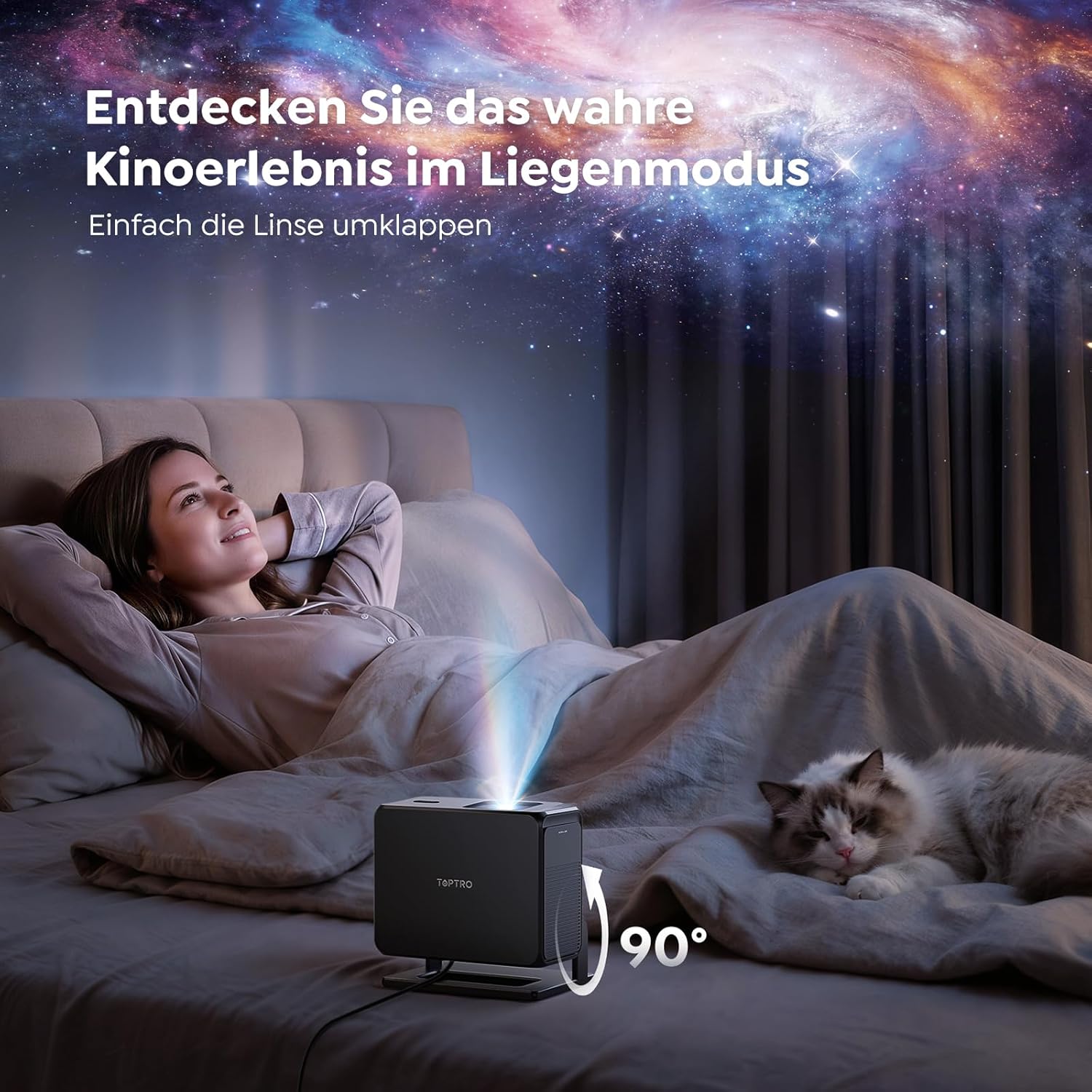
Image: The TOPTRO TP3 projector rotated 90 degrees to project content onto a bedroom ceiling, offering a unique viewizkušnje.
5. Povezljivost
5.1 Žične povezave
- HDMI ARC/CEC: Connect external devices like laptops, gaming consoles (Xbox/PlayStation 5), or Blu-ray players. The ARC feature allows audio to be sent back to a compatible sound system.
- USB: Za predvajanje medijev priključite USB-pogone.
- 3.5 mm avdio priključek: Priključite zunanje žične zvočnike ali slušalke.
5.2 Brezžične povezave
- Wi-Fi 6: Provides faster and more stable wireless connectivity for streaming and online content.
- Bluetooth 5.3: Connect Bluetooth headphones or speakers for an enhanced audio experience.
6. Vzdrževanje
6.1 Čiščenje leče
Gently clean the projector lens with a soft, lint-free cloth designed for optical surfaces. Avoid using abrasive cleaners or excessive force, as this can scratch the lens.
6.2 Generalno čiščenje
Zunanjost projektorja obrišite z mehko, suho krpo. Tekočih čistil ne uporabljajte neposredno na napravi.
6.3 Shranjevanje
When not in use, store the projector in a cool, dry place, away from direct sunlight and extreme temperatures. Use the original packaging or a protective case to prevent dust accumulation and damage.
7. Odpravljanje težav
7.1 Slika ni prikazana
- Ensure the projector is powered on and connected to a power source.
- Check all cable connections (HDMI, USB) to external devices.
- Verify the input source selected on the projector matches the connected device.
- Confirm the lens cap is removed.
7.2 Zamegljena slika
- Allow the auto-focus function to complete its adjustment.
- Prepričajte se, da je projekcijska površina ravna in da je projektor stabilen.
- Clean the projector lens if smudges or dust are visible.
7.3 Ni zvoka
- Preverite glasnost tako na projektorju kot na priključeni izvorni napravi.
- Ensure external speakers or headphones are properly connected (wired or Bluetooth).
- If using HDMI ARC, verify your sound system is compatible and correctly configured.
7.4 Daljinski upravljalnik ne deluje
- Zamenjajte baterije v daljinskem upravljalniku.
- Prepričajte se, da med daljinskim upravljalnikom in IR-sprejemnikom projektorja ni ovir.
For further assistance, refer to the detailed troubleshooting section in the full user manual or contact customer support.
8. Specifikacije
| Funkcija | Specifikacija |
|---|---|
| Znamka | TOPTRO |
| Ime modela | TP3 |
| Izvorna ločljivost | 1920 x 1080 (1080 P) |
| Video Decoding Support | 4K |
| Vrsta zaslona | LED |
| Posebne lastnosti | Auto Focus, Auto Keystone Correction, Obstacle Avoidance, Auto Screen Adjustment, Google TV, Google Voice Control |
| Tehnologija povezljivosti | HDMI, USB, Bluetooth 5.3, Wi-Fi 6 |
| Strojni vmesnik | HDMI ARC/CEC, USB, 3.5mm Audio |
| Dimenzije izdelka (DxŠxV) | 19.4 x 15.8 x 14.1 cm |
| Teža predmeta | 1.2 kg |
| Faktor oblike | Prenosni |
| Vrsta namestitve | Ceiling Mount, Tabletop, Wall |
| Najmanjša velikost slike | 40 palcev |
| Največja velikost slike | 120 palcev |
| Največja dometna razdalja | 2.13 metrov |
| voltage | 220 volta |
| Vključene komponente | HDMI kabel |
| barva | Črna |
| Vrsta krmilnika | Daljinski upravljalnik |
| Združljive naprave | Xbox/PlayStation 5, Smartphone, Tablet, Laptop, Speaker, Notebook |
| Priporočene uporabe | Gaming, Business, Home Cinema, Education |
9. Garancija in podpora
9.1 Informacije o garanciji
Za posebne garancijske pogoje glejte garancijski list, ki je priložen izdelku. Za uveljavljanje garancije shranite dokazilo o nakupu.
9.2 Podpora strankam
If you encounter any issues or have questions regarding your TOPTRO TP3 projector, please contact our customer service team. We provide prompt, professional, and effective support to ensure a smooth user experience.
Contact details can typically be found on our official webspletnem mestu ali na garancijskem listu.