
Uvod
Thank you for choosing the MEETION C9990 Wireless Bluetooth Keyboard and Mouse combo. This product offers versatile connectivity options (2.4GHz USB and dual Bluetooth channels), an ergonomic design for comfort, and rechargeable batteries for extended use. This manual will guide you through the setup, operation, and maintenance of your new device.
Vsebina paketa
- MEETION C9990 Wireless Keyboard
- MEETION Wireless Mouse
- USB sprejemnik (shranjen v predalu za baterije miške)
- Polnilni kabel USB-C
- Uporabniški priročnik
Konec izdelkaview
Funkcije tipkovnice
- Postavitev v polni velikosti: Includes a numeric pad for comprehensive data entry.
- Low-Noise Scissor-Switch Keys: Provides a quiet and comfortable typing experience.
- Večpredstavnostne tipke: Namenske funkcijske tipke za hiter dostop do medijskih kontrol in sistemskih funkcij.
- Fixed Anti-Slip Stand: Ensures stability and an ergonomic typing angle.
- Izjemno tanek dizajn: Estetsko lepoasing and space-efficient.

Image: Close-up of the keyboard keys, illustrating the low-noise scissor-switch design for quiet and comfortable typing.

Image: The keyboard features a fixed-angle anti-slip stand for enhanced stability and typing comfort.
Značilnosti miške
- Ergonomic Sculpted Design: Contoured shape supports natural wrist and hand posture.
- Nastavljiv DPI: Four DPI settings (800-2400) for precise cursor control.
- Tilt-Scroll Wheel: Allows for horizontal and vertical scrolling.
- Stikalo načina: Easily switch between 2.4GHz and Bluetooth modes.

Image: The mouse features an ergonomic sculpted design to provide comfort during extended use.

Image: Detailed diagram of the mouse highlighting its various components and functions, including buttons, scroll wheel, and switches.
Navodila za namestitev
1. Polnjenje naprav
Both the keyboard and mouse are equipped with built-in rechargeable batteries. Before first use, or when the battery indicator shows low power, charge both devices using the provided USB-C cable.
- Priključite konec polnilnega kabla USB-C v polnilni priključek na tipkovnici in miški.
- Connect the USB-A end of the charging cable to a USB power source (e.g., computer USB port, USB wall adapter).
- Indikatorska lučka polnjenja bo med polnjenjem svetila in ugasnila, ko bo naprava popolnoma napolnjena.
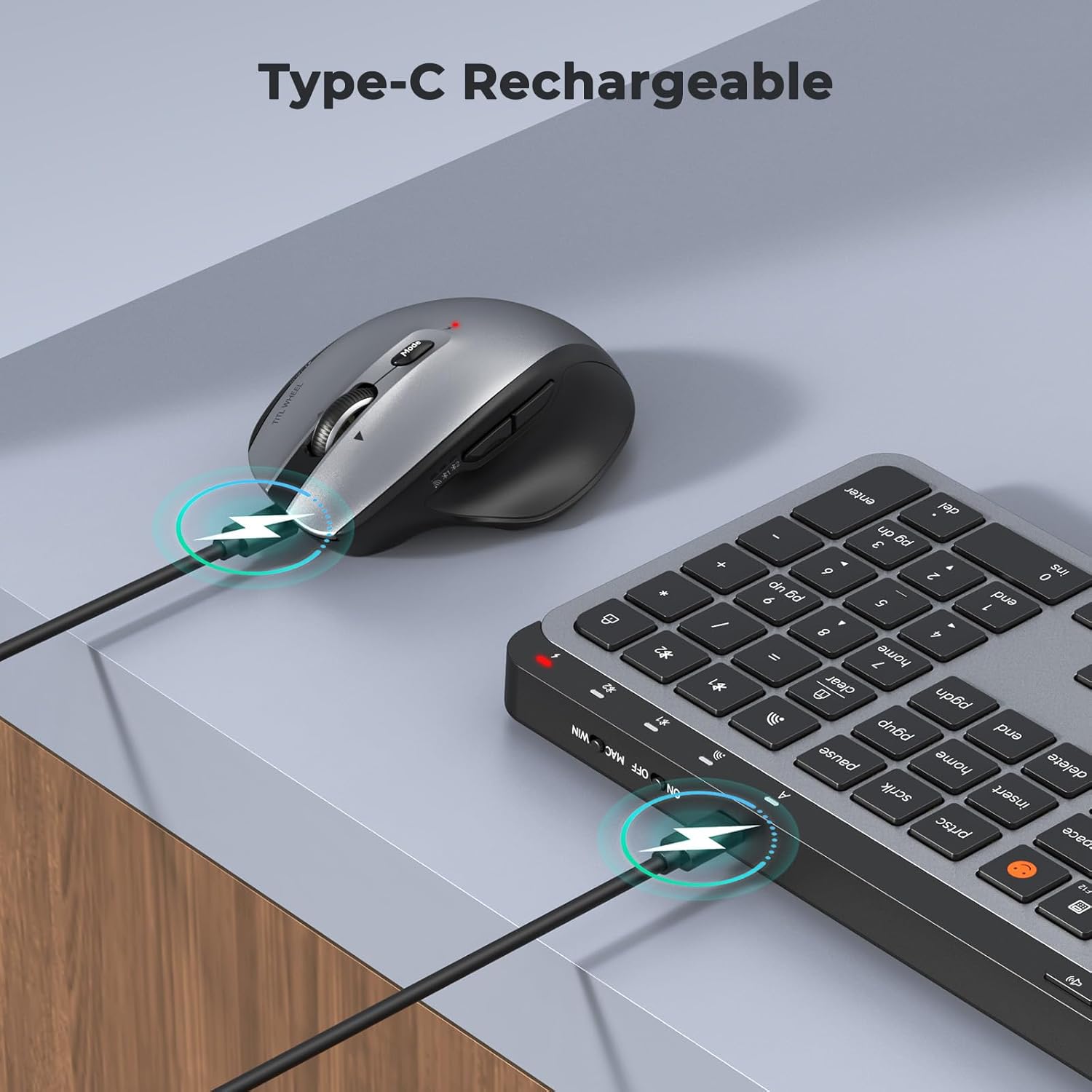
Image: Both the keyboard and mouse are rechargeable via USB-C, ensuring convenience and eliminating the need for disposable batteries.
2. Povezovanje z napravami
The C9990 combo supports three connection modes: 2.4GHz wireless (via USB receiver) and two Bluetooth channels (BT1, BT2).
2.1. Brezžična povezava 2.4 GHz
- Locate the USB receiver, typically stored in the mouse's battery compartment.
- USB-sprejemnik priključite v razpoložljiva vrata USB na vašem računalniku.
- Vklopite tipkovnico in miško z ustreznima stikaloma za vklop.
- Za tipkovnico pritisnite 2.4G button (usually indicated by a USB icon) to switch to 2.4GHz mode.
- For the mouse, switch the mode selector to the 2.4G položaj.
- Naprave bi se morale povezati samodejno.
2.2. Povezava Bluetooth (BT1 / BT2)
- Vklopite tipkovnico in miško.
- Za tipkovnico: Pritisnite in držite BT1 or BT2 button for 3-5 seconds until the indicator light flashes rapidly, indicating pairing mode.
- Za miško: Switch the mode selector to the BT1 or BT2 position, then press and hold the Bluetooth pairing button (often located on the underside) until the indicator light flashes.
- On your device (laptop, tablet, smartphone), go to Bluetooth settings and search for new devices.
- Select "MEETION Keyboard" and "MEETION Mouse" from the list to pair.
- Repeat for the second Bluetooth channel (BT2) if connecting to another device.
3. Preklapljanje med napravami
The C9990 allows seamless switching between up to three connected devices (one 2.4GHz and two Bluetooth).
- Za tipkovnico: Pritisnite namensko 2.4G, BT1, oz BT2 button to switch to the desired connected device.
- Za miško: Use the mode switch on the underside of the mouse to select 2.4G, BT1, oz BT2.

Image: The keyboard and mouse can switch between three devices (PC, tablet, phone) with a single click, indicated by the Bluetooth and 2.4G icons.
Navodila za uporabo
Funkcije tipkovnice
- Multimedia Keys (F1-F12): These keys provide quick access to functions like brightness control, display window, home, dictation, sleep, app switcher, screen mirroring, screen capture, music player, email, and calculator. Functions may vary slightly depending on the operating system.
- Ključ za emotikone: The dedicated emoji key supports Windows, macOS, iPad (iPadOS), and Android Samsung devices. It does not support iPhone (iOS).

Image: The keyboard features a row of multimedia keys (F1-F12) for quick access to various system functions.
Funkcije miške
- Prilagoditev DPI: Press the DPI switch button (usually located near the scroll wheel) to cycle through the available DPI settings (800, 1200, 1600, 2400). Adjust to your preference for cursor speed and precision.
- Tilt-Scroll Wheel: In addition to vertical scrolling, tilt the scroll wheel left or right for horizontal scrolling in applications that support it (e.g., spreadsheets).
- Gumbi naprej/nazaj: Za hitro navigacijo uporabite stranske gumbe web brskalniki in file raziskovalci.
Vzdrževanje
- Čiščenje: Za čiščenje površin tipkovnice in miške uporabite mehko, suho krpo. Za trdovratno umazanijo rahlo obrišiteampKrpo sperite z vodo ali blago čistilno raztopino. Izogibajte se agresivnim kemikalijam ali abrazivnim materialom.
- Vzdrževanje baterije: To prolong battery life, avoid fully discharging the devices frequently. Charge them when the low battery indicator appears. If storing for an extended period, charge them to about 50% and recharge every few months.
- Shranjevanje: Naprave shranjujte na hladnem in suhem mestu, stran od neposredne sončne svetlobe in ekstremnih temperatur.
Odpravljanje težav
Težave s povezavo
- Naprava se ne povezuje: Ensure both the keyboard and mouse are powered on and fully charged. Check that the correct connection mode (2.4G, BT1, or BT2) is selected on both devices. For Bluetooth, ensure your host device's Bluetooth is enabled and the devices are in pairing mode.
- Prekinjena povezava: Move the devices closer to your computer. Avoid using them near strong electromagnetic interference sources (e.g., Wi-Fi routers, other wireless devices).
- 2.4GHz receiver not recognized: Try plugging the USB receiver into a different USB port. Ensure the receiver is fully inserted.
Težave s funkcionalnostjo
- Keys or mouse unresponsive: Recharge the devices. Restart your computer or device. Re-pair the devices if using Bluetooth or re-insert the USB receiver for 2.4GHz.
- Kazalec miške se premika neenakomerno: Clean the mouse sensor. Ensure you are using the mouse on a suitable surface (not highly reflective or transparent). Adjust DPI settings.
Specifikacije
| Številka modela | C9990 |
| Tehnologija povezljivosti | Bluetooth, USB (2.4GHz Wireless) |
| Razporeditev tipkovnice | QWERTY, Full Size |
| Zaznavanje gibanja miške | Optični |
| Nastavitve DPI miške | 800, 1200, 1600, 2400 |
| Vir napajanja | Napajanje z baterijo (polnilna preko USB-C) |
| Združljivi operacijski sistemi | Windows, macOS, Linux, Chrome OS, Android |
| Teža predmeta | 1.16 Kilograms (combined) |
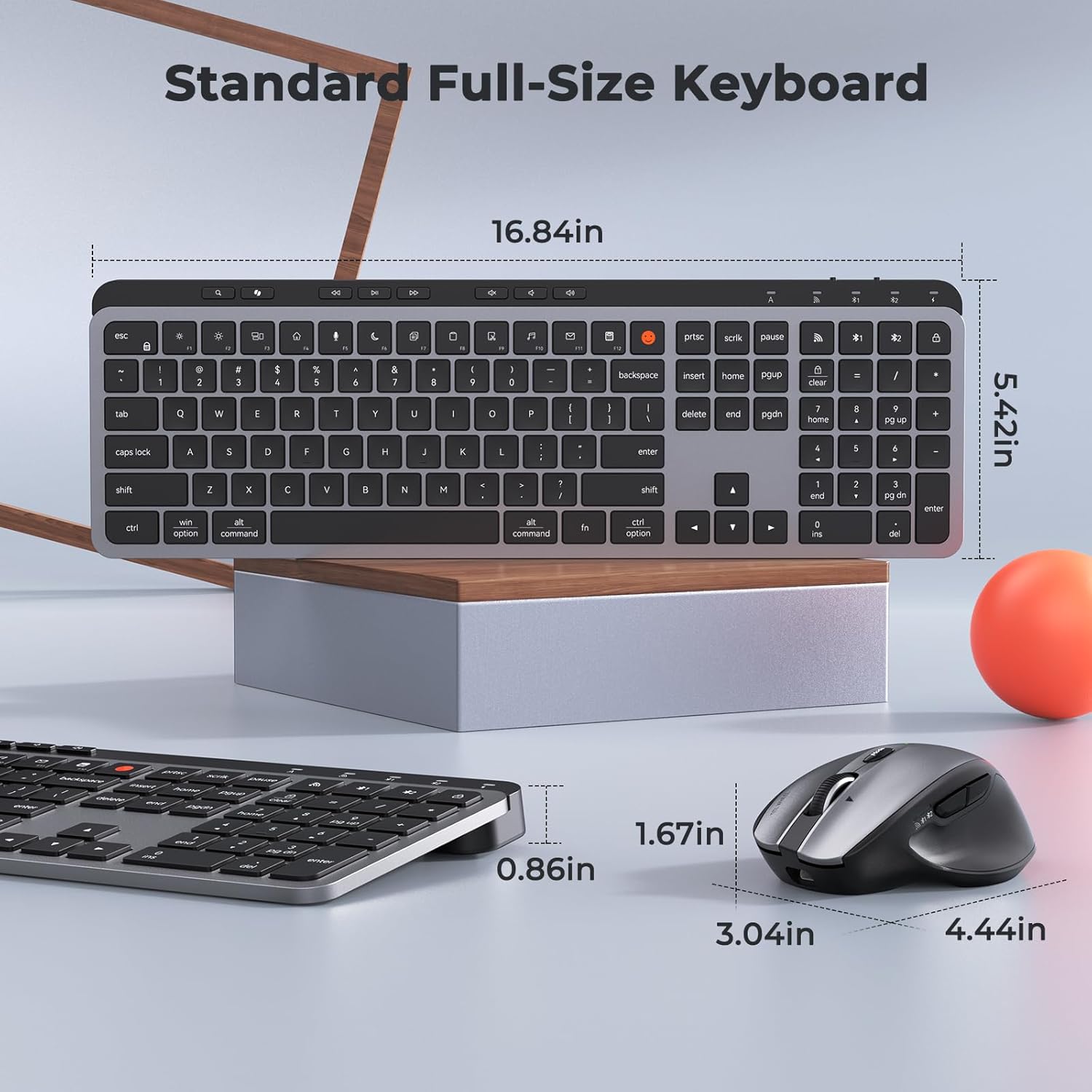
Image: Dimensions of the MEETION C9990 keyboard and mouse for reference.
Garancija in podpora
The MEETION C9990 Wireless Bluetooth Keyboard and Mouse comes with a 1-letna garancija od datuma nakupa. Ta garancija krije proizvodne napake pri normalni uporabi.
For technical support, troubleshooting assistance, or warranty claims, please contact MEETION customer service through the retailer where you purchased the product or visit the official MEETION webspletno mesto za kontaktne podatke.
Varnostne informacije
- Naprav ne izpostavljajte vodi, vlagi ali ekstremnim temperaturam.
- Izogibajte se padcem ali izpostavljanju naprav močnim udarcem.
- Naprav ne poskušajte razstavljati ali popravljati sami. Obrnite se na usposobljeno servisno osebje.
- Hraniti izven dosega otrok.
- Baterije in elektronske komponente odvrzite odgovorno v skladu z lokalnimi predpisi.