
Uvod
This manual provides detailed instructions for the operation and maintenance of your Mesqool CR1031 Portable FM Radio. Please read this manual thoroughly before using the device to ensure proper function and to maximize your listening experience. This radio features FM reception, NOAA weather alerts, Bluetooth connectivity, microSD playback, dual alarms, and a sleep timer.
Konec izdelkaview
The Mesqool CR1031 is a versatile portable radio designed for various listening needs. It includes a 2.4-inch color display, an 8W speaker, and multiple input options.
Komponente in krmilniki

Slika: Spredaj in ob strani view of the Mesqool CR1031 radio highlighting key components.
- Gumb za glasnost: Prilagodi raven zvočnega izhoda.
- Reža za kartico microSD: Za predvajanje zvoka files from a microSD card (not included).
- Headphone Jack / Reset Hole: 3.5mm audio output for private listening; small hole for device reset.
- Vrata USB-C: For charging the internal battery and powering the device.
- Vgrajena baterija 3000 mAh: Provides portable power.
- govornik: 8W speaker for audio output.
- Gumbi za upravljanje: Mode, SOS, WX (Weather), Menu, Back, Preset, Enter, Scan, Play/Pause, Next/Previous Track.
- Teleskopska antena: For improved FM and NOAA signal reception.
Nastavitev
Polnjenje baterije
Before first use, fully charge the radio. Connect the provided USB-C cable to the radio's USB-C port and the other end to a compatible USB power adapter (included) or a computer's USB port. The 2.4-inch color display will indicate charging status. A full charge ensures cordless listening for extended periods.

Image: The radio connected to a laptop via USB-C for charging, illustrating its rechargeable capability.
Začetni vklop
Pritisnite in držite Moč button to turn the radio on. The display will light up, showing the current time and mode.
Navodila za uporabo
Delovanje radia FM
- Izberite način FM: Pritisnite NAČIN button until "FM Radio" is displayed.
- Samodejno skeniranje: Pritisnite SCAN button to automatically search for and save available FM stations. The radio can store up to 40 presets.
- Ročna nastavitev: Uporabite Prejšnja/naslednja skladba gumbe za ročno uglaševanje določene frekvence.
- Access Presets: Pritisnite PREDNASTAVITEV , nato uporabite gumb Prejšnja/naslednja skladba buttons to navigate through saved stations. Press ENTER izbrati.
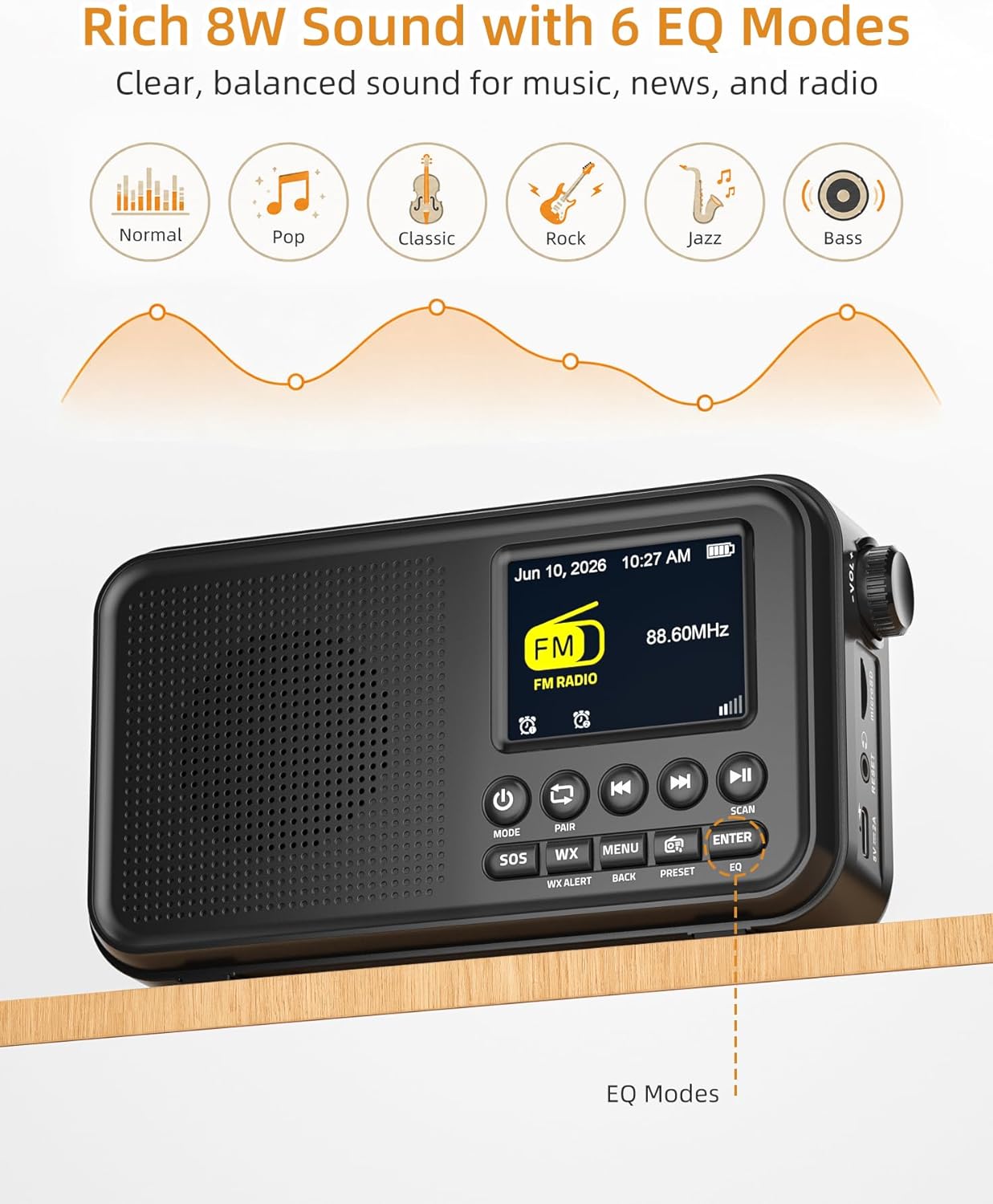
Image: The radio displaying FM mode and options for EQ settings.
Vremensko opozorilo NOAA
The radio includes a built-in U.S. NOAA Weather Band for receiving weather alerts.
- Select WX Mode: Pritisnite WX button to switch to the NOAA Weather Band.
- Izbira kanala: The radio will automatically scan for the strongest NOAA channel. You can manually cycle through channels using the Prejšnja/naslednja skladba gumbi.
- Omogoči opozorila: Ensure the WX Alert function is enabled (check menu settings if necessary) to receive automatic weather alerts.

Image: The radio displaying NOAA Weather Band information in an outdoor environment.
Bluetooth povezljivost
Stream audio wirelessly from your compatible devices.
- Izberite način Bluetooth: Pritisnite NAČIN gumb, dokler se ne prikaže »Bluetooth«. Radio bo preklopil v način seznanjanja, kar bo označevalo utripajoče sporočilo o Bluetoothu.
- Seznani napravo: On your smartphone, tablet, or laptop, enable Bluetooth and search for "Mesqool CR1031" (or similar device name) in the list of available devices. Select it to pair.
- Predvajaj zvok: Once paired, you can play audio from your device, and it will stream through the radio's speaker.

Image: A user connecting their smartphone to the radio via Bluetooth, demonstrating wireless audio streaming.
Predvajanje microSD
Predvajaj zvok files directly from a microSD card.
- Vstavite kartico microSD: Gently insert a microSD card (up to 64GB, not included) into the microSD card slot until it clicks into place.
- Select microSD Mode: Pritisnite NAČIN button until "microSD" or "Card Playback" is displayed.
- Nadzor predvajanja: Uporabite Predvajaj/Premor in Prejšnja/naslednja skladba gumbi za nadzor predvajanja.
Dvojni alarmi
Set two independent alarms to wake up to FM radio or a buzzer.
- Access Alarm Settings: Pritisnite MENI button and navigate to the "Alarm" settings.
- Set Alarm 1/2: Select Alarm 1 or Alarm 2. Set the desired time, alarm source (FM radio or buzzer), and volume.
- Aktiviraj alarm: Ensure the alarm is enabled in the settings.
- Preložitev: When an alarm sounds, press any button (except Power) to activate snooze for extra rest.

Image: The radio illustrating its dual alarm feature, with one alarm set for a meeting and another for waking up.
Časovnik za izklop
Fall asleep to your favorite radio station with the sleep timer function.
- Access Sleep Timer: Pritisnite MENI button and navigate to the "Sleep Timer" settings.
- Nastavi trajanje: Choose a duration from 15, 30, 45, 60, 90, or 120 minutes. The radio will automatically turn off after the selected time.
Načini eQ
Customize your audio experience with 6 equalizer modes.
- Access EQ Settings: Pritisnite EQ button (or navigate via the MENI).
- Izberite način: Choose from Normal, Pop, Classic, Rock, Jazz, or Bass to match your listening preference.
Uradni videoposnetek izdelka
Video: An official product video demonstrating the FM Radio, Bluetooth, and NOAA Weather Alert features of the Mesqool CR1031.
Vzdrževanje
- Čiščenje: Za čiščenje zunanjosti radia uporabite mehko, suho krpo. Ne uporabljajte abrazivnih čistil ali topil.
- Shranjevanje: Radio shranjujte na hladnem in suhem mestu, stran od neposredne sončne svetlobe in ekstremnih temperatur.
- Vzdrževanje baterije: For optimal battery life, avoid fully discharging the battery frequently. Recharge regularly, especially if storing for long periods.
- Izpostavljenost vodi: Ta naprava ni vodoodporna. Izogibajte se izpostavljanju vodi ali visoki vlažnosti.
Odpravljanje težav
| Težava | Možen vzrok | rešitev |
|---|---|---|
| Ni napajanja/se ne vklopi | Baterija je prazna; napajalnik ni priključen. | Charge the battery using the USB-C cable. Ensure the power adapter is properly connected. |
| Poor FM/NOAA reception | Antena ni iztegnjena; Območje šibkega signala. | Popolnoma izvlecite teleskopsko anteno. Za boljši signal poskusite premakniti radio. |
| Bluetooth se ne seznani | Radio not in pairing mode; Device Bluetooth off. | Ensure the radio is in Bluetooth mode and the icon is flashing. Check Bluetooth settings on your device. |
| microSD card not recognized | Card inserted incorrectly; Incompatible format; Card corrupted. | Reinsert the card correctly. Ensure the card is formatted to FAT32. Try a different microSD card. |
| Brez zvoka | Glasnost je prenizka; Vklopljen je zvok; Slušalke so priključene. | Increase volume. Check if headphones are plugged in. Ensure the device is not muted. |
Specifikacije
- Znamka: Mesqool
- Številka modela: CR1031
- barva: Črna
- Dimenzije izdelka: 6.65 cm D x 1.85 cm Š x 3.62 cm V
- Teža artikla: 0.77 funta
- vir energije: Corded Electric, Battery Powered (3000mAh rechargeable battery included)
- Tehnologija povezljivosti: USB, Bluetooth 5.0
- Tehnologija sprejemnika: FM/vremenski pas
- Podprti radijski pasovi: NOAA | FM | WB
- FM frekvenčni razpon: 87.5-108 MHz
- NOAA Frequency: 162.400 - 162.550 MHz
- Vrsta zaslona: 2.4-palčni barvni zaslon
- Posebne lastnosti: Portable, Rechargeable, SOS Alarm, Auto Scan, 40 FM Presets, 8W Sound, microSD Playback, Dual Alarms, Sleep Timer, 6 EQ Modes (Normal, Pop, Classic, Rock, Jazz, Bass)
- Združljive naprave: Pametni telefon, tablični računalnik, prenosni računalnik
- voltage: 5 volta
- Material: Akrilonitril butadien stiren (ABS)
Garancija in podpora
Informacije o garanciji
The Mesqool CR1031 Portable FM Radio comes with a 2-Year Replacement/Refund Warranty for any quality problems. Please retain your proof of purchase for warranty claims.
Vključene komponente
Paket izdelkov vključuje:
- Mesqool CR1031 Portable FM Radio
- Polnilni kabel USB-C
- Napajalni adapter
- Priročnik za lastnika (ta dokument)

Image: The package contents of the Mesqool CR1031, showing the radio, manual, power adapter, and USB-C cable.
Podpora uporabnikom
For further assistance or inquiries, please refer to the contact information provided on the product packaging or the official Mesqool webmesto.