
Memorex MXTAB11
Memorex MXTAB11 11-inch Android 14 Tablet Bundle User Manual
Model: MXTAB11
1. Uvod
The Memorex MXTAB11 11-inch Android 14 Tablet Bundle is designed for versatile use, supporting work, streaming, gaming, and learning. This tablet offers premium performance with an A523 ARM 8-core Cortex processor, optimized graphics, and comes with essential accessories for immediate use.

Image 1: The Memorex MXTAB11 tablet set up with its Bluetooth keyboard and wireless headphones on a wooden table, ready for use.
Ključne značilnosti:
- Zmogljiva zmogljivost: A523 ARM 8-core Cortex processor (up to 2.0GHz) with optimized graphics for smooth multitasking and responsive app performance.
- Živahni zaslon: 11-inch FHD IPS display with 1920 x 1200 pixel resolution for clear visuals.
- Ample shranjevanje: 128 GB notranjega pomnilnika za aplikacije, fotografije in files.
- Efficient Memory: 4GB RAM for smooth operation.
- Modern OS: Runs on Android 14.
- Trajna zasnova: Features a metal body for enhanced durability.
- Povezljivost: Supports 802.11a/b/g/n/ac/ax wireless types.
2. Kaj je v škatli
Your Memorex MXTAB11 Tablet Bundle includes the following items:
- Memorex 11” Tablet
- Bluetooth tipkovnica
- Brezžične slušalke
- Zaščitna torbica s stojalom
- AC Adapter Charger & Cable
- Navodila za uporabo
- Vodnik za hiter začetek
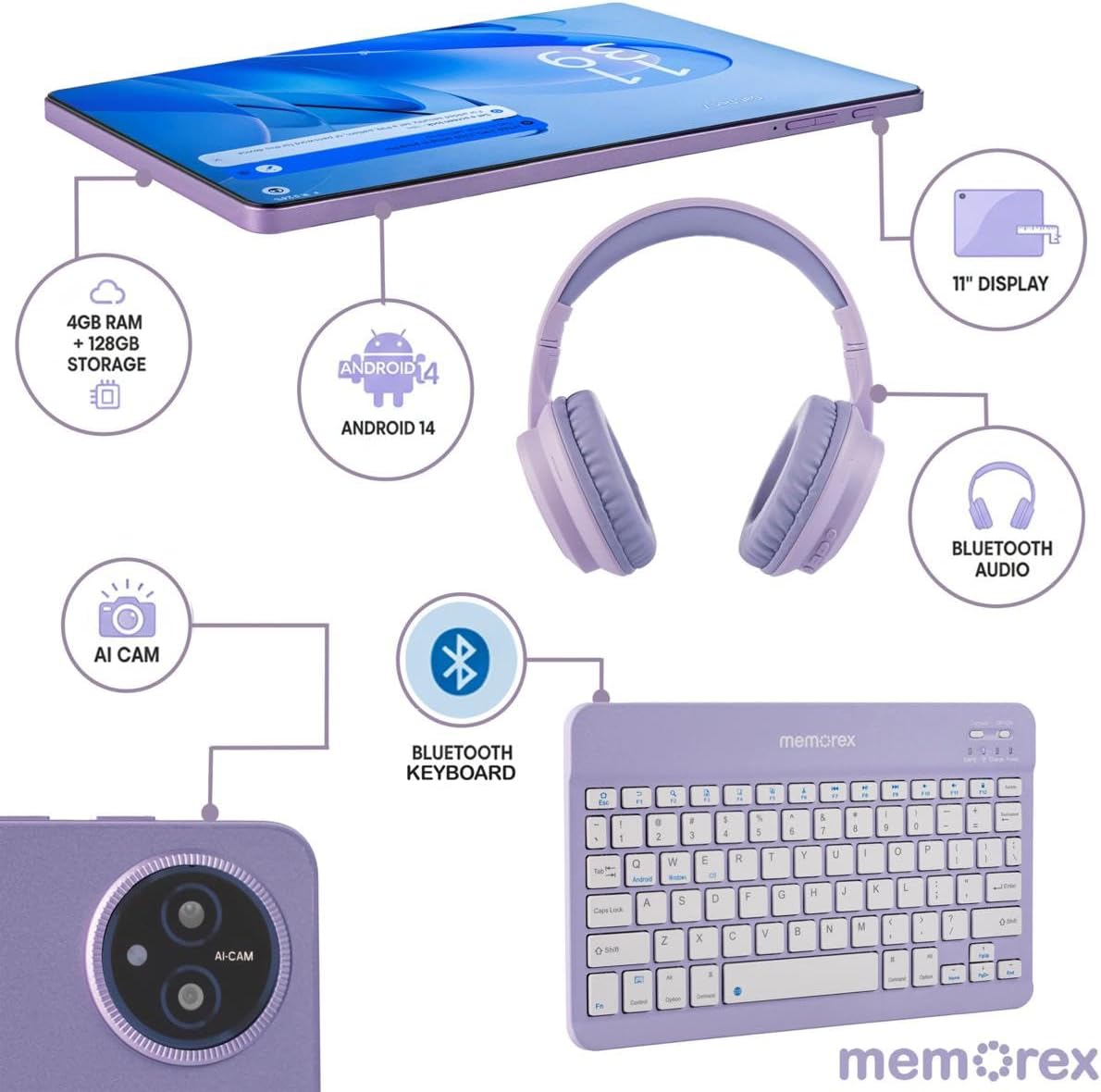
Image 2: A visual breakdown of the Memorex MXTAB11 tablet's features and included accessories, such as 4GB RAM, 128GB storage, Android 14, 11-inch display, AI camera, Bluetooth keyboard, Bluetooth audio, and wireless headphones.
3. Nastavitev
3.1 Začetni vklop in konfiguracija
- Napolnite tablico: Before first use, connect the tablet to the AC adapter charger and cable provided. Allow it to charge fully.
- Vklop: Press and hold the power button (usually located on the side or top edge) until the Memorex logo appears on the screen.
- Sledite navodilom na zaslonu: The tablet will guide you through the initial setup process, including:
- Izbira jezika.
- Povezovanje z omrežjem Wi-Fi.
- Signing in with your Google account (or creating one).
- Nastavitev zaklepanja zaslona (PIN, vzorec, geslo).
3.2 Connecting Bluetooth Keyboard and Wireless Headphones
- Omogoči Bluetooth: On your tablet, swipe down from the top of the screen to open the Quick Settings panel. Tap the Bluetooth icon to turn it on. Alternatively, go to Nastavitve > Povezane naprave > Bluetooth.
- Pair Bluetooth Keyboard:
- Turn on the Bluetooth keyboard (refer to the keyboard's quick start guide for specific instructions).
- On your tablet's Bluetooth settings, tap 'Pair new device'.
- Select the keyboard from the list of available devices. Follow any on-screen prompts to complete pairing.
- Pair Wireless Headphones:
- Put your wireless headphones into pairing mode (refer to the headphones' quick start guide).
- On your tablet's Bluetooth settings, tap 'Pair new device'.
- Select the headphones from the list of available devices. Follow any on-screen prompts to complete pairing.
4. Upravljanje tabličnega računalnika
4.1 Osnovna navigacija
- Domači zaslon: Osrednje središče za vaše aplikacije in pripomočke.
- Predal za aplikacije: Za dostop do vseh nameščenih aplikacij povlecite navzgor od spodnjega dela zaslona.
- Hitre nastavitve in obvestila: Swipe down from the top of the screen to access quick settings (Wi-Fi, Bluetooth, brightness) and view obvestila.
- Nazaj, Domov, Nedavne aplikacije: Use the navigation buttons at the bottom of the screen to go back, return to the home screen, or view nedavno odprtih aplikacij.
4.2 Uporaba aplikacij
The tablet comes pre-loaded with essential Google applications and allows you to download more from the Google Play Store.
- Trgovina Google Play: Tap the Play Store icon to browse and download new apps, games, movies, and books.
- Web Brskanje: Use the pre-installed Chrome browser to access the internet.
- Kamera: Tap the Camera icon to take photos or record videos using the tablet's dual cameras.
- Koledar: Manage your schedule and events.
- Files: Access and organize your documents, images, videos, and other files.

Image 3: A person comfortably using the Memorex MXTAB11 tablet with its Bluetooth keyboard and wireless headphones, demonstrating its suitability for various activities like work or entertainment.
5. Vzdrževanje
- Čiščenje: Za čiščenje zaslona in ohišja tabličnega računalnika uporabljajte mehko krpo, ki ne pušča vlaken. Izogibajte se agresivnim kemikalijam ali abrazivnim materialom.
- Posodobitve programske opreme: Redno preverjajte in nameščajte posodobitve sistema, da zagotovite optimalno delovanje in varnost. Pojdite na Nastavitve > Sistem > Posodobitev sistema.
- Vzdrževanje baterije: Za podaljšanje življenjske dobe baterije se izogibajte ekstremnim temperaturam in ne dovolite, da se baterija pogosto popolnoma izprazni.
- Upravljanje shranjevanja: Občasno očistite nepotrebne filein aplikacije za sprostitev prostora za shranjevanje in ohranjanje zmogljivosti.
6. Odpravljanje težav
6.1 Pogoste težave in rešitve
- Tablični računalnik se ne vklopi: Ensure the tablet is charged. Connect it to the charger and wait a few minutes before attempting to power it on again.
- Počasno delovanje: Close unused applications, clear cache, or restart the tablet. Check for available system updates.
- Težave s povezavo Wi-Fi: Znova zaženite usmerjevalnik Wi-Fi in tablični računalnik. V nastavitvah tabličnega računalnika pozabite na omrežje in se znova povežite.
- Napaka seznanjanja prek Bluetootha: Ensure both devices are in pairing mode and within range. Restart Bluetooth on the tablet and try pairing again.
- Zrušitve aplikacij: Clear the app's cache or data via Settings > Apps > [App Name] > Storage > Clear Cache/DataČe težava ne izgine, znova namestite aplikacijo.
7. Specifikacije
| Velikost zaslona | 11 palcev |
| Ločljivost zaslona | 1920 x 1200 slikovnih pik (FHD IPS) |
| Procesor | A523 ARM Cortex-A523 Octa-Core Processor, up to 2.0 GHz |
| RAM | 4 GB |
| Velikost bliskovnega pomnilnika | 128 GB |
| Operacijski sistem | Android 14 |
| Brezžična vrsta | 802.11a, 802.11ac, 802.11ax, 802.11b, 802.11g, 802.11n |
| Teža predmeta | 5 funtov |
| Dimenzije izdelka | 10 x 4 x 13 palcev |
| barva | Modra |
8. Garancija in podpora
8.1 Politika vračila
Izdelek je upravičen do vračila denarja ali zamenjave v 30 dneh od nakupa.
8.2 Načrti zaščite
Za razširjeno kritje so na voljo dodatni načrti zaščite:
- 2-letni načrt zaščite: Enkratno plačilo v višini 30.99 $.
- Popolna zaščita: Monthly payment of $16.99, covering all eligible past and future purchases.
For further support or inquiries, please refer to the contact information provided in your Quick Start Guide or visit the official Memorex support webmesto.
Ask a question about this manual
Ask about setup, troubleshooting, compatibility, parts, safety, or missing instructions. Manuals+ will review the question and use this page’s manual context to help answer it.