
Ulefone RugKing Pad Pro
Ulefone RugKing Pad Pro Android 16 Rugged Tablet User Manual
Model: RugKing Pad Pro | Brand: Ulefone
1. Uvod
This manual provides essential instructions for setting up, operating, and maintaining your Ulefone RugKing Pad Pro rugged tablet. Please read this manual thoroughly before using the device to ensure proper function and longevity.
2. Vsebina paketa
Preverite, ali so v paketu izdelka vsi elementi:
- Ulefone RugKing Pad Pro Tablet x 1
- AC Charger (100~240V) x 1
- Type-C Data Cable (100 cm) x 1
- Protective Film (Pre-installed) x 1
- Metal Pry Opener x 1
- Portable Strap x 1
- Vijaki x 2
- Multilingual User Manual x 1
- Charging Instruction Card x 1
- Safety Warning Declaration x 1

Figure 2.1: Contents of the Ulefone RugKing Pad Pro package.
3. Izdelek je končanview
The Ulefone RugKing Pad Pro is a rugged tablet designed for durability and performance. Familiarize yourself with its physical components.
3.1 Fizične komponente
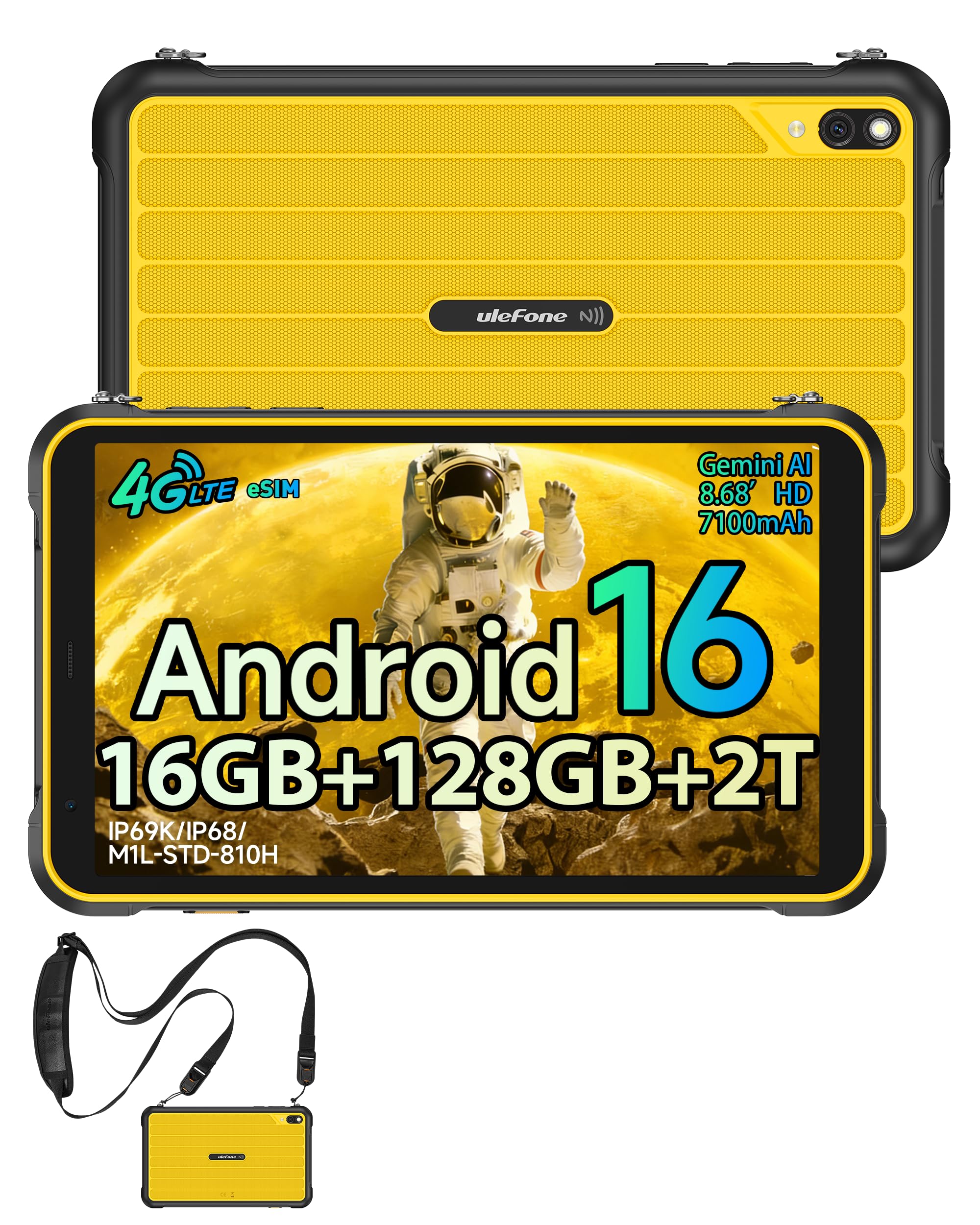
Slika 3.1: Spredaj view of the Ulefone RugKing Pad Pro.

Slika 3.2: stran view z gumbi in priključki.
- Zaslon: 8.68-inch, 90Hz refresh rate, Corning Gorilla Glass.
- Gumb za vklop: Nahaja se ob strani in se uporablja za vklop/izklop ali preklop naprave v stanje pripravljenosti/spanja.
- Gumbi za glasnost: Prilagodite glasnost zvoka.
- Vrata USB Type-C: Za polnjenje in prenos podatkov.
- Rešetke zvočnikov: Dvojni stereo zvočniki za avdio izhod.
- Kamera: 16MP zadnja kamera, 8MP sprednja kamera.
- Svetilka: Integrated 133 lumen Super Torch.
- Reža za kartico SIM/MicroSD: Supports dual SIM and up to 2TB microSD expansion.
- Razširitveni priključek uSmart: For compatible peripherals like endoscopes.
- 3.5 mm priključek za slušalke: For audio accessories.
4. Nastavitev
4.1 Začetni vklop
- Pritisnite in držite Gumb za vklop until the Ulefone logo appears.
- Sledite pozivom na zaslonu, da izberete jezik, regijo in se povežete z omrežjem Wi-Fi.
- Prijavite se s svojim Google Računom ali ustvarite novega za dostop do trgovine Google Play in drugih storitev.
4.2 SIM Card and eSIM Setup
The RugKing Pad Pro supports dual physical SIM cards and eSIM functionality for 4G LTE connectivity.

Figure 4.1: Triple card slot for SIM and MicroSD.
4.2.1 Physical SIM Card Installation
- Poiščite pladenj za kartico SIM na strani tabličnega računalnika.
- Use the provided metal pry opener to eject the tray.
- Place your Nano-SIM cards into the designated slots.
- Previdno vstavite pladenj nazaj v tablični računalnik.
4.2.2 eSIM Activation
To activate eSIM, navigate to Nastavitve > Omrežje in internet > SIM-kartice and follow the instructions to add a new mobile plan. You will typically need a QR code or activation code from your network provider.

Figure 4.2: eSIM connectivity feature.
5. Navodila za uporabo
5.1 Operacijski sistem Android 16
The RugKing Pad Pro runs on Android 16, offering a dynamic and fluid user interface with enhanced security and usability features. Enjoy desktop-like window views for multitasking and smarter notification management.

Figure 5.1: Android 16 user interface.
5.2 Prikaz in interakcija
The 8.68-inch display with a 90Hz refresh rate provides smooth navigation and streaming. With 860 nits peak brightness, the screen is readable even in bright sunlight. Corning Gorilla Glass offers enhanced scratch resistance.

Figure 5.2: Display features including 90Hz refresh rate and Gorilla Glass.
5.2.1 Način rokavice
For use in cold environments or industrial settings, enable Glove Mode in settings to allow touch input while wearing gloves. Note that some leather gloves may not be compatible due to material differences.

Figure 5.3: Tablet operation with gloves enabled.
5.3 Camera and Flashlight
The tablet features a 16MP rear camera for clear photos and document scanning, and an 8MP front camera for video calls. The integrated 133 lumen Super Torch provides bright illumination in low-light conditions.

Figure 5.4: Camera and Super Torch features.
5.4 Povezljivost in navigacija
- 4G LTE: Stay connected with dual SIM or eSIM.
- NFC: Supports Google Pay and other NFC functions for identification and authentication.
- GPS: Vgrajeni GPS, GLONASS, BeiDou in Galileo za natančno navigacijo.
- Wi-Fi: Supports 802.11b/g/n standards.
- Bluetooth: Za priklop brezžične dodatne opreme.

Figure 5.5: NFC enabled device for various applications.

Figure 5.6: GPS navigation in a vehicle.
5.5 Posebnosti
- Ključ po meri: Assign specific functions to a programmable key for quick access.
- ID obraza: Unlock your device using facial recognition.
- FM radio: Listen to FM radio without headphones.
- Razširitveni priključek uSmart: Connect compatible external peripherals such as endoscopes (uSmart E01, E02) or digital microscopes (uSmart C01).

Figure 5.7: uSmart expansion connector and peripherals.
6. Značilnosti vzdržljivosti
The RugKing Pad Pro is built to withstand extreme conditions, certified with IP68, IP69K, and MIL-STD-810H standards.
- IP68: Dustproof and resistant to continuous immersion in water up to 2 meters for 30 minutes.
- IP69K: Protected against high-pressure, high-temperature jet sprays.
- MIL-STD-810H: Military-grade standard ensuring reliable resistance to shocks, vibrations, and extreme temperatures.

Figure 6.1: Rugged design and certifications.

Figure 6.2: Dust, water, and drop resistance tests.
7. Upravljanje baterije
The RugKing Pad Pro is equipped with a 7100 mAh battery, offering extended usage. It supports 492 hours of standby time or 10 hours of video playback on a single charge.
7.1 Polnjenje
- Standardno polnjenje: Connect the provided Type-C cable and AC charger to the tablet.
- Polnjenje Pogo Pin: The tablet is compatible with Pogo Pin charging docks (sold separately) for convenient charging.
- Reverse Charging (OTG): Use the tablet as a power bank to charge other devices via an OTG cable (sold separately).

Slika 7.1: Zmogljivost baterije in načini polnjenja.
8. Shranjevanje in zmogljivost
Powered by an Unisoc T7250 Octa-core processor, the RugKing Pad Pro handles complex applications and demanding tasks efficiently. It comes with 16GB RAM (8GB physical + 8GB virtual) and 128GB internal storage, expandable up to 2TB via microSD card.

Figure 8.1: Octa-core processor for uninterrupted flow.

Figure 8.2: Memory and storage specifications.
*MicroSD card is sold separately for storage expansion. Dynamic RAM activation is user-configurable in Settings.
9. Vzdrževanje
9.1 Čiščenje naprave
- Za čiščenje zaslona in ohišja uporabite mehko krpo, ki ne pušča vlaken.
- Za trdovratno umazanijo rahlo dampkrpo z vodo. Izogibajte se agresivnim kemikalijam ali abrazivnim materialom.
- Ensure all port covers are securely closed before cleaning with liquids to maintain water resistance.
9.2 Posodobitve programske opreme
Regularly check for software updates to ensure optimal performance, security, and access to new features. Navigate to Nastavitve > Sistem > Posodobitev sistema za preverjanje in namestitev razpoložljivih posodobitev.
9.3 Upravljanje shranjevanja
Občasno ponovnoview vaše shranjeno files and applications. Delete unnecessary data to free up space and maintain device speed. Utilize the microSD card slot for large media files.
10. Odpravljanje težav
| Težava | rešitev |
|---|---|
| Naprava se ne vklopi. | Prepričajte se, da je baterija napolnjena. Priključite polnilnik in počakajte nekaj minut, preden poskusite znova vklopiti napravo. |
| Zaslon se ne odziva. | Perform a forced restart by holding the Power button for 10-15 seconds. If the issue persists, ensure Glove Mode is not causing interference if not needed. |
| Ni mogoče vzpostaviti povezave z Wi-Fi. | Preverite, ali je v nastavitvah omogočen Wi-Fi. Znova zaženite usmerjevalnik in tablični računalnik. Preverite geslo za Wi-Fi. |
| Kartica SIM ni zaznana. | Prepričajte se, da je kartica SIM pravilno vstavljena v pladenj. Ponovno zaženite tablični računalnik. Preverite, ali je kartica SIM aktivna pri vašem operaterju. |
| Baterija se hitro izprazni. | Reduce screen brightness, close unused apps, disable unnecessary connectivity features (Bluetooth, GPS, Wi-Fi) when not in use. Check for background app activity. |
11. Specifikacije
| Funkcija | Podrobnost |
|---|---|
| Ime modela | Ulefone RugKing Pad Pro |
| Operacijski sistem | Android 16 |
| Procesor | Osemjedrni Unisoc T7250 |
| RAM | 16 GB (8 GB physical + 8 GB virtual) |
| Notranji pomnilnik | 128 GB |
| Razširljiv prostor za shranjevanje | Do 2 TB prek microSD kartice |
| Velikost zaslona | 8.68 palcev |
| Ločljivost zaslona | 1400 x 800 slikovnih pik (HD+) |
| Hitrost osveževanja | 90 Hz |
| Zaščita zaslona | Corning Gorilla Glass |
| Zadnja kamera | 16 MP |
| Sprednja kamera | 8 MP |
| Snemanje videa | FHD 1080p |
| Kapaciteta baterije | 7100 mAh (litijeva polimerna) |
| Življenjska doba baterije (povprečna) | 13 Days (standby), 10 Hours (video playback) |
| Povezljivost | 4G LTE (Dual SIM, eSIM), Wi-Fi (802.11b/g/n), Bluetooth, NFC |
| Navigacija | GPS, GLONASS, BeiDou, Galileo |
| Ocene vzdržljivosti | IP68, IP69K, MIL-STD-810H |
| Varnostne funkcije | Face ID |
| Dimenzije (D x Š x V) | 20 x 10 x 1 cm |
| Teža | 450 gramov |
12. Garancija in podpora
12.1 Informacije o garanciji
The Ulefone RugKing Pad Pro comes with a 2-letna garancija proizvajalcaTa garancija krije napake v materialu in izdelavi pri normalni uporabi. Za uveljavljanje garancije shranite dokazilo o nakupu.


Figure 12.1: Ulefone brand and 2-year warranty indication.
12.2 Podpora strankam
For technical assistance, warranty claims, or further inquiries, please contact Ulefone customer support. A service center is available in Europe.
- Refer to the official Ulefone webspletno mesto za kontaktne podatke.
- Consult the "Multilingual User Manual" included in your package for additional information.
- The tablet includes a "Service Center 2.0" application for intelligent support.
Povezani dokumenti - RugKing Pad Pro
 |
Uporabniški priročnik za Ulefone Armor Pad 4 Ultra in Armor Pad 4 Ultra Thermal Obsežen uporabniški priročnik za tablici Ulefone Armor Pad 4 Ultra in Armor Pad 4 Ultra Thermal, ki zajema varnostna navodila, komponente naprave, nastavitev, specifikacije in regulativne informacije. |
 |
Ulefone RugKing Pad 2 Pro User Manual User manual for the Ulefone RugKing Pad 2 Pro tablet, covering device layout, setup, safety precautions, and regulatory information. |
 |
Uporabniški priročnik in varnostni priročnik za Ulefone Armor Pad serije 5 Uradni uporabniški priročnik za tablični računalnik Ulefone Armor Pad serije 5, ki zajema nastavitev, funkcije, omrežne specifikacije, varnostne ukrepe in informacije o skladnosti. |
 |
Ulefone RugKing Pad 2 Pro User Manual Comprehensive user manual for the Ulefone RugKing Pad 2 Pro, including setup instructions, device layout, safety guidelines, and regulatory compliance information. |
 |
Ulefone RugKing Pad Pro User Manual User manual and safety guide for the Ulefone RugKing Pad Pro tablet, including setup instructions, safety precautions, and regulatory information. |
 |
Ulefone RugKing Pad Pro User Manual Comprehensive user manual for the Ulefone RugKing Pad Pro tablet, covering device layout, setup instructions, card installation, network bands, and safety regulatory information. |
Ask a question about this manual
Ask about setup, troubleshooting, compatibility, parts, safety, or missing instructions. Manuals+ will review the question and use this page’s manual context to help answer it.