
1. Pomembne varnostne informacije
Pred namestitvijo in uporabo natančno preberite vsa navodila. Priročnik shranite za poznejšo uporabo.
- Namestitev za dve osebi: Always use at least two people to lift and install the TV to prevent injury or damage.
- Montaža na steno: Follow all wall mounting instructions precisely. Ensure the wall structure can support the TV's weight. If unsure, consult a professional.
- Izogibajte se oviram: Do not drill into walls where electrical wiring or piping may be present.
- Stabilna postavitev: If not wall-mounted, ensure the TV is placed on a stable, level surface to prevent tipping.
- Prezračevanje: Ne blokirajte prezračevalnih odprtin. Zagotovite dovolj prostora okoli televizorja za pravilen pretok zraka.
- Vlaga: Keep the TV away from water, moisture, and high humidity environments.
- Napajalni kabel: Zaščitite napajalni kabel pred hojo ali stiskanjem. Ne uporabljajte poškodovanega napajalnega kabla.
- Čiščenje: Pred čiščenjem izključite televizor iz električnega omrežja. Uporabite mehko, suho krpo. Ne uporabljajte tekočih čistil ali aerosolnih čistil.
2. Kaj je vključeno
Preverite, ali so v škatli vse komponente:
- Amazon Ember Artline TV (55-inch)
- Izboljšan daljinski upravljalnik Alexa Voice
- Komplet za stensko montažo
- Napajalni kabel
- 2 AAA bateriji
- Vodnik za hiter začetek
- Amazon Ember Artline 55” Frame (four pieces) - Note: Frames ship separately and may arrive at a different time.

Image: Amazon Ember Artline 55-inch Fire TV with Ash frame.
3. Nastavitev in namestitev
3.1. Preparing the TV for Wall Mount
Before mounting, ensure the TV is prepared correctly. You will need a number two Phillips screwdriver. Do not use an electric drill to prevent stripping the bolt holes.
- Lay the TV screen side down on a soft, clean surface to access the recessed cover on the back.
- Remove the recessed cover.
- Install the two mount bolts into the designated holes using a number two Phillips screwdriver.
Video: Instructions for wall mounting the Amazon Ember Artline TV. This video demonstrates the steps for preparing the TV and installing the wall mount hardware.
3.2. Namestitev stenskega nosilca
You will need at least two people to complete this process. Ensure you have the included wall mounting template, bolts, screws, and anchors. Additionally, you will need an electric drill with a 3/16 inch drill bit, a #2 Phillips driver bit, a hammer, a pencil, and a level or level app. If mounting on wood studs, you'll need a 1/8 inch drill bit. If mounting on brick, you'll need a 5/16 inch drill bit and a stud finder for drywall.
- Načrtovanje lokacije:
- Consider the height of everyone using the TV. Place it at eye level for comfortable viewing.
- Find a mount location away from water or moisture.
- Avoid drilling holes over electrical wiring or piping.
- If installing on a brick wall, locate an area free of cracks.
- If your wall doesn't have proper stud spacing, contact a professional for installation.
- Montaža nosilca:
- Plan the location of the wall mount using the wall mounting template.
- Locate two studs using a stud finder (for drywall). Mark the center of each stud with a pencil.
- Place the mount against the wall and mark at least four screw holes. Use a level or level app to ensure the mount is straight.
- Drill pilot holes on each mark using an electric drill with the appropriate bit (1/8" for drywall, 5/16" for brick).
- If on drywall, anchors are not needed. If on brick, use a hammer to install the mount anchors in the holes.
- Attach the mount to the wall using the mount screws, an electric drill, and a #2 Phillips bit.
- Installing Magnet Plates:
- Attach the template to the wall using double-sided tape.
- Mark the locations for the four magnet plates on the wall, then remove the template.
- Drill pilot holes on each mark using an electric drill with a 3/16 inch bit.
- Install the magnet plate anchors using a hammer.
- Install the magnet plates into the anchors using the magnet plate screws and an electric drill with a #2 Phillips bit.
- Attaching the TV to the Mount:
- While attaching the TV, avoid pressing against the screen.
- Fully extend the TV bracket away from the wall and gently release the bolt latches.
- Place the four alignment stickers above the mount bolts on the back of the TV and the bolt latches on the mount. Fold the stickers up to see them more clearly.
- Hang the mount bolts on the mount hooks. Use the alignment stickers to guide you.
- Close the bolt latches, then push the TV flush with the wall to connect the magnets and magnet plates.
4. Operating Your Amazon Ember Artline Fire TV
4.1. Fire TV Interface
The Amazon Ember Artline features the new Fire TV experience (2026 release) with a modern design for fast access to entertainment. You can pin frequently used apps and browse dedicated content categories. Access hundreds of thousands of movies and TV episodes, including free, ad-supported content. Subscription fees may apply for certain services.

Image: The Fire TV interface displaying various streaming applications and content.
4.2. Alexa Voice Remote Enhanced
The included Alexa Voice Remote Enhanced allows for easy navigation and voice control. Talk naturally to find content, manage your smart home, or explore topics.
- Glasovni nadzor: Press and hold the voice button to use your voice commands.
- Navigacija: Use the directional pad to navigate menus and content.
- Gumbi za hitri dostop: Dedicated buttons for popular streaming services (e.g., Prime Video, Netflix) provide instant access.
4.3. Ambient Experience and Art Mode
The Ember Artline functions as both an entertainment hub and a curated art gallery. It can display art, stream content, and manage your smart home. The matte screen reduces glare for an optimal viewizkušnje.
- Umetnostna galerija: Access a gallery of over 2,000 free works of art.
- Personal Photos: Upload and display your own photos from the Amazon Photos App. Use Alexa to create slideshows or collages (e.g., "Play a slideshow of us biking in the mountains.").
- Match the Room: Upload photos of your space, and the TV will recommend art pieces that complement your decor.
- Okvirji po meri: Choose from ten available frame colors. Frames are easy to install and change.

Image: The Amazon Ember Artline TV seamlessly integrated into a living room, displaying a vibrant piece of art.
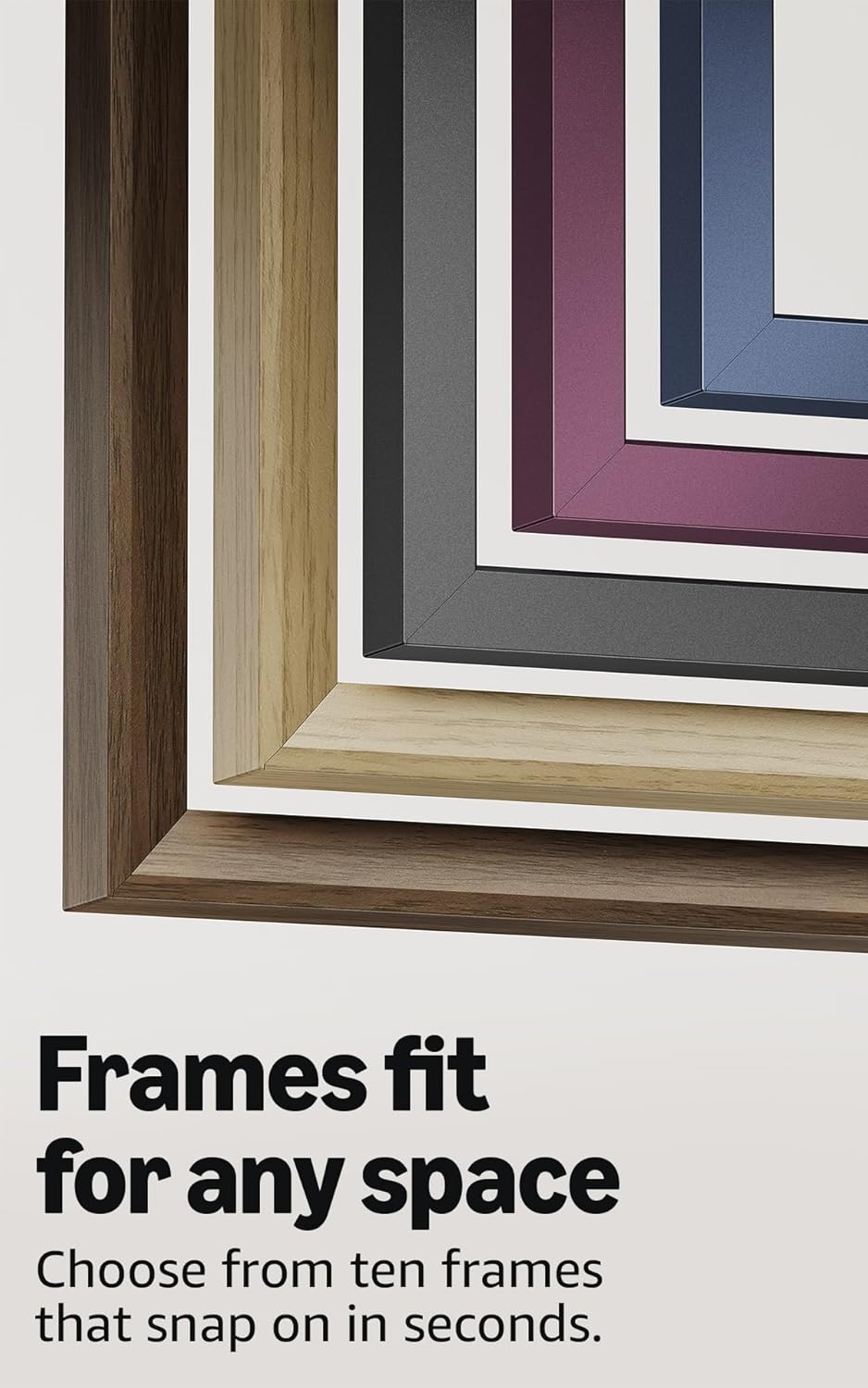
Image: A selection of different colored frames available for the Amazon Ember Artline TV, highlighting customization options.
4.4. Omnisense Technology (Motion Detection)
The custom Omnisense technology uses built-in sensors to detect your presence. The display will wake to show your favorite artwork or allow you to start watching content quickly. When you leave the area, the TV automatically turns off to save energy.

Slika: Podrobna view of the Omnisense sensor, which enables motion detection for automatic display activation and power saving.
Video: Konecview of the Amazon Fire TV 4K TV with Alexa Voice Remote, demonstrating initial setup, interface navigation, and motion detection features.
5. Specifikacije
| Funkcija | Podrobnost |
|---|---|
| Resolucija | 3840 x 2160 (4K UHD) |
| High Dynamic Range (HDR) format | HDR10, HLG, HDR10+ Adaptive, Dolby Vision |
| Vrsta osvetlitve ozadja | LED |
| Hitrost osveževanja | 60Hz |
| Screen finish | Matte, anti-glare |
| Velikost zaslona | 55“ (Viewable display size: 54.6“) |
| vrata HDMI | 3 HDMI 2.0 + 1 HDMI 2.1 z eARC |
| Wifi & Ethernet connectivity | Wi-Fi 6 + 1 Ethernet vrata |
| USB | 1 USB 3.0 |
| Digitalni optični avdio izhod | 1 Digital Optical Audio Port |
| Glasovna podpora | Yes, hands-free with Alexa, press and ask Alexa with the Fire TV Alexa Voice Remote Enhanced or the free Fire TV app. |
| Avdio podpora | Dolby Digital Plus s prenosom zvoka, kodiranega z Dolby |
| Avdio moč | 10 W + 10 W |
| OS | Fire OS |
| Product size (without frame) | 48.3" x 28.3" x 1.54" |
| Teža (brez okvirja) | 39.9 lbs |
| Številka SKU | QL55M800A |
| Standardni stenski nosilec VESA | 300mm x 400mm (Note: Included wall mount is non-VESA; TV is VESA compatible for separately purchased mounts.) |
| TV size with frame | 49.1" x 28.7" x 1.8" |
| TV weight with frame | 42.5 lbs |
6. Funkcije dostopnosti
The Amazon Ember Artline Fire TV includes several accessibility features:
- GlasView bralnik zaslona: Omogoča dostop do večine funkcij Fire TV za slepe ali slabovidne uporabnike.
- Povečevalnik zaslona: Uporabnikom omogoča povečevanje in pomanjševanje ter premikanje po zaslonu.
- Besedilna pasica: Consolidates onscreen text into a compact, customizable banner.
- Podnapisi: Na voljo za videoposnetke in TV-oddaje, kjer je podprto.
- Zvočni opis: Zagotavlja besedne opise dejanj na zaslonu, izrazov obraza in sprememb prizorov (ni na voljo za vse vsebine).
- Podpora za slušne aparate Bluetooth: Podpira pretakanje zvoka za izbrane združljive slušne aparate in naprave Bluetooth za zasebno poslušanje. Podprte so tudi združljive slušalke Bluetooth.
7. Software Updates and Security
Ta naprava prejema zajamčene varnostne posodobitve programske opreme vsaj štiri leta po tem, ko je naprava nazadnje na voljo za nakup kot nova enota na našem webspletna mesta. Za informacije, specifične za vašo napravo, obiščite Upravljanje vsebine in naprav.
8. Garancija in servis
A 1-Year limited warranty and service are included with the Amazon Ember Artline TV. Optional 3-Year and 4-Year Extended Warranties are available for U.S. customers and are sold separately. Extended warranty excludes frame accessories. Use of Fire TV is subject to the terms found on the Amazon webmesto.
The Amazon Ember Artline 55” Frame includes a 90-day limited warranty and service.
9. Odpravljanje težav
If you encounter issues with your Amazon Ember Artline Fire TV, consider the following common troubleshooting steps:
- Brez napajanja: Ensure the power cord is securely connected to both the TV and a working power outlet.
- Brez slike/zvoka:
- Check all cable connections (HDMI, optical audio).
- Preverite, ali je na televizorju izbran pravilen vhodni vir.
- Televizor znova zaženite tako, da ga za 60 sekund izključite iz električne vtičnice in ga nato ponovno priključite.
- Daljinski upravljalnik se ne odziva:
- Zamenjajte baterije AAA v glasovnem upravljalniku Alexa.
- Daljinski upravljalnik ponovno seznanite tako, da 10 sekund držite gumb Domov.
- Težave z omrežno povezljivostjo:
- Preverite, ali vaš usmerjevalnik Wi-Fi in modem delujeta pravilno.
- Znova zaženite usmerjevalnik in modem.
- Go to the TV's Network settings to re-connect to your Wi-Fi network or try a wired Ethernet connection.
- Ambient Experience Not Activating:
- Ensure Omnisense technology is enabled in the TV settings.
- Check for any physical obstructions blocking the motion sensors.
- Zmogljivost programske opreme: If the TV is slow or unresponsive, try restarting it. Ensure the TV's software is up to date.
For further assistance, refer to the online support resources or contact Amazon customer service.