
1. Uvod
Hvala za nakupasing the ULTIMEA Aura A60 U2621 7.1ch Dolby Atmos Soundbar System. This manual provides essential information for setting up, operating, and maintaining your new sound system. Please read this manual thoroughly before use to ensure proper functionality and to maximize your audio experience.

Figure 1.1: Immersive audio experience with the ULTIMEA Aura A60 system.
2. Varnostne informacije
Da bi zmanjšali tveganje električnega udara, požara ali poškodbe naprave, upoštevajte naslednje varnostne ukrepe:
- Te naprave ne izpostavljajte dežju ali vlagi.
- Na napravo ne postavljajte predmetov, napolnjenih s tekočino, kot so vaze.
- Zagotovite ustrezno prezračevanje. Ne blokirajte prezračevalnih odprtin.
- Ne nameščajte v bližini virov toplote, kot so radiatorji, grelniki, peči ali druge naprave (vključno z amplifiers), ki proizvajajo toploto.
- Zaščitite napajalni kabel, da se po njem ne pohodi ali stisne, zlasti pri vtičih, vtičnicah in na mestu, kjer izstopa iz naprave.
- Uporabljajte samo priključke/dodatke, ki jih je določil proizvajalec.
- Izklopite napravo med nevihtami ali ko je dlje časa ne uporabljate.
- Za vse servise se obrnite na usposobljeno servisno osebje.
3. Vsebina paketa
Prosimo, preverite, ali so vsi predmeti prisotni in v dobrem stanju:
- ULTIMEA Aura A60 Soundbar
- Wireless Subwoofer (4-inch, BassMX Technology)
- 4 x Surround Speakers (2 front, 2 rear)
- Daljinski upravljalnik
- HDMI kabel
- Napajalnik/kabli
- Uporabniški priročnik (ta dokument)
4. Izdelek je končanview
The ULTIMEA Aura A60 U2621 is a 7.1ch Dolby Atmos soundbar system designed to deliver an immersive home theater audio experience. It features a main soundbar unit, a powerful wireless subwoofer with BassMX technology, and four surround speakers.
4.1 Glavna enota zvočne letve
The main soundbar unit houses 3 main channels for clear dialogue and primary audio. It serves as the central hub for all audio connections.

Figure 4.1: Main soundbar unit with front surround speakers.
4.2 Brezžični nizkotonec
The dedicated 4-inch wireless subwoofer incorporates BassMX technology to enhance low frequencies, providing deep and resonant bass for a more impactful audio experience.

Figure 4.2: Wireless subwoofer with BassMX technology.
4.3 prostorskih zvočnikov
The system includes four surround speakers: two front and two rear. The rear speakers connect wirelessly to the soundbar, minimizing cable clutter and allowing flexible placement to create an expansive acoustic space.

Figure 4.3: Diagram of 7.1ch sound distribution.
4.4 Vhodna/izhodna vrata
The soundbar features multiple input options for versatile connectivity:
- HDMI eARC: For high-quality audio transmission and seamless TV integration.
- Optični: Digitalni avdio vhod.
- AUX: Analogni avdio vhod.
- USB: Za predvajanje medijev.
- Bluetooth: Brezžično pretakanje zvoka.

Figure 4.4: Rear panel connections, including HDMI eARC.
5. Nastavitev
5.1 Fizična namestitev
Optimalna postavitev komponent vašega zvočnega sistema je ključnega pomena za najboljšo zvočno izkušnjo.
- Soundbar: Place the soundbar centrally below your television. Ensure it is not obstructed.
- Nizkotonski zvočnik: Position the wireless subwoofer on the floor near the soundbar. Experiment with placement to find the best bass response for your room.
- Sprednji prostorski zvočniki: Place the two wired front surround speakers to the left and right of your TV, ideally at ear level when seated.
- Zadnji prostorski zvočniki: Position the two wireless rear surround speakers behind your primary listening position, to the left and right. These speakers will automatically connect wirelessly to the soundbar once powered on.

Figure 5.1: Recommended speaker placement for Dolby Atmos.
5.2 Povezave
Za povezavo sistema zvočne vrstice sledite tem korakom:
- Napajalni priključek: Connect the power cables to the soundbar, subwoofer, and surround speakers, then plug them into a power outlet.
- HDMI eARC (priporočeno): Connect one end of the provided HDMI cable to the HDMI eARC port on your soundbar and the other end to the HDMI eARC/ARC port on your TV. This connection supports Dolby Atmos and allows for TV remote control of the soundbar.
- Optična povezava (alternativa): If your TV does not have an HDMI eARC/ARC port, connect an optical cable (not included) from your TV's optical output to the OPTICAL input on the soundbar.
- AUX Connection (Alternative): For analog audio sources, connect a 3.5mm AUX cable (not included) from your device's audio output to the AUX input on the soundbar.
- USB povezava: Insert a USB drive into the USB port on the soundbar for direct media playback.
- Bluetooth seznanjanje: To connect a Bluetooth device, select the Bluetooth input on the soundbar. On your device, search for 'ULTIMEA Aura A60' and pair.
6. Navodila za uporabo
6.1 Vklop/izklop
Pritisnite gumb za vklop na zvočniški letvi ali daljinskem upravljalniku, da vklopite ali izklopite sistem.
6.2 Izbira vnosa
Use the 'Input' button on the remote control or the soundbar to cycle through available input sources: HDMI eARC, Optical, AUX, USB, and Bluetooth.

Figure 6.1: Remote control for easy operation.
6.3 Nadzor glasnosti
Adjust the master volume using the 'Volume Up' and 'Volume Down' buttons on the remote control or the soundbar. You can also adjust subwoofer and surround speaker levels independently.
6.4 Sound Modes and EQ Presets
The Aura A60 offers various sound modes and EQ presets to optimize audio for different content and preferences.
- Namenski načini: Select from 6 specialized modes: Movie, Music, Voice, Sports, Game, and Night.
- Prednastavitve EQ: Access 121 professional EQ presets for genres like Bass, Pop, Classical, and Rock via the ULTIMEA app.

Figure 6.2: 121 preset EQ matrix for customized audio.
6.5 Nadzor aplikacij
Download the ULTIMEA app to your smartphone for advanced control and customization options, including a 10-band EQ and access to all EQ presets.
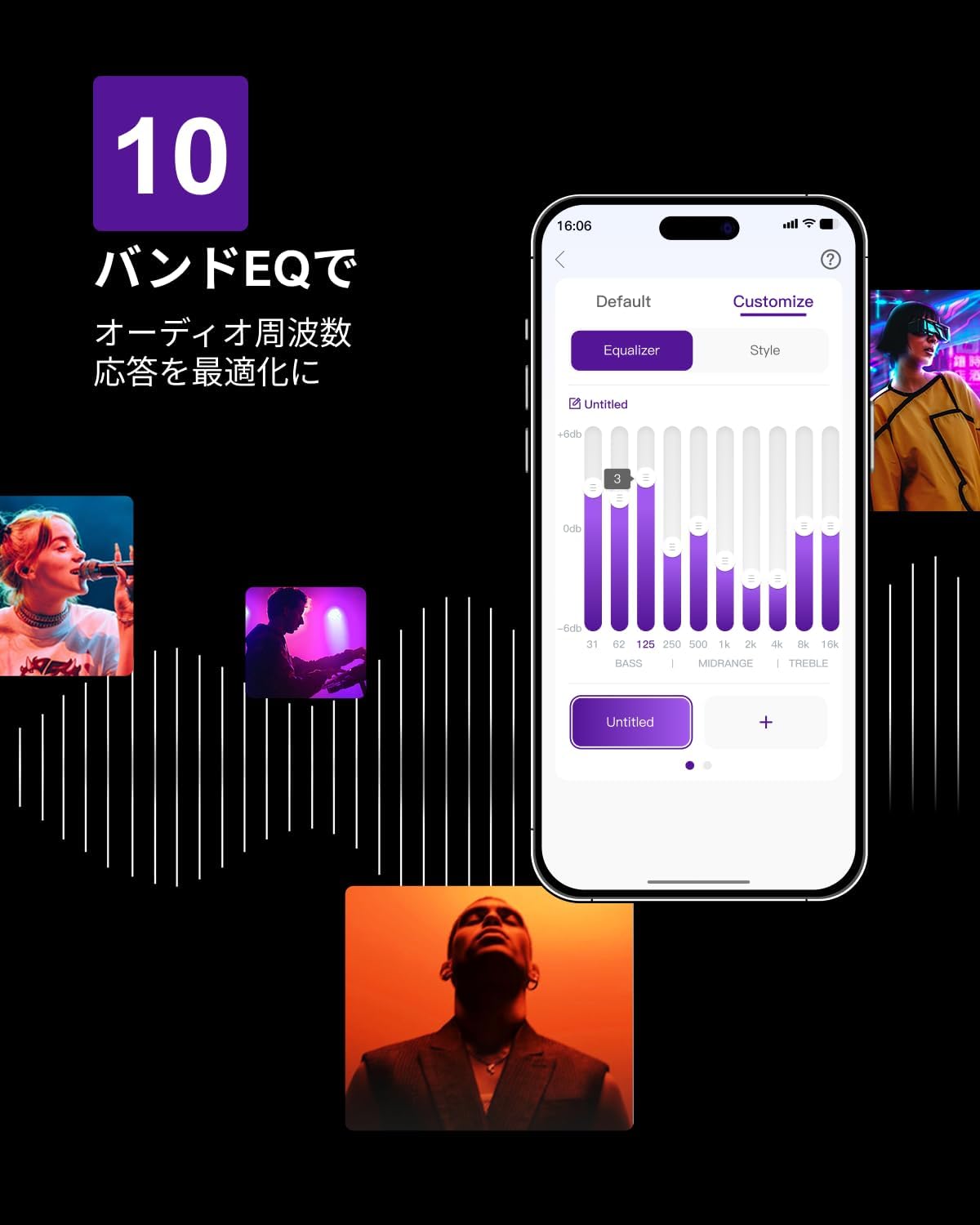
Figure 6.3: ULTIMEA mobile application interface.
7. Vzdrževanje
To ensure the longevity and optimal performance of your ULTIMEA Aura A60 soundbar system, follow these simple maintenance guidelines:
- Čiščenje: Use a soft, dry cloth to wipe the surfaces of the soundbar, subwoofer, and speakers. Do not use liquid cleaners or abrasive materials, as they may damage the finish.
- Prezračevanje: Ensure that all ventilation openings remain clear and unobstructed to prevent overheating.
- Shranjevanje: Če sistem shranjujete dalj časa, ga izključite iz električnega omrežja in shranite na hladnem in suhem mestu, stran od neposredne sončne svetlobe in ekstremnih temperatur.
8. Odpravljanje težav
Če imate težave s sistemom zvočne palice, si oglejte naslednje pogoste težave in rešitve:
| Težava | Možen vzrok | rešitev |
|---|---|---|
| Ni zvoka iz zvočne vrstice. | Izbran napačen vhod, glasnost prenizka, kabli niso pravilno priključeni. | Verify the correct input source. Increase volume. Check all cable connections (HDMI, Optical, AUX). Ensure the soundbar is powered on. |
| No sound from subwoofer/surround speakers. | Subwoofer/speakers not paired or powered on, volume too low. | Ensure subwoofer and surround speakers are powered on. They should automatically pair. If not, refer to the pairing instructions in the full manual (if available) or contact support. Increase their individual volume levels. |
| Popačen ali slab zvok. | Incorrect audio settings, poor source quality, interference. | Adjust EQ settings or try different sound modes. Ensure the audio source is high quality. Check for nearby electronic devices causing interference. |
| Težave s povezavo Bluetooth. | Device out of range, not in pairing mode, interference. | Ensure the soundbar is in Bluetooth pairing mode. Move your device closer to the soundbar. Disconnect and re-pair the device. |
If the problem persists after trying these solutions, please contact ULTIMEA customer support.
9. Specifikacije
| Funkcija | Podrobnost |
|---|---|
| Znamka | KONČNO |
| Ime modela | Aura A60 |
| Številka modela | U2621 |
| Vrsta zvočnika | Soundbar with 7.1ch Surround Sound |
| Avdio tehnologija | Dolby Atmos, BassMX Technology |
| Povezljivost | HDMI eARC, Bluetooth, Optical, AUX, USB |
| Nizkotonec | 4-inch Wired Subwoofer (integrated BassMX) |
| Prostorski zvočniki | 4 (2 wired front, 2 wireless rear) |
| Nadzor | Remote Control, ULTIMEA App |
| barva | Črna |
| Mere (D x Š x V) | 9 cm x 40 cm x 7 cm (Soundbar, approximate) |
| Država izvora | Kitajska |
10. Garancija in podpora
ULTIMEA is committed to providing high-quality products and customer satisfaction. Your Aura A60 U2621 soundbar system comes with comprehensive support.
10.1 Informacije o garanciji
Specific warranty details may vary by region. Please refer to the warranty card included with your product or visit the official ULTIMEA webza najnovejše garancijske pogoje.
10.2 Podpora strankam
For any questions, technical assistance, or troubleshooting not covered in this manual, please contact our dedicated support team:
- 365-Day Support: Our expert staff is available year-round to assist you.
- Klepet v živo: Instant responses are available via live chat on our webmesto.
- Vrne: We offer a 30-day return policy with free shipping for your peace of mind.

365-Day Expert Support

Instant Live Chat

30-dnevno brezplačno vračilo
Za dodatno pomoč obiščite ULTIMEA Brand Store.