
Uvod
Thank you for choosing the MACAP MI40 Luxe On-Demand Espresso Grinder. This manual provides essential information for the safe and efficient operation, maintenance, and care of your new grinder. Please read all instructions carefully before use and retain this manual for future reference.

The MACAP MI40 Luxe On-Demand Espresso Grinder, featuring a sleek black finish and integrated touchscreen display.
Varnostne informacije
Pri uporabi električnih naprav vedno upoštevajte osnovne varnostne ukrepe, da zmanjšate tveganje požara, električnega udara in poškodb.
- Pred uporabo mlinčka preberite vsa navodila.
- Do not immerse the grinder, cord, or plug in water or other liquids.
- Izključite vtič iz vtičnice, ko ga ne uporabljate, pred sestavljanjem ali razstavljanjem delov in pred čiščenjem.
- Izogibajte se stiku z gibljivimi deli.
- Ne uporabljajte nobene naprave s poškodovanim kablom ali vtičem ali po tem, ko naprava ne deluje pravilno ali je bila kakor koli poškodovana. Za pomoč se obrnite na podporo strankam.
- Uporaba priključkov, ki jih proizvajalec ne priporoča ali prodaja, lahko povzroči požar, električni udar ali poškodbe.
- Ne uporabljajte na prostem.
- Kabel naj ne visi čez rob mize ali pulta ali se dotika vročih površin.
- Ensure the hopper lid is securely in place before operating.
- Only grind whole roasted coffee beans. Do not grind other substances such as nuts, spices, or instant coffee.
Nastavitev
1. Razpakiranje
- Previdno odstranite vse komponente iz embalaže.
- Inspect the grinder for any signs of damage. If damaged, do not operate and contact your retailer.
- Odstranite vse zaščitne folije in embalažni material.
2. Identifikacija sestavnih delov
Familiarize yourself with the main parts of your MI40 Luxe grinder:
- Lijak: Holds whole coffee beans.
- Pokrov koša: Covers the hopper.
- Gumb za nastavitev mletja: Located below the hopper, used to set grind fineness.
- Zaslon na dotik: For programming and selecting dosing options.
- Dosing Spout: Kjer se toči mleta kava.
- Držalo za prenosni filter: Supports the portafilter during grinding.
- Stikalo za vklop: Located on the side of the grinder.
3. Začetna montaža
- Install the Hopper: Place the hopper onto the grinder body, ensuring it seats correctly. Rotate it slightly until it locks into position.
- Install the Hopper Lid: Place the lid securely on top of the hopper.
4. Umestitev
Place the grinder on a stable, flat, and dry surface. Ensure there is adequate ventilation around the unit.
5. Napajalni priključek
Priključite napajalni kabel v ozemljeno električno vtičnico. Prepričajte se, da je glasnosttage matches the specifications listed on the grinder's rating label.
Navodila za uporabo
1. Polnjenje zalogovnika
Lift the hopper lid and pour whole roasted coffee beans into the hopper. Do not overfill. Replace the lid securely.
2. Grind Adjustment (Nice Grind Control Dial)
The MI40 Luxe features a stepless grind adjustment dial for precise control. To adjust the grind fineness:
- Vklopite mlinček s stikalom za vklop.
- Rotate the grind adjustment dial. Turning it clockwise results in a finer grind, and counter-clockwise results in a coarser grind.
- For espresso, start with a fine setting and adjust incrementally based on extraction time and taste. It is recommended to adjust the grind while the burrs are running to prevent jamming.

Podrobno view of the Nice Grind Control Dial for precise grind fineness adjustment.
3. Touchscreen Dosing
The touchscreen allows for programmable dosing for single and double shots.
- Vklop: Ensure the grinder is powered on. The touchscreen will illuminate.
- Select Dose: On the main screen, you will see icons for single and double shot doses. Tap the desired dose icon.
- Adjust Dose Time (if needed): To program the dose time, press and hold the desired dose icon until it enters programming mode. Use the '+' and '-' buttons on the screen to adjust the grinding time in seconds. Tap the icon again to save.
- Place Portafilter: Position your portafilter securely in the portafilter holder beneath the dosing spout.
- Začetek brušenja: Tap the selected dose icon once to start grinding. The grinder will automatically stop after the programmed time.
- Ročno brušenje: Some models may offer a manual grind option, typically by pressing a dedicated button or holding a dose icon briefly. Refer to the on-screen prompts.
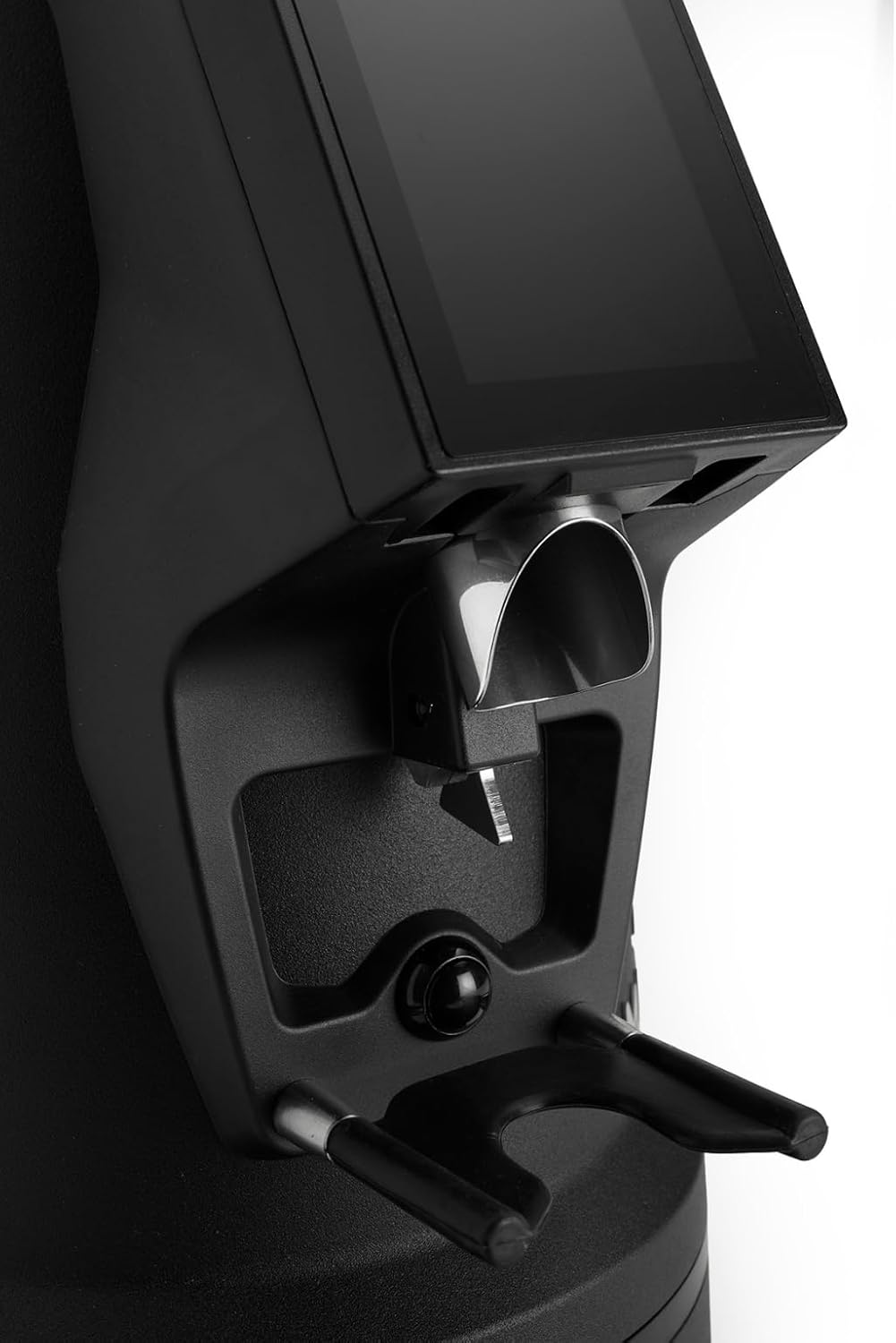
The dosing spout and portafilter holder, designed for efficient and clean coffee dispensing.
Vzdrževanje
Regular cleaning and maintenance ensure optimal performance and longevity of your grinder.
1. Dnevno čiščenje
- Lijak: Empty any remaining beans and wipe the inside of the hopper with a dry cloth.
- Dosing Spout: Use a brush or vacuum cleaner to remove any residual coffee grounds from the dosing spout and portafilter holder area.
- Zunanjost: Obrišite zunanjost mlinčka z adamp krpo. Ne uporabljajte abrazivnih čistil in enote ne potapljajte v vodo.
2. Burrs Cleaning (Weekly/Bi-weekly)
To maintain grind consistency, the burrs should be cleaned regularly.
- Izključite mlinček iz električnega omrežja: Always disconnect the power before cleaning the burrs.
- Odstranite lijak: Empty the hopper and remove it from the grinder body.
- Dostop do rezil: Depending on the model, you may need to unscrew the top burr carrier. Refer to the specific instructions for your MI40 Luxe model.
- Čisti ostružki: Use a stiff brush or a vacuum cleaner to remove all coffee grounds from both the stationary and rotating burrs. Do not use water.
- Ponovno sestavite: Carefully reassemble the burr carrier and hopper, ensuring all parts are securely in place.
3. Splošna nega
- Mlinček hranite na hladnem in suhem mestu.
- Avoid exposing the grinder to direct sunlight or extreme temperatures.
Odpravljanje težav
Če imate težave z mlinčkom, si oglejte naslednje pogoste težave in rešitve:
| Težava | Možen vzrok | rešitev |
|---|---|---|
| Mlinček se ne vklopi | No power, power switch off, or safety interlock not engaged. | Check power cord connection, ensure power switch is ON, verify hopper is correctly seated. |
| No coffee grinding / Grinder jams | Beans not feeding, burrs clogged, or grind setting too fine. | Ensure hopper has beans. Unplug, remove hopper, clean burrs. Adjust to a coarser setting. |
| Nedosledno mletje | Burrs are dirty or worn. | Clean burrs thoroughly. If problem persists, burrs may need replacement. |
| Mlinček je hrupno | Foreign object in burrs or loose components. | Unplug and inspect burrs for foreign objects. Ensure all parts are securely fastened. |
If the problem persists after attempting these solutions, please contact MACAP customer support or your retailer.
Specifikacije
| Funkcija | Podrobnost |
|---|---|
| Model | MI40 Luxe |
| Znamka | Macap |
| Vrsta rezila | Ploščati rezkarji |
| Velikost burra | 65 mm |
| Prilagoditev mletja | Stepless (Nice Grind Control Dial) |
| Odmerjanje | Touchscreen Programmable On-Demand |
| Zmogljivost lijaka | 2.6 lbs (približno 1.2 kg) |
| Material | Nerjaveče jeklo |
| Teža predmeta | 19.6 funta (približno 8.9 kg) |
| Dimenzije (D x Š x V) | 12" x 7.6" x 22" (približno 30.5 cm x 19.3 cm x 55.9 cm) |
| Motor | High-Torque |
Garancija in podpora
Your MACAP MI40 Luxe Grinder is covered by a manufacturer's warranty. For specific warranty terms and conditions, please refer to the warranty card included with your product or visit the official Macap website. For technical support, spare parts, or service inquiries, please contact your authorized Macap dealer or the customer support team.
Kontaktni podatki:
- Refer to your purchase documentation for retailer contact details.
- Visit the official Macap website for global support information.