
Uvod
This manual provides comprehensive instructions for the setup, operation, and maintenance of your ASUS ROG Strix 27” 5K HDR Gaming Monitor (Model: XG27JCG). Please read this manual thoroughly before using the monitor to ensure proper functionality and to maximize your user experience.
The ROG Strix XG27JCG is a 27-inch 5K (5120 x 2880) Fast IPS display designed for high-performance gaming and detailed visual tasks. It features a 180Hz (overclocked) refresh rate, 0.3ms GTG response time, and a Dual Mode function allowing switching between 5K 180Hz and QHD 330Hz. Advanced features include G-SYNC Compatible technology, VESA DisplayHDR 600, and ROG Gaming A.I. Technology.
Video: konecview of the ASUS ROG Strix XG27JCG 27-inch 5K monitor, highlighting its key features and design.
Kaj je v škatli
Preden nadaljujete z namestitvijo, preverite, ali so v embalaži vse komponente.
- ASUS ROG Strix XG27JCG Monitor
- kabel DisplayPort
- Vodnik za hiter začetek
- ROG torbica
- Nalepka ROG
- ROG tripod stand
- Garancijska kartica
- Napajalni kabel
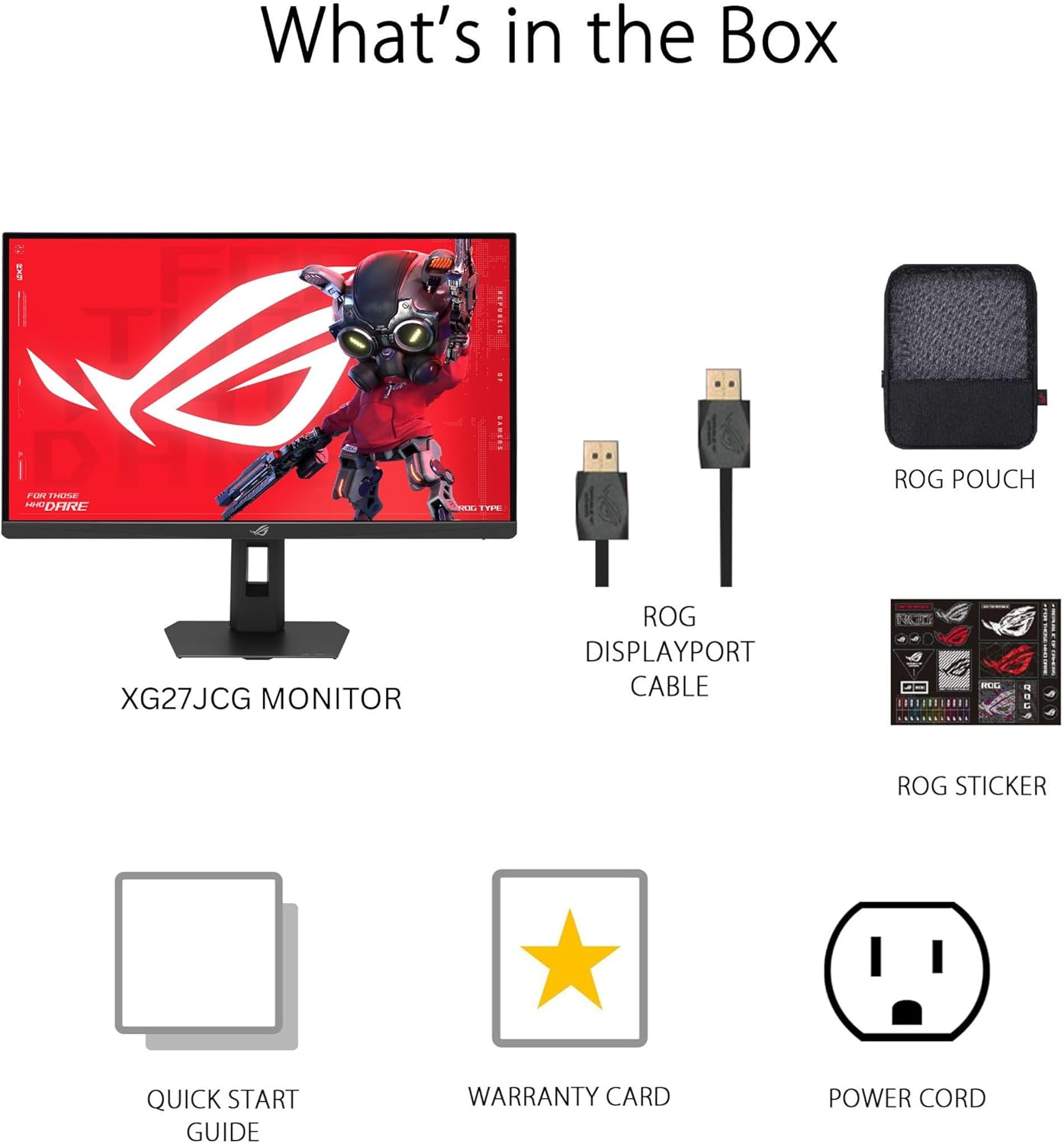
Slika: Contents of the monitor packaging, showing the monitor, DisplayPort cable, ROG pouch, ROG sticker, Quick Start Guide, Warranty Card, and Power Cord.
Navodila za namestitev
1. Sestavljanje stojala
Carefully remove the monitor from its packaging. Attach the stand base to the stand neck, securing it with the provided screw. Then, attach the assembled stand to the back of the monitor until it clicks into place. Ensure all connections are firm.
2. Povezovanje z računalnikom
The monitor supports DisplayPort 1.4 (DSC), HDMI 2.1, and USB-C connectivity. Choose the appropriate cable for your system.
- DisplayPort: En konec kabla DisplayPort priključite na vhod DisplayPort monitorja, drugi konec pa na izhod DisplayPort računalnika.
- HDMI: Connect one end of an HDMI 2.1 cable to the monitor's HDMI input and the other end to your computer's HDMI output.
- USB-C: Connect a USB-C cable to the monitor's USB-C port and to a compatible USB-C port on your computer. This connection also supports 15W power delivery.

Slika: Zadaj view of the monitor's connectivity ports, including HDMI 2.1, DisplayPort 1.4, USB Type-C, and a Headphone Jack.
3. Napajalni priključek
Priključite napajalni kabel na vtičnico monitorja, nato pa drugi konec priključite v električno vtičnico.
4. Začetni vklop
Press the power button located on the monitor to turn it on. The monitor will automatically detect the input source. If no image appears, ensure all cables are securely connected and the computer is powered on.
Navodila za uporabo
Zaslonski meni (OSD).
Use the joystick and buttons on the back of the monitor to navigate the OSD menu. The OSD allows you to adjust various settings such as brightness, contrast, color, input source, and gaming features.
Display Modes and Refresh Rate
The monitor features a Dual Mode function, allowing you to switch between two primary display configurations:
- 5K (5120 x 2880) at 180Hz (OC): Provides ultra-sharp, immersive visuals suitable for cinematic content and detailed work.
- QHD (2560 x 1440) at 330Hz: Offers extremely high frame rates and responsive gaming action, ideal for competitive esports.
Switching between modes can be done via the OSD menu or a dedicated hotkey, if configured.

Slika: Visual representation of the monitor's Dual Mode, allowing users to switch between 5K 180Hz and QHD 330Hz for different gaming experiences.
ROG Gaming A.I. Technology
This monitor includes AI-powered features designed to enhance your gaming experience:
- Dinamično povečanje senc: Automatically brightens dark areas of the game world without overexposing bright areas, improving visibility of hidden enemies or details.
- Dinamični križec: Provides an on-screen crosshair that can adapt to the game environment, ensuring it remains visible against various backgrounds.
- Vizualizacija z umetno inteligenco: Optimizes visual settings based on the game content for improved clarity and detail.

Slika: Examples of Dynamic Crosshair and Dynamic Shadow Boost in action, showing how these features enhance visibility in games.
DisplayWidget Center
The DisplayWidget Center software provides seamless control over monitor settings directly from your Windows or macOS operating system. This utility allows for easy adjustment of GameVisual modes, MultiScreen configurations, and system settings without using the OSD buttons.

Slika: Screenshot of the DisplayWidget Center software, demonstrating its user interface for adjusting monitor settings.
Ergonomics and Adjustments
The monitor stand offers multiple adjustment options to optimize your viewudobje:
- Nagib: +20° do -5°
- Vrtljiva: +40° do -40°
- Vrtenje: +90° to -90° (for portrait mode)
- Nastavitev višine: 0 do 110 mm
Adjust the monitor to an ergonomic position that reduces strain on your neck and eyes. Ensure the top of the screen is at or slightly below eye level.

Slika: Diagram illustrating the monitor's ergonomic adjustments, including tilt, swivel, pivot, and height.
Vzdrževanje
Čiščenje monitorja
- Pred čiščenjem vedno izklopite monitor in izvlecite napajalni kabel.
- Uporabite mehko krpo, ki ne pušča vlaken, dampz vodo ali blagim, neabrazivnim čistilom za zaslone.
- Čistila ne pršite neposredno na zaslon. Najprej ga nanesite na krpo.
- Avoid using alcohol-based cleaners, ammonia, or abrasive materials, as these can damage the screen surface.
Splošna nega
- Monitorja ne izpostavljajte neposredni sončni svetlobi, prekomerni vročini in vlagi.
- Zagotovite zadostno prezračevanje okoli monitorja, da preprečite pregrevanje.
- Izogibajte se postavljanju težkih predmetov na monitor ali njegove kable.
Odpravljanje težav
| Težava | Možna rešitev |
|---|---|
| Na zaslonu ni slike |
|
| Slika je zamegljena ali popačena |
|
| Screen flickers or shows artifacts |
|
| No sound from headphones (if connected to monitor) |
|
Specifikacije
| Funkcija | Podrobnost |
|---|---|
| Znamka | ASUS |
| Številka modela | XG27JCG |
| Velikost zaslona | 27 palcev |
| Resolucija | 5120 x 2880 (5K UHD) |
| Vrsta plošče | Skoraj IPS |
| Hitrost osveževanja | 180 Hz (OC) / QHD 330Hz (Dual Mode) |
| Odzivni čas | 0.3 ms (GTG) |
| Razmerje stranic | 16:9 |
| Kontrastno razmerje | 600:1 |
| Viewkota | 178 Degrees (H/V) |
| Podpora za HDR | VESA DisplayHDR 600 |
| Barvna lestvica | 97 % DCI-P3 |
| Prilagodljiva sinhronizacija | AMD FreeSync Premium Pro, G-SYNC Compatible |
| Povezljivost | 1x DisplayPort 1.4 (DSC), 2x HDMI 2.1, 1x USB-C (with 15W PD), Headphone Jack |
| Poraba energije | 40 vatov |
| Mere predmeta (D x Š x V) | 8.59"D x 24.2"Š x 20.1"V |
| Teža predmeta | 6.9 funta |
| Ergonomske prilagoditve | Tilt (+20° ~ -5°), Swivel (+40° ~ -40°), Pivot (+90° ~ -90°), Height (0~110mm) |
Garancija in podpora
This ASUS ROG Strix XG27JCG monitor comes with a 3-letna garancija. For warranty claims, technical support, or service inquiries, please contact ASUS customer support. Refer to the included Warranty Card for detailed terms and conditions.
You can find additional support resources, drivers, and FAQs on the official ASUS support webspletno mesto: www.asus.com/support/