
Konec izdelkaview
The Blaupunkt Bremen SQR 46 DAB Retro Car Stereo is a modern reinterpretation of the classic 1-DIN car radio from the 1980s. It combines vintage aesthetics with contemporary technology, offering a comprehensive in-car entertainment experience. This unit features Bluetooth connectivity, dual USB ports, SD card slot, AUX input, and AM/FM radio, along with DAB+ digital tuner capabilities. The package includes the receiver, a fully enclosed under-dash/overhead installation mounting kit, and a 22-inch radio antenna, providing a complete solution for various vehicle installations.
Kaj je v škatli
- Blaupunkt Bremen SQR 46 DAB Retro Car Stereo Receiver: The main head unit for audio playback and control.
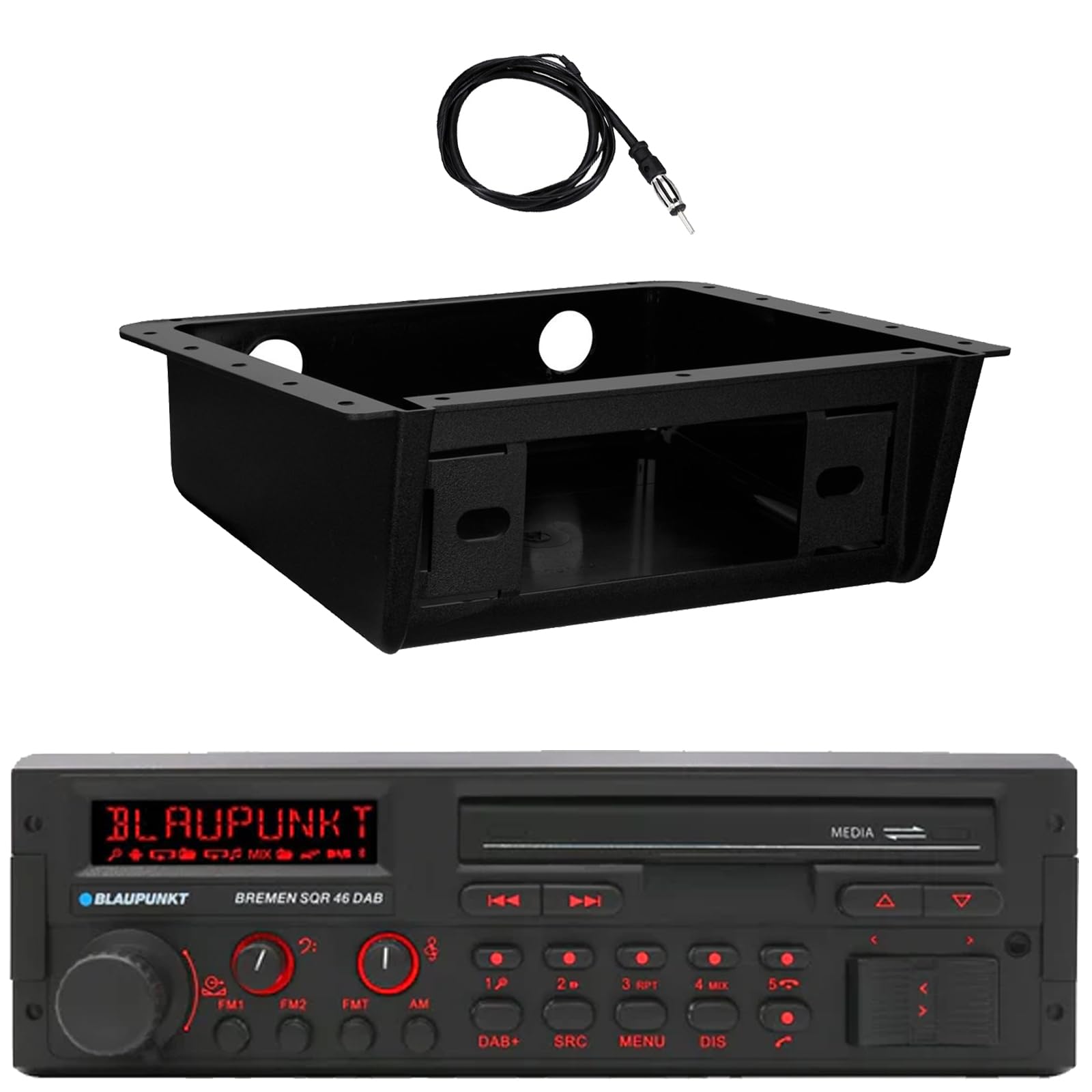
Slika: spredaj view of the Blaupunkt Bremen SQR 46 DAB car stereo receiver, showing the display, control knobs, and buttons.
- Fully Enclosed Under Dash/Overhead Installation Mounting Kit: A premium housing designed for secure installation of the receiver under the dashboard or overhead.

Image: Black, rectangular under-dash/overhead mounting kit, designed to house a single DIN car stereo.
- 22" Radio Antenna: A flexible marine-grade antenna for improved AM/FM radio reception.

Image: Coiled black wire antenna with a silver connector at one end.
Nastavitev in namestitev
Proper installation is crucial for optimal performance. It is recommended that installation be performed by a qualified professional. This section provides general guidelines.
1. Namestitev sprejemnika
- Under Dash/Overhead Installation: The included mounting kit is designed to fully enclose the single DIN receiver. Secure the kit to a suitable flat surface under the dashboard or overhead using appropriate fasteners (not included).
- Insert the Blaupunkt Bremen SQR 46 receiver into the mounting kit. Ensure it is securely seated and locked into place.
- Alternatively, the unit can be installed in a standard single DIN opening in your vehicle's dashboard.
2. Povezave ožičenja
- Napajalni priključek: Connect the yellow wire to a constant 12V power source, the red wire to a switched 12V accessory power source, and the black wire to a chassis ground.
- Priključki zvočnikov: Connect the speaker wires to your vehicle's speakers, ensuring correct polarity for each speaker.
- Antenska povezava: Connect the 22" radio antenna to the antenna input on the rear of the receiver. Route the antenna cable away from other wiring to minimize interference.
- Pomožni vhodi: If using external devices, connect them to the AUX-in port.
- RCA izhodi: Za priklop zunanjih amplifiers, use the RCA pre-outs.
3. Začetni vklop
- After all connections are made, turn on your vehicle's ignition.
- Pritisnite gumb za vklop na sprejemniku, da ga vklopite.
- Follow any on-screen prompts for initial setup, such as language selection or clock setting.
Navodila za uporabo
Osnovne kontrole
- Gumb za vklop: Pritisnite za vklop ali izklop enote.
- Gumb za glasnost: Rotate to adjust the volume level. Press to mute/unmute.
- Gumb SRC (vir): Press to cycle through available audio sources: AM, FM, DAB+, Bluetooth, USB, SD, AUX.
- Gumb MENU: Dostop do sistemskih nastavitev in prilagoditev zvoka.
- DIS (Display) Button: Change display information or dim the display.
- Track/Tune Buttons (<< / >>): Use to skip tracks in media modes or tune radio frequencies.
Radio Operation (AM/FM/DAB+)
- Pritisnite SRC gumb dokler AM, FM, oz DAB+ je izbrana.
- Uporabite Track/Tune buttons to manually tune frequencies or seek for the next strong station.
- Prednastavljene postaje: Press and hold numbered buttons (1-6) to save the current station as a preset. Press briefly to recall a saved station.
Bluetooth delovanje
- Seznanjanje:
- Prepričajte se, da je Bluetooth omogočen na vaši mobilni napravi.
- Izberite Bluetooth as the source on the receiver using the SRC gumb.
- On your mobile device, search for available Bluetooth devices and select "Blaupunkt Bremen SQR 46".
- Potrdite seznanjanje, če ste pozvani.
- Pretakanje zvoka: Once paired, you can stream audio from your device. Use the Track/Tune buttons on the receiver to skip tracks.
- Prostoročno telefoniranje: When a call comes in, the unit will display caller information. Press the green call button to answer, or the red call button to reject/end.
Predvajanje s kartice USB/SD
- Insert a USB drive into one of the USB ports or an SD card into the SD card slot.
- The unit will automatically switch to the USB or SD source and begin playback. If not, press the SRC gumb za izbiro pravilnega vira.
- Uporabite Track/Tune buttons to navigate through tracks.
AUX vhod
- Connect an external audio device (e.g., MP3 player) to the AUX-in port using a 3.5mm audio cable.
- Izberite POMOŽ as the source using the SRC gumb.
- Control playback from the connected device.
Nastavitve zvoka
- Pritisnite MENI button to access audio settings such as Bass, Treble, Balance, Fader, and Equalizer presets.
- Rotate the volume knob to adjust values and press it to confirm selections.
Vzdrževanje
- Čiščenje enote: Za brisanje sprednje plošče in zaslona uporabite mehko, suho krpo. Za trdovratno umazanijo rahlo obrišiteampkrpo sperite z vodo. Izogibajte se uporabi agresivnih kemikalij, abrazivnih čistil ali topil.
- USB/SD Ports: Keep the USB and SD card slots free of dust and debris.
- Splošna nega: Izogibajte se izpostavljanju enote ekstremnim temperaturam, neposredni sončni svetlobi dlje časa ali prekomerni vlagi.
Odpravljanje težav
| Težava | Možen vzrok | rešitev |
|---|---|---|
| Brez moči | Nepravilno ožičenje; Pregorela varovalka; Izklopljen vžig vozila. | Check power and ground connections. Verify vehicle fuse and unit fuse. Ensure vehicle ignition is on. |
| Brez zvoka | Volume too low; Mute activated; Incorrect speaker wiring; Source not selected. | Povečaj glasnost. Izklopi utišanje. Preverite povezave zvočnikov. Izberite pravilen vir zvoka. |
| Bluetooth se ne povezuje | Device not in pairing mode; Unit not in Bluetooth source; Interference. | Ensure Bluetooth is enabled on device and unit. Put device in pairing mode. Try re-pairing. Move closer to the unit. |
| Slab radijski sprejem | Antena ni priključena; Poškodovana antena; Območje šibkega signala. | Check antenna connection. Inspect antenna for damage. Try tuning to a stronger station or moving to a different location. |
| USB/SD se ne predvaja | Nepodprto file format; Poškodovan medij; Izbran napačen vir. | Zagotovite files are in a supported format (e.g., MP3, WMA). Try a different USB drive/SD card. Select USB/SD source. |
Specifikacije
| Funkcija | Podrobnost |
|---|---|
| Znamka | BLAUPUNKT |
| Številka modela | Bremen SQR 46 |
| Tehnologija povezljivosti | Pomožni, Bluetooth |
| Vrsta krmilnika | Pritisni gumb |
| Posebne lastnosti | Built-In Bluetooth, USB, SD Card, AUX-in, DAB+ digital tuner |
| Združljive naprave | Amplifier, Smartphones, USB drives, SD cards |
| Način avdio izhoda | Stereo |
| Vrsta avdio izhoda | RCA (6 channels) |
| Število enot | 1 (Sprejemnik) |
| Vključene komponente | Receiver, Stereo Install Kit, Radio Antenna |
Informacije o garanciji
This Blaupunkt Bremen SQR 46 DAB Retro Car Stereo comes with a 1-letna garancija proizvajalca. This warranty covers defects in materials and workmanship under normal use. Please retain your proof of purchase for warranty claims. For detailed terms and conditions, refer to the warranty card included with your product or visit the official Blaupunkt webmesto.
Podpora uporabnikom
For further assistance, technical support, or warranty inquiries, please contact Blaupunkt customer service. You can typically find contact information on the official Blaupunkt webspletnem mestu ali v dokumentaciji, ki je priložena vašemu izdelku.
Uradno Webspletno mesto: www.blaupunkt.com (Please note: This link is a general placeholder. Refer to your product's specific documentation for the most accurate support contact information.)