
1. Izdelek je končanview
The DDPAI N5 Dual is a screenless dash camera system designed for vehicles, offering both front and rear recording capabilities. It captures high-definition video footage to provide evidence for accident disputes and insurance claims. The system includes a front camera, a rear camera, and a 64GB SD card for storage.

Image: The DDPAI N5 Dual dash camera, showcasing its compact design and connectivity with a smartphone application for viewing in nadzor.
Ključne značilnosti:
- Dvojno snemanje: Captures 2160P (4K) video from the front camera and 1080P video from the rear camera.
- Brezzaslonska zasnova: Compact form factor without an integrated screen, managed via a smartphone app.
- Vgrajeni pomnilnik: Features 32GB built-in eMMC storage for data security.
- Razširljiv prostor za shranjevanje: Supports an external TF card up to 512GB (card not included, but a 64GB SD card is provided with this product).
- Način parkiranja: Offers 72-hour parking monitoring with radar motion detection (requires optional radar module and hardwire kit).
- Povezljivost: Equipped with 5GHz WiFi for fast data transfer to smartphones and built-in GPS for location tracking.
- Napredni sistemi za pomoč vozniku (ADAS): Provides smart voice reminders for front vehicle movement and fatigue driving.
- Nočni vid: Utilizes AI ISP Night Vis 3.0 technology with F1.8 aperture and a 6-layer lens for enhanced low-light recording.
2. Nastavitev in namestitev
2.1 Namestitev armaturne kamere
- Clean the windshield area where the front camera will be mounted. Ensure it does not obstruct your view.
- Attach the front camera to the windshield using the provided adhesive mount.
- Route the power cable neatly along the windshield edge and down to the vehicle's power outlet (cigarette lighter or hardwire kit).
- Namestite zadnjo kamero na zadnje vetrobransko steklo in tako zagotovite jasen pogled view. Connect it to the front camera using the provided cable.

Image: Illustration of the dual recording capability, showing the wide-angle views of both the front (4K UHD) and rear (1080P) cameras.
2.2 Napajalni priključek
- Connect the power cable to the dash cam and then to your vehicle's 12V power outlet.
- For 24-hour parking mode, a hardwire kit (ASIN: B0F21Z5V7D) is required and sold separately.
- For 72-hour parking mode with radar motion detection, an optional radar module (ASIN: B0D4YNL8R8) is also required and sold separately.
2.3 Začetna nastavitev in povezava z aplikacijo
- Download the DDPAI app from your smartphone's app store (iOS or Android).
- Vklopite kontakt vozila, da vklopite kamero na armaturni plošči.
- Open the DDPAI app and follow the on-screen instructions to connect to the dash cam's 5GHz WiFi network.
- Ko ste povezani, lahko view v živo footage, adjust settings, and download recordings.
3. Navodila za uporabo
3.1 Načini snemanja
- Snemanje v zanki: Kamera na armaturni plošči neprekinjeno snema in prepisuje najstarejše posnetke.tage, ko je pomnilnik poln.
- Snemanje v sili: The built-in G-sensor detects sudden impacts or collisions and automatically locks the current video segment to prevent it from being overwritten.
- Spremljanje parkiranja: When properly hardwired and with optional radar module, the dash cam can monitor your vehicle while parked. Radar motion detection triggers recording when movement is detected around the vehicle.
3.2 GPS and ADAS Features
- GPS sledenje: The built-in GPS records your driving route, speed, and location data, which can be viewed via the DDPAI app.
- ADAS Voice Reminders: The system provides audio alerts for events such as the vehicle ahead starting to move (to prevent delayed starts) and fatigue driving reminders to enhance safety.
3.3 Upravljanje shranjevanja
The DDPAI N5 Dual features 32GB of built-in eMMC storage for enhanced data security and reliability. Additionally, it supports an external TF (microSD) card up to 512GB for extended recording capacity. A 64GB SD card is included with this product.
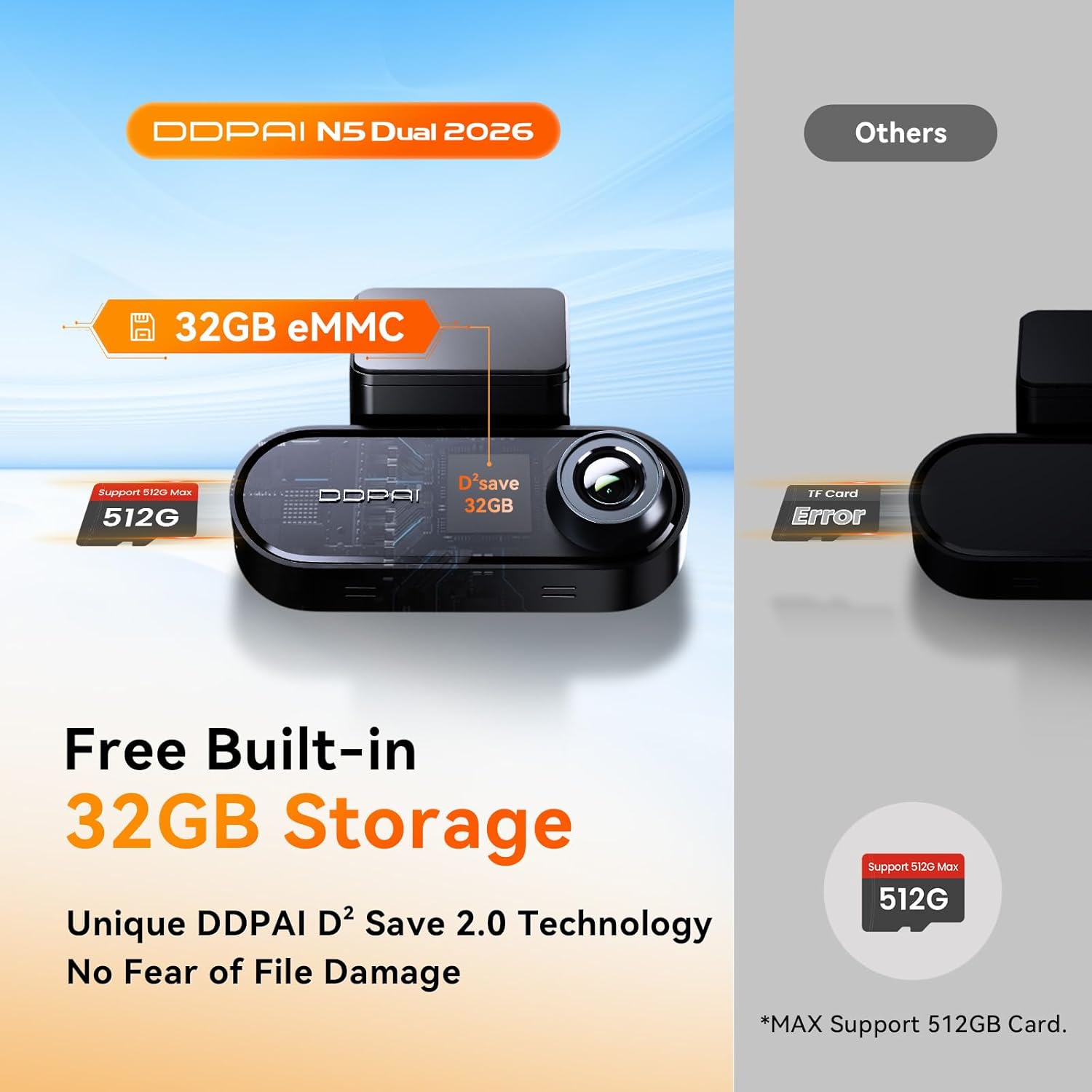
Image: Diagram illustrating the built-in 32GB eMMC storage and the capability to support an additional TF card up to 512GB.

Image: A 64GB SD card, which is included with the DDPAI N5 Dual dash cam for immediate use.
- To access or manage recordings, connect to the dash cam via the DDPAI app.
- Redno varnostno kopirajte pomembne datoteketage, da preprečimo izgubo.
- Format the TF card periodically (e.g., monthly) through the app to maintain optimal performance and prevent data corruption.
4. Vzdrževanje
4.1 Čiščenje
- Wipe the camera lenses with a soft, lint-free cloth to ensure clear video quality.
- Keep the dash cam body clean and free from dust.
4.2 Posodobitve vdelane programske opreme
- Check for firmware updates regularly through the DDPAI app.
- Perform updates over-the-air (OTA) via the app to ensure your dash cam has the latest features and bug fixes.
4.3 Storage Card Care
- Use high-quality TF cards from reputable brands to ensure reliable recording.
- Format the TF card regularly (e.g., once a month) using the dash cam's app to prevent data errors and extend the card's lifespan.
5. Odpravljanje težav
- Kamera na armaturni plošči se ne vklopi: Check the power cable connection to both the dash cam and the vehicle's power outlet. Ensure the vehicle's ignition is on.
- Težave s snemanjem: Ensure a TF card is inserted and properly formatted. Check if the storage is full; if so, format the card or replace it.
- Težave z brezžično povezavo: Restart the dash cam and your smartphone. Ensure you are within range of the dash cam's WiFi signal.
- Slaba kakovost videa: Clean the camera lenses. Ensure the dash cam is securely mounted and not vibrating. Check app settings for resolution.
- GPS ne deluje: Prepričajte se, da ima kamera na armaturni plošči jasen view of the sky. GPS signal acquisition may take a few minutes after startup.
6. Specifikacije
| Funkcija | Specifikacija |
|---|---|
| Znamka | DDPAI |
| Model | N5 Dual |
| Ločljivost sprednje kamere | 2160P (4K) |
| Ločljivost zadnje kamere | 1080P |
| Front Camera Wide Angle | 140° |
| Vgrajena shramba | 32 GB eMMC |
| Podpora za zunanje shranjevanje | Up to 512GB TF card |
| Priložena SD kartica | 64 GB SD kartica |
| WiFi | 5 GHz |
| GPS | Vgradna |
| Način parkiranja | 72H (with optional radar module and hardwire kit) |
| ADAS | Yes (Voice Reminders) |
| Nočni vid | AI ISP Night Vis 3.0, F1.8 Aperture, 6-Layer Lens |
7. Garancija in podpora
For warranty information and technical support, please refer to the official DDPAI webspletno mesto ali se obrnite neposredno na njihovo službo za stranke. Račun shranite kot dokazilo o nakupu za uveljavljanje garancije.