
Uvod
This manual provides detailed instructions for the setup, operation, and maintenance of your wegear CHERRY x PIXIU 98 8KHz Esports Gaming Mechanical Keyboard. Designed for high-performance gaming and versatile use, this keyboard features advanced CHERRY MX2A switches, tri-mode connectivity, and customizable RGB lighting. Please read this manual thoroughly to ensure optimal performance and longevity of your device.
Kaj je vključeno
Preverite, ali so v paketu prisotni vsi elementi:
- 1 x wegear CHERRY x PIXIU 98 Mechanical Keyboard
- 1 x 1.8 m USB kabel
- 1 x 4K Wireless Receiver
- 1 x snemalnik ključev
- 1 x uporabniški priročnik
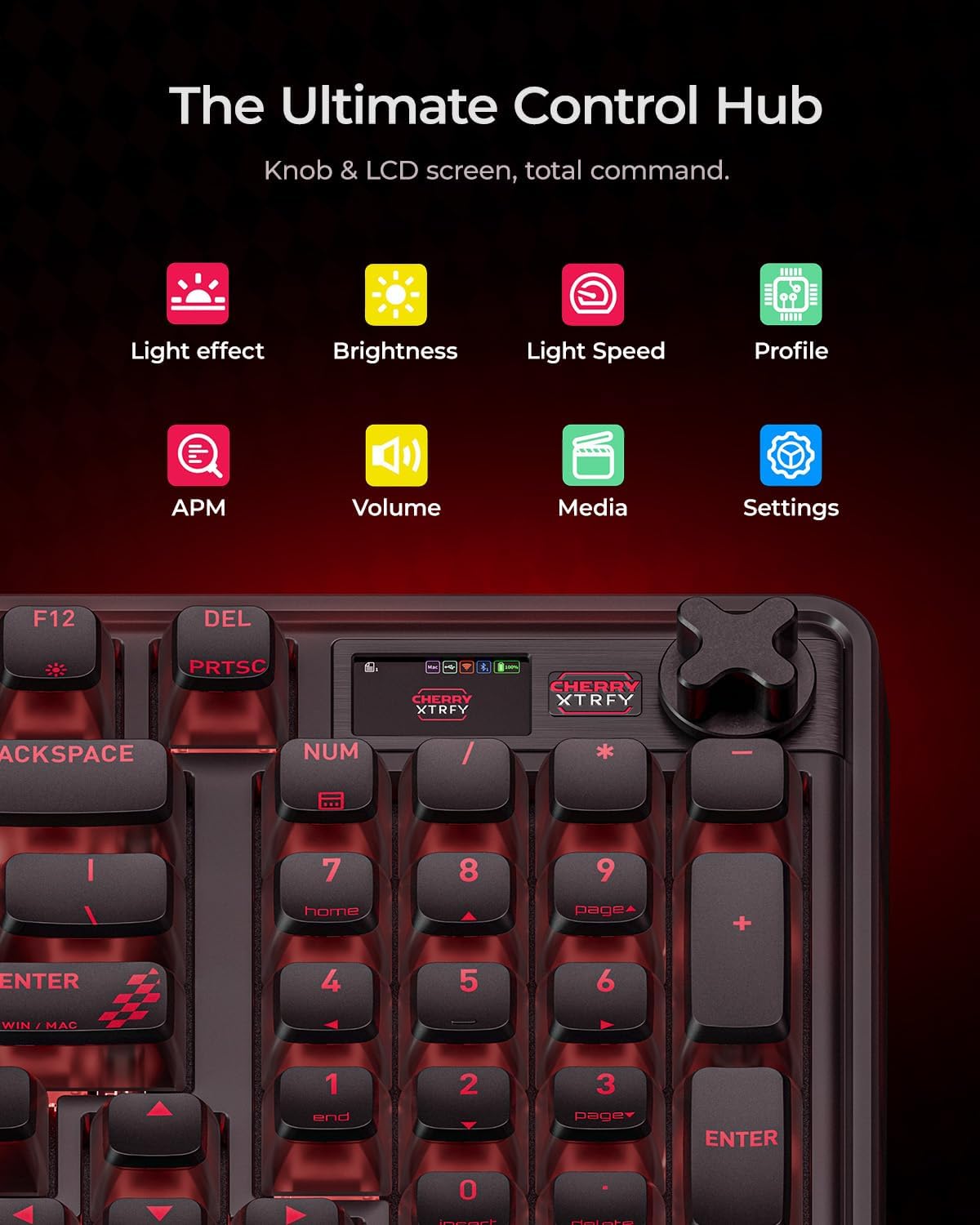
Image: The complete setup of the wegear CHERRY x PIXIU 98 keyboard, showing the keyboard, USB cable, 4K wireless receiver, keycap puller, and user manual laid out next to the product box.
Nastavitev
Možnosti povezave
The PIXIU 98 keyboard offers three versatile connection modes:
- Žično USB-C: For the lowest latency and stable connection, connect the provided USB-C cable directly to your computer.
- 2.4 GHz brezžično: For high-speed wireless performance, plug the 4K wireless receiver into a USB port on your computer.
- Bluetooth: For multi-device convenience, pair the keyboard via Bluetooth. It supports seamless switching between up to three paired devices.

Image: A visual representation of the keyboard's tri-mode connectivity, highlighting the USB-C port, 2.4GHz wireless icon, and Bluetooth icon, along with the physical switch on the keyboard for mode selection.
Začetna povezava
- Locate the connection mode switch on the side of the keyboard.
- Select your desired connection mode (Wired, 2.4G, or Bluetooth).
- For 2.4G wireless, ensure the 4K wireless receiver is plugged into your device.
- For Bluetooth, activate Bluetooth on your device and search for "PIXIU 98" to pair.
Navodila za uporabo
Funkcije delovanja
- High Polling Rates: Experience ultra-low latency with 8000 Hz wired and 4000 Hz wireless polling rates, ensuring rapid response times.
- N-Key Rollover: Full N-key rollover guarantees every keystroke is registered, even during intense gaming sessions.
- Stikala CHERRY MX2A: Equipped with precise CHERRY MX2A switches featuring Gold Crosspoint Contact technology for smoother actuation, improved acoustics, and a lifespan of 100 million keystrokes. These switches are hot-swappable for easy customization without soldering.
- Premium Gasket Construction: Enjoy a satisfying typing experience with the keyboard's gasket construction and multi-layer internal padding, reducing unwanted noise and enhancing key feel.

Image: A dynamic graphic showcasing the keyboard's high polling rates: 8000 Hz in wired mode and 4000 Hz in 2.4G wireless mode, emphasizing low latency for competitive gaming.

Image: A detailed exploded diagram of a CHERRY MX2A Brown Switch, illustrating its internal mechanism, Gold Crosspoint Technology, and hot-swappable design, along with its 100 million click lifespan.

Slika: Eksplodirala view of the keyboard's internal structure, detailing the premium gasket construction with multiple layers of sound-dampening materials for serene keystrokes.
Prilagajanje in nadzor
- RGB osvetlitev: Customize your setup with 16.8 million colors, 12 pre-loaded lighting effects, and 4 speed levels. The softly side-diffused lighting and 4-way transparency design create a comfortable visual experience.
- Knob & LCD Screen: The intuitive knob and LCD screen provide total command over lighting, media, and connections. Monitor battery life, APM (actions per minute), and profiles instantly.
- Programska oprema CHERRY UTILITY: For advanced customization of effects, macros, and key settings, download and use the free CHERRY UTILITY software.

Image: A close-up of the keyboard's integrated knob and LCD screen, displaying icons for various functions such as light effects, brightness, light speed, profile management, APM, volume, media controls, and general settings.

Image: A screenshot of the CHERRY UTILITY software, showing options for profiles, lighting effects (Rainbow, Wave, Spectrum, Breathing, Rolling, Curve, Scan, Radiation, Ripples, Single Key, Static, Custom), actions, performance settings, and screen customization for the LCD display.
Ergonomija in dizajn
- Compact Full-Size Layout: The 95-key layout provides all essential keys while maintaining a compact footprint for more desk space.
- Nastavljive stojke: Dva-stage kickstands allow you to set the keyboard at 5°, 8.2°, or 11.3° angles for personalized comfort and stability.

Image: A visual demonstration of the keyboard's two-stage adjustable kickstands, illustrating the three available tilt angles (5°, 8.2°, and 11.3°) for ergonomic comfort.
Življenjska doba baterije
The keyboard features a built-in 4000mAh lithium battery, offering extended runtime:
- Up to 1100 hours (Bluetooth mode, lights off, LCD off)
- Up to 150 hours (Bluetooth mode, lights off, LCD on)
- Up to 45 hours (Bluetooth mode, RGB on, LCD on)
An intelligent sleep mode helps conserve power during periods of inactivity.
Vzdrževanje
Čiščenje
- Za brisanje površine tipkovnice uporabite mehko, suho krpo.
- For dust and debris between keycaps, use compressed air or the provided keycap puller to remove keycaps and clean thoroughly.
- Izogibajte se uporabi močnih kemikalij ali abrazivnih materialov.
Zamenjava stikala
The CHERRY MX2A switches are hot-swappable. Use the provided keycap puller to carefully remove keycaps, then use a switch puller (not included) to remove switches. Insert new compatible 3-pin or 5-pin switches by aligning them correctly and pressing firmly until they click into place.

Image: A visual guide demonstrating the hot-swappable nature of the keyboard's switches and the customizable knob, showing a keycap puller and switch puller in action.
Odpravljanje težav
- Tipkovnica se ne odziva: Check the connection mode switch. Ensure the USB cable is securely connected, the wireless receiver is properly inserted, or Bluetooth is paired correctly.
- Zamik ali vhodna zamuda: For optimal performance, ensure the keyboard is fully charged. In wireless modes, minimize interference from other wireless devices. For critical applications, use the wired connection.
- Težave z RGB osvetlitvijo: Use the knob and LCD screen or the CHERRY UTILITY software to adjust lighting effects and brightness. Ensure the battery has sufficient charge if using wireless mode.
- Ključi se ne registrirajo: Ensure switches are properly seated. If a specific switch is faulty, it can be replaced due to the hot-swappable design.
- Programska oprema ne zazna tipkovnice: Ensure the CHERRY UTILITY software is up-to-date and the keyboard is connected via USB-C or 2.4G wireless.
Specifikacije
| Funkcija | Podrobnost |
|---|---|
| Dimenzije izdelka | 15.35 x 5.5 x 1.38 cm (15.35"D x 5.5"Š x 1.38"V) |
| Teža predmeta | 2.65 funtov |
| Proizvajalec | wegear |
| Številka modela artikla | PIXIU 98 |
| Baterije | 1 nestandardna baterija (priložena) |
| Znamka | wegear |
| Združljive naprave | Igralna konzola, prenosnik, računalnik, tablica |
| Tehnologija povezljivosti | 2.4G, Bluetooth, USB-A |
| Opis tipkovnice | Igranje |
| Priporočene uporabe | Everyday Use, Gaming, Personal, Programming |
| Posebne lastnosti | Backlit, Ergonomic, Hot-Swappable, Rechargeable, Volume Roller |
| Osvetlitev tipkovnice | RGB |
| Slog | Taktilno stikalo |
Uradni videoposnetki izdelkov
Tactile Typing, Knob Control
Video: A short demonstration highlighting the tactile feedback of the keyboard's switches and the functionality of the control knob for various settings.
wegear x CHERRY Mechanical Gaming Keyboard
Video: Prekoračitevview video predstavitevasing the wegear x CHERRY Mechanical Gaming Keyboard, emphasizing its design, features, and gaming capabilities.
Garancija in podpora
For warranty information and technical support, please refer to the official wegear website or contact customer service through your retailer. Keep your purchase receipt for warranty claims.