
HomeWizard HWE-KWH1
HomeWizard 1-Phase Wi-Fi kWh Meter (MID Certified) Instruction Manual
Model: HWE-KWH1
1. Uvod
The HomeWizard 1-Phase Wi-Fi kWh Meter is designed to provide accurate, real-time energy consumption data for single-phase electrical installations. This MID-certified meter is suitable for official billing purposes and offers comprehensive monitoring capabilities via the HomeWizard app. It is ideal for tracking energy usage of large consumers such as electric vehicle charging stations, heat pumps, and solar installations.
2. Varnostne informacije
Opozorilo: Namestitev te naprave vključuje delo z visoko glasnostjotage electricity. Improper installation can lead to serious injury or death.
- Namestitev mora opraviti usposobljen električar v skladu z lokalnimi električnimi predpisi in predpisi.
- Ensure the main power supply is disconnected before attempting any installation or maintenance.
- Ne odpirajte naprave casing. V notranjosti ni delov, ki bi jih lahko uporabnik servisiral.
- Napravo hranite stran od vode in prekomerne vlage.
- Napravo upravljajte znotraj njene določene glasnostitage and current ratings (100A, 230V).
3. Vsebina paketa
Preverite, ali so v paketu prisotni vsi elementi:
- HomeWizard 1-Phase Wi-Fi kWh Meter (Model: HWE-KWH1)
- Vodnik za hiter začetek
4. Izdelek je končanview
The HomeWizard kWh Meter is a compact device designed for DIN rail mounting, providing precise energy measurement and Wi-Fi connectivity for smart home integration.

Figure 4.1: HomeWizard kWh Meter showing its compact dimensions (10.6 x 3.6 x 6.6 cm).

Figure 4.2: Key features of the HomeWizard kWh Meter, including backlit LCD, intuitive button control, impulse LED, DIN rail mounting, and security seal orifice.
Ključne značilnosti:
- MID Certified: Ensures accuracy for official billing and leasinnamene g.
- Povezljivost Wi-Fi: Real-time data access via the HomeWizard app.
- 1-Phase Measurement: Suitable for single-phase electrical systems.
- Montaža na DIN letev: Easy installation in standard electrical panels.
- Kompaktna zasnova: Fits into most electrical cabinets.
- Osvetljen LCD zaslon: Direct on-site display of measurements.
- Intuitive Button Control: Simple navigation.
- Impulse LED: Indicates current energy consumption.
- Security Seal Orifice: For protection against tampering.
5. Nastavitev in namestitev
The HomeWizard kWh Meter is designed for installation in your electrical panel. Due to the nature of electrical work, professional installation is highly recommended.
5.1. Zahteve za namestitev
- Technical knowledge of electrical installations is required.
- Standard 35mm DIN rail for mounting.
- 2.4 GHz Wi-Fi network for app connectivity.
5.2. Koraki namestitve (priporočljiva je strokovna namestitev)
- Odklop napajanja: Before starting, ensure the main power supply to your electrical panel is completely switched off.
- Mount the Meter: Securely attach the HomeWizard kWh Meter onto a 35mm DIN rail within your electrical panel.
- Wire the Meter: Connect the meter according to the wiring diagram provided in the quick start guide and local electrical standards. Ensure correct phase and neutral connections, and connect the load.
- Obnovi moč: Once wiring is complete and verified, restore power to the electrical panel.
- Povezava Wi-Fi: Follow the instructions in the Quick Start Guide to connect the meter to your 2.4 GHz Wi-Fi network.
- Integracija aplikacije: Download the HomeWizard app from your device's app store and follow the in-app instructions to add and configure your new kWh meter.

Figure 5.1: The HomeWizard kWh Meter being installed on a DIN rail in an electrical cabinet. Professional installation is advised.
6. Navodila za uporabo
The HomeWizard kWh Meter provides real-time energy data directly on its LCD screen and through the HomeWizard mobile application.
6.1. On-Device Display
- The backlit LCD screen displays current energy consumption (kWh) and other relevant metrics.
- Use the intuitive button control to cycle through different display modes and view historical data directly on the device.
- The impulse LED will flash to indicate active energy consumption.
6.2. HomeWizard App Integration
The HomeWizard app is the primary interface for monitoring and managing your energy data.
- Prenesite aplikacijo: Iskanje "HomeWizard" in your smartphone's app store (iOS or Android).
- Ustvari račun: If you don't have one, create a HomeWizard account and log in.
- Dodaj napravo: Follow the in-app instructions to add your kWh meter. Ensure your phone is connected to the same 2.4 GHz Wi-Fi network as the meter during setup.
- Monitor porabe: View real-time and historical energy consumption data, including grid draw, grid feed-in, and consumption by specific appliances (if configured with other HomeWizard devices).
- Insights and Optimization: The app provides insights into your energy usage patterns, helping you identify large consumers and optimize your energy consumption.

Figure 6.1: The HomeWizard app interface showing real-time energy consumption data, including grid usage and solar production.

Figure 6.2: A smartphone displaying the HomeWizard app, illustrating its user-friendly interface for energy monitoring.
6.3. Aplikacije
The HomeWizard kWh Meter is versatile and can be used to monitor various high-consumption devices and energy sources:
- Toplotne črpalke
- Electric Vehicle (EV) Charging Stations
- Klimatske naprave
- Solar Panels (for production monitoring)
- Električni grelniki vode
- Indukcijske kuhalne plošče
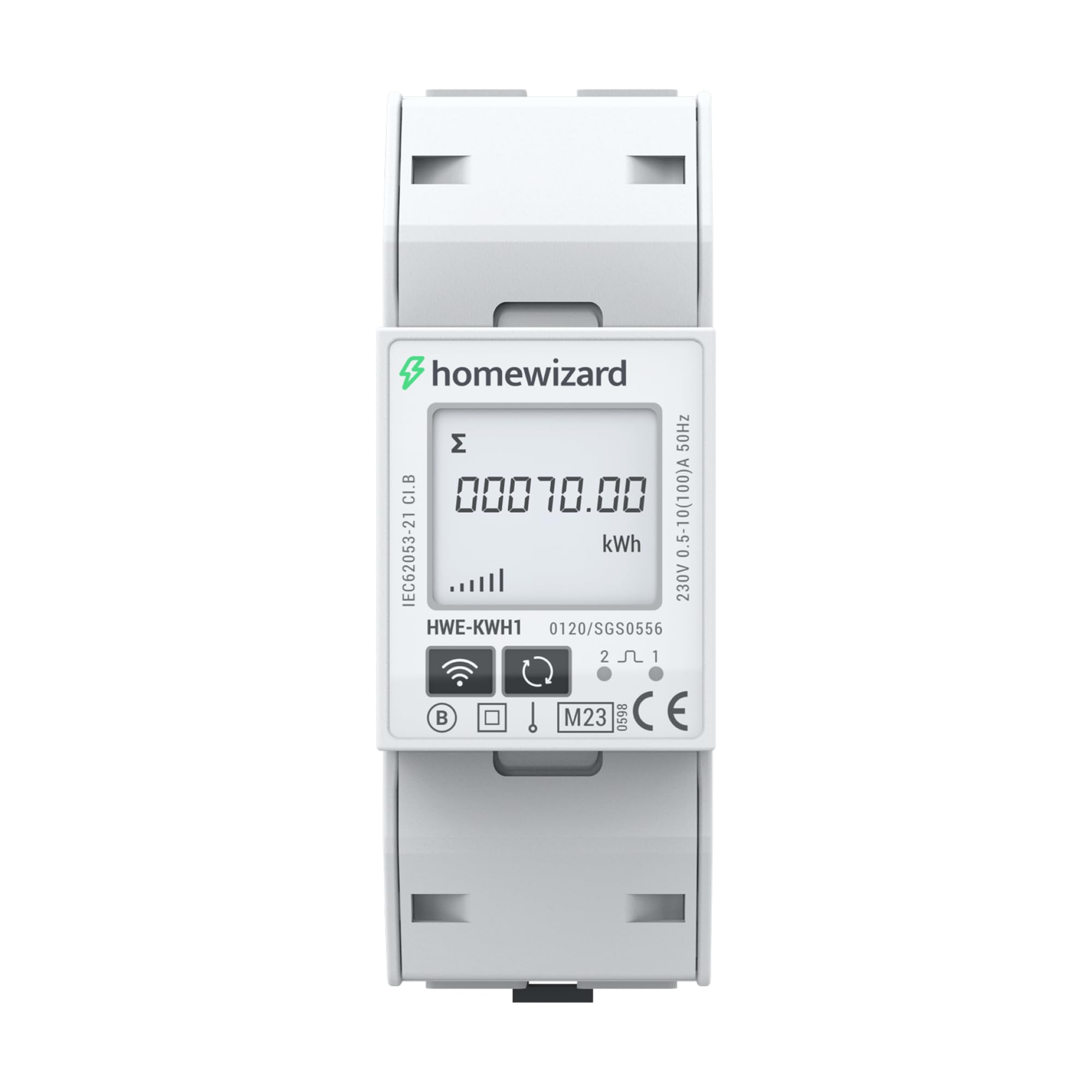
Figure 6.3: The HomeWizard kWh Meter monitoring an electric vehicle charging station and solar panel output.
7. Vzdrževanje
The HomeWizard kWh Meter is designed for maintenance-free operation.
- Čiščenje: Po potrebi zunanjost naprave nežno obrišite s suho, mehko krpo. Ne uporabljajte tekočih čistil ali topil.
- Posodobitve vdelane programske opreme: Ensure your device's firmware is up to date through the HomeWizard app to benefit from the latest features and improvements.
- Brez delov, ki bi jih lahko servisiral uporabnik: Do not attempt to open or repair the device. Refer to qualified personnel for any issues.
8. Odpravljanje težav
If you encounter issues with your HomeWizard kWh Meter, try the following steps:
- Brez napajanja/izklop zaslona:
- Check the main power supply to the electrical panel.
- Ensure all wiring connections are secure (consult a qualified electrician).
- Ni povezave Wi-Fi:
- Verify your Wi-Fi network is 2.4 GHz. The device does not support 5 GHz networks.
- Ensure the Wi-Fi signal strength is adequate at the meter's location.
- Znova zaženite usmerjevalnik Wi-Fi.
- Attempt to re-pair the device with the HomeWizard app.
- Nepravilni odčitki:
- Confirm that the meter is correctly wired according to the installation diagram.
- Ensure the meter is MID certified for accurate measurements.
- Aplikacija ne prikazuje podatkov:
- Preverite internetno povezavo na pametnem telefonu.
- Ensure the HomeWizard app is updated to the latest version.
- Log out and log back into the HomeWizard app.
- If the issue persists, contact HomeWizard support.
9. Specifikacije
| Znamka | Domači čarovnik |
| Model | HWE-KWH1 |
| Mere izdelka (D x Š x V) | 10.6 x 3.6 x 6.6 cm |
| Teža predmeta | 167 gramov |
| barva | siva |
| Material | Plastika |
| voltage | 230 volta |
| Trenutna ocena | 100 A |
| Poraba energije | 2 vatov |
| MID Certified | ja |
| Baterije priložene | št |
| Potrebne baterije | št |
| Prvič na voljo | 19. november 2025 |
10. Garancija in podpora
10.1. Informacije o garanciji
The HomeWizard kWh Meter comes with a 2-year availability for spare parts. For specific warranty terms and conditions, please refer to the documentation provided with your purchase or visit the official HomeWizard webmesto.
10.2. Posodobitve programske opreme
Software updates are provided to enhance functionality and security. Information regarding guaranteed software updates is not available in the provided data. Please check the HomeWizard app or webspletno mesto za najnovejše informacije.
10.3. Podpora strankam
For technical assistance, troubleshooting, or any other inquiries, please contact HomeWizard customer support.
- Proizvajalec: Domači čarovnik
- Prodajalec: HomeWizard BV (on Amazon.fr)
- Refer to the HomeWizard webspletno mesto za kontaktne podatke in vire podpore.
Ask a question about this manual
Ask about setup, troubleshooting, compatibility, parts, safety, or missing instructions. Manuals+ will review the question and use this page’s manual context to help answer it.