
1. Uvod
This manual provides essential information for setting up, operating, and maintaining your ASUS NUC 15 Pro Mini Desktop Computer. This compact and powerful AI Mini PC features an Intel Series 2 Core Ultra 7 255H processor, Intel Arc 140T GPU, 32GB DDR5 RAM, and a 1TB PCIe SSD, running on Windows 11 Pro. It is designed for demanding tasks such as AI computing, video editing, 3D rendering, and gaming, offering 8K/Quad 4K HDR display support and advanced connectivity options like Thunderbolt 4 and WiFi 7.
2. Vsebina paketa
Preverite, ali so v paketu vsi elementi:
- Mini računalnik ASUS NUC 15 Pro
- AC adapter in napajalni kabel
- VESA nosilec
- Brezžična tipkovnica
- Brezžična miška
- Uporabniški priročnik (ta dokument)
3. Izdelek je končanview
3.1 Ključne lastnosti
- Procesor: Intel Series 2 Core Ultra 7 255H (16 cores, 16 threads, up to 5.1 GHz, 24 MB Intel Smart Cache)
- Grafika: Integrated Intel Arc 140T GPU
- Pomnilnik: 32GB DDR5 RAM (upgradeable to 128GB)
- Shranjevanje: 1TB PCIe 4.0 SSD (upgradeable to 48TB)
- Operacijski sistem: Windows 11 Pro
- Podpora za prikaz: Up to 8K or Quad 4K HDR via HDMI 2.1 and Thunderbolt 4
- Povezljivost: Wi-Fi 7, Bluetooth 5.4, 2.5G gigabitni ethernet
- Pristanišča: 1x USB 3.2 Gen2 x 2 Type-C, 3x USB 3.2 Gen2 Type-A, 1x USB 2.0 Gen2 Type-A, 2x HDMI 2.1, 2x Thunderbolt 4, 1x 2.5G Gigabit Ethernet
3.2 Processor and AI Capabilities
The Intel Series 2 Core Ultra 7 255H processor, with its 16 cores and 16 threads, provides robust performance for demanding applications. The integrated Intel Arc 140T GPU and built-in AI Acceleration Engine enhance AI computing, video editing, and 3D rendering tasks.

Slika 3.2.1: konecview of the Intel Core Ultra 7 255H processor specifications, highlighting 16 cores, 16 threads, 24 MB cache, 96 TOPS, and 5.1 GHz max turbo frequency.

Slika 3.2.2: Illustration of the Neural Processing Unit (NPU) for on-device AI acceleration, supporting applications like Midjourney, DeepSeek, Photoshop, and Premiere Pro.
3.3 Vrata in povezljivost
The ASUS NUC 15 Pro offers a comprehensive array of ports for connecting various peripherals and displays.

Slika 3.3.1: Diagram illustrating the various ports on the ASUS NUC 15 Pro, including USB 3.2 Gen2 x 2 Type-C, USB 3.2 Gen2 Type-A, USB 2.0 Type-A, HDMI 2.1, Thunderbolt 4, and 2.5G Ethernet.
4. Navodila za namestitev
4.1 Začetna povezava
- Poveži zaslon: Connect your monitor(s) to the HDMI 2.1 or Thunderbolt 4 ports. The system supports up to four 4K HDR displays or one 8K display.
- Povežite zunanje naprave: Plug in the wireless keyboard and mouse receiver into an available USB port. Connect any other USB devices as needed.
- Priključite napajanje: Connect the AC adapter to the DC-In port on the mini PC, then plug the power cord into an electrical outlet.
- Omrežna povezava: For wired internet, connect an Ethernet cable to the 2.5G Gigabit Ethernet port. For wireless internet, ensure your Wi-Fi network is available.
- Vklop: Pritisnite gumb za vklop, ki se nahaja na sprednji strani naprave.

Slika 4.1.1: Visual representation of the ASUS NUC 15 Pro connected to multiple displays, demonstrating its support for quad 4K or 8K display configurations via HDMI and Thunderbolt ports.
4.2 Nastavitev operacijskega sistema
Upon first boot, the Windows 11 Pro operating system will guide you through the initial setup process, including language selection, network configuration, and user account creation. Follow the on-screen instructions to complete the setup.
5. Navodila za uporabo
5.1 Splošna uporaba
Your ASUS NUC 15 Pro is ready for a wide range of applications, from everyday computing to intensive tasks.
- Večopravilnost: Leverage the powerful Intel Core Ultra 7 processor for seamless multitasking across various applications.
- AI Computing: Utilize the integrated AI capabilities for enhanced performance in AI-driven software.
- Zasloni visoke ločljivosti: Connect multiple high-resolution monitors for an expansive workspace or immersive entertainment.
5.2 Povezljivost
The mini PC offers advanced connectivity options for fast and reliable data transfer and network access.
- Wi-Fi 7: Za visokohitrostni brezžični dostop do interneta.
- Bluetooth 5.4: For connecting wireless peripherals such as headphones, speakers, and game controllers.
- Thunderbolt 4: Provides high-bandwidth connections for external GPUs, high-speed storage, and display output.
- 2.5G Ethernet: For ultra-fast wired network connections.

Slika 5.2.1: Diagram highlighting the advanced connectivity features of the ASUS NUC 15 Pro, including Wi-Fi 7, Bluetooth 5.4, and 2.5G LAN for uninterrupted network performance.
5.3 Scenariji uporabe
The ASUS NUC 15 Pro is versatile and suitable for various applications:
- Graphic Design / Video Processing: Utilize the powerful CPU and GPU for demanding creative tasks.
- Igranje iger: Enjoy a smooth gaming experience with the Intel Arc 140T GPU.
- NAS (omrežno shrambo): Its compact size and connectivity make it suitable for home server applications.
- Domači kino: Connect to your TV for 8K or 4K HDR media playback.

Slika 5.3.1: Examples of how the ASUS NUC 15 Pro can be used, including graphic design, video processing, gaming, network attached storage (NAS), and as a home theater PC.
6. Vzdrževanje in nadgradnje
6.1 Nadgradnje pomnilnika in shranjevanja
The ASUS NUC 15 Pro features a tool-free design for easy upgrades of RAM and SSD.
- RAM: Supports 16GB–64GB DDR5 RAM, upgradeable to 128GB.
- SSD: Supports 512GB–2TB PCIe 4.0 SSDs, upgradeable to 48TB.
- Postopek: Refer to the detailed instructions in the physical user manual for safe access and installation of components.
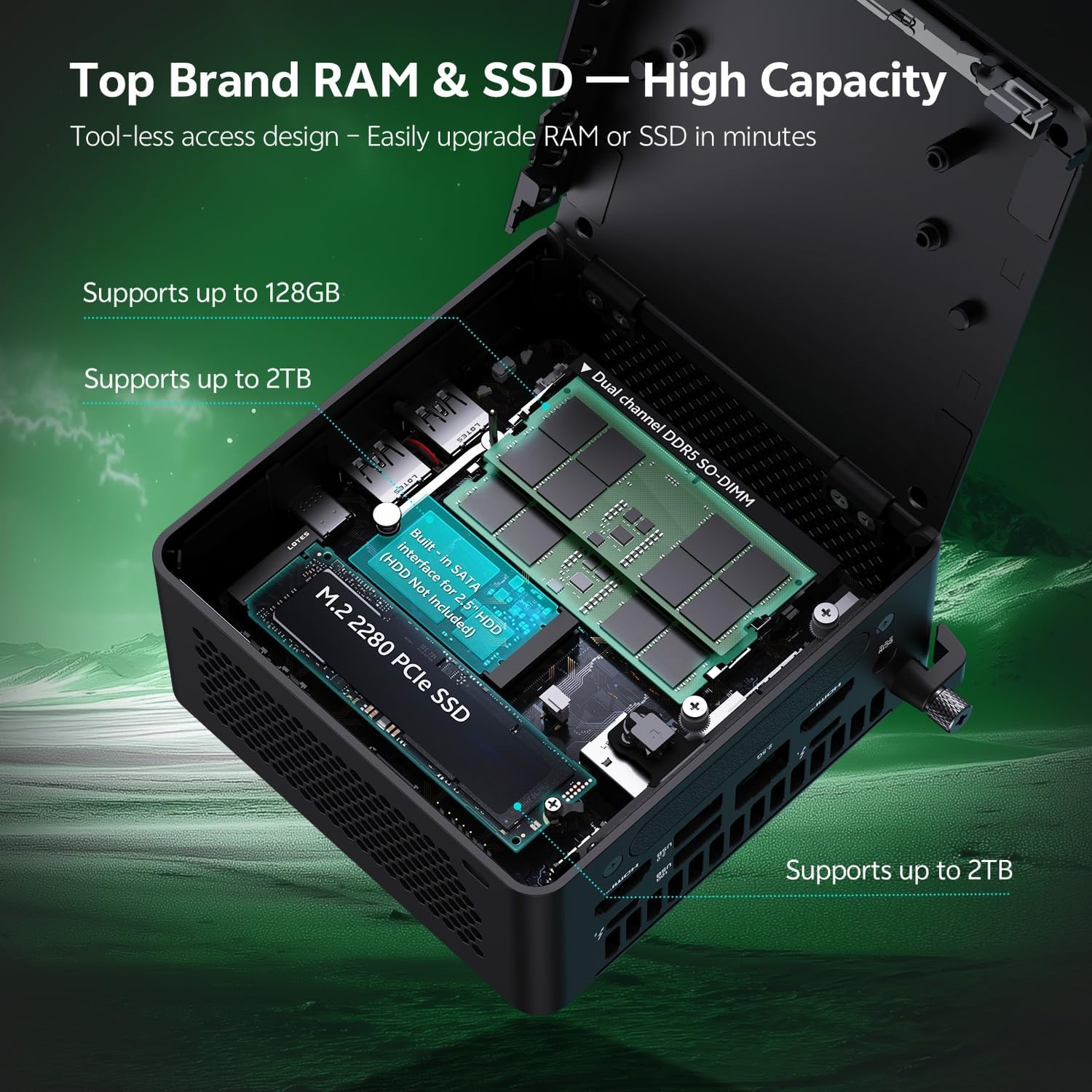
Slika 6.1.1: Internal layout of the ASUS NUC 15 Pro, illustrating the dual-channel DDR5 SO-DIMM slots for RAM and the M.2 2280 PCIe SSD slot, both designed for tool-less access and upgrades.
6.2 Hladilni sistem
The device incorporates a Smart Silent Cooling System with dual heat pipes and a large fan to ensure efficient heat dissipation and stable performance.
- Poskrbite za ustrezno prezračevanje okoli mini računalnika, da preprečite pregrevanje.
- Periodically clean dust from the vents using compressed air to maintain optimal cooling efficiency.

Slika 6.2.1: Eksplodiral view diagram of the ASUS NUC 15 Pro's Smart Silent Cooling System, showing dual heat pipes and a large fan designed for efficient thermal management and multi-ventilation.
7. Odpravljanje težav
If you encounter issues with your ASUS NUC 15 Pro, refer to the following common troubleshooting steps:
- Brez napajanja:
- Ensure the AC adapter is securely connected to both the mini PC and a working power outlet.
- Verify the power cord is not damaged.
- Brez zaslona:
- Check that the display cable (HDMI or Thunderbolt) is firmly connected to both the mini PC and the monitor.
- Prepričajte se, da je monitor vklopljen in nastavljen na pravilen vhodni vir.
- Poskusite z drugim kablom za zaslon ali monitorjem, če je na voljo.
- Ni internetne povezave:
- Pri žičnih povezavah preverite stanje ethernetnega kabla in usmerjevalnika.
- Za Wi-Fi se prepričajte, da je Wi-Fi omogočen v nastavitvah sistema Windows in da ste povezani s pravilnim omrežjem.
- Znova zaženite usmerjevalnik/modem in mini računalnik.
- Periferne naprave se ne odzivajo:
- Ensure wireless keyboard/mouse receivers are properly inserted into a USB port.
- Check battery levels for wireless peripherals.
- Poskusite priključiti periferne naprave na različna vrata USB.
8. Specifikacije
| Funkcija | Podrobnost |
|---|---|
| Znamka | ASUS |
| Ime modela | RNUC15HU7 |
| Operacijski sistem | Windows 11 Pro |
| Model procesorja | Intel Core Ultra 7 255H |
| Hitrost procesorja | Do 5.1 GHz |
| Grafični koprocesor | Grafični procesor Intel Arc 140T |
| Velikost nameščenega RAM-a | 32 GB DDR5 (Upgradeable to 128 GB) |
| Zmogljivost pomnilnika | 1 TB PCIe SSD (Upgradeable to 48 TB) |
| Strojni vmesnik | HDMI, Thunderbolt 4, USB 2.0 Type A, USB 3.2 Gen 2 |
| Tehnologija povezljivosti | Bluetooth 5.4, Wi-Fi 7, Ethernet (2.5G) |
| Video izhodni vmesnik | HDMI 2.1, Thunderbolt 4 |
| Mere predmeta (D x Š x V) | 4.6 x 4.4 x 2.1 palcev |
| Teža | 1.36 lbs |
| barva | Črna |
| UPC | 197105156340 |
9. Garancija in podpora
9.1 Informacije o garanciji
Your ASUS NUC 15 Pro Mini Desktop Computer comes with a 12-month warranty. This warranty covers manufacturing defects and issues arising from normal use. Please retain your proof of purchase for warranty claims.
Note: The manufacturer box is opened by professional engineers for customizing and testing. Factory defects and blemishes are significantly reduced by this in-depth inspection and testing process.
9.2 Tehnična podpora
For technical assistance, troubleshooting beyond this manual, or warranty inquiries, please contact ASUS customer support.
- Obiščite uradno podporo ASUS webspletno mesto za gonilnike, pogosta vprašanja in kontaktne podatke.
- Have your product model (RNUC15HU7) and serial number ready when contacting support.