
1. Uvod
Thank you for choosing the GOLOZA Digital Alarm Clock. This manual provides detailed instructions for setting up and operating your new alarm clock. Please read it thoroughly to ensure proper use and to enjoy all the features this product offers.
This digital alarm clock features a large, clear display, customizable brightness and night mode, multiple alarm tones and volume levels, a convenient snooze function, and a USB charging port. Its modern curved design makes it a stylish addition to any bedroom.
2. Kaj je v škatli
Ob razpakiranju se prepričajte, da so vsi spodaj navedeni predmeti prisotni in v dobrem stanju:
- GOLOZA Digital Alarm Clock
- USB Charging Cable (71in/1.8m)
- Napajalni adapter
- Uporabniški priročnik

Image: Contents of the product packaging, showing the digital alarm clock, charging cable, adapter, and user manual.
3. Nastavitev
3.1 Začetni vklop
- Remove the insulating paper from the battery compartment on the back of the clock. This battery provides power-off memory for settings.
- Connect the USB charging cable to the clock's USB port.
- Plug the power adapter into a standard wall outlet. The clock display will light up.

Image: A person removing the insulating paper from the battery compartment and plugging in the USB cable to power the clock.
4. Navodila za uporabo
4.1 Time Setting and 12/24H Switch
- Dolgo pritisnite poletni čas za vstop v način nastavitve časa. Številke za ure bodo utripale.
- Pritisnite +/- gumb za preklapljanje med 12-urnim in 24-urnim formatom časa.
- Pritisnite poletni čas button again to confirm the format. The hour digits will flash.
- Pritisnite +/- button to adjust the hour. Long press for quick adjustment.
- Pritisnite poletni čas button to confirm the hour. The minute digits will flash.
- Pritisnite +/- button to adjust the minute. Long press for quick adjustment.
- Pritisnite poletni čas button to confirm the minute and exit time setting.
Video: Instructions on how to set the time and switch between 12-hour and 24-hour display formats on the GOLOZA Digital Alarm Clock.

Image: The alarm clock displaying time in 12-hour, 24-hour, and DST formats.
4.2 DST (Daylight Saving Time) Switch
- Pritisnite poletni čas button to enter DST switch mode. The display will show "ON" or "OFF".
- Pritisnite +/- button to toggle between "ON" and "OFF".
- Pritisnite poletni čas gumb za potrditev izbire in izhod.
Video: Demonstration of how to set the DST (Daylight Saving Time) mode on the digital alarm clock.
4.3 Nastavitev alarma
- Dolgo pritisnite Alarm (bell icon) gumb za vstop v način nastavitve alarma. Številke za ure bodo utripale.
- Pritisnite +/- button to adjust the alarm hour. Long press for quick adjustment.
- Pritisnite Alarm button to confirm the hour. The minute digits will flash.
- Pritisnite +/- button to adjust the alarm minute. Long press for quick adjustment.
- Pritisnite Alarm button to confirm the minute and exit alarm time setting.
Video: Step-by-step guide on how to set the alarm time on the GOLOZA Digital Alarm Clock.
4.4 Alarm Tones and Volume
- To change the alarm volume, press the Glasnost (-/+) button. There are 2 levels of alarm volume (75-85dB). The last selected volume will be saved automatically.
- To change the alarm ringtone, press the Ringtone (-/+) button. Choose from 3 fixed ringing music sounds: Birdsongs, Beep, and Chording. The last selected ringtone will be saved automatically.

Image: The alarm clock showing two alarm volume levels (75dB and 85dB) and the snooze button.

Image: Icons illustrating the three available alarm sounds: Beep, Chording, and Bird Song.
5. Lastnosti
5.1 Prilagoditev svetlosti
The clock offers 5 adjustable brightness levels (including OFF) to suit your preference.
- Pritisnite Snooze/Light (Zzz/sun icon) button to cycle through the 5 brightness levels.
- The display can be set from sleep-friendly dim to a soothing glow, or completely off.
Video: Demonstration of how to adjust the display brightness of the GOLOZA Digital Alarm Clock through its five levels.

Image: The alarm clock on a nightstand, showing its adjustable brightness for peaceful sleep.
5.2 Customizable Night Mode
The Night Mode feature allows you to set specific times for the display brightness to automatically adjust to a lower level.
- Dolgo pritisnite Snooze/Light (Zzz/sun icon) button to enter Night Mode setting. The start hour will flash.
- Pritisnite +/- button to adjust the start hour for Night Mode.
- Pritisnite Dremež/svetloba button to confirm the start hour. The start minute will flash.
- Pritisnite +/- button to adjust the start minute.
- Pritisnite Dremež/svetloba button to confirm the start minute. The end hour will flash.
- Repeat the steps to set the end hour and minute for Night Mode.
- Once set, the clock will automatically dim during the specified period.
Video: Guide on how to set the customizable night mode, allowing the clock to automatically adjust brightness during specific hours.

Image: The alarm clock demonstrating its customizable night mode, with a visual representation of time-based brightness adjustment.
5.3 Funkcija dremeža
When the alarm rings, press the raised Snooze (Zzz) button to activate the 9-minute snooze function. The alarm will ring again after 9 minutes. To turn off the alarm completely for the day, press any other button except the Snooze button.
5.4 vrata za polnjenje USB
The clock includes a USB charging port (Type-C) for convenient charging of your mobile devices. Simply connect your device's charging cable to the USB port on the back of the alarm clock.
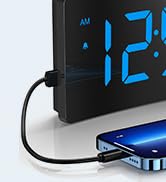
Image: The digital alarm clock with a smartphone connected to its USB port for charging.
6. Vzdrževanje
- Uro očistite z mehko, suho krpo. Ne uporabljajte abrazivnih čistil ali topil.
- Keep the clock away from direct sunlight, high temperatures, and humid environments.
- Pazite, da vam ura ne pade ali da je ne izpostavljate močnim udarcem.
- Ensure the non-slip rubber sticker at the bottom is clean and intact for stability.

Image: The alarm clock on a surface, showing its non-slip design with a bottom rubber sticker.
7. Odpravljanje težav
| Težava | rešitev |
|---|---|
| Clock display is blank | Ensure the USB cable is securely connected and the power adapter is plugged into a working outlet. Check if the display brightness is set to OFF. |
| Alarm se ne oglasi | Verify the alarm is set and activated (bell icon visible). Check alarm volume settings. |
| Izguba časa/nastavitev po izpadu električne energijetage | Ensure the insulating paper has been removed from the backup battery compartment. The battery retains settings but does not power the display or alarm during an outage. |
| Zaslon je presvetel/pretemno | Adjust brightness using the Snooze/Light button. Check Night Mode settings if applicable. |
8. Specifikacije
| Funkcija | Podrobnost |
|---|---|
| Znamka | GOLOZA |
| Številka modela | TCA-245 |
| Vrsta zaslona | LED |
| Stopnje svetlosti | 5 (including OFF) |
| Toni alarma | 3 (Birdsongs, Beep, Chording) |
| Glasnost alarma | 2 stopenj (75–85 dB) |
| Trajanje dremeža | 9 minut |
| Format časa | 12H/24H/DST |
| Vir napajanja | Žični električni (USB) |
| Funkcija pomnilnika | Yes (battery backup for settings) |
| Dimenzije izdelka | 5.05 cm Š x 3.03 cm V |
| Teža predmeta | 0.28 kilogramov |
9. Garancija in podpora
GOLOZA provides a 24-month safeguard and 24-hour fast support for this product.
If you have any questions or require assistance, please contact us via the following path:
- Your Account > Orders > Order Detail > Sold by: GOLOZA > Ask a question
Image: GOLOZA Support information, highlighting 24-month warranty and contact method.