
DWVO MADWVJ0Wtz
DWVO Computer Desk with Drawers & Hutch Instruction Manual
Model: MADWVJ0Wtz
1. Pomembne varnostne informacije
Pred sestavljanjem in uporabo natančno preberite vsa navodila. Ta priročnik shranite za poznejšo uporabo.
- Ensure the desk is properly assembled and placed on a stable surface to prevent tipping.
- Adjustable foot pads are included to stabilize the desk on uneven ground.
- Always use the included anti-tip kit to secure the desk to a wall, especially if children are present.

Slika 1.1: Illustration of potential injury from tipping and the use of an anti-tip strap to prevent falling danger.
2. Izdelek je končanview
The DWVO Computer Desk with Drawers & Hutch is designed for home office and gaming environments, offering ample storage and integrated features for enhanced productivity and convenience.
Ključne značilnosti:
- LED svetlobni trakovi: Prilagodljiva RGB LED osvetlitev, ki jo upravljate prek aplikacije na telefonu ali stikala, s sinhronizacijo glasbe in funkcijami časovnika.
- Priročna polnilna postaja: Integrated with 2 USB ports and 4 power outlets, featuring a 6.56ft power cord.
- Detachable Top Hutch & Monitor Shelf: Maximizes desktop space and provides elevated display options.
- Velika zmogljivost skladiščenja: Includes 3 drawers (one with lock), side storage shelves, and a full monitor stand.
- Čvrsta in trpežna konstrukcija: Made from 0.79" metal frame and 0.59" high-grade P2 particle board with adjustable foot pads.
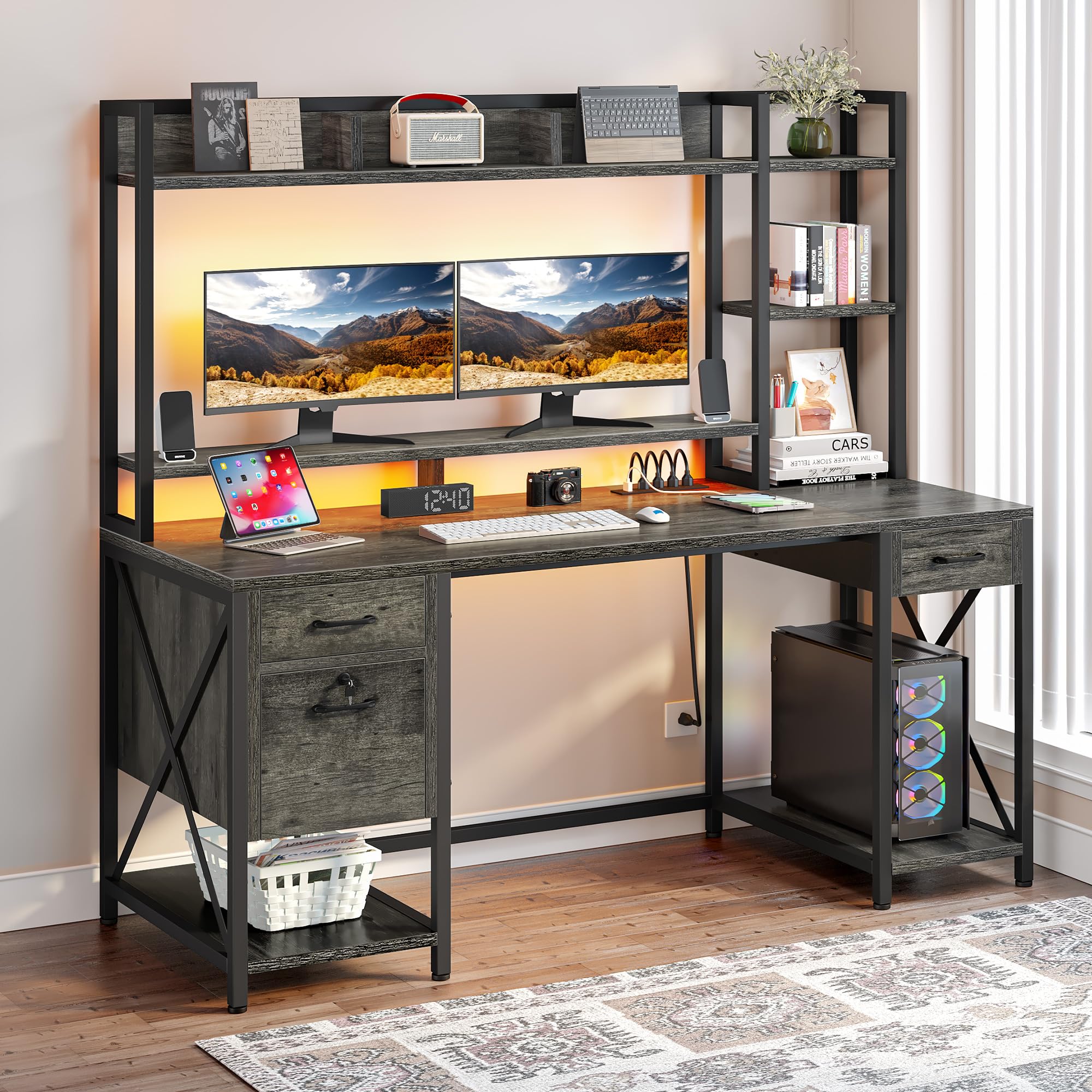
Slika 2.1: The DWVO Computer Desk with Drawers & Hutch.

Slika 2.2: Product dimensions for planning your space.
Posnetek 2.1: Uradnik nadview of the DWVO Computer Desk with Drawers & Hutch, showcasinnjegove lastnosti in obliko.
3. Vsebina paketa
Pred začetkom montaže preverite, ali so prisotne vse komponente. Če kateri koli deli manjkajo ali so poškodovani, se obrnite na podporo strankam.
- 1 x Computer Desk (all desk panels and frame components)
- 1 x Packet of Fittings (screws, bolts, connectors, anti-tip kit)
- 1 x Navodila za uporabo (ta dokument)
- 1 x LED Light Strip with controller
- 1 x Power Outlet & USB Hub
4. Nastavitev in montaža
Assembly is required for this product. It is recommended that two people assemble the desk to ensure stability and ease of construction. All necessary tools for assembly are included.
Koraki generalne skupščine:
- Razpakirajte in prepoznajte dele: Previdno razpakirajte vse komponente in jih razporedite. Za identifikacijo vsakega dela glejte priloženi seznam delov.
- Sestavite okvir: Begin by connecting the metal frame components according to the diagrams in the separate assembly manual. Ensure all screws are tightened securely but do not overtighten until the entire frame is assembled.
- Pritrdite namizne plošče: Secure the main desktop and hutch panels to the assembled frame.
- Namestitev predalov: Assemble the drawer boxes and install the drawer slides onto both the drawers and the desk frame. Ensure the slides are aligned correctly for smooth operation.
- Vključite električne vtičnice in LED luči: Install the power outlet strip into its designated slot. Attach the LED light strip to the underside of the hutch or monitor stand as indicated in the assembly manual.
- Končne prilagoditve: Once fully assembled, tighten all screws. Adjust the foot pads to level the desk on uneven surfaces.
- Namestitev kompleta proti prevračanju: Secure the desk to a wall using the provided anti-tip kit to prevent accidental tipping.
For detailed, step-by-step instructions and diagrams, please refer to the separate assembly manual included in your package.
5. Navodila za uporabo
5.1. LED svetlobni trakovi
The desk features an RGB LED light strip for customizable ambiance.
- Nadzor: The LED lights can be controlled via a dedicated light strip switch or a smartphone application.
- Prilagajanje: Use the app to select any color, adjust brightness, and choose from various dynamic modes.
- Sinhronizacija glasbe: The lights can synchronize with music played through a built-in microphone.
- Funkcija časovnika: Nastavite urnike za samodejni vklop ali izklop luči.

Slika 5.1: LED light strip in operation, showing color customization.
5.2. Polnilna postaja
Vgrajena polnilna postaja omogoča priročen dostop do energije.
- Vtičnice: Use the 4 AC outlets to power your computer, monitors, and other devices.
- Vrata USB: The 2 USB ports (5V/2A) are suitable for charging smartphones, tablets, and other USB-powered accessories.
- Napajalni kabel: The charging station is connected via a 6.56ft power cord. Plug it into a standard wall outlet.

Slika 5.2: Integrated power outlets and USB ports.
5.3. Drawers and Storage
Utilize the various storage options to keep your workspace organized.
- Predali: The desk includes three drawers. The bottom drawer is designed as a file drawer, accommodating A4/Letter-sized documents and features a lock for security.
- Hutch and Shelves: Use the top hutch and side shelves for displaying items, storing books, or organizing office supplies.
- Stojalo za monitor: The elevated monitor stand provides ergonomic viewing and additional storage underneath.

Slika 5.3: File drawer with lock and adjustable file stojala.
6. Vzdrževanje
Redno vzdrževanje zagotavlja dolgo življenjsko dobo in optimalno delovanje vaše mize.
- Čiščenje: Površine obrišite z mehko, damp krpo. Izogibajte se agresivnim kemikalijam ali abrazivnim čistilom, ki lahko poškodujejo površino.
- Preverjanje strojne opreme: Občasno preverite vse vijake in pritrdilne elemente, da se prepričate, da so trdno pritrjeni. Po potrebi jih privijte, da ohranite stabilnost.
- LED Strip Adhesion: If the LED light strip begins to detach, re-secure it using additional adhesive tape or a suitable wood glue for a more permanent fix.
- Drsniki predalov: Keep drawer slides free of dust and debris for smooth operation. Lubricate with a silicone-based spray if needed.
7. Odpravljanje težav
Ta razdelek obravnava pogoste težave, na katere lahko naletite.
| Težava | Možen vzrok | rešitev |
|---|---|---|
| LED light strip does not stick or falls down. | Original adhesive may be insufficient or surface not clean. | Clean the surface thoroughly. Apply additional strong adhesive tape or a small amount of wood glue to secure the strip. |
| Drawers do not align or close completely. | Screws on drawer tracks are not flush, or tracks are misaligned. | Ensure all screws securing the drawer tracks are tightened completely and are flush with the surface. Recheck track alignment according to the assembly manual. |
| Missing or mismatched parts during assembly. | Packaging error or manufacturing defect. | Double-check all packaging for small parts. Contact DWVO customer service with your model number and a description of the missing/mismatched parts. |
| Miza se zdi nestabilna ali majava. | Ohlapni pritrdilni elementi ali neravna tla. | Tighten all assembly screws. Adjust the leveling foot pads at the bottom of the desk legs to compensate for uneven flooring. |
8. Specifikacije
Detailed specifications for the DWVO Computer Desk with Drawers & Hutch.
| Funkcija | Podrobnost |
|---|---|
| Znamka | DWVO |
| Številka modela | MADWVJ0Wtz |
| Mere izdelka (D x Š x V) | 19.68 cm x 59.1 cm x 59.1 cm |
| Teža predmeta | 92.9 funta |
| barva | siva |
| Vrsta materiala | Inženirski les, kovina |
| Število predalov | 3 |
| Število polic | Multi-shelves |
| Posebne lastnosti | Power Outlets, USB Outlets, LED Lights, Drawers, Lock, Hutch |
| Zahtevana montaža | ja |
| Priporočene osebe za montažo | 2 |
| Priložena orodja za sestavljanje | ja |
| GTIN | 199449407010 |
9. Garancija in podpora
This DWVO product comes with a limited warranty.
- Vrsta garancije: Limited Warranty. Specific terms and duration may vary. Please refer to your purchase documentation or contact DWVO customer service for details.
- Podpora strankam: For assembly assistance, missing parts, or any product-related inquiries, please contact DWVO customer service. Refer to the contact information provided with your purchase or visit the official DWVO webmesto.
Ask a question about this manual
Ask about setup, troubleshooting, compatibility, parts, safety, or missing instructions. Manuals+ will review the question and use this page’s manual context to help answer it.