
ROCAM CR1030DAB
ROCAM CR1030DAB Solar DAB+/FM Emergency Radio User Manual
Model: CR1030DAB
Uvod
Hvala za nakupasing the ROCAM CR1030DAB Solar DAB+/FM Emergency Radio. This portable radio is designed for reliable communication and power in various situations, from daily use to outdoor adventures and emergencies. It features DAB+/FM radio reception, Bluetooth connectivity, multiple charging options including solar and hand crank, a powerful 12000 mAh battery, and integrated lighting functions. Please read this manual thoroughly before use to ensure proper operation and to maximize the product's lifespan.
Varnostna navodila
- Naprave ne izpostavljajte ekstremnim temperaturam, neposredni sončni svetlobi dlje časa (po polnjenju) ali visoki vlažnosti.
- Izogibajte se padcem ali izpostavljanju radia močnim udarcem.
- Enote ne razstavljajte ali poskušajte popraviti sami. Vsa servisna dela prepustite usposobljenemu osebju.
- Keep the device away from water and other liquids, except for its IPX6 water resistance which protects against strong jets of water. Do not submerge.
- Ensure the USB-C port cover is securely closed when not in use, especially in wet conditions.
- When using the hand crank, turn it at a steady, moderate pace. Excessive force or speed can damage the mechanism.
- The SOS alarm is very loud. Avoid activating it unnecessarily or near sensitive ears.
- Baterije zavrzite v skladu z lokalnimi predpisi.
Vsebina paketa
Preverite, ali so v paketu prisotni vsi elementi:
- 1 × Radio ROCAM CR1030DAB
- 1 × USB-C polnilni kabel
- 1 × Prenosni trak
- 1 × uporabniški priročnik
Konec izdelkaview
Seznanite se s komponentami in upravljalnimi elementi radia.

Slika: Spredaj view of the ROCAM CR1030DAB radio, highlighting its display, control buttons, and extended antenna. The radio is shown in an outdoor setting, emphasizing its portable and robust design.
Ključne komponente:
- 2.4-palčni barvni zaslon: Shows station information, battery level, time, and menu options.
- Gumbi za upravljanje: Power, Mode, Menu, Scan, Volume, Navigation (Up/Down/Left/Right/OK), SOS.
- Teleskopska antena: For optimal DAB+/FM signal reception.
- Solarni panel: Located on top for solar charging.
- Ročna ročica: On the side for manual power generation.
- Svetilka: Integrated LED light on one end.
- Branje Lamp: Foldable panel with 12 LEDs.
- Vhodno/izhodna vrata USB-C: For charging the radio and charging external devices.
- Vhod za slušalke (3.5 mm): Za zasebno poslušanje.
- Predal za baterije: For AAA backup batteries.

Slika: Podrobno view of the radio's 2.4-inch color display, illustrating its clarity and the information presented, such as station name and signal strength.
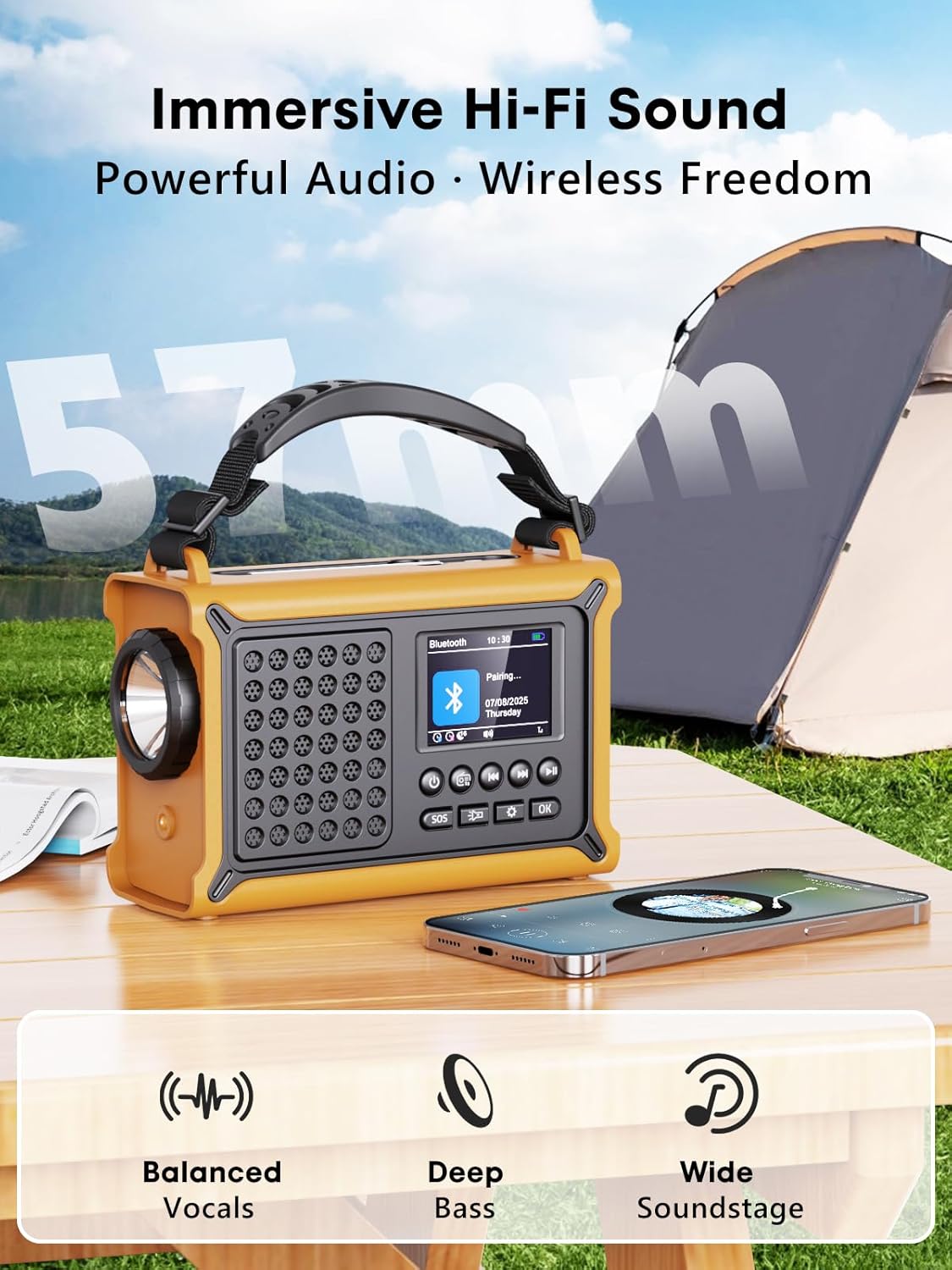
Slika: The radio highlighting its audio capabilities, featuring 57mm speakers designed for clear, powerful sound with balanced vocals and deep bass.

Slika: The radio held in hand, illustrating its ultra-portable design and compact dimensions (17.3 cm length, 12.1 cm height, 7.4 cm width), along with its IPX6 water resistance.
Nastavitev
1. Začetno polnjenje
Before first use, it is recommended to fully charge the radio's internal 12000 mAh battery using the supplied USB-C cable. Connect the USB-C cable to the radio's USB-C input port and the other end to a standard USB power adapter (not included) or a computer USB port. The charging indicator on the display will show the charging status. A full charge ensures maximum battery life and optimal performance.
2. Inserting AAA Batteries (Optional Backup)
For an additional power backup, you can insert 3 AAA batteries (not included) into the battery compartment. This provides an alternative power source if the internal rechargeable battery is depleted and other charging methods are unavailable.
3 Vklop in izbira jezika
Pritisnite in držite Moč button to turn on the radio. Upon first power-on, you may be prompted to select your preferred language from the 12 available options. Use the navigation buttons to select and the OK gumb za potrditev.
Navodila za uporabo
Vklop/izklop
- Za vklop: Pritisnite in držite Moč gumb.
- Za izklop: Pritisnite in držite Moč gumb znova.
DAB+/FM Radio Operation
- Izberite način: Pritisnite Način button to switch between DAB+ and FM radio modes.
- Podaljšana antena: Za najboljši sprejem popolnoma raztegnite teleskopsko anteno.
- Samodejno skeniranje: V načinu DAB+ ali FM pritisnite Skeniraj button to automatically search for available stations. The radio will store up to 40 DAB+ and 40 FM stations.
- Manual Tuning/Station Selection: Uporabite Gor/Dol navigation buttons to browse through scanned stations or manually tune frequencies.
- Nadzor glasnosti: Uporabite Glasnost +/- gumbe za prilagajanje ravni zvoka.
- Prednastavitve: Če želite shraniti postajo, uglasite želeno postajo in nato pritisnite in držite OK button. Use navigation buttons to select a preset number and press OK to save. To recall a preset, briefly press the OK button, then use navigation to select the preset.
Bluetooth povezljivost
- Vstopite v način Bluetooth: Pritisnite Način button until "Bluetooth" appears on the display. The radio will enter pairing mode, indicated by a blinking Bluetooth icon.
- Seznanjanje: On your smartphone or other Bluetooth device, enable Bluetooth and search for available devices. Select "ROCAM CR1030DAB" from the list.
- Povezan: Once paired, the radio will emit a confirmation sound, and the Bluetooth icon will stop blinking. You can now play audio from your device through the radio.
Polnjenje radia
The radio offers multiple charging methods for its internal 12000 mAh battery:

Slika: The radio demonstrating its versatile charging capabilities, including the solar panel, USB-C input, hand crank, and the option for AAA batteries.
- USB-C polnjenje: Connect the supplied USB-C cable to a 5V/2A (or higher) USB power source. This is the fastest charging method.
- Sončno polnjenje: Place the radio with the solar panel facing direct sunlight. The solar charging indicator will illuminate. This method is ideal for maintaining charge or slow charging in emergencies. The 8500 mm² panel provides 350 mA.
- Polnjenje ročne gonilke: Rotate the hand crank clockwise or counter-clockwise at a steady pace (approx. 120-150 RPM). Cranking for 1 minute can provide several minutes of radio playback. The hand crank generates 650 mA.
- AAA baterije: If the internal battery is depleted, the radio can operate using 3 AAA batteries (not included) inserted into the battery compartment.
External Device Charging (Power Bank Function)
The radio can act as a power bank to charge external devices like smartphones. Connect your device's charging cable to the radio's USB-C output port. The radio's 12000 mAh battery provides a 5V/1A output.
Funkcije osvetlitve

Slika: A composite image illustrating the radio's versatile lighting options: a powerful 5W flashlight, the SOS red flashing light, and a soft 12-LED reading lamp.
- Svetilka: Pritisnite Svetilka button once to turn on the 5W LED flashlight. Press again to cycle through brightness levels (if available) or turn off.
- Branje Lamp: Lift the reading lamp panel. Press the Branje Lamp button (often combined with flashlight button or a separate one) to activate the 12-LED reading lamp. Press again to cycle through brightness levels or turn off.
Funkcija alarma SOS
V nujnih primerih pritisnite in držite SOS button. The radio will emit a loud 120 dB siren and flash a red light to attract attention. Press the SOS button again to deactivate the alarm.
Vzdrževanje
- Čiščenje: Radio obrišite z mehko, damp krpo. Ne uporabljajte abrazivnih čistil ali topil.
- Shranjevanje: When not in use for extended periods, store the radio in a cool, dry place. It is recommended to fully charge the internal battery every 3-6 months to maintain its health.
- Vzdrževanje baterije: Avoid completely draining the internal battery frequently. Recharge it as soon as possible when the low battery indicator appears.
Odpravljanje težav
| Težava | Možen vzrok | rešitev |
|---|---|---|
| Radio se ne vklopi. | Baterija je prazna. | Charge the radio via USB-C, solar, or hand crank. Ensure AAA batteries are inserted correctly if using them. |
| Slab radijski sprejem. | Antenna not extended, weak signal area, interference. | Fully extend the telescopic antenna. Reposition the radio to a location with better signal. Perform an auto scan again. |
| Naprava Bluetooth se ne more povezati. | Radio not in pairing mode, device too far, already connected to another device. | Ensure the radio is in Bluetooth pairing mode. Move the device closer to the radio. Disconnect from other Bluetooth devices. |
| Zunanja naprava se ne polni. | Radio battery too low, incorrect cable, device not compatible. | Ensure the radio has sufficient charge. Use a compatible USB-C cable. Some devices may draw too much power. |
| Hand crank is stiff or not charging. | Mechanism obstruction, incorrect cranking speed. | Check for any obstructions. Rotate the crank at a steady, moderate pace. Do not force it. |
Specifikacije
| Model | CR1030DAB |
| Radijski pasovi | DAB+, FM |
| Različica Bluetooth | 5.0 |
| Kapaciteta baterije | 12000 mAh (litijeva) |
| Metode polnjenja | USB-C, Solar, Hand Crank, 3x AAA Batteries (backup) |
| Velikost sončne plošče | 8500 mm² (350 mA output) |
| Izhod ročice | 650 mA |
| USB izhod | 5V/1A |
| Zaslon | 2.4-palčni barvni LCD-zaslon |
| Prednastavitve | 80 (40 DAB +, 40 FM) |
| Vodoodpornost | IPX6 |
| SOS alarm | 120 dB |
| Svetilka | 5W LED |
| Branje Lamp | 12-LED |
| Dimenzije | 12D x 17.2Š x 7.3V cm (približno) |
| Teža | 820 grama (približno) |

Slika: A comparison chart detailing the specifications of the ROCAM CR1030DAB against generic alternatives, emphasizing its advanced features like a larger color display, higher battery capacity, and more efficient charging.
Garancija in podpora
ROCAM products are designed for reliability and performance. This product comes with a standard manufacturer's warranty. For specific warranty details, please refer to the documentation provided with your purchase or contact ROCAM customer support.
If you encounter any issues or have questions regarding the operation or maintenance of your ROCAM CR1030DAB radio, please contact our customer support team.
- Podpora strankam: Refer to your product packaging or the ROCAM official webspletno mesto za kontaktne podatke.
- Spletni viri: Visit the ROCAM webspletno mesto za pogosta vprašanja, registracijo izdelkov in dodatno podporno gradivo.
Sorodni dokumentiCR1030DAB


Ask a question about this manual
Ask about setup, troubleshooting, compatibility, parts, safety, or missing instructions. Manuals+ will review the question and use this page’s manual context to help answer it.