
1. Uvod
Welcome to the Rokid AI Glasses Style user manual. These ultra-light smart sunglasses integrate advanced AI features, including ChatGPT 5.2, real-time translation, a 12MP first-person camera, and open-ear audio. Designed for comfort and functionality, they enhance daily activities from cycling and hiking to outdoor vlogging. This manual provides essential information for setup, operation, maintenance, and troubleshooting to ensure optimal use of your device.
2. Kaj je v škatli
Video: Unboxing the Rokid AI Glasses Style, showing all included accessories and packaging details.
- Rokid AI Glasses Style
- Polnilni kabel
- Uporabniški priročnik
- Eyeglass Case
- Mehka torbica za nošenje
- Extra Nose Pads

Image: The Rokid AI Glasses Style and its accessories, including the charging cable, user manual, and eyeglass case.
3. Izdelek je končanview
Ključne značilnosti
- Real-Time Global Translator: Supports 89 online languages and 6 offline languages (EN/CN/JP/FR/DE/ES) for seamless communication.
- 12MP First-Person Camera with EIS: Captures 12MP photos and stable 3K videos from your perspective using a Sony IMX681 sensor.
- Integrated ChatGPT 5.2 AI Assistant: Provides hands-free knowledge, object recognition, and real-time information via voice commands.
- Ultralahka zasnova: Weighs 38.5g (without lenses) with a TR90 polymer titanium frame for extended comfort.
- All-Day Battery System: Built-in 210mAh battery offers 6 hours music, 5 hours calls, 2 hours online translation, or 45 minutes video recording.
- Private Open-Ear Audio: Dual directional AAC speakers deliver clear sound while maintaining environmental awareness.
- Gesture + Voice Control System: Seamless interaction with nods, shakes, and two-finger taps for calls and AI activation.
- Trajna zasnova: Flexible TR90 frames and titanium alloy hinges ensure longevity.

Image: A user interacting with the AI assistant to identify a cat breed, showcasing the smart capabilities.

Image: Visual representation of the 12MP HD camera and video recording capabilities of the glasses.
Komponente

Image: An in-depth look at the glasses, highlighting the power switch, touchpad, HD camera, and open-ear speakers.
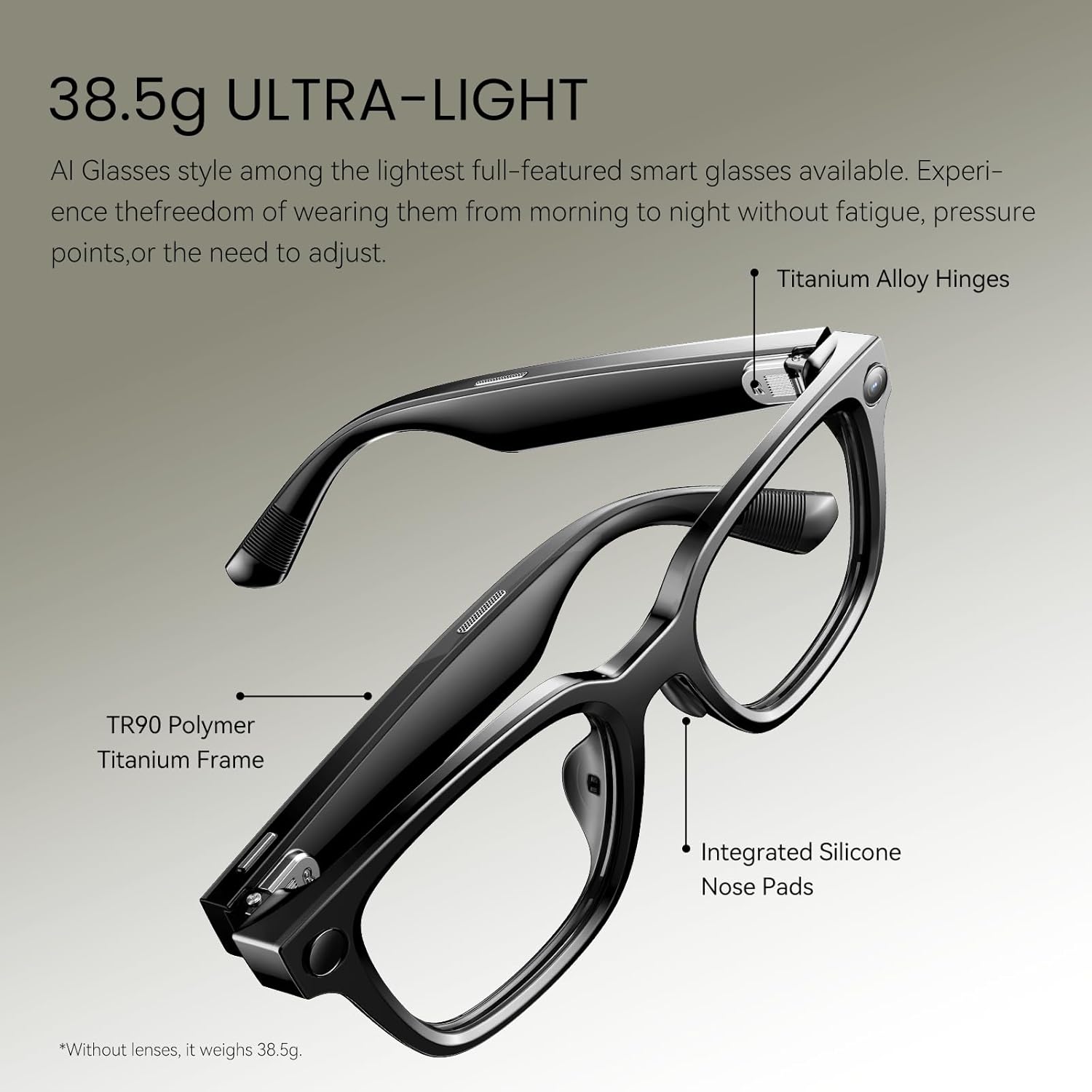
Image: A close-up of the private open-ear audio speakers integrated into the glasses' temples.
4. Nastavitev
4.1 Začetno polnjenje
Before first use, fully charge your Rokid AI Glasses Style using the provided magnetic charging cable. Connect the cable to the charging port on the glasses and a compatible USB power source.
4.2 Vklop/izklop
- Za vklop: Press and hold the button on the right arm for 3 seconds.
- Za izklop: Press and hold the button on the right arm for 3 seconds.
4.3 Bluetooth seznanjanje
- Ensure your glasses are powered on.
- Open the Rokid AI App on your smartphone.
- The device will automatically enter pairing mode. Follow the instructions within the app to complete the pairing process.

Image: The Rokid AI App interface on a smartphone, used for managing and setting up the smart glasses.
5. Navodila za uporabo
5.1 AI Assistant (ChatGPT 5.2)
Your Rokid AI Glasses Style integrates ChatGPT 5.2 for hands-free assistance. Activate by voice command or gesture.
- Glasovni ukaz: Say "Hey Rokid" followed by your query (e.g., "Hey Rokid, what's the weather?").
- Visual Intelligence: Point at an object and ask "Hey Rokid, what is this?" for context-aware spoken answers.

Image: A user demonstrating the AI Q&A feature by asking the glasses to identify a cat breed.
5.2 Real-Time Translation
Break language barriers with instant translation.
- Spletni prevod: Supports 89 languages via Microsoft Translator.
- Prevajanje brez povezave: Built-in support for 6 major languages (English, Chinese, Japanese, French, German, Spanish).
Video: A demonstration of the real-time translation feature, showing spoken language being translated and displayed.
5.3 12MP First-Person Camera
Capture photos and videos from your perspective.
- Fotografirati: Say "Hey Rokid, take a photo" or tap the shutter button.
- Posnemi video: Say "Hey Rokid, start recording" or press and hold the shutter button.
- EIS: Electronic Image Stabilization ensures stable 3K videos.

Slika: npramples of first-person content captured by the glasses, including a baby, cooking, and a dog walk.
Video: First-person view from the Rokid AI Glasses Style while riding a roller coaster, demonstrating video capture in dynamic environments.
5.4 Open-Ear Audio
Uživajte v zvoku, medtem ko se zavedate svoje okolice.
- Dual directional AAC speakers provide crisp, clear sound.
- Ideal for calls, music, and AI responses without blocking ambient noise.
5.5 Gesture and Touch Control
Interact with your glasses using intuitive gestures and touch controls.
- Odgovorite na klice: Nod your head.
- Prekini klice: Shake your head.
- Trigger AI: Use two-finger taps on the temple.
- Nadzor glasnosti: Swipe on the touchpad located on the right temple.

Image: Visual guide to gesture and voice controls for seamless interaction with the glasses.
5.6 Navigacija
Receive real-time voice guidance for navigation.
- Aktiviraj: Say "Hi Rokid, navigate to [your destination]".
- The glasses will plan the route and provide voice guidance.
- You can also open the navigation feature in the Rokid AI App to view the route and choose options.
Video: Demonstration of the navigation feature, showing how to activate it via voice and view routes in the app.
5.7 AI Meeting Notes
Record meetings and generate AI-assisted summaries and transcriptions.
- Glasovni nadzor: Say "Hi Rokid, start meeting minutes" to begin recording. Say "Hi Rokid, end meeting minutes" to stop.
- Nadzor aplikacij: In the Rokid AI App, start the meeting minutes function. The glasses will record audio in real-time. Tap 'Stop' in the app when the meeting ends.
- After recording, tap the recording in the app to view the AI-assisted summary and full transcription.
Video: A demonstration of how to use the AI Meeting Notes feature via voice control and the companion app.
6. Vzdrževanje
6.1 Čiščenje
- Use a soft, clean cloth to wipe the lenses and frame.
- Avoid harsh chemicals or abrasive materials that could damage the lenses or frame.
- The lenses have a scratch-resistant treatment, but proper care is still recommended.
6.2 Polnjenje
- Charge the glasses using the provided magnetic charging cable.
- For extended use, an optional 3000mAh charging case is available (sold separately).

Image: Battery performance details for different usage scenarios of the Rokid AI Glasses Style.
6.3 Posodobitve vdelane programske opreme
The Rokid AI App provides free firmware updates. Regularly update your glasses to access new features and improvements.
7. Odpravljanje težav
- Glasses not responding: Ensure the glasses are charged and powered on. Try restarting the device.
- Težave s povezavo Bluetooth: Ensure Bluetooth is enabled on your phone and the glasses are in pairing mode. Try unpairing and re-pairing the device.
- AI Assistant not responding: Check your internet connection for online features. Ensure the Rokid AI App is running and updated.
- Camera indicator light: When using camera functions, the indicator light will stay solid white. Do not block this light as it may cause the camera function to become unavailable.
- Lens removal/replacement: If sunglasses lenses are restricted, they can be removed and replaced. Refer to the video tutorial in the Rokid AI App for specific instructions.
8. Specifikacije
| Funkcija | Podrobnost |
|---|---|
| Številka modela | Očala z umetno inteligenco |
| Teža predmeta | 10.2 ounces (38.5g without lenses) |
| Kapaciteta baterije | 210 milliamp ure |
| Senzor kamere | Sony IMX681 |
| Snemanje videa | 3K |
| Shranjevanje pomnilnika | 32 GB |
| RAM | 2 GB |
| Operacijski sistem | YodaOS-Master |
| Povezljivost | Bluetooth |
| Vodoodpornost | IPX4 (odporen na škropljenje) |
| UV zaščita | UV400 |

Image: Standard dimensions of the Rokid AI Glasses Style for fit reference.
9. Safety & Warranty
9.1 Varnostne informacije
- Naprave ne izpostavljajte ekstremnim temperaturam ali neposredni sončni svetlobi dlje časa.
- Izogibajte se padcem ali izpostavljanju očal močnim udarcem.
- Hraniti izven dosega otrok.
- Ensure the charging port is completely dry before charging to prevent short circuits.
- When using the camera, be mindful of privacy and local regulations regarding recording.
9.2 Garancija
Refer to the included 'Safety & Warranty' booklet for detailed warranty information, terms, and conditions. For support, visit the Rokid webspletno mesto ali se obrnite na službo za stranke.