
1. Uvod
Thank you for choosing the Angrox Backlit Universal Remote Control for LG Smart TVs. This remote is designed to provide a seamless and enhanced television viewing experience, especially in low-light conditions. It serves as a direct replacement for your original LG TV remote, offering broad compatibility and ease of use without requiring complex setup procedures. This manual provides detailed instructions for setting up, operating, maintaining, and troubleshooting your new remote control.
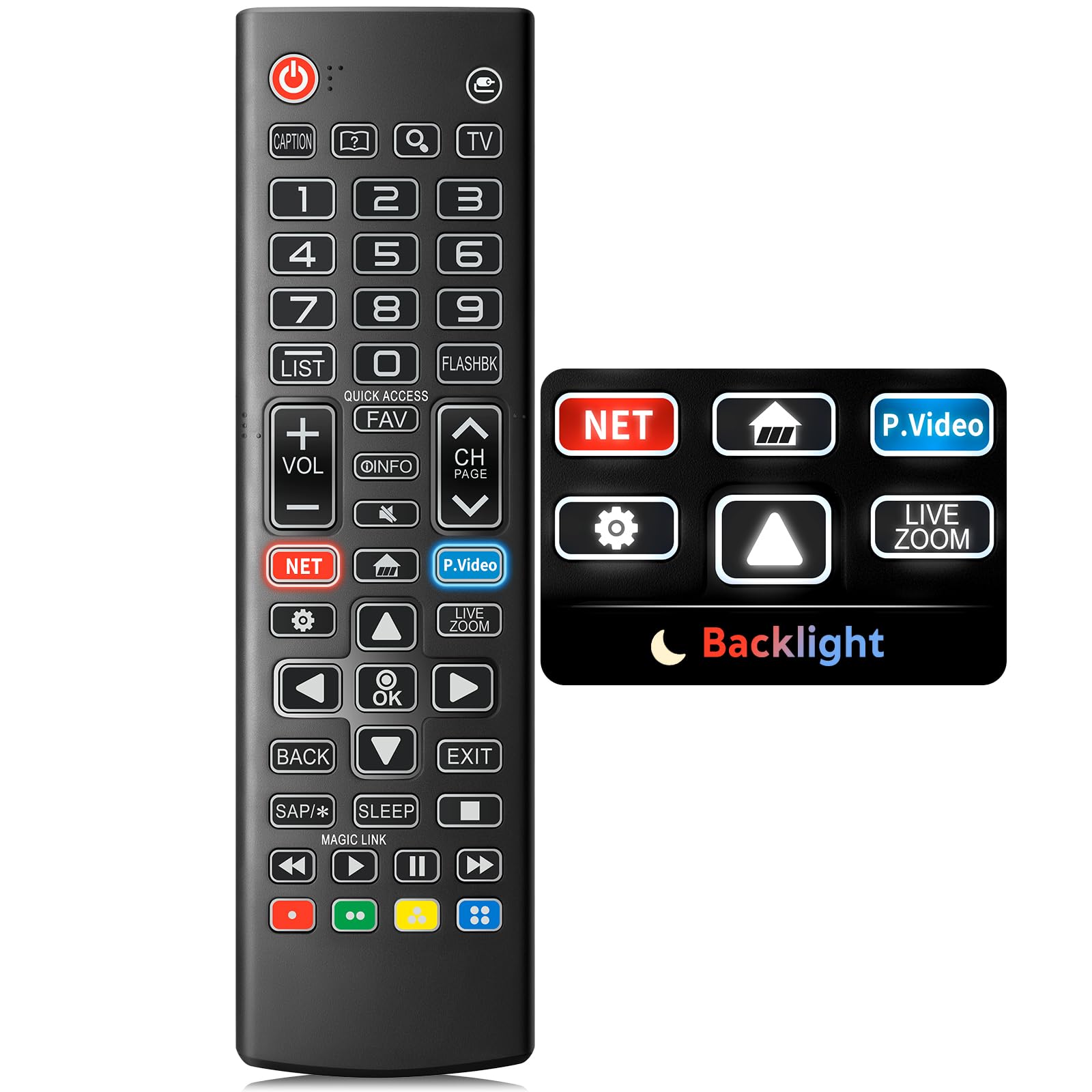
Image: The Angrox Backlit Universal Remote Control, a sleek black remote with clearly labeled buttons.
2. Ključne značilnosti
- Easy Nighttime Operation: Features soft glow buttons that illuminate, allowing for clear visibility and use in dark environments without causing glare. The backlight activates with any button press and automatically turns off after 10 seconds of inactivity.
- Univerzalna združljivost: Designed as a direct replacement for LG TV remotes, compatible with all LG TV models. No programming or complex pairing is required; it works immediately out of the box.
- Visokokakovostna izvedba: Equipped with sensitive buttons and stable signal transmission for smooth and responsive operation.
- Ergonomska oblika: Shaped to fit comfortably in the hand, reducing fatigue during extended use. The button layout is intuitive for users of all ages.
- Vzdržljiv in zanesljiv: Constructed from high-quality, sturdy materials to withstand daily use and accidental drops, ensuring a long lifespan.

Image: A comparison showing the remote control with its backlight off and then with its buttons illuminated, highlighting the easy nighttime operation feature.

Image: The remote control displayed alongside various LG TV models (OLED, UHD, QNED, NanoCell), illustrating its broad compatibility.
3. Navodila za nastavitev
3.1 Namestitev baterije
- Poiščite pokrov prostora za baterije na zadnji strani daljinskega upravljalnika.
- Potisnite pokrov navzdol ali pritisnite zapah, da odprete predal.
- Insert two (2) AAA batteries, ensuring the positive (+) and negative (-) terminals align correctly with the indicators inside the compartment.
- Pokrov predalčka za baterije namestite nazaj tako, da ga potisnete nazaj na svoje mesto, dokler se ne zaskoči.
Opomba: Batteries are not included with the remote control. Please use new AAA alkaline batteries for optimal performance.

Image: A visual guide demonstrating the correct insertion of two AAA batteries into the remote control's battery compartment.
3.2 Initial Use (No Pairing Required)
The Angrox Backlit Universal Remote Control is designed for immediate use with LG Smart TVs. No pairing or programming steps are necessary. Once batteries are installed, the remote is ready to control your LG television.
4. Navodila za uporabo
This section details the functions of the buttons on your Angrox remote control.

Image: A comprehensive layout of the remote control, with labels pointing to each button and describing its primary function.
4.1 Osnovne funkcije
- Moč (
 ): Vklopi ali izklopi TV.
 - Vnos (): Changes the input source (e.g., HDMI 1, HDMI 2).
- Povečanje/zmanjšanje glasnosti (VOL +/-): Prilagodi raven glasnosti.
- Kanal gor/dol (CH Page): Spremeni televizijski kanal.
- Mute (): Izklopi ali vklopi zvok televizorja.
- Številski gumbi (0-9): Neposredno vnese številke kanalov ali druge numerične vnose.
- Navigacijski gumbi (gor/dol/levo/desno): Uporablja se za pomikanje po menijih in možnostih.
- Gumb V redu: Selects menu items or confirms your input.
4.2 Special Function Buttons
- Gumb Netflix: Launches the Netflix application directly.
- Amazon Prime Video Button: Launches the Amazon Prime Video application directly.
- Hiter dostop: A feature that allows you to enter a specified app or Live TV directly by pressing and holding the number buttons.
- seznam: Dostopa do seznama shranjenih programov.
- Flashback: Vrne se na prejšnje viewed channel or input.
- Informacije: Displays information on the current program.
- Priljubljeno: Dostop do seznama priljubljenih kanalov.
- Nastavitve (): Accesses the Quick Settings menu.
- Nazaj: Počisti prikaze na zaslonu in se vrne na TV viewing.
- Izhod: Zapusti trenutni meni.
- Spanje: Accesses the sleep timer.
- Gumbi za upravljanje medijev (predvajanje, premor, ustavitev, hitro previjanje naprej, previjanje nazaj): Controls media content playback.
4.3 Funkcija osvetlitve ozadja
The remote control features a soft backlight for easy use in the dark. Simply press any button, and the backlight will turn on. It will automatically turn off after 10 seconds of inactivity to conserve battery life.
Video: A demonstration of the Angrox Backlit Remote for LG Smart TV, showcasing its easy nighttime use and responsive buttons. This video highlights the convenience of the backlit feature in dark environments.
5. Specifikacije
| Znamka | Angroks |
| Ime modela | AKB75095307 |
| Številka modela | AKB75095307 |
| Posebne lastnosti | Backlit, Ergonomic, Lightweight, No Programming Required, Universal |
| Združljive naprave | Television (All LG TV models) |
| Največje število podprtih naprav | 1 |
| Tehnologija povezljivosti | Infrardeči |
| Količina gumbov | 30 |
| Vrsta krmilnika | Nadzor gumbov |
| Največji doseg | 10 metre (približno 33 čevljev) |
| Število potrebnih baterij | 2 AAA bateriji |
| Vrsta baterije | Alkalna |
| Mere predmeta (D x Š x V) | 9.25 cm D x 1.89 cm Š x 0.73 cm V |
6. Odpravljanje težav
Če imate težave z daljinskim upravljalnikom, si oglejte naslednje pogoste rešitve:
- Daljinec se ne odziva:
- Prepričajte se, da so baterije pravilno vstavljene s pravilno polarnostjo (+/-).
- Stare baterije zamenjajte z novimi alkalnimi baterijami AAA.
- Preverite, ali so med daljinskim upravljalnikom in infrardečim sprejemnikom televizorja kakšne ovire.
- Ensure you are within the maximum operating range (10 meters) of the TV.
- Osvetlitev ozadja ne deluje:
- Verify battery power. Low batteries may affect backlight functionality.
- The backlight is designed to turn off after 10 seconds of inactivity. Press any button to reactivate it.
- Specific buttons not working (e.g., Netflix, Amazon Prime):
- Ensure your LG Smart TV is connected to the internet and the respective applications are installed and updated.
- Some smart TV features or app shortcuts may vary slightly depending on your TV's model and region.
- Remote feels sluggish or unresponsive:
- Zamenjajte baterije s svežimi.
- Clean the remote's infrared emitter (at the top) and the TV's IR receiver with a soft, dry cloth to ensure a clear signal path.
7. Vzdrževanje
To ensure the longevity and optimal performance of your Angrox remote control, follow these maintenance guidelines:
- Čiščenje: Use a soft, dry cloth to clean the remote's surface. Avoid using liquid cleaners, aerosols, or harsh chemicals, as they may damage the remote.
- Zamenjava baterije: Replace batteries promptly when the remote's performance declines or if the backlight becomes dim. Remove batteries if the remote will not be used for an extended period to prevent leakage.
- Shranjevanje: Daljinski upravljalnik shranjujte na hladnem in suhem mestu, stran od neposredne sončne svetlobe, ekstremnih temperatur in visoke vlažnosti.
- Izogibajte se kapljicam: While durable, repeated drops can damage internal components. Handle the remote with care.
8. Garancija in podpora
8.1 Informacije o garanciji
The Angrox Backlit Universal Remote Control (Model AKB75095307) is covered by a 90-dnevna garancija from the date of purchase. This warranty covers manufacturing defects and ensures the product functions as described under normal use. It does not cover damage caused by misuse, accidents, unauthorized modifications, or normal wear and tear.
8.2 Podpora strankam
For any questions, technical assistance, or warranty claims, please contact Angrox customer support through the retailer where you purchased the product or visit the official Angrox store online. Please have your purchase receipt and product model number available when contacting support.