
1. Uvod
The LAMTTO 2-in-1 Wireless CarPlay and Android Auto Adapter converts your vehicle's wired CarPlay or Android Auto system into a wireless solution. This device allows for convenient access to navigation, music, phone calls, and voice assistants like Siri or Google Assistant without the need for a physical cable connection to your smartphone.
Vsebina paketa:
- 1 x 2-in-1 Wireless CarPlay and Android Auto Adapter
- 1 x USB-A v USB-C adapter
- 1 x uporabniški priročnik
2. Varnostne informacije
Pomembna varnostna navodila:
- When operating this wireless adapter, interference with other nearby wireless devices may occur.
- Ensure compliance with battery handling instructions (if applicable to connected devices).
- Naprave ne izpostavljajte ekstremnim temperaturam ali vlagi.
3. Izdelek je končanview
The LAMTTO 2-in-1 adapter features a high-performance 5.8 GHz chip for faster processing and a stable connection. Its compact design allows for discreet installation, maintaining a tidy vehicle interior. The device supports both USB-A and USB-C ports for flexible connectivity.

Figure 3.1: Compact design of the LAMTTO adapter.

Figure 3.2: Internal components and connection speed.
4. Navodila za namestitev
The adapter offers a simple Plug & Play setup process. No applications or drivers are required.
- Priključite adapter: Plug the adapter into your car's USB data port (either USB-A or USB-C, using the provided adapter if necessary).
- Activate Bluetooth and Wi-Fi: On your smartphone, enable both Wi-Fi and Bluetooth.
- Seznani z Bluetooth: Open your smartphone's Bluetooth interface, search for the adapter's Bluetooth name, and select "Connect."
- Samodejna ponovna povezava: After the initial connection, the device will automatically connect to your vehicle each time you start the car.
Opomba: The connection method for both CarPlay and Android Auto is identical.

Figure 4.1: Step-by-step setup and control methods.
5. Navodila za uporabo
Once connected, the adapter enables wireless access to your smartphone's features through your car's infotainment system. You can control functions using the car's original controls.
- Glasovni nadzor: Za prostoročno upravljanje uporabite Siri ali Google Assistant.
- Navigacija: Access map applications like Waze or Apple Maps.
- Predvajanje glasbe: Stream music from apps like Spotify.
- Telefonski klici: Make and receive calls directly through the car's system.
- Krmilniki vozila: The adapter integrates seamlessly with your car's steering wheel buttons, touchscreen, and factory knobs.
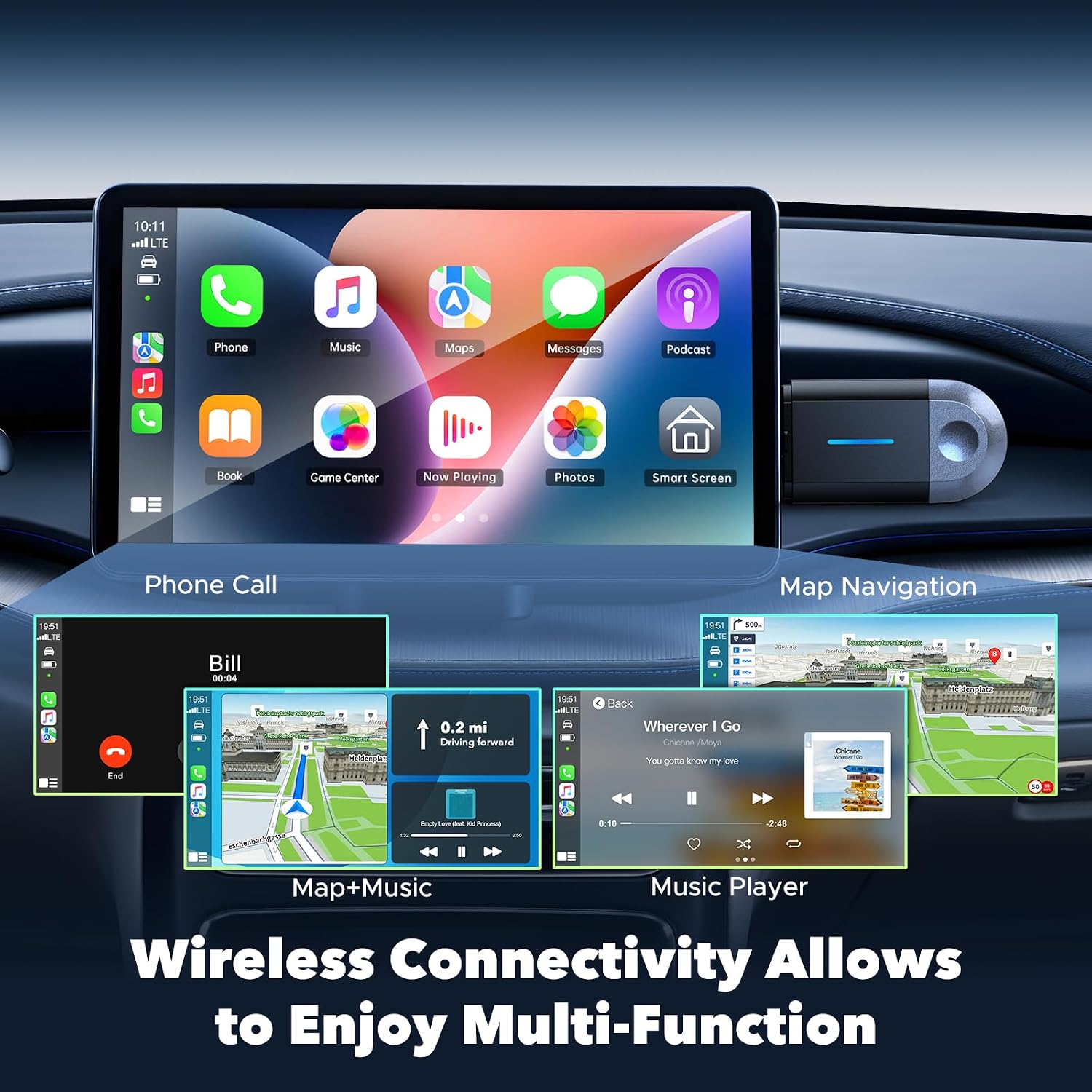
Figure 5.1: Wireless multi-function display on car screen.
6. Firmware Update (OTA)
The adapter supports Over-The-Air (OTA) firmware updates to ensure optimal performance and compatibility. To update the firmware:
- Connect your smartphone to the adapter's Wi-Fi network.
- Open a mobile browser on your smartphone.
- Vnesite naslov 192.168.1.101 in the browser's address bar.
- Sledite navodilom na zaslonu, da preverite in namestite morebitne razpoložljive posodobitve.

Figure 6.1: OTA firmware update interface.
7. Združljivost
The LAMTTO 2-in-1 Wireless CarPlay and Android Auto Adapter is designed for wide compatibility.
- Združljivost pametnih telefonov: Supports iPhone 8 or newer (iOS 11+) and Android phones with Android 11+.
- Združljivost z vozilom: Compatible with over 98% of vehicles equipped with factory-wired Apple CarPlay and Android Auto from the year 2016 onwards. This includes brands such as Ford, Audi, Toyota, VW, and more.
- Nezdružljiva vozila: Not compatible with BM-W, Ben-z, or Tes-la vehicles. Not compatible with Huawei phones.

Figure 7.1: Device and vehicle compatibility overview.
8. Odpravljanje težav
If the device experiences abnormal operation:
- Perform a restart by unplugging the adapter and then reinserting it into the car's USB port.
- Ensure your smartphone's Wi-Fi and Bluetooth are active and properly paired.
- Check for any available firmware updates as described in Section 6.
9. Specifikacije
| Funkcija | Specifikacija |
|---|---|
| Znamka | LAMTTO |
| Ime modela | carplay wireless adapter |
| Tehnologija povezljivosti | Bluetooth, 802.11ac (5.8 GHz WLAN) |
| Vir napajanja | Corded Electric (via car's USB port) |
| Material | Plastika |
| Teža izdelka | 20 gramov |
| barva | Črna |
| Združljive naprave | Smartphones with iOS 10+ and Android 11+ |
| Vrsta namestitve | Wall Mount (refers to compact, discreet placement) |
| Vrsta namestitve | Brezžično |
| Vrsta priključka | USB Type C (with included USB-A adapter) |
| Nadzorna metoda | Glas |
| Vrsta avdio izhoda | Bluetooth, pomožni |
| Način avdio izhoda | Stereo |
| Podprti formati | Bluetooth 5.3, IEEE 802.11ac |
| Podprte aplikacije | Spotify, Waze, Apple Maps, other CarPlay/Android Auto compatible audio apps |
10. Garancija in podpora
The LAMTTO 2-in-1 Wireless CarPlay and Android Auto Adapter comes with a 24-month warranty. For any product inquiries or technical assistance, please contact customer support. Support is available 24/7.