
1. Uvod
The GODIYMODULES SMC05 is an integrated stepper and servo motor driver controller designed for precise control of motor rotation, speed, and angle. Featuring a 1.8-inch color screen and intuitive knob operation, this module supports a wide range of applications requiring accurate motor positioning and speed regulation. It offers multiple control modes and communication options for versatile integration into various systems.
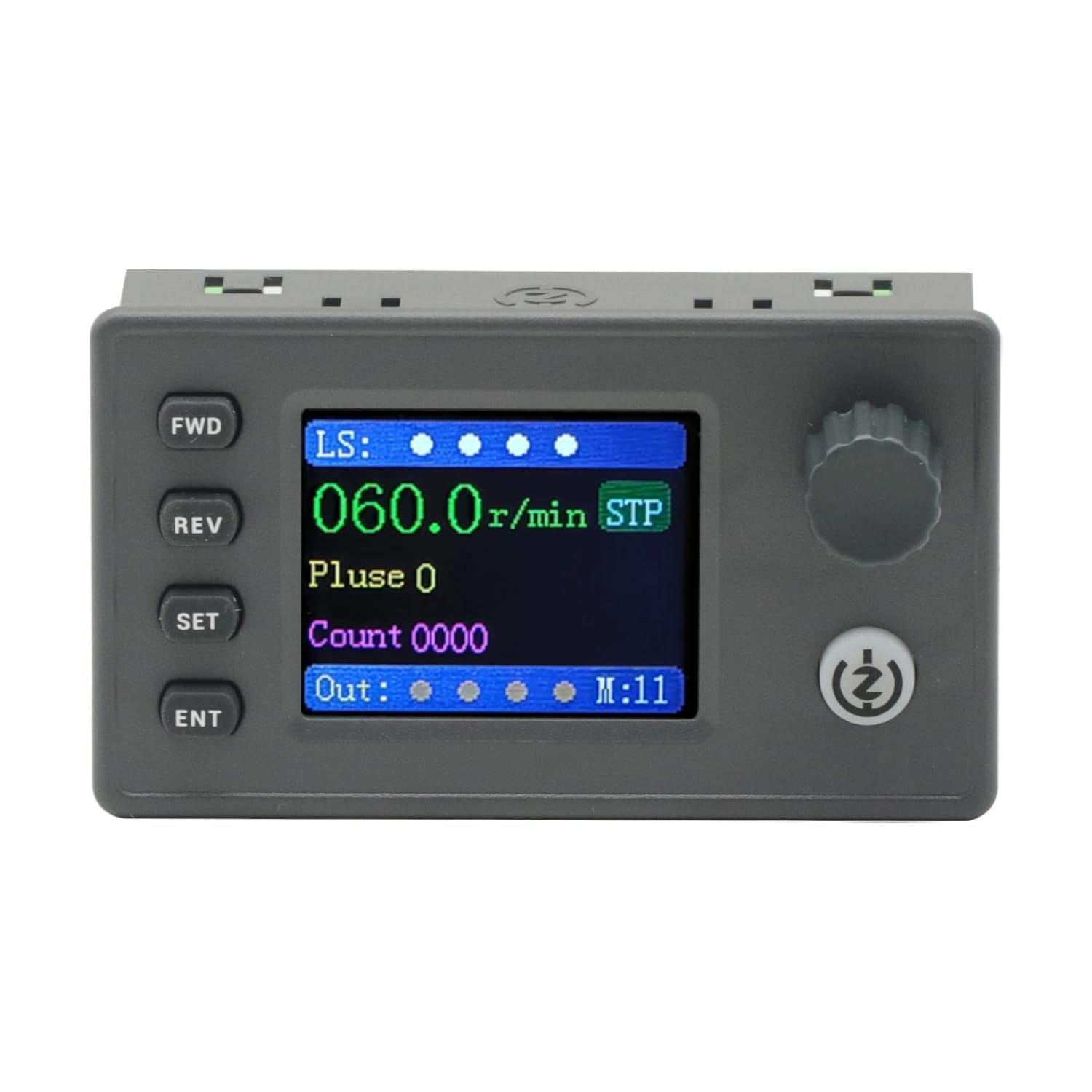
Figure 1: The SMC05 Stepper/Servo Motor Driver Controller, highlighting its 1.8-inch color screen, knob operation, and shortcut buttons.
2. Značilnosti izdelka
- Integriran nadzor: Combines stepper motor driver and servo motor control functionalities.
- Wide Voltage Domet: Operates with a working voltage od 12-24V.
- Kompaktna zasnova: Product dimensions are 83x48x35.5mm.
- Izhodni signali: Features 4 output channels with 0V output voltage.
- Vhodni signali: Includes 4 limit inputs and 3 extended key interfaces.
- Visoka pulzna frekvenca: Supports motor pulse frequencies from 1Hz to 200,000Hz.
- Barvni zaslon: Equipped with a 1.8-inch color screen for clear information display.
- Pulse Voltage: Motor pulse voltage is 0V output, collector output form.
- Komunikacija: Supports Modbus protocol via serial port/485.
- Več načinov: Supports 20 different motion control modes.
- Jezikovna podpora: Display in both Chinese and English.

Figure 2: Key features of the SMC05 controller, including support for various modes and input/output capabilities.
3. Nastavitev in namestitev
3.1 Power Supply and Connections
Zagotovite delovni voltage is within the specified range of 12-24V DC. Connect the power supply to the designated terminals. The controller features various input and output interfaces for connecting limit switches, expansion buttons, and motor drives.

Slika 3: Podrobno view of the SMC05 controller's extension interface, indicating connections for power, limit switches, expansion buttons, communication, and motor outputs.
3.2 Ožičenje motorja
Proper wiring of the stepper or servo motor drive is crucial for correct operation. Refer to the wiring diagrams provided to ensure all connections are secure and correctly aligned with the motor and power source.

Slika 4: Nprample wiring diagram for connecting the SMC05 controller to a microstep driver and a stepper motor.
4. Navodila za uporabo
The SMC05 controller features a user-friendly interface with a 1.8-inch color screen, a rotary knob, and several control buttons for easy operation and parameter adjustment.
4.1 Konec nadzorne ploščeview

Figure 5: Front panel layout of the SMC05 controller with labels for all buttons, the rotary knob, and display indicators.
- Gumb za naprej: Initiates forward rotation.
- REV Button: Initiates reverse rotation.
- Gumb SET: Enters the settings menu or exits current settings.
- Gumb ENT: Potrdi izbire ali odpre podmenije.
- Rotacijski gumb: Adjusts parameters such as speed, pulse count, and navigates menus.
- Gumb Start/Stop: Starts or stops motor operation.
- Zaslon: Shows current speed, pulse count, motion mode, and various indicators.
4.2 Osnovna operacija
- Vklop: Connect the 12-24V DC power supply. The screen will light up.
- Nastavitev parametrov: Pritisnite NASTAVI button to enter the settings menu. Use the rotary knob to navigate through options like Akcija, Motor, in Sistem. Pritisnite ORL izbrati.
- Adjusting Speed/Pulse: V okviru Akcija or Motor settings, you can adjust parameters such as forward pulse, forward speed, reverse pulse, and reverse speed using the rotary knob.
- Starting Motor: Once parameters are set, press the Start/Stop button to begin motor operation. The motor will rotate according to the configured speed and direction.
- Spreminjanje smeri: Uporabite FWD in REV buttons to change the motor's rotation direction during operation.
- Stopping Motor: Pritisnite Start/Stop button again to halt motor movement.
4.3 Advanced Features Demonstration
The following video demonstrates various operational aspects and advanced features of the SMC05 controller, including interface navigation, stepper motor control, use of expansion buttons, limit switches, and output control, as well as servo motor drive integration.
Video 1: Demonstration of the SMC05 controller's interface, stepper motor drive, expansion button functionality, limit switch activation, output control, and servo motor drive operation.
5. Specifikacije
| Funkcija | Specifikacija |
|---|---|
| Dimenzije izdelka | 3.27 x 1.89 x 1.4 palcev (83 x 48 x 35.5 mm) |
| Teža predmeta | 3.27 unč |
| Delovni letniktage | 12-24V DC |
| Izhodni signal | 4 channels, 0V output voltage |
| Vhodni signal | 4 limit inputs, 3 extended key interfaces |
| Motor Pulse Frequency | 1Hz - 200,000Hz |
| Vrsta zaslona | 1.8-palčni barvni zaslon |
| Motor Pulse Voltage | 0V output, collector output form |
| Komunikacijski protokol | Modbus (serial port/485) |
| Vključene komponente | 1PCS SMC05 Controller |
6. Vzdrževanje
To ensure the longevity and optimal performance of your SMC05 controller, follow these maintenance guidelines:
- Napravo vzdržujte čisto in brez prahu ter umazanije. Za čiščenje uporabljajte mehko, suho krpo.
- Izogibajte se izpostavljanju krmilnika ekstremnim temperaturam, vlagi ali neposredni sončni svetlobi.
- Ensure all connections are secure and free from corrosion. Periodically check wiring for any signs of wear or damage.
- Ne poskušajte odpreti pokrova casing or modify the internal components, as this may void the warranty and cause damage.
7. Odpravljanje težav
If you encounter issues with your SMC05 controller, refer to the following common troubleshooting steps:
- Brez napajanja: Check the power supply connection and ensure it provides the correct voltage (12-24V DC). Verify the power adapter is functioning.
- Motor se ne premika:
- Ensure the motor is correctly wired to the driver and the driver to the controller.
- Check if the motor parameters (speed, pulse) are set correctly on the controller.
- Verify that the Start/Stop button has been pressed to initiate movement.
- Check for any active limit switch inputs that might be preventing movement.
- Incorrect Speed/Direction: Review the speed and direction settings in the controller's menu. Ensure the FWD/REV buttons are used appropriately.
- Težave s prikazom: If the screen is blank or shows errors, try restarting the device. If the problem persists, contact support.
- Communication Errors (Modbus): Verify the serial port/485 connections and ensure the communication parameters (baud rate, parity, etc.) are correctly configured on both the controller and the connected device.
For persistent issues not resolved by these steps, please contact GODIYMODULES customer support.
8. Garancija in podpora
Information regarding specific warranty terms for the GODIYMODULES SMC05 controller is not available in the provided product data. Please refer to the product packaging or the manufacturer's official webza podrobne informacije o garanciji.
For technical support, troubleshooting assistance, or inquiries about the product, please contact GODIYMODULES customer service through their official channels.