
Uvod
This manual provides essential information for the safe and effective operation of your Radioddity FS-T8 FRS Two-Way Radio. Please read this manual thoroughly before using the device and retain it for future reference. The Radioddity FS-T8 is a Family Radio Service (FRS) device designed for clear, long-range communication, suitable for various outdoor activities and family use.
Vsebina paketa
Upon unpacking, please ensure all items listed below are present and in good condition. If any items are missing or damaged, please contact Radioddity customer support.
- 4 x Radioddity FS-T8 Two-Way Radios
- 4 polnilnih baterij (2000 mAh)
- 4 x polnilna kabla USB-C
- 4 x sponke za pas
- 4 x vrvice
- 4 x Compasses
- 4 x Badges
- Sticker Sheets
- Uporabniški priročnik
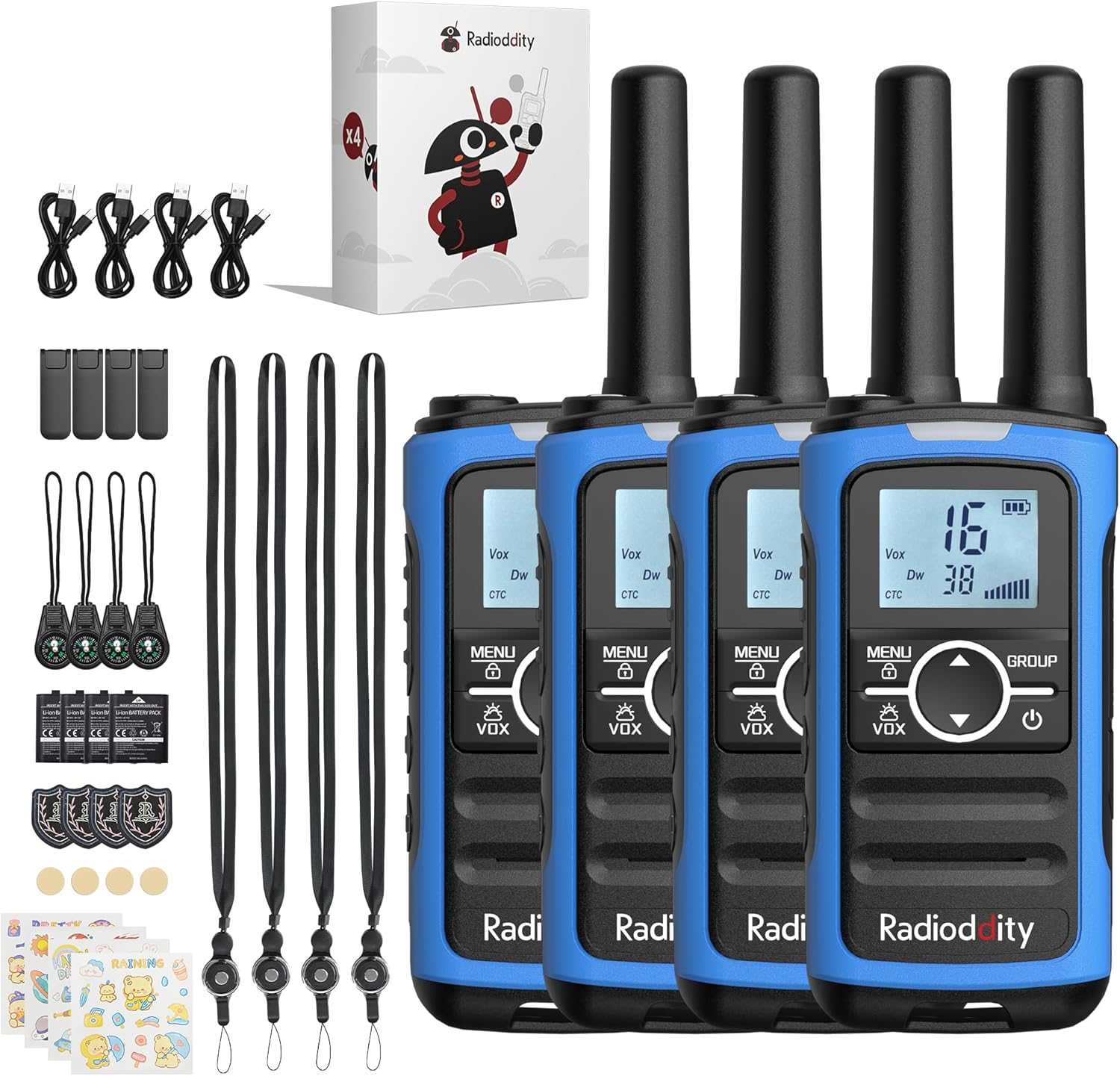
Image: A complete set of Radioddity FS-T8 walkie talkies and their accessories, laid out on a surface.
Konec izdelkaview
The Radioddity FS-T8 features a compact design with an easy-to-read backlit digital display. It includes essential functions for reliable communication and safety.

Image: A close-up of the Radioddity FS-T8 walkie talkie, highlighting its digital display and main control buttons.
Nastavitev
Namestitev in polnjenje baterije
The FS-T8 radios come with 2000mAh rechargeable batteries. They are also compatible with 3xAA batteries (not included) for backup power.
- To install the rechargeable battery, remove the battery compartment cover on the back of the radio.
- Insert the 2000mAh rechargeable battery pack, ensuring correct polarity.
- Ponovno namestite pokrov prostora za baterije.
- To charge, connect the USB-C charging cable to the radio's USB-C port and a compatible 5V USB power adapter (not included). A full charge takes approximately 2 hours and provides up to 48 hours of continuous talk time.
- For AA battery use, open the compartment and insert 3xAA batteries, observing polarity.

Image: An illustration showing the USB-C charging port on the Radioddity FS-T8 and the option for both rechargeable and AA batteries.
Pritrjevanje dodatkov
Each radio includes a belt clip and a lanyard for convenient carrying. The lanyard can be attached to either the top or bottom loop on the radio.
- Sponka za pas: Potisnite sponko za pas v režo na zadnji strani radia, dokler se ne zaskoči.
- Vrvica: Thread the lanyard loop through the desired attachment point (top or bottom) on the radio and secure it.
- Kompas: The included compass can be attached to the lanyard. Avoid attaching the compass directly to the radio's magnetic areas, as this may affect its accuracy.
Navodila za uporabo
Vklop/izklop
Za vklop ali izklop radia pritisnite in držite Moč button (usually marked with a power symbol) until the display lights up or turns off.
Izbira kanala
The FS-T8 features 22 FRS channels. To select a channel:
- Pritisnite MENI enkrat pritisnite gumb. Številka kanala bo utripala.
- Uporabite Up or Dol s puščičnimi gumbi izberite želeni kanal.
- Pritisnite MENI button again to confirm your selection, or wait a few seconds for it to auto-confirm.
Group Call Function
The One-Key Group Call feature allows instant communication with all other FS-T8 radios within range, regardless of their current channel setting. This is ideal for ensuring everyone hears important messages.
- To initiate a group call, press and hold the SKUPINA gumb.
- Jasno govorite v mikrofon.
- Spustite SKUPINA gumb za poslušanje.

Image: A visual representation of the group call feature, demonstrating its ease of use in an outdoor family setting.
VOX (Glasovni prenos)
Funkcija VOX omogoča prostoročno komunikacijo. Ko je aktivirana, bo radio samodejno oddajal, ko zazna vaš glas.
- To activate/deactivate VOX, press the MENI button multiple times until the VOX icon flashes.
- Uporabite Up or Dol arrow buttons to select a VOX sensitivity level (1-3, with 3 being most sensitive) or 'OFF'.
- Pritisnite MENI za potrditev.
Zaklepanje tipkovnice
Da preprečite nenamerne spremembe nastavitev, lahko zaklenete tipkovnico.
- Tipkovnico zaklenete tako, da pridržite tipko MENI dokler se na zaslonu ne prikaže ikona ključavnice.
- Za odklepanje pritisnite in držite MENI ponovno pritisnite gumb, dokler ikona ključavnice ne izgine.
Vremenski kanali NOAA
Stay informed about hazardous weather conditions with the integrated NOAA weather channels.
- Za dostop do vremenskih kanalov NOAA pritisnite MENI button until the NOAA icon appears.
- Uporabite Up or Dol arrow buttons to scan through the 11 available NOAA channels. The radio will automatically select the strongest signal.
- Pritisnite MENI to exit NOAA mode.

Image: The Radioddity FS-T8 showing its NOAA weather channel feature, providing critical weather alerts.
Flashlight and SOS Alert
The FS-T8 includes a built-in flashlight and an SOS alert function for emergencies.
- To turn on/off the flashlight, press the dedicated Svetilka gumb na strani radia.
- To activate the SOS alert, press and hold the SOS button (often combined with the flashlight button or a separate dedicated button). The flashlight will flash in an SOS pattern, and an audible alert may sound.
Razpon Učinkovitost
The effective communication range varies based on terrain and obstructions:
- Up to 3 miles in open areas with minimal obstructions.
- Approximately 1 mile in semi-obstructed zones (e.g., light foliage, scattered buildings).
- Up to 547 yards in heavily obstructed urban environments.

Image: A graphic illustrating the varying communication ranges of the FS-T8 in different types of terrain.
Vzdrževanje
Čiščenje
To maintain your radio's performance and appearance:
- Radio obrišite z mehko, damp krpo.
- Ne uporabljajte ostrih kemikalij ali abrazivnih čistil.
- Pred polnjenjem se prepričajte, da so vsa priključka suha.
Skrb za baterijo
- Pred prvo uporabo popolnoma napolnite baterije.
- Avoid overcharging or completely draining the rechargeable batteries.
- If using AA batteries, remove them if the radio will not be used for an extended period to prevent leakage.
Odpravljanje težav
| Težava | Možen vzrok | rešitev |
|---|---|---|
| Brez moči | Baterija je skoraj prazna ali ni pravilno vstavljena. | Charge the rechargeable battery or replace AA batteries. Ensure batteries are installed with correct polarity. |
| Ne morem komunicirati z drugimi radijskimi napravami | Različni kanali ali kode zasebnosti. Izven dosega. | Ensure all radios are on the same channel and privacy code. Use the Group Call function. Move closer to other radios. |
| Slaba kakovost zvoka | Šibek signal. Ovire. | Move to an area with fewer obstructions. Check battery level. |
| Tipkovnica se ne odziva | Tipkovnica je zaklenjena. | Tipkovnico odklenete tako, da pritisnete in držite gumb MENU. |
Specifikacije
| Funkcija | Podrobnost |
|---|---|
| Znamka | Radiodity |
| Številka modela | FS-T8 (QYWRFTB01) |
| Frekvenčno območje | FRS |
| Število kanalov | 22 |
| Največji razpon govora | 3 Miles (unobstructed) |
| Vrsta baterije | 2000mAh Rechargeable (included), 3xAA (not included) |
| Povprečna življenjska doba baterije | Do 48 uri |
| Polnjenje | USB-C (5V only) |
| Posebne lastnosti | Integrated Flashlight, NOAA Weather Channels, One-Key Group Call, SOS Alarm, VOX (Voice Operated Transmission), Keypad Lock, 131 Privacy Codes |
| Stopnja vodoodpornosti | Ni vodoodporen |
| Dimenzije izdelka | 1.18"D x 1.9"Š x 5.9"V |
| Teža predmeta | 0.3 funta |
| FCC ID | 2AN62-T8 |
Garancija
The Radioddity FS-T8 FRS Two-Way Radio comes with a 19-month warranty from the date of purchase. This warranty covers manufacturing defects and malfunctions under normal use. Please retain your proof of purchase for warranty claims. For detailed warranty terms and conditions, please visit the official Radioddity webspletno mesto ali se obrnite na podporo strankam.
Podpora
For further assistance, technical support, or to inquire about replacement parts, please contact Radioddity customer service through the following channels:
- Na spletu: Visit the official Radioddity webspletno mesto za pogosta vprašanja, članke za podporo in kontaktne obrazce.
- E-pošta: Glejte embalažo izdelka ali uradna navodila. webspletno mesto za e-poštni naslov za podporo strankam.
Please have your model number (FS-T8) and purchase information ready when contacting support.