
Uvod
Thank you for choosing the vretti PB821 Portable Thermal Printer. This compact and versatile device is designed for convenient, inkless printing from various devices, including smartphones, tablets, and laptops. Its portability makes it ideal for business, office, home, and travel use. This manual provides essential information on setting up, operating, maintaining, and troubleshooting your printer to ensure optimal performance.
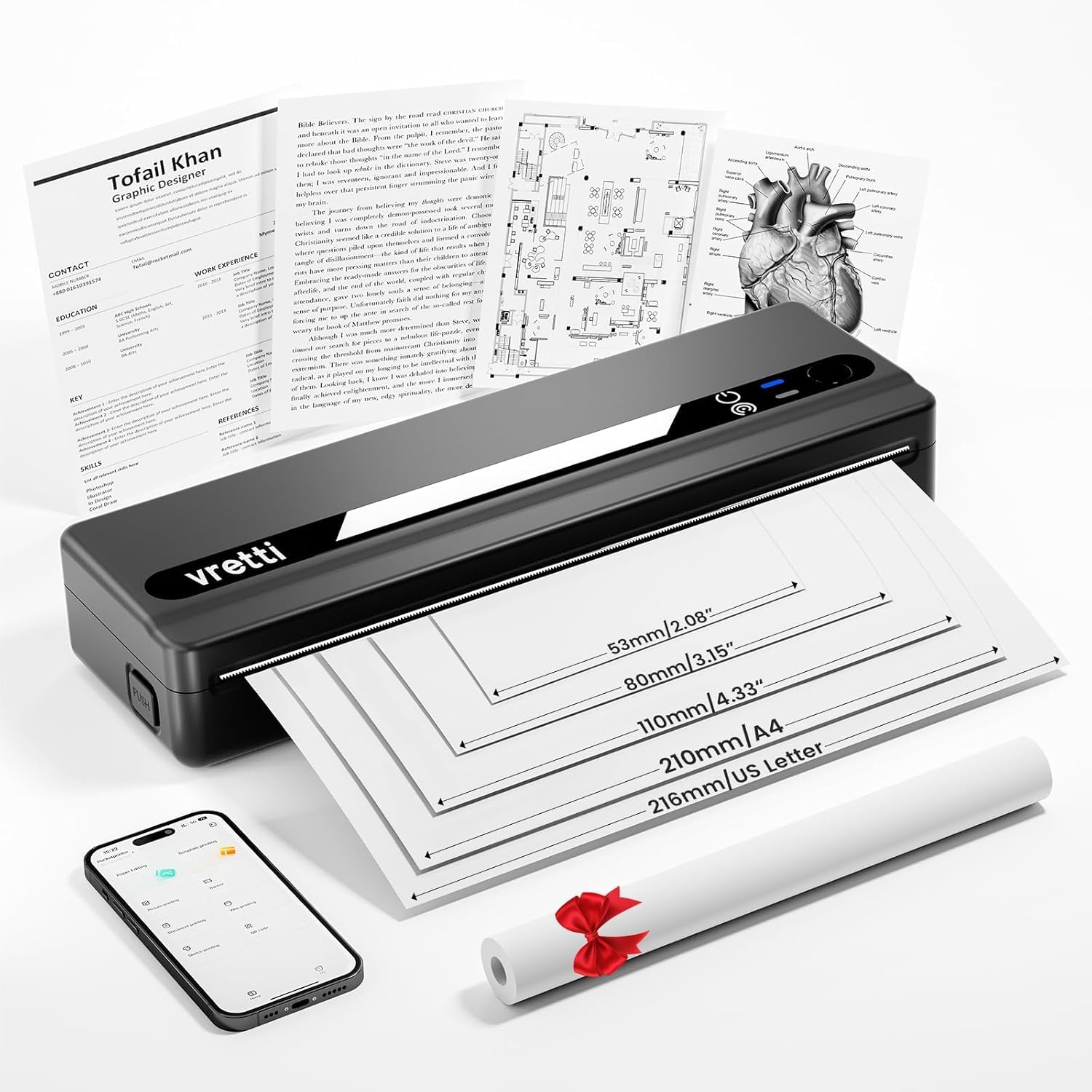
Image: The vretti PB821 Portable Thermal Printer, a sleek black device, ready for use.
Vsebina paketa
Po razpakiranju preverite vsebino paketa, da se prepričate, da so prisotni vsi elementi:
- vretti PB821 Portable Thermal Printer
- 1 Roll of Thermal Paper
- Polnilni kabel USB-C
- Uporabniški priročnik
Konec izdelkaview
Ključne značilnosti
- Brezžično tiskanje prek Bluetootha: Connects wirelessly to phones and tablets via the "XLifePro" app.
- Prenosen in kompakten: Small and lightweight design for easy transport.
- Cost-effective Inkless Printing: Utilizes advanced thermal printing technology, eliminating the need for ink, toner, or ribbons.
- High-quality Printing: Delivers clear prints with a 203 DPI resolution.
- Dolgotrajna baterija: Built-in 1500mAh rechargeable battery supports printing up to 223 A4 sheets on a full charge.
- Podpora za več velikosti papirja: Compatible with A5, A4, Letter, and 2-4 inch labels.
Možnosti povezave

Image: The vretti PB821 printer supports both Bluetooth and USB connections for versatile use with Android, iOS, iPad, Windows, Mac OS, Linux, and Chromebook devices.
The vretti PB821 printer offers flexible connectivity, allowing you to print wirelessly via Bluetooth from mobile devices or directly via USB from computers. This ensures compatibility across various operating systems and devices.
Prenosna zasnova

Image: A visual comparison highlighting the compact and portable design of the vretti PB821 printer against a larger, traditional printer, emphasizing its convenience.
The PB821 is designed for maximum portability, making it easy to carry in a backpack or bag. Its compact form factor does not compromise on functionality, offering easy setup and smooth, inkless printing.
Nastavitev
1. Začetno polnjenje
Before first use, fully charge the printer using the provided USB-C cable. Connect the cable to the printer's USB-C port and a compatible power adapter (not included) or computer USB port. The charging indicator light will show the charging status.

Image: Visual representation of the printer's 1500mAh battery capacity, USB-C charging, and its ability to print up to 223 A4 sheets on a single charge.
2. Vstavljanje termičnega papirja
The vretti PB821 supports various thermal paper types. To load paper:
- Odprite pokrov papirja na tiskalniku.
- Termični papir vstavite s stranjo za tiskanje navzgor. Prepričajte se, da je papir pravilno poravnan z vodili.
- Varno zaprite pokrov papirja.

Image: The vretti PB821 printer showcasing its compatibility with different thermal paper types, including folding thermal paper and roll paper, along with various paper sizes.
3. Povezovanje prek Bluetootha (mobilne naprave)
To print wirelessly from your smartphone or tablet:
- Download the "XLifePro" app from the App Store (iOS) or Google Play Store (Android).
- Turn on the vretti PB821 printer. The Bluetooth indicator light will blink.
- Open the XLifePro app, navigate to the device connection settings, and select the PB821 printer from the list of available Bluetooth devices.
- Ko je povezava vzpostavljena, bo indikatorska lučka Bluetooth začela neprekinjeno svetiti.

Image: Step-by-step guide on connecting the vretti PB821 printer via Bluetooth, including downloading the XLifePro app and pairing the device.
4. Connecting via USB (Computers)
To print from your Windows, Mac OS, or Linux computer:
- Download the appropriate printer driver from the official vretti webspletno mesto: vrettitech.com/pages/p83-support.
- Install the driver on your computer following the on-screen instructions.
- Connect the vretti PB821 printer to your computer using the provided USB-C cable.
- The computer should recognize the printer, and you can now select it as your printing device.

Image: Instructions for USB connection, detailing driver download from the vretti website and connecting the PB821 printer to a laptop.
Navodila za uporabo
Tiskanje iz mobilnih naprav
Ko je vzpostavljena povezava prek Bluetootha:
- Open the document, image, or file you wish to print within the XLifePro app. The app supports various formats including TXT, PDF, Excel, and Word documents.
- Select the print option within the app.
- Confirm print settings such as paper size and quantity.
- Začnite tiskanje.
Printing from Computers
Once connected via USB and drivers are installed:
- Odprite dokument oz file želite natisniti na računalniku.
- Izberite možnost tiskanja v aplikaciji (npr. File > Natisni).
- Choose "vretti PB821" from the list of available printers.
- Adjust print settings as needed (e.g., paper size, orientation).
- Kliknite »Natisni«.
Supported Paper Types and Sizes
The PB821 printer is compatible with various thermal paper types and sizes, including:
- A4 (210 mm)
- Letter (8.5" x 11" / 216mm)
- A5 (148 mm)
- B5 (175mm)
- 2-inch (53mm) labels
- 3-inch (80mm) labels
- 4-inch (110mm) labels

Image: The vretti PB821 printer demonstrating its support for multiple paper sizes, including standard document sizes and various label sizes.
Using the XLifePro App
The XLifePro app provides additional functionalities beyond basic printing, including:
- Access to multiple templates for creative printing.
- Options for document printing, picture printing, and more.
- Customization features for various printing needs.

Image: Screenshots of the XLifePro app interface, illustrating its diverse range of templates and printing options.
Vzdrževanje
Čiščenje tiskalnika
To maintain print quality and prolong the printer's lifespan:
- Ensure the printer is turned off and disconnected from power before cleaning.
- Uporabite mehko krpo, ki ne pušča vlaken, dampened with water or isopropyl alcohol to gently wipe the print head and paper path.
- Ne uporabljajte abrazivnih čistil ali topil.
- Allow the printer to dry completely before turning it on.
Skrb za baterijo
Za optimizacijo življenjske dobe baterije:
- Izogibajte se pogostemu popolnemu praznjenju baterije.
- Ko tiskalnika dalj časa ne uporabljate, ga shranite na hladnem in suhem mestu.
- Charge the printer regularly, even if not in frequent use, to prevent deep discharge.
Odpravljanje težav
| Izdaja | Možen vzrok | rešitev |
|---|---|---|
| Tiskalnik se ne vklopi | Prazna baterija; gumb za vklop ni pravilno pritisnjen | Napolnite tiskalnik; Pritisnite in nekaj sekund držite gumb za vklop |
| Ni mogoče vzpostaviti povezave prek Bluetooth | Bluetooth na napravi izklopljen; Tiskalnik ni v načinu seznanjanja; Težava z aplikacijo | Ensure Bluetooth is enabled; Restart printer; Reinstall XLifePro app |
| Slaba kakovost tiskanja | Low battery; Dirty print head; Incorrect paper type | Charge printer; Clean print head; Use recommended thermal paper |
| Zastoj papirja | Nepravilno vstavljanje papirja; Poškodovan papir | Turn off printer, carefully remove jammed paper, reload correctly; Use undamaged paper |
| Računalnik ne prepozna tiskalnika | Missing/incorrect drivers; Faulty USB cable/port | Install/reinstall drivers from vretti website; Try a different USB cable/port |
Specifikacije
| Funkcija | Podrobnost |
|---|---|
| Model | PB821 |
| Znamka | vretti |
| Tehnologija tiskanja | Toplotna |
| Tehnologija povezljivosti | Bluetooth, USB |
| Največja ločljivost tiskanja | 203 DPI (črno-belo) |
| Tiskarski mediji | Thermal Paper (plain) |
| Podprte velikosti listov | 2'', 3'', 4'', A4, 8.5''x 11'' US Letter |
| Največja kapaciteta vhodnih listov | 30 listov |
| Kapaciteta baterije | 1500 mAh (litij-ionska) |
| Dimenzije izdelka | 25.7 x 7 x 4.7 cm |
| Teža predmeta | 900 g |
| Dvostransko tiskanje | št |
| Barva črnila | Črna |
Garancija in podpora
The vretti PB821 Portable Thermal Printer comes with a standard manufacturer's warranty. For specific warranty details, technical support, or service inquiries, please refer to the warranty card included in your package or visit the official vretti webspletnega mesta. Račun shranite kot dokazilo o nakupu za uveljavljanje garancije.
Video o izdelku
Video: An official product video demonstrating the features and usage of the vretti PB821 Portable Thermal Printer, including its compact design, wireless connectivity, and printing capabilities.