1. Uvod
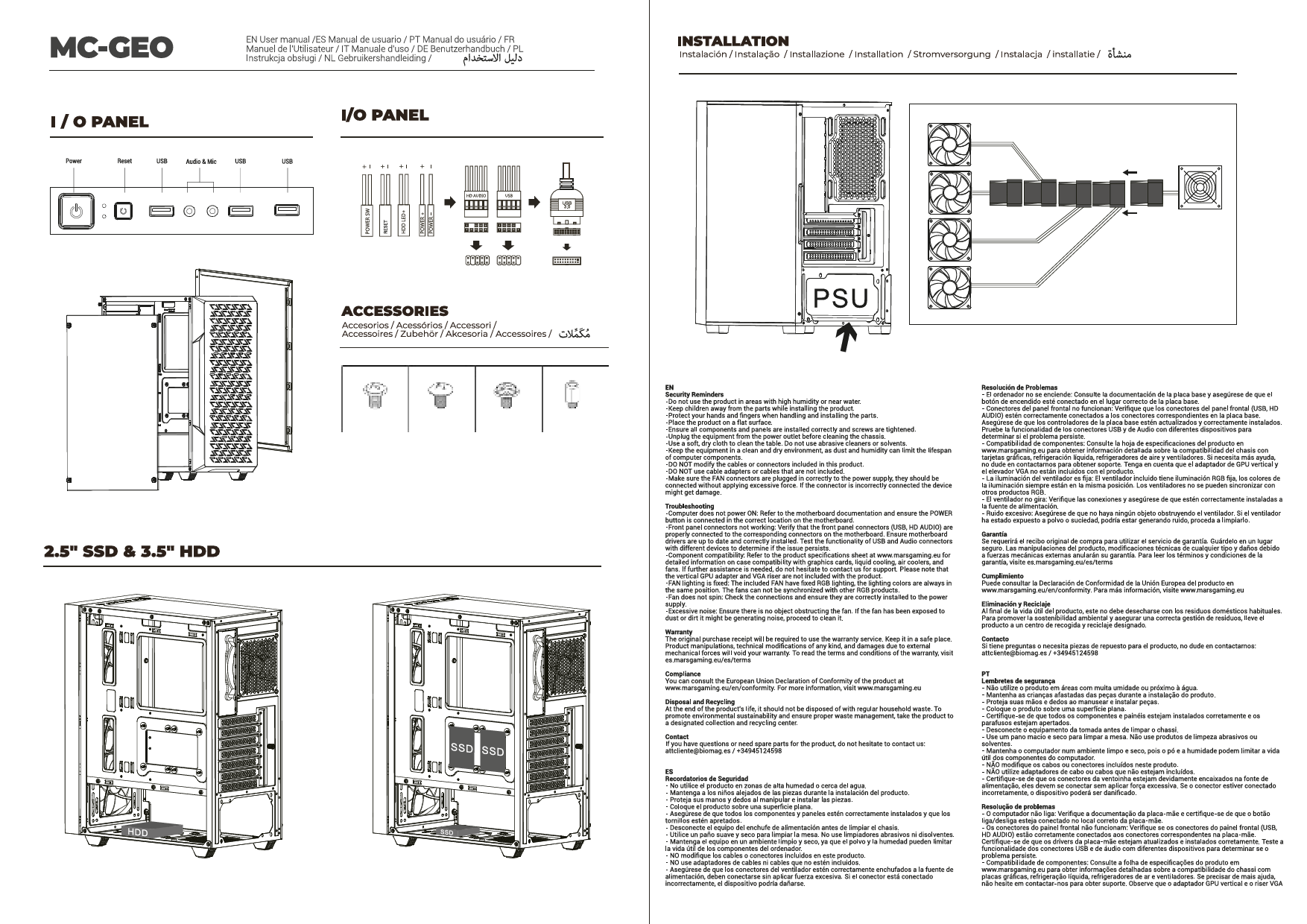
This manual provides detailed instructions for the installation, operation, and maintenance of your Mars Gaming MC-3TCORELCDM Micro-ATX Gaming Case. This case features an integrated 7.2-inch IPS screen, triple tempered glass panels, and a dual-chamber structure designed to optimize airflow and provide a clean aesthetic for your PC build.
2. Nastavitev in namestitev
Before beginning installation, ensure all components are compatible with the MC-3TCORELCDM case. This case supports Micro-ATX and Mini-ITX motherboards.
2.1. Internal Component Installation
The MC-3TCORELCDM case offers optimized internal space for various components:
- Združljivost matične plošče: Micro-ATX, Mini-ITX
- VGA (Graphics Card) Support: Up to 415mm length, 150mm width
- Višina CPU hladilnika: Do 160 mm
- Razširitvene reže: 5
- Drive zalivi: 2x 3.5" HDD / 3x 2.5" SSD (refer to diagram for specific locations)
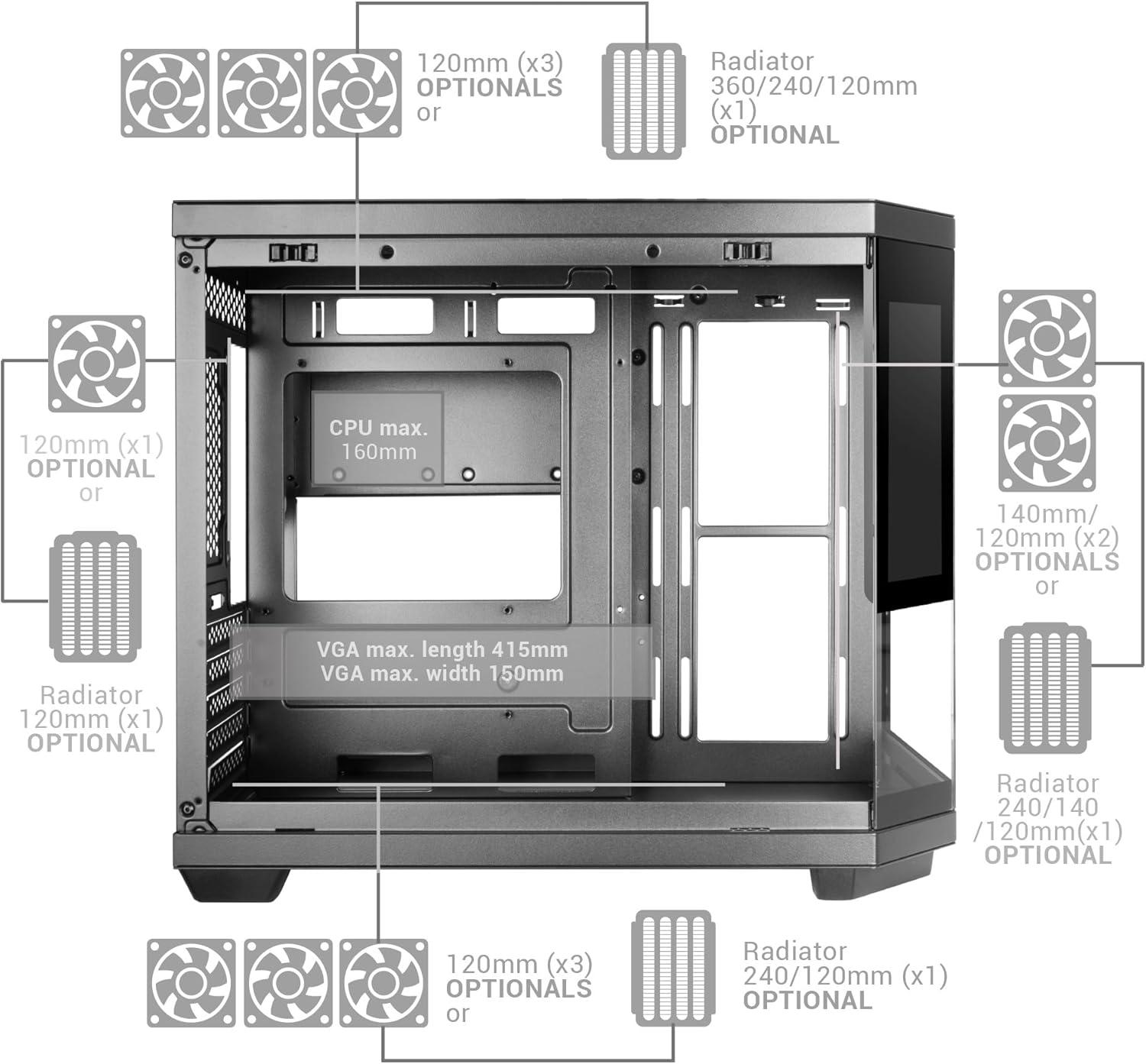
Figure 1: Internal layout diagram with component dimensions and optional cooling placements.
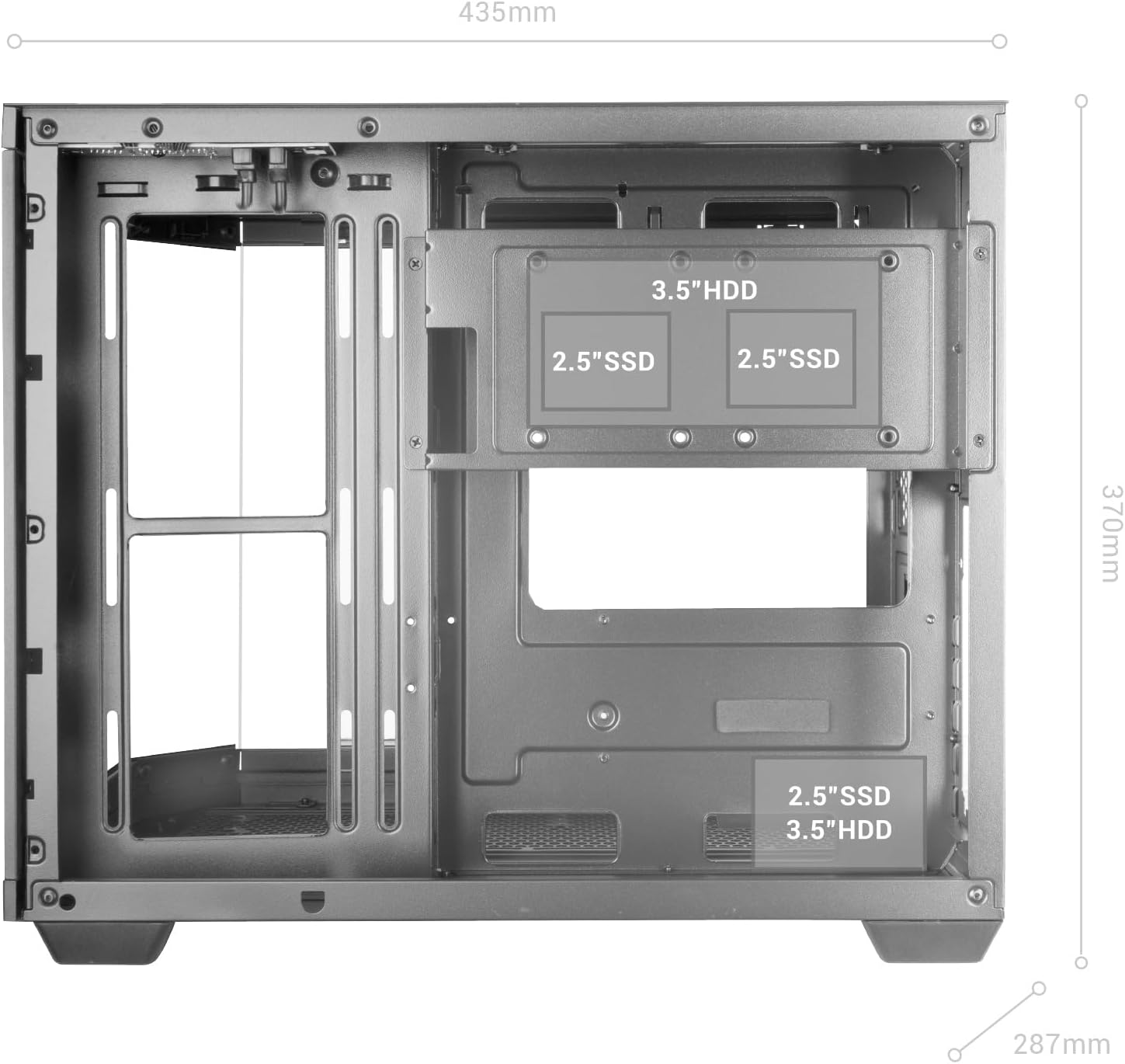
Slika 2: Podrobno view of internal drive bay locations for 3.5" HDDs and 2.5" SSDs.
2.2. Namestitev hladilnega sistema
The case supports extensive cooling configurations:
- Fan Capacity: Up to 9x 120mm fans or 2x 140mm + 6x 120mm fans.
- Podpora za tekoče hlajenje: Up to 360mm radiators.

Slika 3: Nprample of liquid cooling installation within the MC-3TCORELCDM case, supporting up to 360mm radiators and multiple fans.
2.3. Dual Chamber Structure
The dual-chamber design separates the power supply unit (PSU) and cables from the main hardware components, improving airflow and cable management.

Slika 4: View of the double side chamber, illustrating space for cable routing and rear motherboard connectors.
3. Navodila za uporabo
3.1. Integrated 7.2" IPS Screen
The MC-3TCORELCDM features a 7.2-inch IPS screen integrated into the central tempered glass panel. This screen can display system telemetry (temperatures, usage), custom images, animations, or videos using its dedicated control software.

Figure 5: The 7.2-inch IPS display showing real-time system information such as memory, CPU, disk, and GPU temperatures.
3.2. Top Panel Connectivity
The top panel provides convenient access to various ports for immediate connection of peripherals.
- 1x vrata USB-C
- 1x USB 3.0 vrata
- 1x USB 2.0 vrata
- HD Audio + Microphone Jacks

Figure 6: Top panel connectivity options for easy access to peripherals.
4. Vzdrževanje
Redno vzdrževanje zagotavlja optimalno delovanje in dolgo življenjsko dobo vašega računalniškega ohišja.
4.1. Filtri za prah
The MC-3TCORELCDM case includes magnetic dust filters on the top and bottom panels. Periodically remove and clean these filters to prevent dust buildup and maintain efficient airflow.
4.2. Tempered Glass Panels
The triple tempered glass panels can be cleaned with a soft, lint-free cloth and a mild glass cleaner. Avoid abrasive materials or harsh chemicals that could scratch or damage the glass.

Slika 7: Panoramski posnetek view of the case highlighting the triple tempered glass panels.
5. Odpravljanje težav
If you encounter issues with your MC-3TCORELCDM case, consider the following general troubleshooting steps:
- Težave z napajanjem: Ensure all power cables are securely connected to the power supply, motherboard, and components. Verify the power supply switch is in the 'ON' position.
- Zmogljivost hlajenja: Check that all fans are spinning correctly and are free from obstructions. Ensure dust filters are clean. Verify liquid cooling pumps are operational if installed.
- Povezljivost: If USB or audio ports are not functioning, ensure the internal headers are correctly connected to the motherboard.
- IPS-zaslon: If the IPS screen is not displaying correctly, check its power and data connections. Refer to the dedicated control software for display settings and troubleshooting.
- Component Fit: Double-check that all components are installed according to the specified dimensions and clearances.
For specific component-related issues, refer to the respective component manuals (e.g., motherboard, GPU, PSU).
6. Specifikacije
| Funkcija | Podrobnost |
|---|---|
| Znamka | Mars Gaming |
| Ime modela | MC3TCORELCDMW |
| Vrsta ohišja | Stolp |
| Združljivost matične plošče | Micro ATX, Mini ITX |
| Material | Kaljeno steklo |
| barva | Bela |
| Mere predmeta (D x Š x V) | 17.13"D x 11.3"Š x 14.57"V |
| Teža predmeta | 5.88 kilogramov |
| VGA Max. Length | 415 mm |
| VGA Max. Width | 150 mm |
| CPU Cooler Max. Height | 160 mm |
| Zmogljivost ventilatorja | Up to 9x 120mm or 2x 140mm + 6x 120mm |
| Podpora za tekoče hlajenje | Do 360 mm |
| Notranji zalivi | 2x 3.5" HDD / 3x 2.5" SSD |
| Total USB 3.0 Ports | 1 |
| Other Special Features | Dust Filter, Integrated 7.2" IPS Screen |
7. Garancija in podpora
Mars Gaming products are designed for reliability and performance. For warranty information, technical support, or service inquiries, please visit the official Mars Gaming webspletno mesto ali se obrnite neposredno na njihovo podporo strankam. Shranite dokazilo o nakupu za uveljavljanje garancije.