
Uvod
Thank you for choosing the LIORQUE Wireless Weather Station YGH6208. This device provides accurate indoor and outdoor temperature and humidity readings, weather forecasts, and features a DCF radio-controlled clock with alarm functions. This manual will guide you through the setup, operation, and maintenance of your weather station.
Vsebina paketa
- 1 x LIORQUE Wireless Weather Station (Main Unit)
- 1 x zunanji senzor
- 3 x AAA Batteries (for Main Unit)
- 2 x AAA Batteries (for Outdoor Sensor)
- 1 x Uporabniški priročnik (ta dokument)
Konec izdelkaview
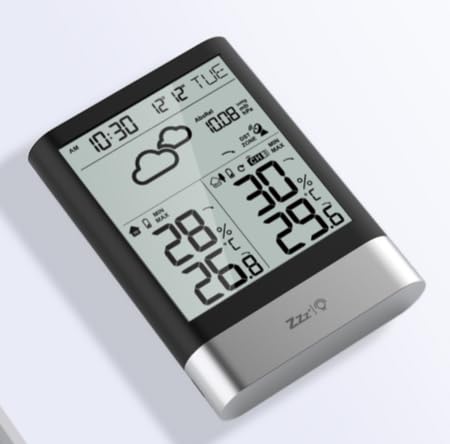
Slika 1: LIORQUE Wireless Weather Station Main Unit. This image shows the front view of the main display unit, highlighting its LCD screen and compact design.
Lastnosti glavne enote:
- 4.3-inch LCD screen with backlight
- Prikaz notranje temperature in vlažnosti
- Prikaz zunanje temperature in vlažnosti
- Ikone vremenske napovedi
- DCF radio-controlled clock with manual setting option
- Double alarm clock with snooze function
- Calendar and day of the week display (7 languages)
- Max/Min temperature and humidity records
- Air pressure display and weather trend
- 12/24 urni prikaz časa
Značilnosti zunanjega senzorja:
- Wireless transmission up to 100m (open area)
- Merjenje temperature in vlažnosti
- Supports hanging or standing placement
- Data updated every 30 seconds
- Supports up to 3 sensors (one included)
Nastavitev
1. Namestitev baterije
- Zunanji senzor: Open the battery compartment cover on the back of the outdoor sensor. Insert 2 x AAA batteries, ensuring correct polarity (+/-). Close the cover.
- Glavna enota: Open the battery compartment cover on the back of the main unit. Insert 3 x AAA batteries, ensuring correct polarity (+/-). Close the cover.
- The main unit will power on and display indoor readings.
2. Združevanje senzorjev
After installing batteries in both units, the main unit will automatically search for the outdoor sensor. The outdoor temperature and humidity should appear on the main unit's display within a few minutes. If the outdoor readings do not appear:
- Ensure both units are within range (up to 100m in open air).
- Press the "TX" button inside the outdoor sensor's battery compartment to manually send a signal.
- On the main unit, press and hold the "CHANNEL" button to initiate a manual search for the sensor.
3. Začetne nastavitve (čas, datum, enote)
The weather station will attempt to synchronize with the DCF radio signal for automatic time setting. This may take several hours, especially in areas with weak signals. You can manually set the time and date if needed.
- Ročna nastavitev časa: Press and hold the "MODE" button to enter time setting mode. Use the "UP" and "DOWN" buttons to adjust values and "MODE" to confirm and move to the next setting (e.g., 12/24 hour format, hour, minute, year, month, day, language for day of week).
- Enote za temperaturo: Press the "°C/°F" button to switch between Celsius and Fahrenheit.
- Air Pressure Units: Press the "BARO" button to cycle through air pressure units (e.g., hPa, inHg).
Navodila za uporabo
Prikaz informacij
The 4.3-inch LCD screen displays various information:
- Čas in datum: Trenutni čas, datum in dan v tednu.
- Notranje branje: Trenutna notranja temperatura in vlažnost.
- Branje na prostem: Current outdoor temperature and humidity from the connected sensor.
- Vremenska napoved: Ikone, ki označujejo napovedane vremenske razmere (npr. sončno, oblačno, deževno).
- Zračni tlak: Current atmospheric pressure and trend.
- Osvetlitev ozadja: The screen backlight activates with a light touch and returns to normal brightness after 10 seconds to conserve battery.
Funkcija budilke
The weather station features a double alarm clock with snooze.
- Nastavitev alarmov: Pritisnite gumb "ALARM", da view Alarm 1. Press "ALARM" again to view Alarm 2. Hold "ALARM" to enter alarm setting mode. Use "UP" and "DOWN" to adjust the hour and minute, and "ALARM" to confirm.
- Vklop/izklop alarmov: Medtem ko viewing an alarm, press "UP" to toggle it on or off. An alarm icon will appear when active.
- Funkcija dremeža: When an alarm sounds, press any button (except "ALARM OFF") to activate snooze. The alarm will sound again after a set interval. Press "ALARM OFF" to stop the alarm completely.
Največji in minimalni zapisi
The weather station records the maximum and minimum indoor/outdoor temperature and humidity values.
- Press the "MAX/MIN" button once to display maximum recorded values.
- Press "MAX/MIN" again to display minimum recorded values.
- Press "MAX/MIN" a third time to return to current readings.
- To clear records, hold the "MAX/MIN" button while viewsnemanje zapisov.
Vzdrževanje
- Zamenjava baterije: Ko se na zaslonu prikaže indikator nizke napolnjenosti baterije, zamenjajte baterije v glavni enoti in zunanjem senzorju. Vedno zamenjajte vse baterije hkrati.
- Čiščenje: Clean the display and unit surfaces with a soft, damp krpo. Ne uporabljajte abrazivnih čistil ali topil.
- Namestitev zunanjega senzorja: For optimal performance and longevity, install the outdoor sensor in a shaded area, protected from direct sunlight and rain. Ensure it is within the 100m wireless range of the main unit.
Odpravljanje težav
| Težava | Možna rešitev |
|---|---|
| Ni prikaza zunanje temperature/vlažnosti. |
|
| Napačen prikaz časa. |
|
| Zaslon je zatemnjen ali prazen. |
|
| Vremenska napoved se zdi netočna. |
|
Specifikacije
- Model: YGH6208
- Znamka: LIORQUE
- Vrsta zaslona: LCD
- Vir napajanja (glavna enota): 3 x AAA baterije (priložene)
- Vir napajanja (zunanji senzor): 2 x AAA baterije (priložene)
- Brezžični doseg: Do 100 m (odprto območje)
- Natančnost temperature: ±0.5 °C
- Senzorska tehnologija: Funk (Wireless)
- Posebne lastnosti: DCF Radio Clock, Alarm, Snooze, Weather Forecast, Max/Min Records, Backlight
- Vključene komponente: Weather Station Main Unit, Outdoor Sensor
Garancija in podpora
LIORQUE products are designed for reliability and performance. For warranty information or technical support, please refer to the contact details provided with your purchase or visit the official LIORQUE webspletnega mesta. Prosimo, shranite dokazilo o nakupu za uveljavljanje garancije.