
Uvod
Thank you for choosing the Surfans F20 Pro Android Hi-Res Music Player. This manual provides essential information for setting up, operating, and maintaining your device. Please read it thoroughly to ensure optimal performance and longevity of your music player.
1. Nastavitev
1.1 Razpakiranje in vsebina paketa
Carefully unpack your Surfans F20 Pro. Ensure all components are present.
Paket naj vsebuje:
- 1 x Surfans F20 Pro Music Player
- (Other accessories like USB cable, protective case, etc., may be included depending on the specific package.)
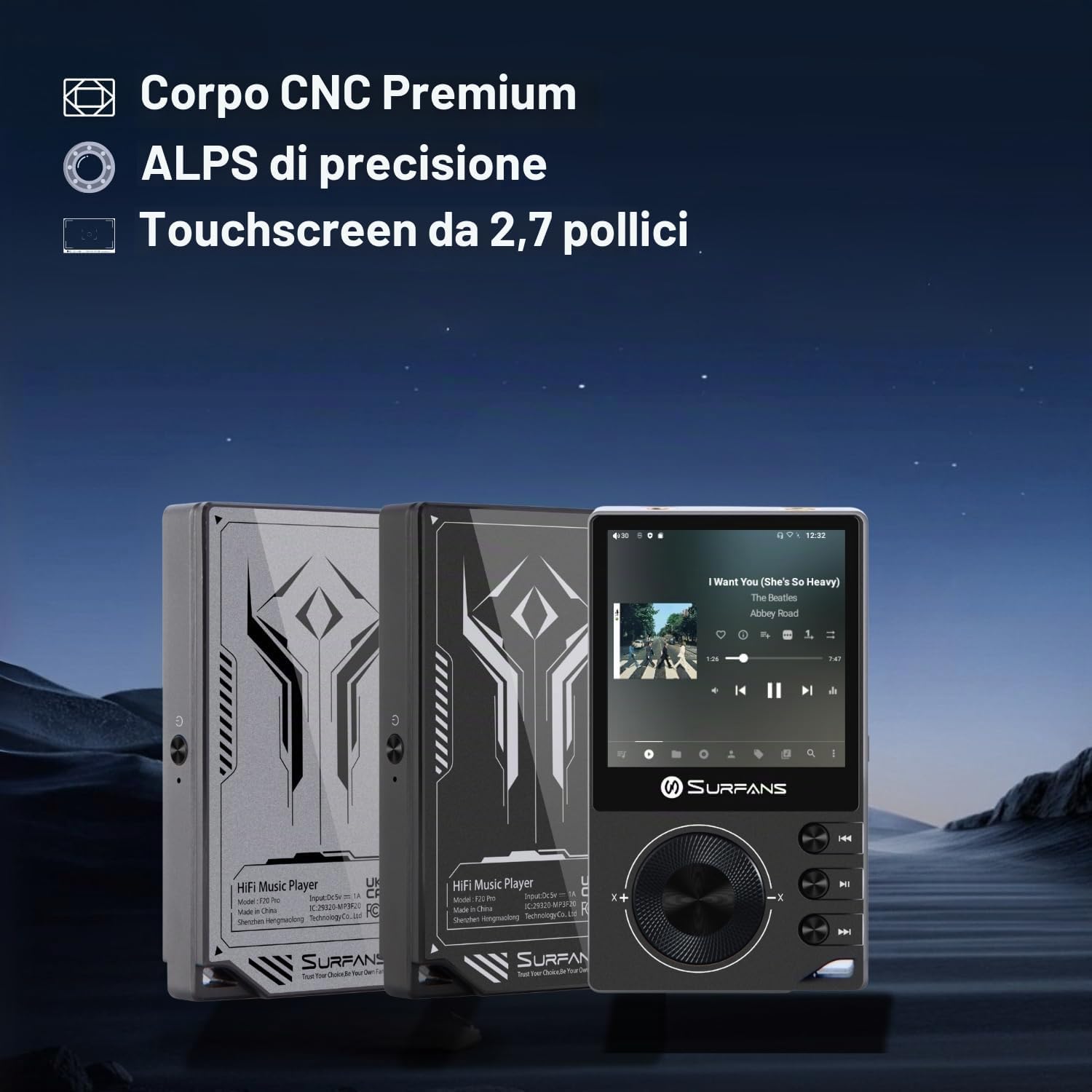
The Surfans F20 Pro features a premium CNC body for durability and aesthetics.
1.2 Polnjenje naprave
Before first use, fully charge the device. Connect the included USB cable to the player's charging port and to a USB power adapter (not included) or a computer's USB port. The charging indicator will show the charging status. A full charge typically takes approximately 3 hours.
The Surfans F20 Pro features a 1450mAh rechargeable battery, providing up to 15 hours of music playback on a full charge.
1.3 Vklop/izklop
- Za vklop: Press and hold the Power button located on the side of the device until the screen lights up.
- Za izklop: Press and hold the Power button until a power-off menu appears on the screen. Select "Power Off" to shut down the device. A short press will turn the screen on/off.
1.4 Začetna konfiguracija
Upon first power-on, you may be guided through an initial setup process. This typically includes:
- Izbira jezika: Izberite želeni jezik.
- Nastavitev Wi-Fi: Connect to a Wi-Fi network to enable streaming services and software updates. Navigate to Settings > Network & Internet > Wi-Fi.
- Google račun: Za dostop do trgovine Google Play in drugih Googlovih storitev se prijavite s svojim Google Računom.
1.5 Razširitev shrambe
The Surfans F20 Pro comes with 32GB of internal memory. You can expand the storage up to 1TB using a Micro SD card. Insert the Micro SD card into the designated slot on the device.
2. Navodila za uporabo
2.1 Naprava končanaview in Navigacija
The F20 Pro features a 2.73-inch touchscreen for primary interaction and physical buttons for quick control.

The Surfans F20 Pro features a touchscreen interface for easy navigation and access to various applications.
- Zaslon na dotik: Tap, swipe, and pinch to navigate menus, select options, and control playback.
- Fizični gumbi: Use the side buttons for power, volume control, and playback (play/pause, skip tracks). The scroll wheel provides tactile navigation.
2.2 Predvajanje glasbe
The F20 Pro supports various audio formats including MP3, AAC, FLAC, WAV, and DSD. You can play music stored on the device's internal memory or Micro SD card, or stream from online services.
- Lokalno predvajanje: Use the pre-installed music player app to browse and play your local audio files.
- Pretakanje: Install and use streaming applications like Spotify, Apple Music, Tidal, or YouTube from the Google Play Store.
2.3 Priključitev avdio naprav
The player offers both wired and wireless audio output options.

The F20 Pro features both 3.5mm single-ended and 4.4mm balanced audio output ports for versatile headphone connectivity.
- Žične slušalke:
- 3.5 mm enostranski: Connect standard headphones to the 3.5mm port.
- 4.4 mm uravnoteženo: For enhanced audio quality and power, connect compatible balanced headphones to the 4.4mm port. This port provides 500mW of power.
- Bluetooth slušalke/zvočniki:
- The F20 Pro supports Bluetooth 5.0 with LDAC for high-fidelity wireless audio.
- To pair: Go to Settings > Connected devices > Pair new device. Ensure your Bluetooth device is in pairing mode.

The F20 Pro supports Bluetooth 5.0 with LDAC for high-quality wireless audio streaming.
This video demonstrates the process of pairing a Bluetooth device with a music player. The steps shown are generally applicable to the Surfans F20 Pro.
2.4 Povezljivost Wi-Fi
The device supports dual-band Wi-Fi (2.4GHz and 5GHz) for fast downloads and smooth streaming.

The Surfans F20 Pro supports dual-band Wi-Fi for reliable internet connection and streaming.
- To connect: Go to Settings > Network & Internet > Wi-Fi. Select your network and enter the password.
- Once connected, you can use pre-installed or downloaded streaming apps.
2.5 Povezava z računalnikom
You can connect the F20 Pro to a computer via USB to transfer files or use it as a USB DAC.
This video illustrates how to easily connect a music player to a PC for file transfer or other functions. The process is similar for the Surfans F20 Pro.
- Predvajalnik povežite z računalnikom s kablom USB.
- On the player, swipe down from the top of the screen to access notifications. Tap on the USB connection notification and select "File transfer" or "USB DAC" mode as needed.
3. Vzdrževanje
3.1 Čiščenje naprave
To keep your F20 Pro in optimal condition:
- Za brisanje zaslona in ohišja uporabite mehko, suho krpo, ki ne pušča vlaken.
- Avoid using abrasive cleaners, solvents, or aerosol sprays, which can damage the finish.
- Naprave ne izpostavljajte prekomerni vlagi.
3.2 Skrb za baterije
Za maksimiranje življenjske dobe in zmogljivosti baterije:
- Izogibajte se ekstremnim temperaturam.
- Naprave ne puščajte popolnoma izpraznjene dlje časa.
- Za dolgotrajno shranjevanje napolnite baterijo do približno 50 % in jo shranite na hladnem in suhem mestu.
3.3 Posodobitve programske opreme
The F20 Pro runs on Android 12. Periodically check for software updates to ensure the best performance and access to new features. Connect to Wi-Fi and go to Settings > System > System update.
4. Odpravljanje težav
4.1 Naprava se ne vklopi
- Prepričajte se, da je baterija napolnjena. Napravo priključite na polnilnik za vsaj 30 minut.
- Try pressing and holding the Power button for 10-15 seconds to force a restart.
4.2 Brez zvočnega izhoda
- Check headphone connections (3.5mm or 4.4mm). Ensure they are fully inserted.
- Verify volume levels on the device and any connected Bluetooth audio devices.
- Če uporabljate Bluetooth, se prepričajte, da je naprava pravilno seznanjena in povezana.
- Test with different headphones or speakers to rule out a faulty audio accessory.
4.3 Wi-Fi or Bluetooth Connection Issues
- Ensure Wi-Fi or Bluetooth is enabled in the settings.
- Restart the F20 Pro and your router/Bluetooth device.
- V nastavitvah pozabite omrežje/napravo in poskusite znova vzpostaviti povezavo.
- Prepričajte se, da ste v dosegu omrežja Wi-Fi ali naprave Bluetooth.
4.4 Počasno delovanje ali zrušitve aplikacij
While the F20 Pro has an Octa-Core processor and 3GB RAM, some apps or heavy multitasking might affect performance.
- Zaprite neuporabljene aplikacije v ozadju.
- Clear app caches (Settings > Apps > [App Name] > Storage & cache > Clear cache).
- Prepričajte se, da je programska oprema naprave posodobljena.
- If issues persist, consider a factory reset (Settings > System > Reset options > Erase all data), but back up your data first.
5. Specifikacije
Below are the key technical specifications for the Surfans F20 Pro Music Player:
| Funkcija | Podrobnost |
|---|---|
| Ime modela | F20 Pro |
| Znamka | Surfans |
| Operacijski sistem | Android 12 |
| Procesor | Osemjedrni |
| RAM | 3 GB |
| Notranji pomnilnik | 32 GB |
| Razširljiv prostor za shranjevanje | Do 1 TB prek Micro SD kartice |
| DAC | Dual ESS9018 |
| Podpora za zvok visoke ločljivosti | DSD512 |
| Povezljivost | AUX, Bluetooth 5.0 (LDAC), USB, Dual-Band Wi-Fi (2.4GHz & 5GHz) |
| Velikost zaslona | 2.73 palcev |
| Tehnologija zaslona | Zaslon na dotik |
| Podprti zvočni formati | MP3, AAC, FLAC, WAV, DSD |
| Uravnotežen izhod | 4.4mm (500mW) |
| Kapaciteta baterije | 1450 mAh |
| Življenjska doba baterije | Up to 15 hours music playback |

The Surfans F20 Pro features dual ESS9018 DACs for superior audio decoding.

Internal audio architecture showing dual DACs and multi-stage amplifier design for both single-ended and balanced outputs.
6. Garancija in podpora
For warranty information and technical support, please refer to the documentation provided with your purchase or contact the seller directly. The seller for this product is SurfansAudio.
Shranite dokazilo o nakupu za morebitne garancijske zahtevke.