
1. Uvod
This manual provides detailed instructions for the safe and efficient use of your Surfans F20 Pro Android Hi-Res Music Player. Please read this manual thoroughly before operating the device and retain it for future reference.
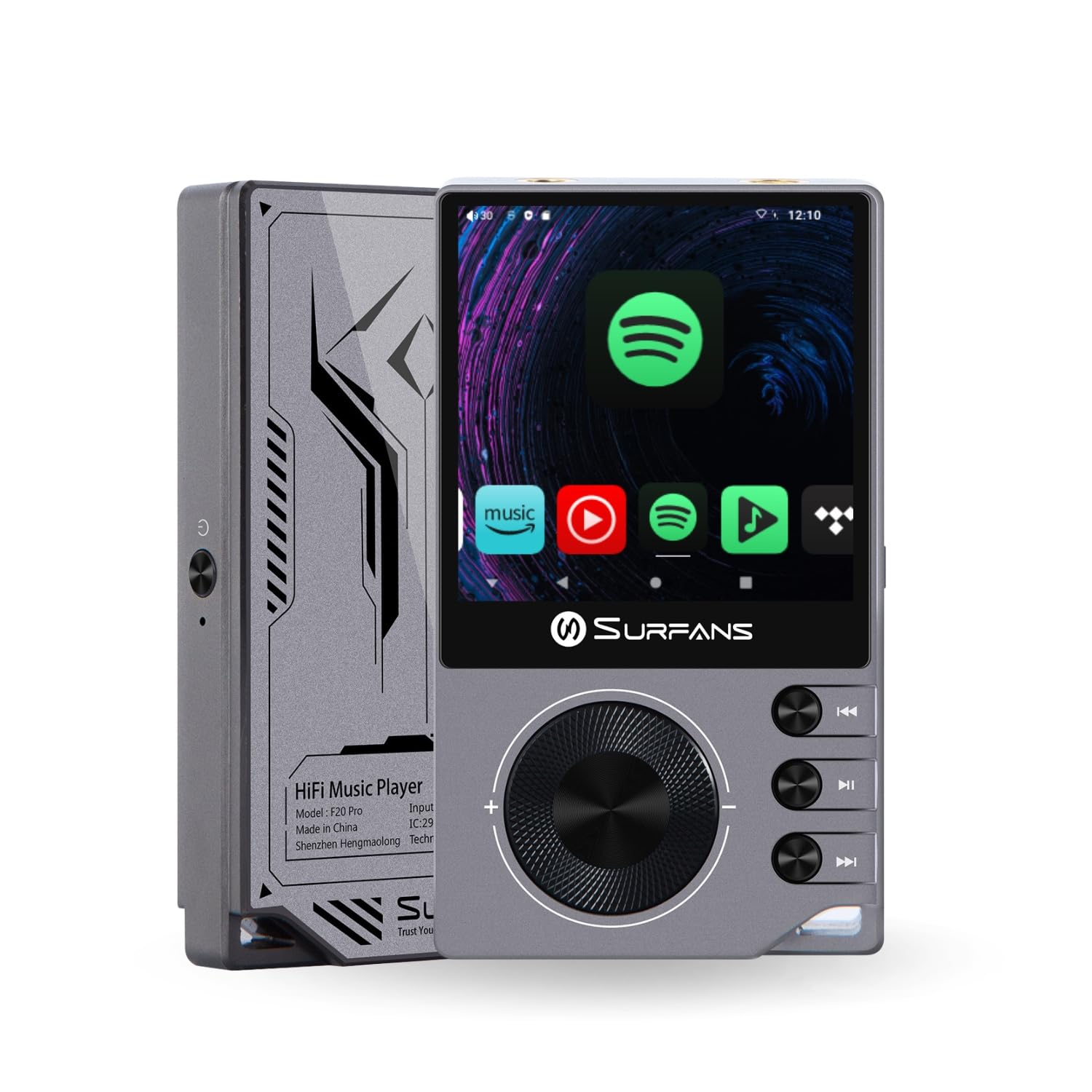
The Surfans F20 Pro Hi-Res Music Player, showcasinzaradi svoje kompaktne zasnove in vmesnika z zaslonom na dotik.
2. Vsebina paketa
Preverite, ali so v paketu prisotni vsi elementi:
- Surfans F20 Pro Hi-Res Music Player
- USB Type-C kabel
- 32 GB MicroSD Memory Card (pre-installed or separate)
- Zaščitna torbica
- Uporabniški priročnik (ta dokument)
3. Naprava je končanaview
Familiarize yourself with the physical components and ports of your F20 Pro player.

Spredaj in zadaj view of the Surfans F20 Pro, highlighting its robust CNC metal chassis and button layout.
3.1. Ključne značilnosti
- Dual ESS9018Q2M DACs: For high-fidelity audio processing.
- Octa-Core Android 12 System: Enables streaming app compatibility and smooth operation.
- 3.5mm Single-Ended & 4.4mm Balanced Outputs: Versatile headphone connectivity.
- Bluetooth 5.0 with LDAC: High-quality wireless audio transmission.
- Dvopasovni Wi-Fi (2.4 GHz in 5 GHz): For stable internet connectivity.
- Razširljiv prostor za shranjevanje: Supports up to 1TB via MicroSD card.
- 2.7-palčni zaslon na dotik: Intuitiven uporabniški vmesnik.
4. Nastavitev
4.1. Polnjenje naprave
Before first use, fully charge the F20 Pro. Connect the included USB Type-C cable to the device's charging port and a compatible USB power adapter (not included) or computer USB port. The charging indicator will show the charging status.
4.2. Vstavljanje kartice MicroSD
The F20 Pro supports MicroSD cards up to 1TB for expanded storage. Locate the MicroSD card slot on the side of the device. Gently insert the card until it clicks into place. To remove, push the card in again until it springs out.
4.3. Začetni vklop
Press and hold the power button until the screen illuminates. Follow the on-screen prompts to complete the initial setup, including language selection and Wi-Fi connection.
4.4. Povezovanje z Wi-Fi
Pojdite na Nastavitve > Omrežje in internet > Wi-Fi. Select your desired network and enter the password if prompted. The F20 Pro supports both 2.4GHz and 5GHz Wi-Fi bands.

The Surfans F20 Pro demonstrating its dual-band Wi-Fi capability for fast and stable connections.
4.5. Bluetooth seznanjanje
Za povezavo Bluetooth slušalk ali zvočnikov:
- Prepričajte se, da je vaša naprava Bluetooth v načinu seznanjanja.
- On the F20 Pro, go to Nastavitve > Povezane naprave > Seznani novo napravo.
- Select your device from the list and confirm pairing.

An illustration of the Bluetooth 5.0 chip, indicating support for high-resolution wireless audio codecs like LDAC.
5. Upravljanje naprave
5.1. Osnovna navigacija
The F20 Pro features a 2.7-inch touchscreen for navigation. Swipe to scroll, tap to select, and use the physical buttons for quick controls:
- Gumb za vklop: Vklop/izklop, vklop/izklop zaslona.
- Kolo za glasnost: Prilagodi glasnost zvočnega izhoda.
- Gumbi za nadzor predvajanja: Predvajanje/pavza, naslednja skladba, prejšnja skladba.
5.2. Predvajanje glasbe
The F20 Pro supports various audio formats including DSD512, 192kHz/24bit, FLAC, WAV, WMA, M4A, MP3, MP2, and AAC.
5.2.1. Lokalno Files
Prenos glasbe files to the device's internal storage or MicroSD card via USB connection to a computer. Use the pre-installed music player application to browse and play your library.
5.2.2. Streaming Applications
The Android 12 operating system allows installation of streaming apps like Spotify, Apple Music, Tidal, or YouTube. Connect to Wi-Fi and download apps from the Google Play Store or other compatible sources.

The Surfans F20 Pro's screen showing various streaming application icons, demonstrating its Android capabilities.
5.3. Priključki za slušalke
The device offers both single-ended and balanced audio outputs.
- 3.5 mm enojni izhod: Standard headphone jack (125mW/32Ω).
- 4.4 mm uravnotežen izhod: For enhanced audio performance with compatible headphones (500mW/32Ω).

Od blizu view of the 3.5mm single-ended and 4.4mm balanced audio output ports on the Surfans F20 Pro.
6. Vzdrževanje
6.1. Čiščenje
Use a soft, dry, lint-free cloth to clean the device. Avoid using abrasive cleaners or solvents, which may damage the surface.
6.2. Posodobitve programske opreme
Periodically check for software updates to ensure optimal performance and access to new features. Updates can typically be found in Nastavitve > Sistem > Posodobitev sistema.
6.3. Skrb za baterijo
Da podaljšate življenjsko dobo baterije, se izogibajte pogostemu popolnemu praznjenju naprave. Ko naprave dalj časa ne uporabljate, jo shranite na hladnem in suhem mestu.

Notranji view of battery cells, representing the long-lasting battery capacity of the F20 Pro.
7. Odpravljanje težav
If you encounter issues with your F20 Pro, refer to the following common problems and solutions:
| Težava | Možen vzrok | rešitev |
|---|---|---|
| Naprava se ne vklopi | Prazna baterija; zrušitev sistema | Charge the device; Press and hold the power button for 10-15 seconds to force restart. |
| Ni zvoka | Volume too low; Incorrect output selected; Faulty headphones | Increase volume; Check headphone connection; Test with different headphones. |
| Ni mogoče vzpostaviti povezave z Wi-Fi | Napačno geslo; Izven dosega; Težava z usmerjevalnikom | Verify password; Move closer to router; Restart router. |
| Počasno delovanje/zrušitve aplikacije | Preveč aplikacij, ki se izvajajo; premalo prostora za shranjevanje; zastarela programska oprema | Close background apps; Free up storage; Check for system updates. |
8. Specifikacije
Detailed technical specifications for the Surfans F20 Pro:
| Funkcija | Podrobnost |
|---|---|
| Znamka | Surfans |
| Ime modela | F20 PRO |
| Čipi DAC | Dvojni ESS9018Q2M |
| op-Amps | Dual OPA1612 |
| Operacijski sistem | Android 12 |
| RAM | 3 GB |
| Notranji pomnilnik | 32 GB |
| Razširljiv prostor za shranjevanje | Do 1 TB prek kartice MicroSD |
| Velikost zaslona | 2.73 palcev |
| Povezljivost | Aux, Bluetooth 5.0 (LDAC), USB Type-C, Wi-Fi (2.4GHz & 5GHz) |
| Avdio izhodi | 3.5mm Single-Ended (125mW/32Ω), 4.4mm Balanced (500mW/32Ω) |
| Podprti zvočni formati | DSD512, 192kHz/24bit, FLAC, WAV, WMA, M4A, MP3, MP2, AAC |
| barva | siva |

An illustration of the dual ESS9018K2M DAC chips, central to the F20 Pro's high-resolution audio capabilities.
9. Informacije o garanciji
The Surfans F20 Pro comes with a 1-letna garancija od datuma nakupa. Ta garancija krije proizvodne napake in napake v izdelavi pri normalni uporabi. Ne krije škode, ki jo povzroči napačna uporaba, nesreče, nepooblaščene spremembe ali običajna obraba. Prosimo, shranite dokazilo o nakupu za uveljavljanje garancije.
10. Podpora strankam
For further assistance, technical support, or warranty inquiries, please contact Surfans customer service through the official website or your retailer. You may also find additional resources and FAQs online.