
1. Uvod
Welcome to the OnePlus 15 user manual. This guide provides essential information for setting up, operating, maintaining, and troubleshooting your new smartphone. The OnePlus 15 is designed for high performance and extended battery life, featuring a Snapdragon 8 Elite Gen 5 processor, a 7300mAh battery, and a triple 50 MP camera system. Please read this manual thoroughly to ensure optimal use of your device.
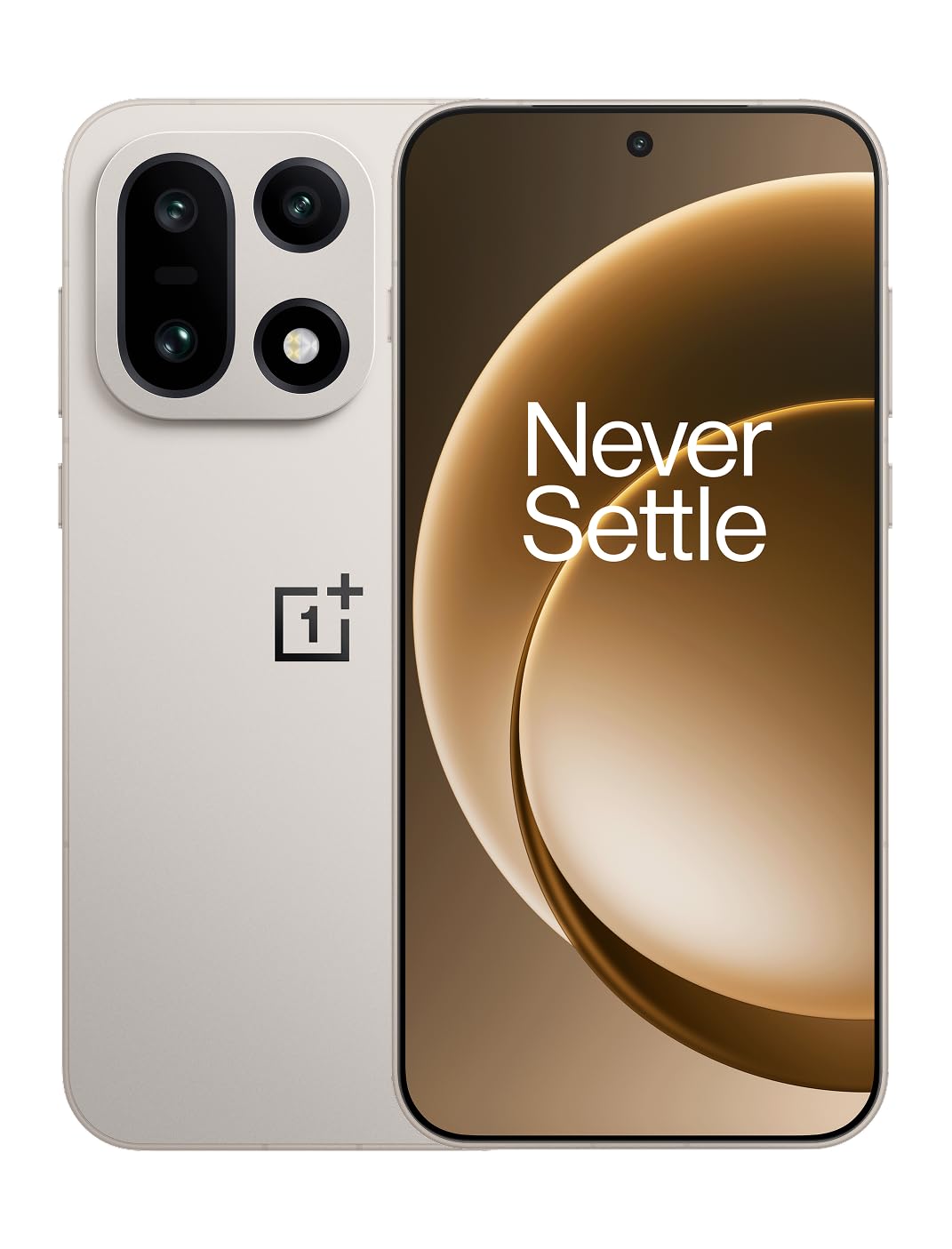
Slika 1: Spredaj view pametnega telefona OnePlus 15.
2. Kaj je v škatli
Preverite, ali so v embalaži izdelka vsi elementi:
- OnePlus 15 Smartphone (x1)
- Polnilnik (x1)
- USB Data Cable (x1)
- Orodje za izmet SIM kartice (x1)
- Hitri vodnik (x1)
- Safety Guide (x1)

Figure 2: Included items in the OnePlus 15 package.
3. Nastavitev
3.1. Namestitev kartice SIM
The OnePlus 15 supports Dual-SIM functionality. To install your SIM card(s):
- Poiščite pladenj za kartico SIM na strani naprave.
- Vstavite orodje za izmet SIM kartice v majhno luknjo poleg pladnja in močno pritisnite, dokler pladenj ne izskoči.
- Vstavite kartico(-e) Nano-SIM v reži z zlatimi kontakti obrnjenimi navzdol. Prepričajte se, da so pravilno nameščene.
- Previdno vstavite pladenj za kartico SIM nazaj v telefon.

Slika 3: stran view of the OnePlus 15, highlighting the SIM card tray.
3.2 Začetni vklop in nastavitev
Če želite napravo prvič vklopiti:
- Pritisnite in držite gumb za vklop (nahaja se na desni strani), dokler se ne prikaže logotip OnePlus.
- Sledite navodilom na zaslonu, da dokončate začetno nastavitev, vključno z izbiro jezika, povezavo Wi-Fi, prijavo v Google Račun in varnostnimi nastavitvami.
3.3. Polnjenje baterije
The OnePlus 15 is equipped with a 7300mAh battery. To charge your device:
- Žično polnjenje: Connect the provided USB Data Cable to the Type-C port on the bottom of the phone and the other end to the charger. Plug the charger into a power outlet.
- Brezžično polnjenje: Place the phone on a compatible wireless charging pad. Ensure the phone is centered on the pad for efficient charging.
A full charge provides approximately 68.7 hours of talk time.

Figure 4: Illustration of the 7300mAh battery capacity.
4. Upravljanje vaše naprave
4.1. Zaslon
The OnePlus 15 features a 6.78-inch AMOLED display with a 2772x1272 resolution and a 165 Hz refresh rate. This provides smooth visuals and vibrant colors. Adjust display settings such as brightness, color mode, and refresh rate in the device settings menu.
4.2. Zmogljivost
Powered by the Snapdragon 8 Elite Gen 5 processor and 16GB of RAM, the OnePlus 15 delivers fast and efficient performance for multitasking, gaming, and demanding applications. The Tri-Chip System, combining the Snapdragon 8 Elite Gen 5 with a dedicated Wi-Fi chip and CPU scheduler, optimizes for speed, connectivity, and power efficiency.
Video 1: Konecview of the OnePlus 15's performance capabilities and user experience.
4.3. Sistem kamer
The device is equipped with a Triple 50 MP camera system, offering wide, ultra-wide, and telephoto lenses for versatile photography. The DetailMax Engine enhances photo quality in various lighting conditions, including day, night, and motion shots. Both front and rear cameras are available for capturing images and videos.

Slika 5: Zadaj view OnePlus 15, razstavaasing the triple camera system.
Figure 6: DetailMax Engine for stunning photos.
4.4. Povezljivost
The OnePlus 15 supports a range of connectivity options:
- Brezžično: Wi-Fi, Bluetooth, NFC, Infrared.
- Žično: USB Type-C.
- Navigacija: Dual-band GPS (L1+L5) and Galileo (E1+E5a).
- SIM: Dual SIM support for managing multiple networks.
4.5. Operacijski sistem
The device runs on Android 16 with OxygenOS 16, providing a fast and smooth user experience. Regular software updates will be provided to enhance features and security.
5. Vzdrževanje
5.1. Vzdržljivost in zaščita
The OnePlus 15 is built with IP66/IP68/IP69 and IP19K ratings, offering resistance against dust and water. While designed to be durable, avoid exposing the device to extreme conditions or prolonged submersion in water.

Figure 7: OnePlus 15 demonstrating water resistance.
5.2. Čiščenje naprave
Use a soft, lint-free cloth to clean the screen and body of your phone. Avoid using abrasive materials or harsh chemicals, which can damage the display or finish.
5.3. Posodobitve programske opreme
Periodically check for software updates in the device settings. Keeping your software up-to-date ensures you have the latest features, security patches, and performance improvements.
6. Odpravljanje težav
This section addresses common issues you might encounter with your OnePlus 15.
6.1. Naprava se ne vklopi
- Prepričajte se, da je baterija napolnjena. Telefon priključite na polnilnik in počakajte nekaj minut, preden ga poskusite znova vklopiti.
- Pritisnite in držite gumb za vklop vsaj 10-15 sekund, da prisilite ponovni zagon.
6.2. Poor Network Connectivity
- Preverite, ali je vaša SIM-kartica pravilno vstavljena.
- Verify that airplane mode is not enabled.
- Ponovno zaženite napravo.
- If issues persist, contact your network provider.
6.3. Aplikacije se sesuvajo ali zamrzujejo
- Zaprite in znova odprite aplikacijo.
- Clear the app's cache and data in device settings.
- Prepričajte se, da je aplikacija posodobljena na najnovejšo različico.
- If the issue is widespread, consider restarting the phone.
6.4. Hitro praznjenje baterije
- Zmanjšajte svetlost zaslona in čas izklopa zaslona.
- Onemogočite neuporabljene funkcije, kot so Wi-Fi, Bluetooth ali GPS, ko jih ne potrebujete.
- Identify and close power-intensive applications running in the background.
- Check for recent software updates, as they often include battery optimizations.
7. Specifikacije
Detailed technical specifications for the OnePlus 15 (Model: CPH2749).
| Funkcija | Podrobnost |
|---|---|
| Ime modela | OnePlus 15 |
| Številka modela artikla | CPH2749 |
| Dimenzije izdelka | 6.36 x 3.02 x 0.32 palcev |
| Teža predmeta | 1.28 funtov |
| Operacijski sistem | Android 16 |
| Model procesorja | Snapdragon 8 Elite Gen 5 |
| Hitrost procesorja | 4.61 GHz |
| Velikost nameščenega RAM-a | 16 GB |
| Zmogljivost pomnilnika | 512 GB |
| Velikost stoječega zaslona | 6.78 palcev |
| Resolucija | 2772*1272 |
| Hitrost osveževanja | 165 Hz |
| Kapaciteta baterije | 7300 milliamp Ure (7300 mAh) |
| Čas pogovora po telefonu | 68.7 ur |
| Tehnologije povezljivosti | Infrared, NFC, USB, Wi-Fi, Bluetooth |
| GPS | Dual band: GPS(L1+L5) Galileo(E1+E5a) |
| Posebne lastnosti | Dual SIM, Wireless Charging |
| Avdio priključek | Type-C headphones: supported Type-C digital headphones & Type-C analog headphones |
| Druge funkcije fotoaparata | Front, Rear (Triple 50 MP Camera System) |
| Ocena IP | IP66/IP68/IP69 and IP19K rated |
| barva | Sand Storm |
8. Informacije o garanciji
Your OnePlus 15 device is covered by a limited manufacturer's warranty. Please refer to the included Safety Guide or visit the official OnePlus website for detailed warranty terms and conditions, including coverage duration and service procedures. Keep your proof of purchase for warranty claims.
9. Podpora
For further assistance, technical support, or to access additional resources, please visit the official OnePlus support website or contact customer service. You can find contact details and FAQs on the OnePlus webmesto.
Spletni viri: www.oneplus.com/support