
1. Uvod
This manual provides detailed instructions for the safe and effective use of your Moukey MPS5 Portable Karaoke Machine. Please read this manual thoroughly before operating the device and retain it for future reference. The MPS5 is a versatile portable speaker system designed for various audio playback needs, including karaoke, music streaming, and public address, featuring wireless microphones and multiple connectivity options.
2. Kaj je v škatli
Carefully unpack all items from the box. Ensure all components listed below are present and in good condition.
- Moukey MPS5 Portable Karaoke Machine (1 unit)
- Brezžični mikrofoni (2 enoti)
- Polnilni kabel USB (1 enota)
- 3.5mm AUX Cable (1 unit)
- Shoulder Strap (1 unit)
- Uporabniški priročnik (1 enota)
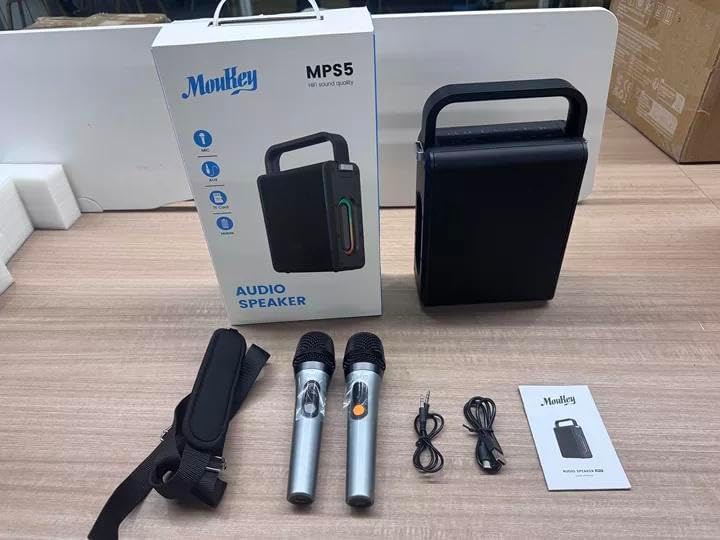
Image: All components included in the Moukey MPS5 package.
3. Izdelek je končanview
The Moukey MPS5 is a compact yet powerful portable karaoke machine. It features a robust design with integrated LED lighting on the sides, enhancing the user experience. A sturdy handle and an included shoulder strap provide convenient portability.
Slika: spredaj view of the Moukey MPS5 speaker.

Slika: Stran view of the Moukey MPS5, showing the LED lighting.
4. Ključne značilnosti
- Excellent Sound Output: The MPS5 delivers 200W peak power (RMS 60W) through a 4-inch woofer and two 2-inch tweeters, providing full-range stereo sound with enhanced bass.
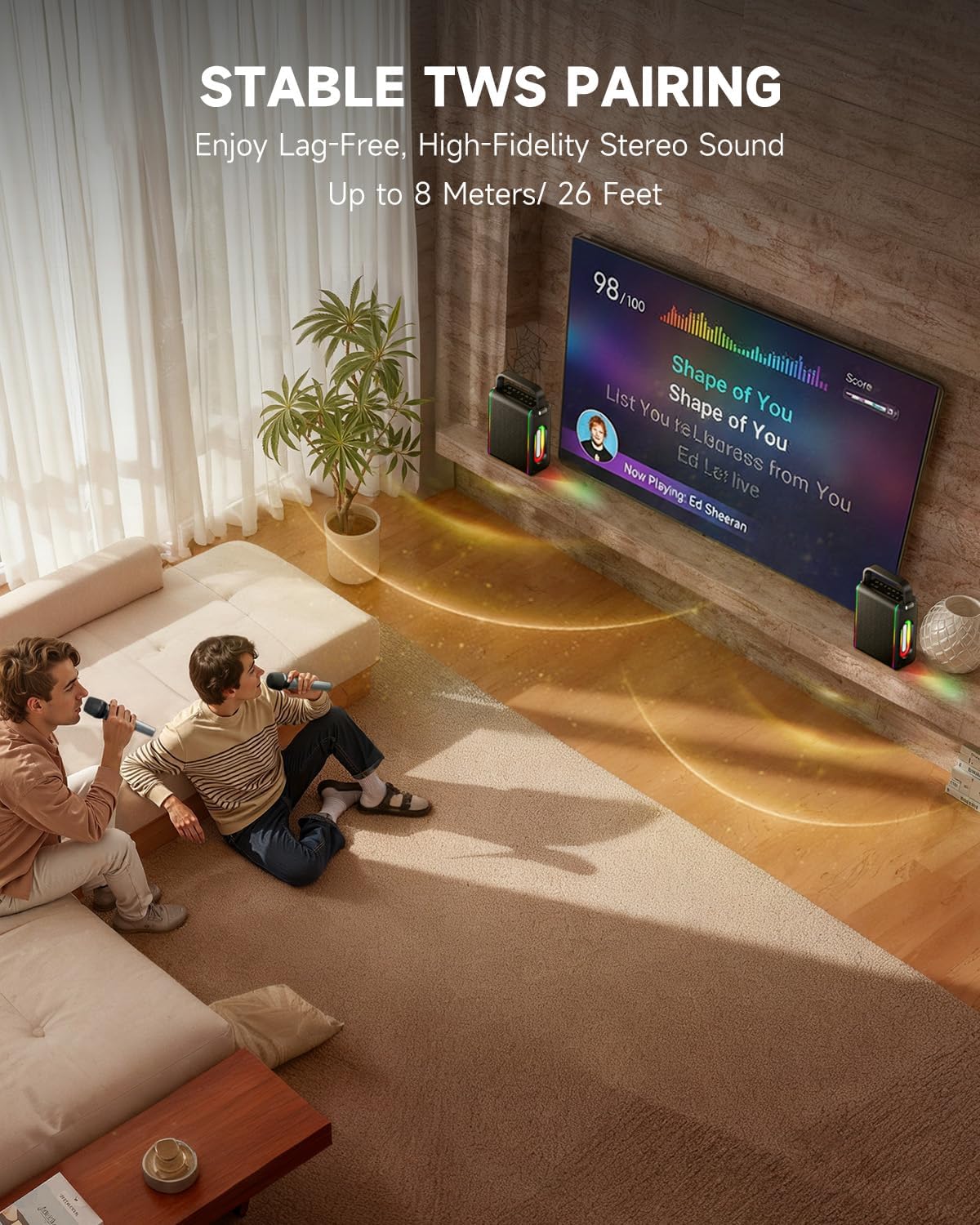
- Powerful Functionality: Supports Bluetooth 5.3 for wireless connection to various devices. Also includes Micro TF card, Flash USB, MP3, and AUX IN playback options. Features stable TWS (True Wireless Stereo) pairing for connecting two MPS5 units for a wider stereo soundstage.
- Izjemno dolga življenjska doba baterije: The rechargeable battery provides up to 8 hours of continuous music playback on a 2-hour charge, suitable for extended use indoors or outdoors.
- Lahek in prenosen dizajn: Weighing only 2kg, the MPS5 is designed for easy transport. It can be carried by hand using the integrated handle or with the included shoulder strap.
- Dvojni brezžični mikrofoni: Includes two 2.4Ghz rechargeable microphones with a connection range of up to 60 feet and up to 8 hours of use time per charge (2-3 hours charging time). Features one-tap connectivity for effortless pairing.

Image: Internal speaker components of the MPS5.

Image: MPS5 connected to multiple devices via Bluetooth.

Image: Battery life and charging details for the MPS5.

Image: Demonstrating the portability of the MPS5 with hand and shoulder strap options.

Image: The two wireless microphones for the MPS5.
5. Nastavitev
5.1 Polnjenje zvočnika in mikrofonov
Before first use, fully charge the MPS5 speaker and both wireless microphones.
- govornik: Connect the provided USB Type-C cable to the charging port on the speaker and to a compatible USB power adapter (not included). The charging indicator light will show charging status. A full charge takes approximately 2 hours.
- Mikrofoni: Each microphone has a charging port. Connect them to a USB power source using the provided USB cable. Charging time for microphones is 2-3 hours.
5.2 Vklop/izklop
- Za vklop zvočnika pritisnite in držite gumb za vklop (U) on the top panel for 2 seconds.
- Za izklop pritisnite in držite gumb za vklop (U) ponovno za 2 sekunde.
5.3 Bluetooth seznanjanje
- Ensure the MPS5 speaker is powered on and in Bluetooth mode (indicated by a blue LED). If not, press the 'M' (Mode) button to switch to Bluetooth mode.
- Na mobilni napravi (pametnem telefonu, tabličnem računalniku itd.) omogočite Bluetooth in poiščite razpoložljive naprave.
- Select 'Moukey MPS5' from the list of devices to pair. A voice prompt will confirm successful connection.
5.4 Združevanje TWS (pravi brezžični stereo)
To achieve stereo sound, you can pair two Moukey MPS5 speakers together.
- Ensure both MPS5 speakers are powered on and in Bluetooth mode, but not connected to any other device.
- On one of the speakers, double-press the 'M' (Mode) button. The speaker will enter TWS pairing mode.
- The two speakers will automatically connect to each other. A voice prompt will confirm successful TWS pairing.
- Once TWS is established, connect your mobile device to one of the MPS5 speakers via Bluetooth as described in section 5.3. Both speakers will then play audio in stereo.
Video: Hiter pregledview of the MPS5 Karaoke Machine, demonstrating TWS pairing and other features.
6. Navodila za uporabo
6.1 Nadzor nadview
The top panel of the MPS5 speaker features several buttons for controlling playback, volume, and microphone settings.
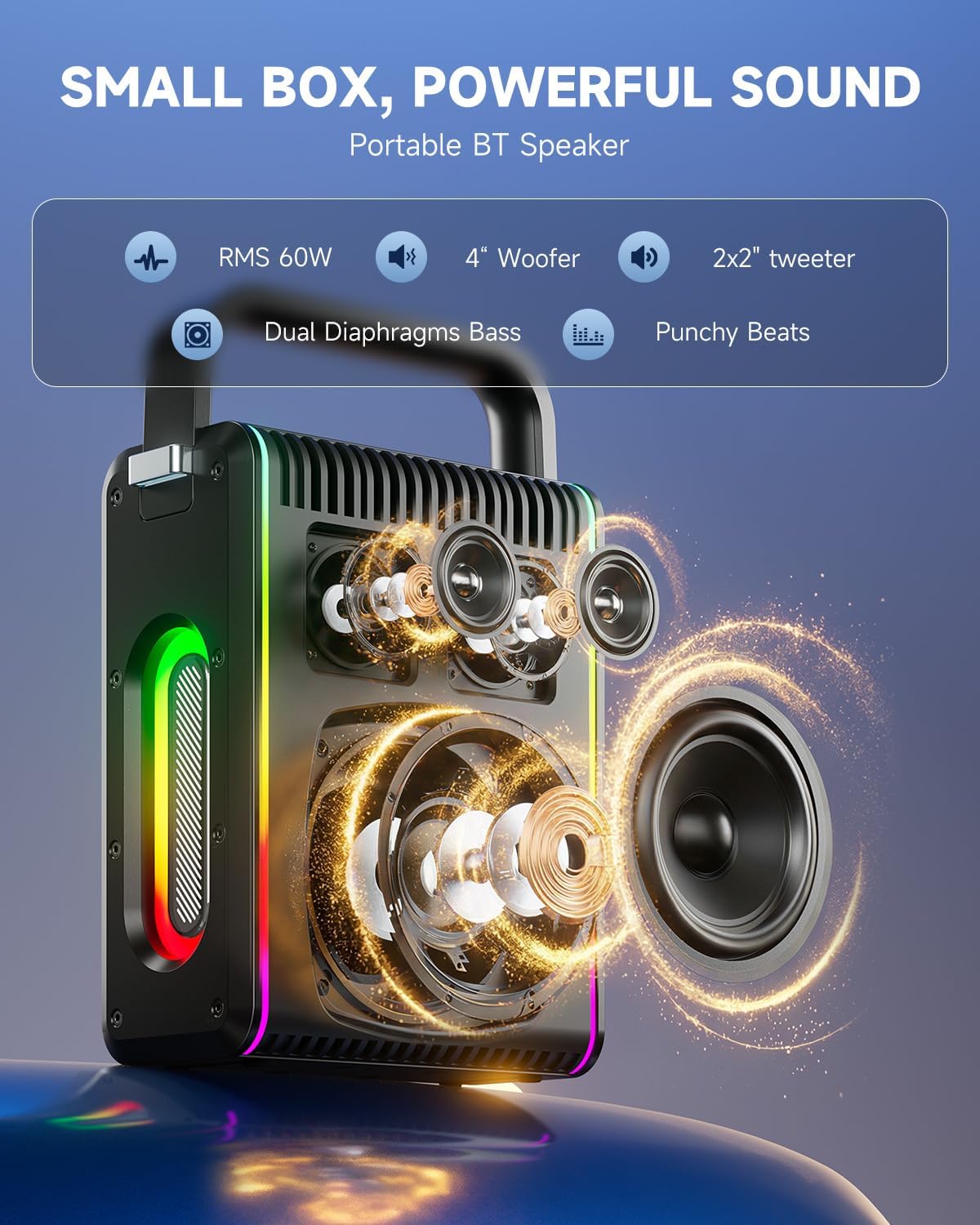
Image: Top control panel of the MPS5.
- Gumb za prižig (U): Pritisnite in držite 2 sekund za vklop/izklop.
- Gumb za način (M): Short press to cycle through input modes (Bluetooth, AUX, USB, TF Card). Double-press to initiate TWS pairing.
- Microphone Volume (Mic - / Mic +): Prilagodi glasnost priključenih mikrofonov.
- Echo Adjustment (R- / R+): Prilagodi odmevni učinek za mikrofone.
- Predvajaj/pavza (▶): Predvaja ali začasno ustavi trenutno skladbo.
- Zmanjšanje glasnosti (-): Decreases the main speaker volume.
- Povečaj glasnost (+): Increases the main speaker volume.
- EQ A/E: Short press to switch between EQ modes. Long press to toggle between original sound and accompaniment elimination.
6.2 Uporaba mikrofona
The MPS5 comes with two wireless microphones for karaoke and vocal performances.
- Vklop/izklop: Pritisnite in držite gumb za vklop na mikrofonu, da ga vklopite ali izklopite.
- Seznanjanje: The microphones are pre-paired with the speaker. If re-pairing is needed, ensure the speaker is on, then power on the microphone. They should connect automatically.
- Microphone Disconnect/Reconnect: Press the dedicated microphone button on the speaker's control panel to quickly disconnect or reconnect the microphones.
6.3 Načini avdio vhoda
In addition to Bluetooth, the MPS5 supports several wired and local storage input options.

Image: Input ports on the MPS5 speaker.
- AUX vhod: Connect an external audio device using the 3.5mm AUX cable. Select AUX mode using the 'M' button.
- USB predvajanje: Vstavite USB-ključ z zvočno datoteko MP3 filev vrata USB. Zvočnik bo samodejno preklopil v način USB in začel predvajati.
- Predvajanje kartice TF: Insert a Micro TF card containing MP3 audio filev režo za kartico TF. Zvočnik bo samodejno preklopil v način kartice TF in začel predvajati.
6.4 LED osvetlitev
The MPS5 features dynamic LED lighting on its sides. Use the dedicated LED button (if available, or refer to the 'M' button for light control if combined) to cycle through different light modes or turn them off.
7. Vzdrževanje
- Čiščenje: Za čiščenje zunanjosti zvočnika uporabite mehko, suho krpo. Ne uporabljajte tekočih čistil ali abrazivnih materialov.
- Shranjevanje: Napravo shranjujte na hladnem in suhem mestu, stran od neposredne sončne svetlobe in ekstremnih temperatur.
- Vzdrževanje baterije: Da podaljšate življenjsko dobo baterije, se izogibajte pogostemu popolnemu praznjenju baterije. Napravo redno polnite, tudi če je dalj časa ne uporabljate.
8. Odpravljanje težav
If you encounter issues with your Moukey MPS5, refer to the following common problems and solutions:
| Težava | Možen vzrok | rešitev |
|---|---|---|
| Brez moči | Baterija je prazna. | Zvočnik napolnite s priloženim kablom USB Type-C. |
| Ni zvoka iz zvočnika | Glasnost je prenizka ali utišana. Izbran je napačen način vnosa. | Increase volume using the '+' button. Press 'M' to cycle through input modes. |
| Bluetooth povezovanje ni uspelo | Zvočnik ni v načinu seznanjanja. Naprava je predaleč. | Ensure speaker is in Bluetooth mode. Move device closer to speaker. Try restarting both devices. |
| Mikrofon ne deluje | Microphone is off or uncharged. Microphone is disconnected. | Ensure microphone is charged and powered on. Press the microphone button on the speaker to reconnect. |
| Seznanjanje TWS ni uspelo | Zvočniki so že povezani z drugo napravo. | Ensure both speakers are not connected to any other Bluetooth device before initiating TWS pairing. |
9. Specifikacije
- Znamka: Moukey
- Številka modela: MPS5
- Izhodna vattage: 200 vatov (najvišja)
- Tehnologija povezljivosti: Bluetooth 5.3
- Avdio vhod: Bluetooth, TF card, USB, MP3, AUX, Wired microphones
- Število kanalov: 2
- vir energije: Napajanje na baterije
- Vrsta priključka: USB tipa C
- Mere predmeta (D x Š x V): 2.36 x 6.3 x 12.2 palcev
- Teža artikla: Približno 2 kg
- Združljive naprave: Smartphone, Tablet, Laptop, MP3 Player, Microphone
- barva: Black with Silver Accents
10. Garancija in podpora
The Moukey MPS5 Portable Karaoke Machine comes with a 1-letna garancija od datuma nakupa. Ta garancija krije proizvodne napake in napake v izdelavi pri normalni uporabi. Za uveljavljanje garancije shranite dokazilo o nakupu.
For technical support, troubleshooting assistance, or warranty inquiries, please contact Moukey customer service through the retailer where the product was purchased or visit the official Moukey webspletno mesto za kontaktne podatke.