
1. Končanoview
The NBD K200 is a compact digital camera designed for capturing high-quality photos and videos. It features a 64MP photo resolution, 4K video recording capabilities, 16X digital zoom, and autofocus. Its lightweight design and user-friendly interface make it suitable for various users, including beginners and travelers.

Slika: Konecview of the NBD K200 camera highlighting its 64MP, 4K, Beauty Mode, Backlight Portrait, Auto Focus, 16X Zoom, Smart Stabilization, and Built-in Filters features.
Vsebina paketa
Prepričajte se, da so v paketu prisotni vsi elementi:
- NBD K200 Digital Camera Body
- 64GB TF Card (MicroSD Card)
- USB-C kabel
- Ovratni trak
- Uporabniški priročnik (ta dokument)

Image: The NBD K200 camera, USB cable, card reader, 64GB memory card, lens cleaning cloth, and camera wrist strap, presented as a complete kit.
2. Nastavitev
2.1 Polnjenje baterije
Before first use, fully charge the camera battery. The camera uses a Lithium Ion battery.
- Insert the battery into the camera's battery compartment.
- Connect the camera to a power source using the provided USB-C cable.
- The charging indicator light will show the charging status. A full charge typically allows for over 300 photos.

Image: The NBD K200 camera connected via USB-C cable to a power bank, illustrating the charging process and highlighting its powerful battery life for approximately 300 photos per charge.
2.2 Vstavljanje pomnilniške kartice
The camera supports microSD cards. A 64GB TF card is included.
- Poiščite režo za pomnilniško kartico na fotoaparatu.
- Insert the TF card into the slot with the gold contacts facing the correct direction until it clicks into place.
- Za odstranitev kartico nežno pritisnite, dokler ne izskoči.
3. Upravljanje kamere
3.1 Vklop/izklop
Pritisnite in držite gumb za vklop, da vklopite ali izklopite kamero.
3.2 Osnovne kontrole
The camera features a Multi-Functional Roller Button for simplified operation.
- Valjčni gumb: Used for one-touch mode switching and precise zoom adjustment. Roll left to zoom out, roll right to zoom in.
- Sprožilec: Pritisnite za fotografiranje ali začetek/ustavitev snemanja videa.
- Gumb za način: Cycles through different shooting modes.
- Gumb Flash: Activates the built-in flash.
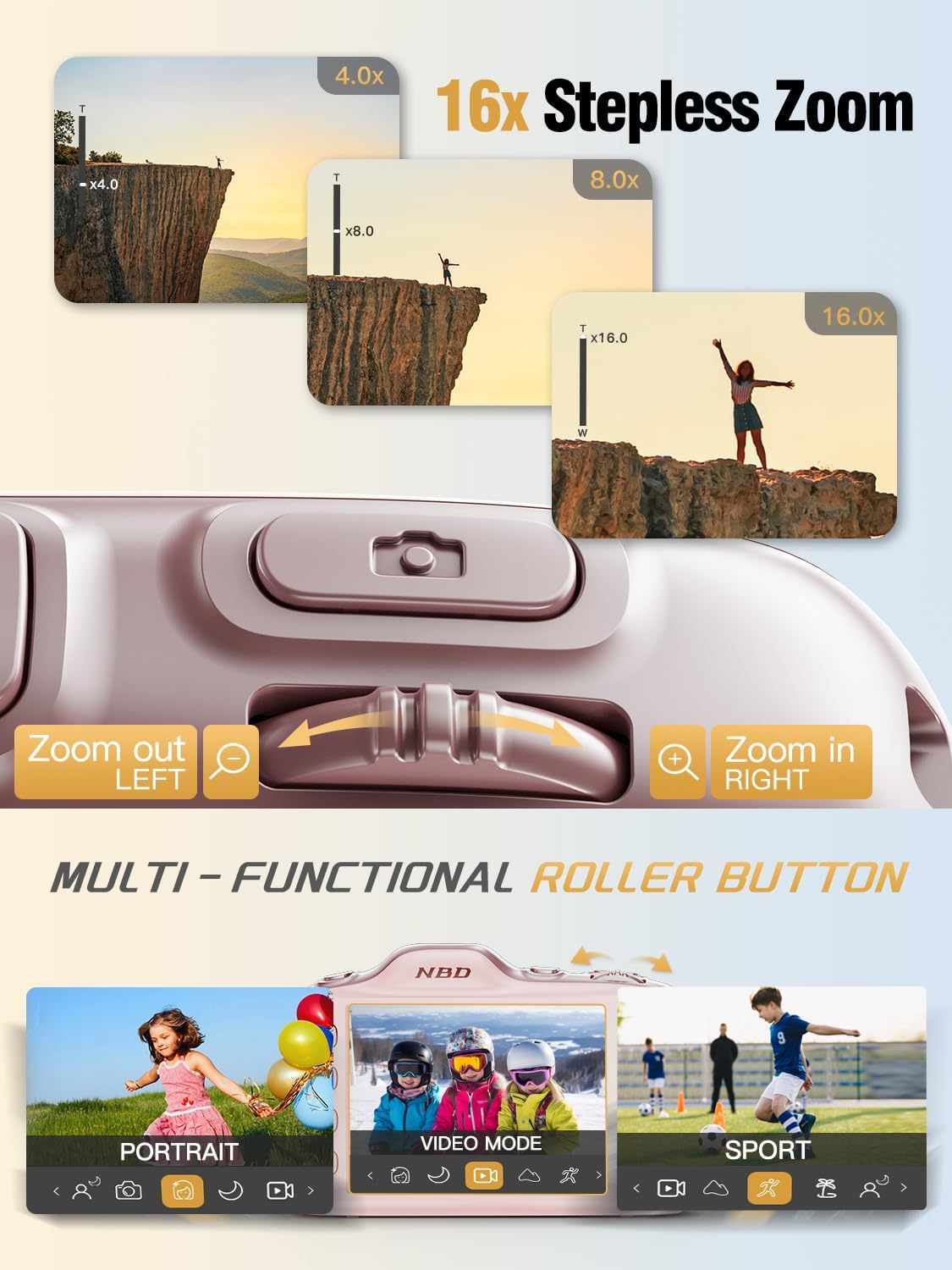
Image: Close-up of the NBD K200 camera's top, highlighting the 16x stepless zoom roller button for zooming in and out, and the mode switch for selecting different shooting modes like Portrait, Video, and Sport.
3.3 Fotografiranje
The camera features autofocus for clear images.
- Point the camera at your subject. The autofocus system will automatically detect and focus.
- Use the roller button to adjust the 16X digital zoom as needed.
- Za zajem fotografije pritisnite sprožilec do konca.

Image: A woman holding the NBD K200 camera, with the screen displaying an autofocus frame around a subject's face, illustrating the camera's auto-focus capability for effortless portrait photography.
3.4 Snemanje videoposnetkov
The camera supports 4K video recording at various frame rates (24, 30, 60 FPS).
- Switch to video mode using the mode button or roller.
- Pritisnite sprožilec, da začnete snemati. Na zaslonu se običajno prikaže rdeč indikator.
- Ponovno pritisnite sprožilec, da ustavite snemanje.

Image: A young girl running through a field with balloons, illustrating the NBD K200 camera's 4K 30FPS cinema capture capability for smooth, ultra HD video recording.
3.5 Načini in funkcije fotografiranja
The NBD K200 offers several modes and features to enhance your photography.
- Lepotni način: Enhances facial features for portraits and selfies.
- Nočni način: Optimizes settings for low-light conditions, smoothing grain and balancing tones.
- Pokončni način: Designed for capturing natural radiance in subjects, balancing tones and softening light.
- Športni način: Ideal for capturing fast-moving subjects with anti-shake stabilization.
- Zaporedni način: Captures multiple photos in quick succession (up to 10FPS) for action shots.
- Vgrajeni filtri: Apply various creative filters like Vintage, Cool Tone, Warm Tone, Sepia, Sketch, and Japan Style.
- Samosprožilec: Options for 3, 5, 7, or 10-second delays for group shots or selfies.

Image: A circular diagram illustrating the NBD K200 camera's various shooting modes, including Photo, Video, Night Mode, Portrait Mode, Burst Mode, and Beauty Mode, with example images for each.

Slika: npramples of built-in filters available on the NBD K200 camera, including Vintage, Cool Tone, Warm Tone, Sepia, Sketch, and Japan Style, demonstrating how they alter image ambiance.
3.6 Prenos Files
Transfer photos and videos to a computer or smartphone using the USB-C cable.
- Connect the camera to your device using the USB-C cable.
- Kamera se bo prikazala kot izmenljiva pomnilniška naprava.
- Povleci in spusti files na želeno lokacijo.
4. Vzdrževanje
4.1 Skrb za baterije
- Pred daljšim shranjevanjem baterijo popolnoma napolnite.
- Izogibajte se izpostavljanju baterije ekstremnim temperaturam.
- Uporabljajte samo priložene ali odobrene polnilne kable in adapterje.
4.2 Čiščenje fotoaparata
- Za čiščenje ohišja fotoaparata uporabite mehko krpo, ki ne pušča vlaken.
- For the lens, use a specialized lens cleaning cloth and solution. Avoid touching the lens directly.
- Ne uporabljajte močnih kemikalij ali abrazivnih materialov.
4.3 Shranjevanje
- Fotoaparat shranjujte na hladnem in suhem mestu, stran od neposredne sončne svetlobe.
- If storing for a long period, remove the battery.
- Keep the camera in its protective case or a soft pouch to prevent scratches.
5. Odpravljanje težav
Če naletite na težave, si oglejte naslednje pogoste rešitve:
| Težava | Možna rešitev |
|---|---|
| Kamera se ne vklopi | Prepričajte se, da je baterija napolnjena in pravilno vstavljena. |
| Ne morem snemati fotografij/videoposnetkov | Check if the memory card is inserted and has sufficient space. Ensure the camera is not in playback mode. |
| Slike so zamegljene | Ensure autofocus is engaged. Check for smudges on the lens. Hold the camera steady or use anti-shake feature. |
| Računalnik ne prepozna kamere | Ensure the USB-C cable is securely connected. Try a different USB port or cable. |
| Flash ne deluje | Ensure the flash is enabled in the camera settings or via the dedicated flash button. |
6. Specifikacije
Detailed technical specifications for the NBD K200 Digital Camera:
| Funkcija | Podrobnost |
|---|---|
| Znamka | NBD |
| Ime modela | K200 |
| Učinkovita še vedno ločljivost | 64 MP |
| Video ločljivost | 4K (2160p) |
| Hitrost sličic | 24, 30, 60 FPS |
| Zoom | 16-kratni digitalni zoom |
| Samodejno ostrenje | Yes (Contrast Detection) |
| Stabilizacija slike | Proti tresenju |
| Tehnologija foto senzorja | CMOS (1/2.4-palčni) |
| Zaslonka | F1.8 |
| Najmanjša hitrost zaklopa | 1/4000 sekunde |
| Vrsta zaslona | LCD (2.8 Inches, Color Screen) |
| Mediji za shranjevanje | microSD (up to 64GB included) |
| File Format (Photo) | JPEG (Fine Quality) |
| File Format (video) | MOV |
| Vrsta baterije | Litij ion |
| Povezljivost | USB-C |
| Teža predmeta | 0.26 kilograma (približno 121 g) |
| Stopnja vodoodpornosti | Ni vodoodporen |
7. Garancija in podpora
For warranty information and technical support, please refer to the contact details provided with your purchase or visit the official NBD webspletnega mesta. Shranite dokazilo o nakupu za uveljavljanje garancije.