
1. Uvod
This manual provides detailed instructions for the assembly, operation, and maintenance of your AsiaHorse Pegasus Micro ATX PC Case. Please read this manual thoroughly before beginning installation to ensure proper setup and to maximize the performance and longevity of your system. The Pegasus case is designed for Micro ATX and ITX motherboards, featuring a dual-chamber design, 270-degree panoramic tempered glass, and optimized airflow for efficient cooling.
2. Varnostne informacije
- Pred nameščanjem ali servisiranjem kakršnih koli komponent v ohišju računalnika vedno izključite napajalnik iz stenske vtičnice.
- Handle tempered glass panels with care. Although durable, they can break if dropped or subjected to sharp impacts.
- Pri rokovanju z notranjimi komponentami nosite antistatične rokavice ali uporabljajte antistatično zapestnico, da preprečite poškodbe zaradi elektrostatične razelektritve (ESD).
- Majhne dele in vijake hranite izven dosega otrok.
- Ensure all cables are routed properly and do not obstruct fan blades or airflow paths.
3. Vsebina paketa
Preden nadaljujete z namestitvijo, preverite, ali so vse komponente prisotne:
- AsiaHorse Pegasus Micro ATX PC Case (White)
- Škatla s priborom (vsebuje vijake, distančnike, kabelske vezice itd.)
- Uporabniški priročnik (ta dokument)
Note: Fans and other PC components are not included and must be purchased separately.
4. Nastavitev in namestitev
Follow these steps for assembling your PC within the AsiaHorse Pegasus case.
4.1 Priprava primera
- Ohišje postavite na ravno, stabilno površino.
- Remove the tempered glass side panel by unscrewing the thumb screws at the rear of the case. Gently slide the panel off and set it aside on a soft, non-abrasive surface.
- Remove the rear panel and any other panels as needed for easier access during installation. The case features a mortise and tenon structure for swift assembly and disassembly.
4.2 Namestitev matične plošče
The Pegasus case supports Micro ATX and ITX motherboards.
- Install the necessary standoffs for your motherboard form factor.
- Carefully place your motherboard into the case, aligning it with the standoffs and the I/O shield opening.
- Pritrdite matično ploščo z vijaki.
4.3 Namestitev napajalne enote (PSU).
The case supports PSUs up to 200mm in length and features a bottom mount design.
- Mount your PSU into its designated compartment, typically at the rear bottom of the case.
- Pritrdite napajalnik z vijaki.
- Route the necessary power cables through the cable management cutouts to the main chamber. The ultra-sized rear cavity provides ample space for cable management and improved heat dissipation.
4.4 Namestitev pogona za shranjevanje
Ohišje podpira 2x 3.5" trde diske in 3x 2.5" SSD diske.
- Locate the drive bays/mounts, typically in the rear chamber.
- Install your HDDs and SSDs into the appropriate mounts and secure them with screws.
4.5 Namestitev grafične kartice (GPU)
The case accommodates GPUs up to 400mm (L) x 180mm (H) with 4 horizontal PCIe slots.
- Z zadnje strani ohišja odstranite potrebne pokrove rež PCIe.
- Insert your GPU into the PCIe slot on the motherboard and secure it with a screw or latch.
4.6 Cooling System Installation (Fans & Radiators)
The case offers extensive cooling support:
- Podpora ventilatorjev: 9 total mounts (Top x3, Bottom x3, Side x2, Back x1).
- Podpora za radiator: Top (360mm/240mm), Side (240mm/120mm).
Water Cooling Installation Reminder:
When installing water cooling at the top of the case, ensure the combined thickness of the water cooling unit and fan does not exceed 52mm. If the thickness exceeds 52mm, install the motherboard and CPU power cable in advance, then fit the water cooling last to avoid wiring difficulties.

Figure 4.6.1: Powerful Space Layout for Components

Figure 4.6.2: Mortise and Tenon Structure for Easy Access

Figure 4.6.3: Ultra-Sized Rear Cavity for Cable Management
Video 4.6.1: AsiaHorse Pegasus PC Case Assembly Demo. This video demonstrates the assembly process for the Pegasus PC case, including component installation.
Video 4.6.2: AsiaHorse Pegasus Micro ATX PC Case OverviewTa videoposnetek ponuja splošen pregledview of the case features, including cooling support and internal layout.
Video 4.6.3: AsiaHorse MATX PC Case Dimensions and Cooling. This video highlights the dimensions and cooling capabilities of the AsiaHorse MATX PC case.
5. Upravljanje ohišja računalnika
Once all components are installed and secured, reattach all panels. Connect your peripherals and power cable to the PSU. The front I/O panel provides convenient access to essential ports.
5.1 Sprednja V/I plošča
The front I/O panel includes:
- 1x USB 3.0 port (for fast data transfer)
- 1x USB 2.0 port (for mouse/keyboard or other peripherals)
- 1x Type-C 3.2 port (for faster transfer speeds and stronger compatibility)
- 1x HD Audio port (for headphones/microphone)
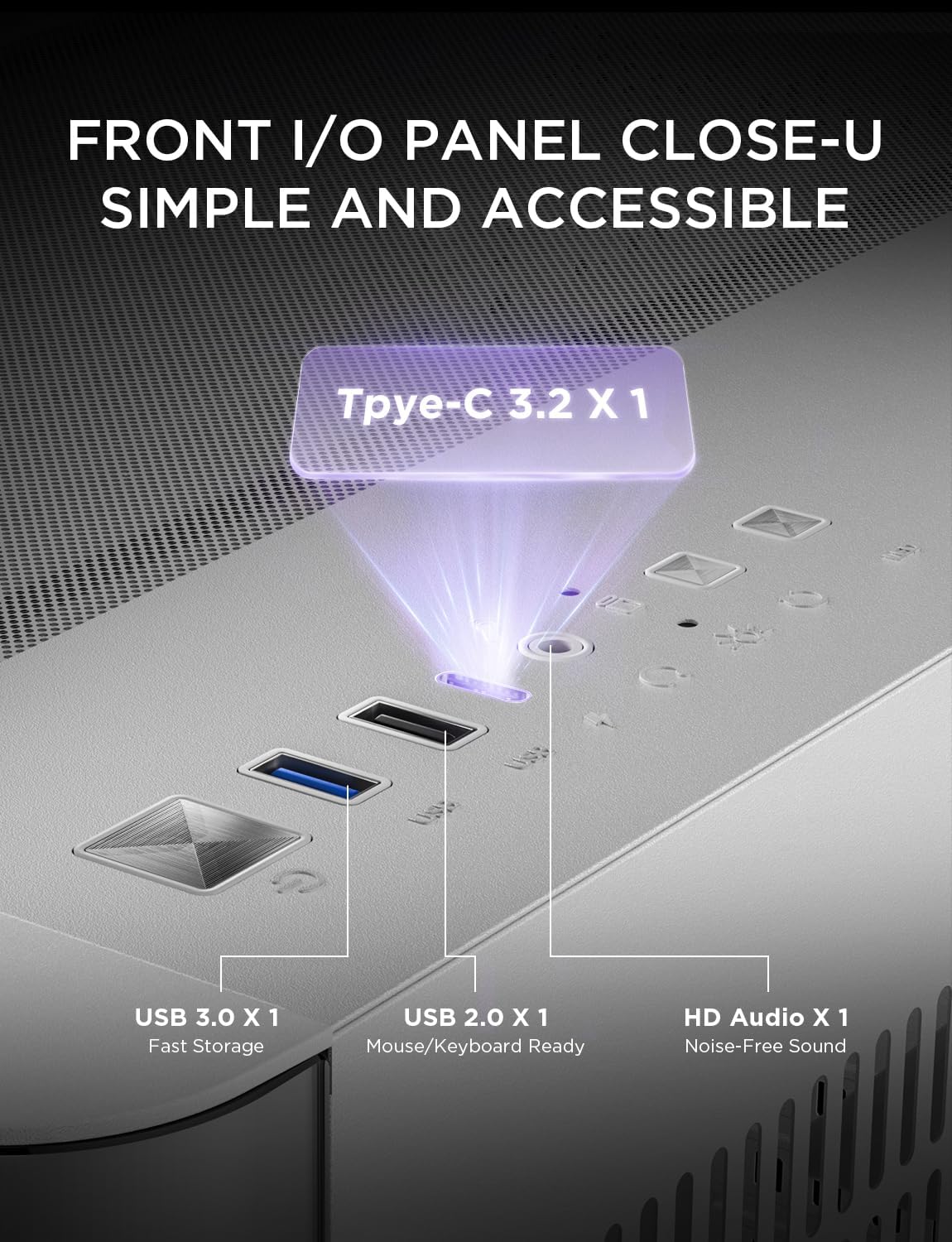
Figure 5.1.1: Front I/O Panel
6. Vzdrževanje
Redno vzdrževanje pomaga zagotoviti optimalno delovanje in podaljša življenjsko dobo komponent vašega računalnika.
6.1 Filtri za prah
The AsiaHorse Pegasus case features multiple dust-proof designs to keep your PC spotless:
- Magnetic Dust Filter: Located on the top panel for easy removal and cleaning.
- Pull-Out Bottom Dust Filter: Easily accessible for cleaning without disassembling the case.
Clean dust filters regularly (e.g., monthly) to maintain optimal airflow and prevent dust buildup inside the case.

Figure 6.1.1: Dust Filter Locations and Easy Removal
6.2 Čiščenje kaljenega stekla
Use a soft, lint-free cloth and a mild glass cleaner (or water) to clean the tempered glass panels. Avoid abrasive cleaners or materials that could scratch the glass.
7. Odpravljanje težav
Če naletite na težave s sestavljanjem računalnika, upoštevajte naslednje pogoste korake za odpravljanje težav:
- Brez napajanja: Ensure all power cables (PSU to wall, PSU to motherboard, GPU, drives) are securely connected. Check the power switch on the PSU.
- Ventilatorji se ne vrtijo: Verify fan headers are correctly connected to the motherboard or fan controller. Check BIOS settings for fan control.
- Brez zaslona: Ensure the monitor cable is connected to the graphics card (not the motherboard I/O unless using integrated graphics). Reseat the graphics card and RAM modules.
- Pregrevanje: Check fan orientation for proper airflow (intake/exhaust). Ensure dust filters are clean and not obstructed. Verify CPU cooler and GPU cooler are properly seated and functioning.
- Sprednja vhodno/izhodna vrata ne delujejo: Check that the front panel connectors (USB, audio) are correctly plugged into the motherboard headers.
For more complex issues, consult the manuals for your individual PC components (motherboard, GPU, PSU) or seek professional assistance.
8. Specifikacije
| Funkcija | Specifikacija |
|---|---|
| Znamka | AsiaHorse |
| Ime modela | Pegasus-White |
| Vrsta ohišja | Srednji stolp |
| Združljivost matične plošče | Micro ATX, ITX |
| Mere (D x Š x V) | 17.83" G x 11.02" Š x 14.84" V (453 mm x 280 mm x 377 mm) |
| Material | Alloy Steel (SPCC), Tempered Glass |
| Teža predmeta | 15.21 funta |
| Največja dolžina GPU | 400 mm |
| Max GPU Height | 180mm (with 4 horizontal PCIe slots) |
| Največja višina hladilnika procesorja | 157 mm |
| Največja dolžina PSU | 200 mm |
| Drive Bays | 2x 3.5-palčni trdi disk, 3x 2.5-palčni SSD |
| Podpora oboževalcev | Top: 3x 120mm, Bottom: 3x 120mm, Side: 2x 120mm, Back: 1x 120mm (Total 9 mounts) |
| Podpora za radiatorje | Top: 360mm/240mm, Side: 240mm/120mm |
| Sprednja V / I vrata | 1x USB 3.0, 1x USB 2.0, 1x Type-C 3.2, 1x HD Audio |
| Posebne lastnosti | 270° Curved Panoramic Glass, Dual Chamber Design, Optimized Airflow, Tool-free Panels, Multiple Dust Filters |
9. Garancija in podpora
9.1 Informacije o garanciji
The AsiaHorse Pegasus Micro ATX PC Case comes with a 3-letna garancija from the date of purchase. This warranty covers manufacturing defects and ensures the product meets specified quality standards. Please retain your proof of purchase for warranty claims.
9.2 Podpora strankam
For technical assistance, warranty claims, or any questions regarding your AsiaHorse Pegasus PC Case, please contact AsiaHorse customer support through their official website or the retailer where the product was purchased. Provide your model number (Pegasus) and proof of purchase for efficient service.