
1. Izdelek je končanview
The USX MOUNT XTL908 is a heavy-duty tilting TV wall mount designed for large televisions ranging from 60 to 120 inches. It supports TVs weighing up to 220 lbs and features a low-profile design, positioning the TV just 2.6 inches from the wall. The mount is compatible with VESA patterns up to 900x600mm and can be installed on wood studs (16-32 inches apart), concrete, or brick walls.

Image 1.1: The USX MOUNT XTL908 TV Wall Mount installed in a modern living room setting.

Image 1.2: The ultra-slim profile of the mount, showing the TV positioned close to the wall.
2. Varnostne informacije
Read all instructions carefully before installation. If you have any questions, consult a qualified installer. Improper installation can result in serious injury or damage.
- Zmogljivost teže: Do not exceed the maximum weight capacity of 220 lbs (100 kg). This mount is intended for use only with the maximum weights indicated.
- Velikost televizorja: Ta nosilec je zasnovan za televizorje z diagonalo med 60 in 120 palci.
- Vrsta stene: Install only on wood studs, solid concrete, or brick walls. NE install on drywall alone.
- Razmik med čepi: Ensure wood studs are spaced between 16 and 32 inches apart.
- Montažna oprema: Use only the provided mounting hardware. If you require concrete anchors, please contact customer support.
- Integrity Test: After installation, perform an integrity test by gently pulling on the mount to ensure it is securely fastened to the wall.

Image 2.1: The robust construction of the mount, designed to securely hold TVs up to 220 lbs.
3. Vsebina paketa
Pred namestitvijo preverite, ali so vse komponente prisotne in nepoškodovane. Če kateri koli deli manjkajo ali so okvarjeni, se obrnite na podporo strankam.
- Sestavljanje stenske plošče
- TV nosilci (2)
- Mounting Hardware Kit (screws, washers, spacers, anchors for concrete/brick)
- Predloga za pritrditev
- Navodila za uporabo
4. Specifikacije
| Funkcija | Specifikacija |
|---|---|
| Vrsta namestitve | Stenski nosilec |
| Vrsta gibanja | Nagib |
| Znamka | NOSILEC USX |
| Material | Kovina |
| barva | Črna |
| Združljive naprave | televizija |
| Največji kot nagiba | 12 Degrees Down, 5 Degrees Up |
| Minimum Supported Screen Size | 60 palcev |
| Maximum Supported Screen Size | 120 palcev |
| Največja nosilnost | 220 lbs (100 kg) |
| Združljivost VESA | Do 900x600 mm |
| Razdalja od stene (nizka profesionalnafile) | 2.6 palcev |
| Stud Spacing Compatibility | 16-32 palcev |

Image 4.1: Visual representation of VESA patterns supported and the maximum load capacity of 220 lbs.

Image 4.2: Technical drawing showing the dimensions of the TV interface and wall plate.

Slika 4.3: Druga view of the product dimensions, highlighting key measurements.
5. Nastavitev in namestitev
Before you begin, ensure you have all necessary tools and that your wall type is suitable for this mount. The installation video below provides a visual guide.
Video 5.1: Official USX MOUNT XTL908 installation video, demonstrating the step-by-step mounting process.
5.1 Preverjanja pred namestitvijo
- Preverite združljivost televizorja: Check your TV's weight and VESA mounting pattern to ensure it falls within the mount's specifications (60-120 inches, up to 220 lbs, VESA up to 900x600mm).
- Določite vrsto stene: Determine if your wall is wood stud, solid concrete, or brick.
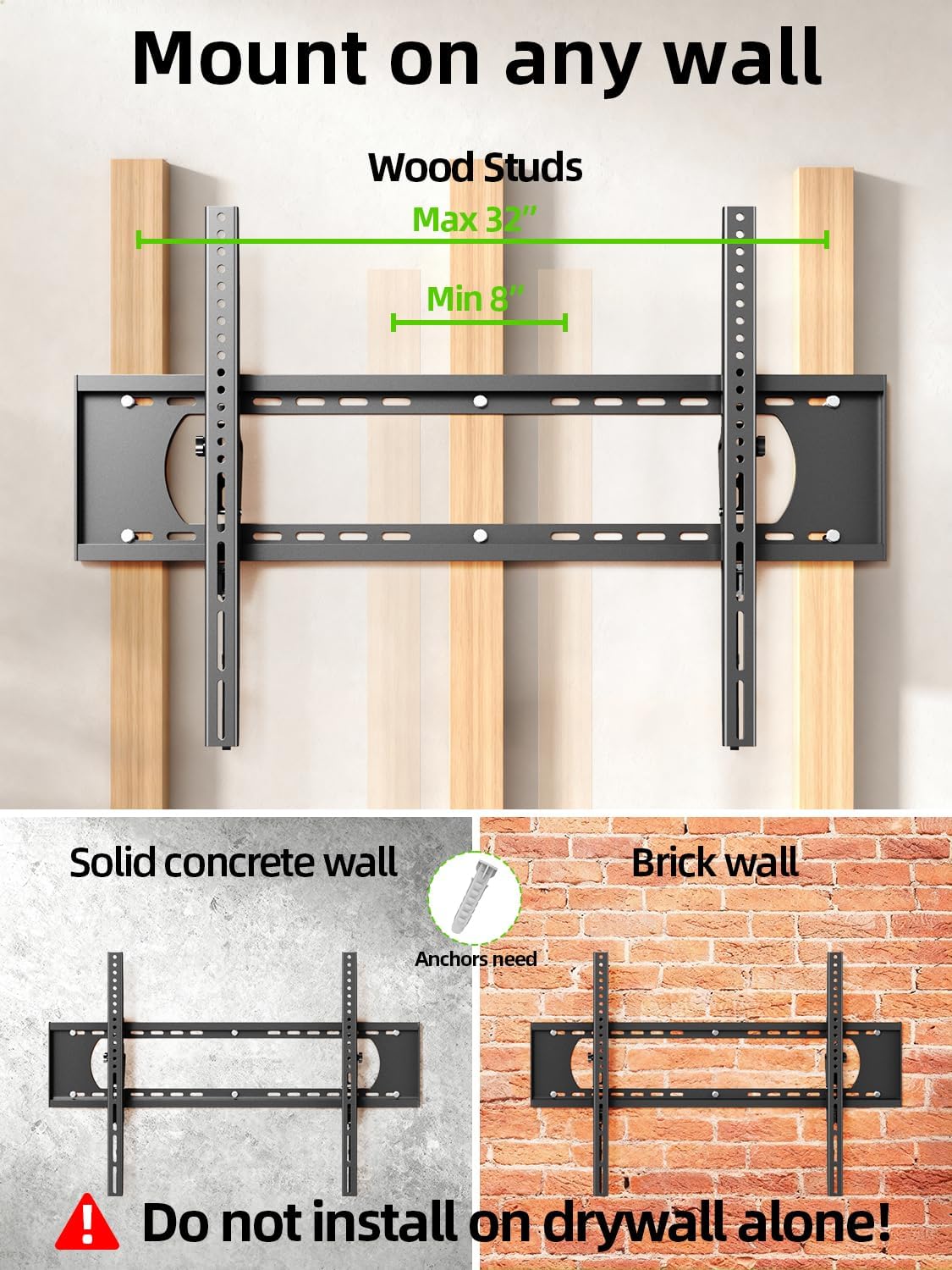
Image 5.2: The mount is suitable for wood studs (16-32" spacing), solid concrete, and brick walls. Not for drywall alone.
5.2 Attaching TV Brackets
Depending on your TV's back, choose the appropriate option:
- For Flat TV Back: Align the TV brackets with the VESA holes on the back of your TV. Secure them using the appropriate screws and washers from the hardware kit. Do not overtighten.
- For Irregular TV Back: If your TV has an irregular or curved back, use the provided spacers to create a flat mounting surface before attaching the brackets.
5.3 Montaža stenske plošče
Use the provided mounting template to mark the drill holes on your wall. Ensure the template is level before marking.
- Za lesene čepe: Locate the center of your wood studs. Drill pilot holes (7/32 in. / 5.5mm diameter, 2.5 in. / 64mm depth). Secure the wall plate using lag bolts and washers. Do not use plastic anchors for wood studs.
- Za betonske/opečne stene: Drill pilot holes (3/8 in. / 10mm diameter, 2.5 in. / 64mm depth). Insert concrete anchors into the drilled holes. Secure the wall plate using lag bolts and washers.
After securing the wall plate, perform an integrity test by pulling on the mount to ensure it is firmly attached to the wall.

Image 5.3: Simplified 3-step installation process: 1. Attach TV brackets, 2. Mount wall plate, 3. Hang up TV.
5.4 Hanging and Securing the TV
- Carefully lift the TV with the attached brackets and hook them onto the top edge of the wall plate.
- Televizor previdno spustite, dokler se nosilci popolnoma ne zaskočijo s stensko ploščo.
- Use the quick lock and release pull tabs to secure the TV to the wall plate, preventing accidental dislodgement.
6. Navodila za uporabo
6.1 Nastavitev kota nagiba
The USX MOUNT XTL908 allows for easy tilt adjustment to optimize your viewing angle and reduce glare. The mount can tilt 5 degrees upwards and 12 degrees downwards.
- To adjust the tilt, loosen the tilting adjustment knobs located on the TV brackets.
- Nagnite TV na želeni kot.
- Tighten the tilting adjustment knobs to secure the TV in place.
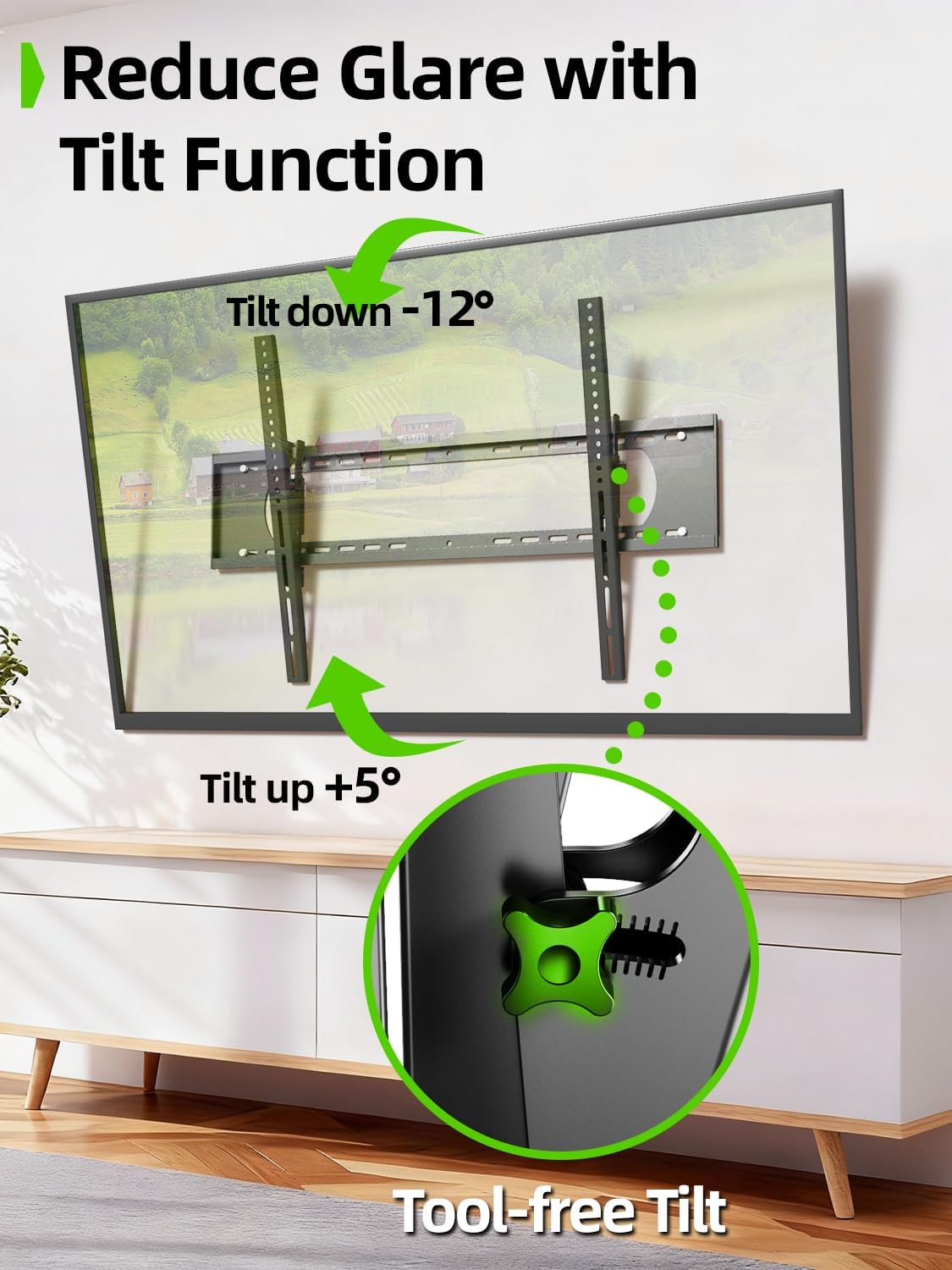
Image 6.1: The tilt function allows for easy adjustment up to +5° and down to -12° to reduce glare.

Image 6.2: The mount's tilt range for optimal viewz različnih položajev.
6.2 Quick Lock and Release
The mount features pull tabs for easy locking and releasing of the TV from the wall plate.
- Za zaklepanje the TV, ensure the pull tabs are pushed upwards into the locked position after hanging the TV.
- Za sprostitev the TV, gently pull down on the cords attached to the tabs. This will unlock the TV from the wall plate, allowing you to lift it off.

Image 6.3: The adjustable pull tabs for easy locking and releasing of the TV.

Image 6.4: Illustration of pulling the cords to release the TV from the mount.
7. Vzdrževanje
Redno vzdrževanje zagotavlja dolgo življenjsko dobo in varno delovanje vašega stenskega nosilca za televizor.
- Čiščenje: Nosilec obrišite z mehko, suho krpo, da odstranite prah. Izogibajte se abrazivnim čistilom ali topilom.
- Periodični pregledi: Periodically check all screws and bolts to ensure they are tight and secure. Re-tighten if necessary.
- Preverite glede poškodb: Inspect the mount for any signs of wear, corrosion, or damage. If any issues are found, contact customer support and do not use the mount until it is repaired or replaced.
8. Odpravljanje težav
Če med namestitvijo ali po njej naletite na kakršne koli težave, si oglejte naslednje pogoste težave in rešitve.
| Težava | Možen vzrok | rešitev |
|---|---|---|
| Televizor ni poravnan | Stenska plošča med namestitvijo ni bila poravnana. | Remove TV, loosen wall plate screws, adjust level, re-tighten. Ensure to use a level during installation. |
| Nosilec se na steni zdi ohlapen | Screws not fully tightened; incorrect wall anchors used; wall material not suitable. | Ensure all lag bolts are fully tightened. Verify correct anchors for concrete/brick. Do not install on drywall alone. If issues persist, consult a professional. |
| TV cannot be tilted | Tilting adjustment knobs are too tight. | Loosen the tilting adjustment knobs on the TV brackets to allow movement. Re-tighten once desired angle is achieved. |
| TV cannot be removed from mount | Quick release pull tabs are in the locked position. | Pull down on the cords attached to the quick release tabs to unlock the TV. |
9. Garancija in podpora
For warranty information or technical support, please refer to the contact details provided with your purchase or visit the official USX MOUNT webspletnega mesta. Račun shranite kot dokazilo o nakupu za morebitne garancijske zahtevke.
If you have any questions or require additional assistance, please do not hesitate to contact USX MOUNT customer service.