
1. Uvod
The AJAZZ AK029 is a high-performance one-handed mechanical gaming keyboard designed for precision and speed. It features a compact 29-key layout, magnetic switches, an 8000Hz polling rate, and 0.01mm RT precision for an ultra-responsive gaming experience. This manual provides detailed instructions for setup, operation, maintenance, and troubleshooting.

Image: The AJAZZ AK029 one-handed gaming keyboard, showcasing its compact design and dimensions (155mm length, 122mm width, 33mm height).

Slika: Prekoview of the AK029 gaming keyboard, highlighting its sleek design and gaming features.

Image: The AK029 keyboard being used in various scenarios, including gaming, video editing, and 3D modeling, demonstrating its versatility.
2. Nastavitev
Vsebina paketa
- AJAZZ AK029 Keyboard Body
- Kabel USB-C (1.6 m)
- Izvleček za ključe
- Rezervna stikala
- Detachable Carrying Strap
- Uporabniški priročnik

Image: The complete package contents of the AJAZZ AK029, including the keyboard, USB-C cable, keycap puller, spare switches, and user manual.
Priključitev tipkovnice
- Priključite konec priloženega kabla USB-C v vrata USB-C na tipkovnici.
- Connect the other end of the USB cable to an available USB port on your computer (Windows or Mac).
- Vaš operacijski sistem bo tipkovnico samodejno prepoznal.
3. Navodila za uporabo
Ključne funkcije in postavitev
The AK029 features a 29-key layout optimized for gaming and productivity. Many keys have secondary functions accessible via the Fn ključ.
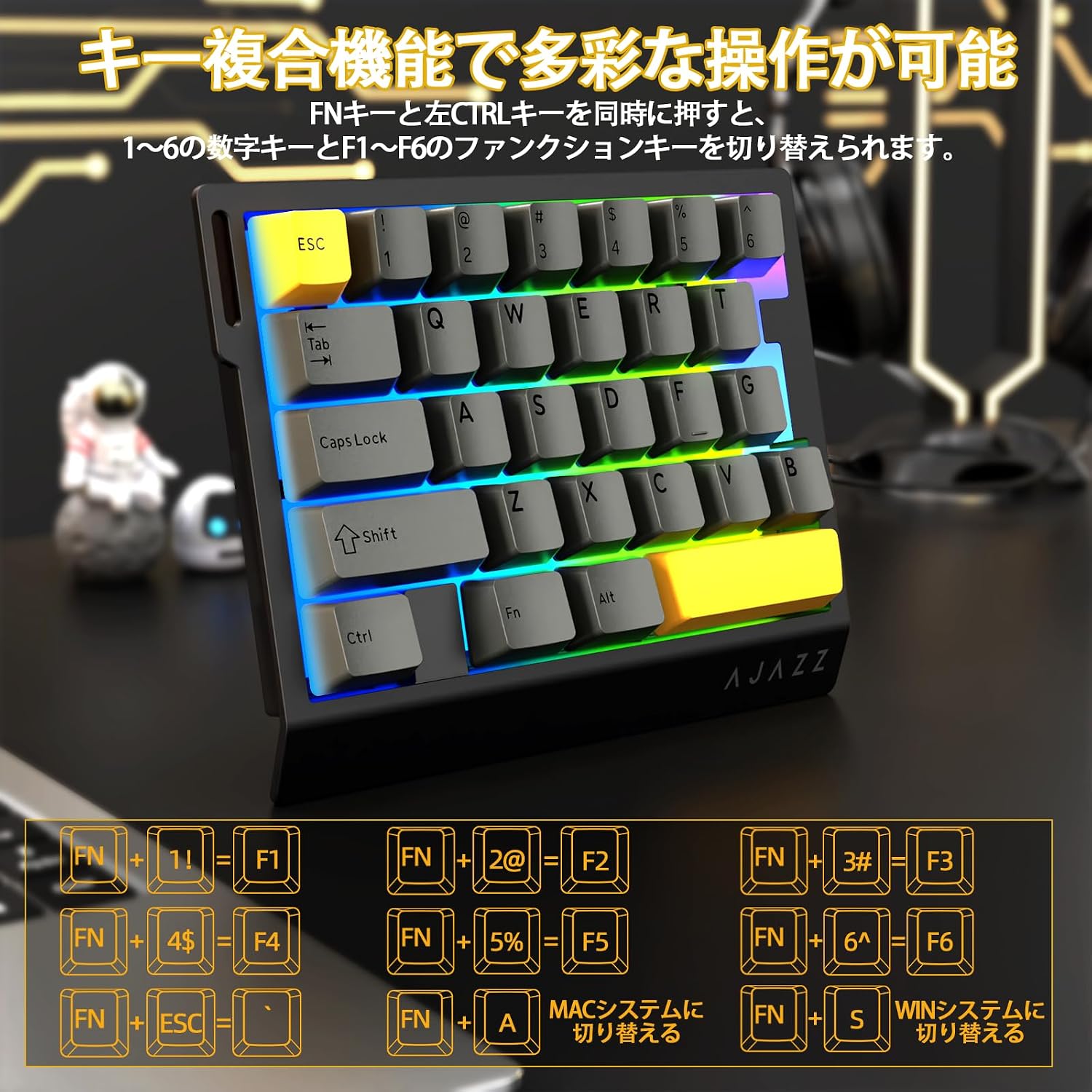
Image: Diagram illustrating the various FN key combinations for accessing secondary functions, such as F1-F6, tilde, and system switching.
- FN + 1-6: Switches between number keys (1-6) and function keys (F1-F6). Default is number keys.
- FN + Esc: Tilde (~)
- FN + A: Switches to Mac mode.
- FN + S: Switches to Windows mode.
Note: When using Mac mode on a Windows PC, the Windows key and Alt key functions may be reversed.
Načini osvetlitve RGB
The keyboard features vibrant RGB backlighting with multiple customizable effects.

Image: The keyboard displaying its colorful RGB backlight, which can be customized with various effects.
- FN + Tab: Cycles through 20 different RGB lighting modes.
- FN + G: Increases backlight brightness (5 levels). Backlight flashes 3 times at maximum brightness.
- FN + F: Decreases backlight brightness (5 levels). Backlight flashes 3 times at minimum brightness.
- FN + V: Changes the direction of the lighting effect.
- FN + B: Changes the backlight color.
- FN + T: Increases the speed of the lighting effect (5 levels). Backlight flashes 3 times at maximum speed.
- FN + R: Decreases the speed of the lighting effect (5 levels). Backlight flashes 3 times at minimum speed.
- FN + C: Toggles side light mode (Streaming RGB constant light - Rainbow Breath - Off). Default is Streaming.
- FN + X: Toggles backlight on/off (side lights remain on).
- FN + Space (long press 3-5 seconds): Resets lighting settings to factory defaults. Keyboard lights flash 3 times.
Kazalnik Lamps
- Indikator Caps Lock: Pressing the Caps Lock key illuminates a white LED (uppercase input ON). Pressing it again turns off the LED (lowercase input).
- Indikator sistema: The main key area lights flash 3 times to indicate successful system switching.
Web Prilagoditev gonilnika
The dedicated driver software allows for extensive customization of key functions, macros, and RGB lighting effects. This enables true personalization to match individual playstyles and preferences.

Image: Screenshot of the web driver interface, showing options for custom keys, lighting effects, macro management, and performance settings.
Voznik Webspletno mesto: https://ajazz.driveall.cn/#/
4. Vzdrževanje
Čiščenje
- Za brisanje površine tipkovnice uporabite mehko, suho krpo.
- Za prah med tipkami uporabite stisnjen zrak.
- Izogibajte se uporabi močnih kemikalij ali abrazivnih materialov.
Hot-Swappable Switch Replacement
The AK029 supports hot-swappable magnetic switches, allowing for easy replacement and customization.

Slika: Bližnji posnetek view of the hot-swappable magnetic switches, showing the mechanism and keycap removal tool.
- Z izvlečnikom tipkovnice nežno odstranite želeno tipkovnico.
- Use the switch puller to firmly grip the top and bottom tabs of the switch.
- Pull the switch straight upwards to remove it from the keyboard.
- Align the pins of the new switch with the holes on the keyboard.
- Gently push the new switch vertically until it clicks into place.
5. Odpravljanje težav
Tipkovnica se ne odziva
- Prepričajte se, da je kabel USB-C varno priključen na tipkovnico in računalnik.
- Poskusite tipkovnico priključiti na drug USB vhod na računalniku.
- Preizkusite tipkovnico na drugem računalniku, da izključite težavo, specifično za računalnik.
- Znova zaženite računalnik.
RGB Backlight Not Working or Incorrect
- Ensure the backlight is not turned off (FN + X).
- Adjust brightness using FN + G (increase) and FN + F (decrease).
- Cycle through lighting modes using FN + Tab.
- Perform a factory reset for lighting settings by long-pressing FN + Space for 3-5 seconds.
Key Input Issues or Inaccurate Response
- Ensure the correct system mode (Windows/Mac) is selected using FN + A or FN + S.
- If a specific key is not responding, try replacing its switch using the hot-swap procedure.
- Update the keyboard firmware using the dedicated web programsko opremo gonilnika.
- Check for any physical obstructions under the keycap or switch.
6. Specifikacije
| Funkcija | Opis |
|---|---|
| Znamka | A.JAZZ |
| Model | AK029 |
| Povezljivost | Žični USB-C |
| Postavitev tipk | 29 Keys (One-Handed) |
| Tip stikala | Magnetic Switches (Hot-Swappable) |
| Polling Rate | 8000Hz |
| Zakasnitev | 0.125 ms izjemno nizka zakasnitev |
| RT Precision | 0.01mm (0.03mm detection increments) |
| Stopnja skeniranja | 130K |
| Osvetlitev ozadja | RGB (20 načinov osvetlitve) |
| Key Rollover | Popoln N-Key Rollover |
| Material plošče | Aluminijeva zlitina |
| Zvok Dampening | 5-Layer Structure (PO sandwich cotton, IXPE switch pad, PET sound sheet, EPDM cotton, silicone gel) |
| Ergonomija | Ergonomic design with stepped curved keycaps and wrist rest |
| Združljiv OS | Windows, MAC |
| Dimenzije | 155 mm (D) x 122 mm (Š) x 33 mm (V) |
| Teža | Pribl. 300 g |
| Dolžina kabla | 1.6m |

Image: Detailed basic specifications of the AK029 keyboard, including brand, model, connectivity, dimensions, and lighting.

Slika: Razstavljeno view of the keyboard's internal structure, highlighting the 5-layer sound dampening system and aluminum alloy plate for enhanced stability and acoustics.

Image: Illustration of the ergonomic design of the AK029, featuring stepped keycaps and a wrist rest for comfortable long-term use.
7. Garancija in podpora
Informacije o garanciji
The AJAZZ AK029 keyboard comes with a 1-year manufacturer's warranty from the date of purchase. This warranty covers defects in materials and workmanship under normal use.
Podpora uporabnikom
For technical assistance, warranty claims, or any other inquiries, please contact AJAZZ customer support through their official webspletno mesto ali prodajalec, kjer je bil izdelek kupljen.
Uradno Webspletno mesto: https://ajazz.driveall.cn/#/