
Uvod
The Rapoo M308 is a versatile multi-mode wireless mouse designed for efficiency and comfort. It features an ambidextrous design, allowing comfortable use for both right-handed and left-handed individuals. With its dual connectivity options, Bluetooth 5.0 and 2.4 GHz wireless, you can seamlessly connect to up to three devices and switch between them with ease. The mouse is engineered for long-lasting performance, offering a battery life of up to 12 months.
Vsebina paketa
- Rapoo M308 Multi-mode Wireless Mouse
- USB sprejemnik (shranjen v miški)
- 2 AA baterije
- Vodnik za hiter začetek (ta priročnik)
Konec izdelkaview
Familiarize yourself with the components of your Rapoo M308 mouse.
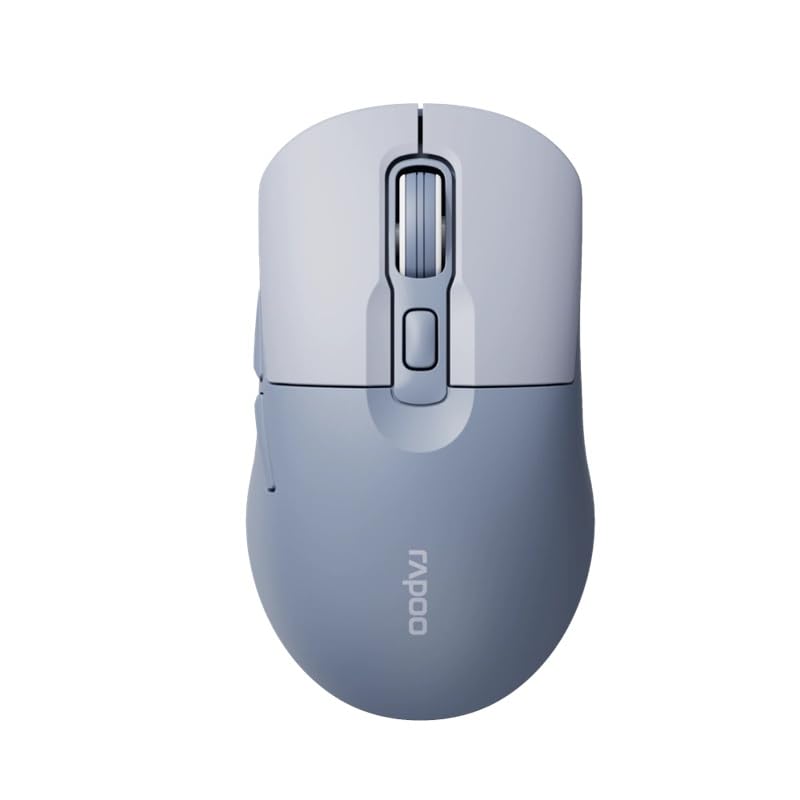
Image: The Rapoo M308 Multi-mode Wireless Mouse in blue, showcasing its ergonomic, ambidextrous design with a scroll wheel and multiple buttons.
- Levi gumb: Standardna funkcija levega klika.
- Desni gumb: Standardna funkcija klika z desno miškino tipko.
- Kolesce za pomikanje: Za drsenje in funkcijo klika s srednjim gumbom miške.
- Gumb DPI: Prilagodi občutljivost kurzorja (DPI).
- Mode Switch Button/Indicator: Switches between connected devices (2.4G, Bluetooth 1, Bluetooth 2) and indicates current mode.
- Stranski gumbi: Forward/Backward navigation (programmable).
- Predal za baterije: Located on the underside, holds 2 AA batteries.
- Reža za USB sprejemnik: Located inside the battery compartment for storage.
Nastavitev
1. Namestitev baterije
- Odprite pokrov predalčka za baterije na spodnji strani miške.
- Vstavite dve bateriji AA in pazite na pravilno polarnost (+/-).
- Zaprite pokrov prostora za baterije.
2. Povezovanje prek brezžične povezave 2.4 GHz
- Remove the USB receiver from its storage slot inside the battery compartment.
- USB-sprejemnik priključite v razpoložljiva vrata USB na vašem računalniku.
- Turn on the mouse. The mouse should automatically connect to your computer. The mode indicator light will show a steady green light for a few seconds.
3. Povezava prek Bluetooth
The M308 mouse supports two Bluetooth connections (BT1 and BT2).
- Vklopi miško.
- Press the mode switch button to select either Bluetooth 1 (blue light flashes slowly) or Bluetooth 2 (blue light flashes slowly).
- Press and hold the mode switch button for 3 seconds until the blue light starts flashing rapidly. This indicates the mouse is in pairing mode.
- V računalniku ali napravi pojdite v nastavitve Bluetooth in poiščite nove naprave.
- Select "Rapoo M308" from the list of available devices to pair.
- Once paired, the blue light will become steady for a few seconds and then turn off.
Navodila za uporabo
Preklapljanje med napravami
The Rapoo M308 allows you to connect to up to three devices (one 2.4G wireless and two Bluetooth devices) and switch between them.
- Briefly press the mode switch button to cycle through the connected devices: 2.4G (green light), Bluetooth 1 (blue light), Bluetooth 2 (blue light).
- The indicator light will briefly illuminate in the corresponding color to confirm the selected mode.
Prilagoditev DPI
Press the DPI button (usually located behind the scroll wheel) to cycle through different DPI settings. This changes the cursor speed and sensitivity. The indicator light may flash to show the current DPI level (e.g., one flash for low DPI, two for medium, etc.).
Vzdrževanje
- Čiščenje: Za čiščenje miške uporabite mehko, suho krpo. Za trdovratno umazanijo rahloamp Krpo lahko uporabite, vendar pazite, da v napravo ne vdre vlaga.
- Zamenjava baterije: When the mouse performance degrades or the indicator light signals low battery, replace the two AA batteries following the installation steps.
- Shranjevanje: When not in use for extended periods, turn off the mouse to conserve battery life. Store the USB receiver inside the mouse to prevent loss.
Odpravljanje težav
- Miška se ne odziva:
- Preverite, ali je miška vklopljena.
- Prepričajte se, da so baterije pravilno vstavljene in niso izpraznjene. Po potrebi jih zamenjajte.
- Za povezavo 2.4 G se prepričajte, da je sprejemnik USB varno priključen v delujoča vrata USB. Poskusite z drugimi vrati USB.
- For Bluetooth connection, ensure the mouse is in the correct Bluetooth mode (BT1 or BT2) and successfully paired with your device. Re-pair if needed.
- Premikanje kurzorja je neenakomerno ali počasno:
- Očistite optični senzor na spodnji strani miške.
- Prepričajte se, da miško uporabljate na primerni površini (neodsevni, neprozorni).
- Prilagodite nastavitev DPI z gumbom DPI.
- Cannot switch between devices:
- Ensure all devices are properly connected (2.4G receiver plugged in, Bluetooth devices paired).
- Briefly press the mode switch button to cycle through modes. A long press will initiate Bluetooth pairing mode.
Specifikacije
| Blagovna znamka | Rapoo |
| Model | M308 |
| Tehnologija povezljivosti | Bluetooth 5.0, 2.4 GHz Radio Frequency |
| Posebne lastnosti | Lahka |
| Zaznavanje gibanja | Optični |
| Količina gumbov | 4 |
| Ročna orientacija | Obojepravni |
| Priporočene uporabe | Pisarna |
| Združljive naprave | Osebni računalnik, prenosnik |
| Teža predmeta | 50 gramov |
| Operacijski sistem | Linux, Mac, Windows |
| Življenjska doba baterije | 12 mesecev |
| Število baterij | 2 AA (priloženo) |
| Vir napajanja | Napajanje na baterije |
| Potreben je najmanj OS | Mac OS 14 Sonoma, Windows 11 |
| Material | Plastika |
| Država izvora | Kitajska |
| Vključene komponente | Miška |
Garancija in podpora
The Rapoo M308 Multi-mode Wireless Mouse comes with a 2-letna garancija od datuma nakupa. Ta garancija krije proizvodne napake in okvare pri normalni uporabi.
For technical support, warranty claims, or further assistance, please refer to the contact information provided on the Rapoo official website or your local distributor's support channels. Please retain your proof of purchase for warranty validation.