
Uvod
This instruction manual provides detailed information for the safe and effective use of your NBD S205D 8K 64MP Digital Camera. Please read this manual thoroughly before operating the device and retain it for future reference. The NBD S205D is designed for high-quality photo and video capture, featuring 8K video recording, a 64MP sensor, autofocus, 16x digital zoom, and Wi-Fi connectivity.
Varnostne informacije
- Fotoaparata ne izpostavljajte vodi ali prekomerni vlagi.
- Pazite, da vam fotoaparat ne pade na tla ali da ga ne izpostavljate močnim udarcem.
- Fotoaparat hranite stran od močnih magnetnih polj.
- Ne poskušajte razstavljati ali spreminjati fotoaparata. S tem boste razveljavili garancijo.
- Use only NBD-approved accessories and power adapters.
- Ko fotoaparata ne uporabljate, ga hranite na hladnem in suhem mestu.
- Hraniti izven dosega otrok.
Vsebina paketa
Preverite, ali so v paketu vsi elementi:
- NBD S205D Digital Camera
- 2 x Lithium-ion Batteries (2000 mAh each)
- 64 GB Micro SD kartica
- USB polnilni kabel
- Uporabniški priročnik (ta dokument)
- Pašček za fotoaparat
- Microphone (if included in kit)
Konec izdelkaview
Seznanite se s komponentami fotoaparata.
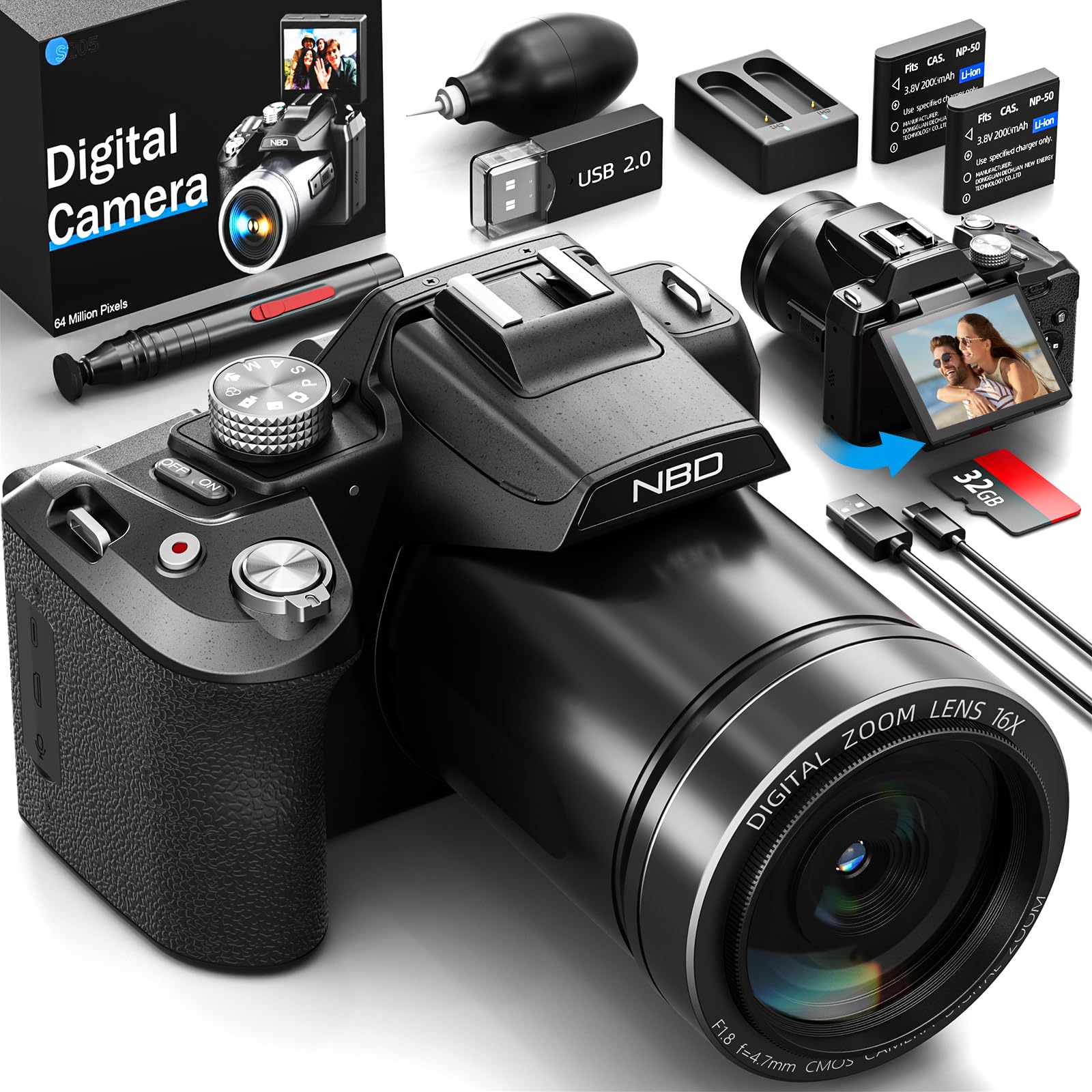
Slika: spredaj view of the NBD S205D Digital Camera, showing the lens, flash, and the 3-inch 180-degree rotatable screen in an open position. The camera body is deep black.
Ključne komponente:
- Objektiv: Captures images and videos. Features F1.8 night vision.
- Flash: Zagotavlja osvetlitev v slabih svetlobnih pogojih.
- 3" 180° Rotatable Screen: Za kadriranje posnetkov, ponovnoviewing content, and vlogging.
- Gumb za vklop: Vklopi/izklopi kamero.
- Sprožilec: Pritisnite do polovice za izostritev, do konca za zajem fotografije.
- Izbirnik načina: Selects shooting modes (e.g., Photo, Video, Playback).
- Ročica za zoom: Controls digital zoom (up to 16x).
- Gumbi za krmarjenje: Za navigacijo po menijih in prilagajanje nastavitev.
- Vhod za mikrofon: For external microphone connection.
- Vrata USB: Za polnjenje in prenos podatkov.
- Reža za kartico SD: For inserting the Micro SD card.
- Predal za baterije: Houses the Lithium-ion batteries.
Nastavitev
1. Polnjenje baterij
- Odprite pokrov prostora za baterije.
- Insert the two provided Lithium-ion batteries, ensuring correct polarity.
- Zaprite pokrov prostora za baterije.
- Connect the camera to a power source using the USB charging cable. The charging indicator will illuminate.
- Charge until the indicator light changes or turns off, indicating a full charge.
2. Vstavljanje kartice Micro SD
- Poiščite režo za SD kartico na strani fotoaparata.
- Insert the 64GB Micro SD card with the gold contacts facing down, until it clicks into place.
- Za odstranitev kartico nežno pritisnite, dokler ne izskoči.
- Opomba: Ensure the camera is powered off before inserting or removing the SD card to prevent data corruption.
3. Začetni vklop
- Pritisnite in držite gumb za vklop, dokler se zaslon ne prižge.
- Follow the on-screen prompts to set the language, date, and time.
Navodila za uporabo
1. Fotografiranje
- Turn the Mode Dial to Foto način.
- Kadrirajte posnetek z vrtljivim zaslonom.
- Press the Shutter button halfway down to activate autofocus. The focus frame will turn green when focused.
- Za zajem fotografije do konca pritisnite sprožilec.
- Use the Zoom Lever to adjust the 16x digital zoom.
2. Snemanje videoposnetkov
- Turn the Mode Dial to Video način.
- Press the Shutter button to start recording. A red indicator will appear on the screen.
- Ponovno pritisnite gumb Sprožilec, da ustavite snemanje.
- The camera supports resolutions up to 8K/30FPS and 4K/60FPS. Adjust video resolution in the camera settings menu.
3. Način predvajanja
- Turn the Mode Dial to Način predvajanja.
- Use the Navigation buttons to browse through your photos and videos.
- Press the OK/Enter button to view fotografijo ali predvajanje videa.
4. Povezljivost Wi-Fi
- Enable Wi-Fi in the camera's settings menu.
- Download the NBD camera app on your smartphone or tablet.
- Connect your smart device to the camera's Wi-Fi network (SSID and password displayed on camera screen).
- Use the app to remotely control the camera, transfer filein delite vsebino.
5. Night Vision (F1.8 Lens)
The camera's F1.8 lens is designed to capture significantly more light in low-light conditions, enhancing image clarity and detail without requiring additional settings. Simply use the camera as normal in dim environments.
Vzdrževanje
- Čiščenje leče: Uporabite mehko krpo, ki ne pušča vlaken in je posebej zasnovana za objektive fotoaparatov. Ne uporabljajte abrazivnih materialov ali agresivnih kemikalij.
- Čiščenje zaslona: Wipe the screen gently with a microfiber cloth.
- Čiščenje telesa: Za brisanje ohišja fotoaparata uporabite mehko, suho krpo. Za trdovratno umazanijo rahlo obrišiteampen krpo z vodo.
- Shranjevanje: When not in use for extended periods, remove the batteries and store the camera in a dry, dust-free environment.
- Vzdrževanje baterije: Redno polnite baterije, tudi če niso popolnoma izpraznjene, da ohranite njihovo zdravje.
Odpravljanje težav
| Težava | Možen vzrok | rešitev |
|---|---|---|
| Kamera se ne vklopi. | Baterija je prazna ali nepravilno vstavljena. | Charge the batteries fully. Ensure batteries are inserted with correct polarity. |
| Fotografiranje/snemanje videoposnetkov ni mogoče. | SD kartica je polna, zaklenjena ali ni vstavljena. | Insert a formatted SD card. Check if the SD card's write-protect switch is off. Delete unnecessary fileali zamenjajte kartico. |
| Slike so zamegljene. | Lens is dirty, camera shake, or focus issue. | Clean the lens. Hold the camera steady or use a tripod. Ensure autofocus locks before shooting. |
| Povezava Wi-Fi ne uspe. | Napačno geslo, Wi-Fi kamere ni omogočen ali težava z aplikacijo. | Verify Wi-Fi is enabled on the camera. Re-enter password. Restart camera and smart device. Reinstall the app if necessary. |
| Kratka življenjska doba baterije. | Frequent use of flash, Wi-Fi, or high-resolution recording. | Reduce use of power-intensive features. Carry spare charged batteries. |
Specifikacije
| Številka modela | NBD-EU-S205D (S205D) |
| Senzorska tehnologija | CMOS, 1/2-inch |
| Največja ločljivost slike | 64 Megapixels (via interpolation) |
| Ločljivost zajema videa | 8K/30FPS, 5K, 4K/60FPS, 2K, 1080P, 720P |
| Zaslonka objektiva | F1.8 (Night Vision) |
| Vrsta povečave | 16x digitalni zoom |
| Zaslon | 3-inch 180° Rotatable OLED Screen (360 x 640 resolution) |
| Vrsta ostrenja | Avtomatsko, Ročno |
| Stabilizacija slike | Digitalno |
| Povezljivost | Wi-Fi, USB |
| Mediji za shranjevanje | Micro SD kartica (do 128 GB, 64 GB vključenih) |
| File Formati | MP4 (Video), JPEG (Photo) |
| Vrsta baterije | Lithium-ion (2 x 2000 mAh included) |
| Dimenzije (D x Š x V) | 12.7 x 12.5 x 8.5 cm |
| Teža | Pribl. 500 g |
| barva | Deep Black |
Garancija in podpora
The NBD S205D Digital Camera comes with a doživljenjska garancija, covering manufacturing defects and malfunctions under normal use. For warranty claims or technical assistance, please contact NBD customer support.
NBD offers Podpora strankam 24/7 to assist you with any questions or issues you may encounter. Please refer to the contact information provided on the NBD official website or your product packaging for support channels.
Opomba: Garancija ne krije škode, ki nastane zaradi nepravilne uporabe, nesreč, nepooblaščenih popravil ali normalne obrabe.