
1. Uvod
Thank you for choosing the OMOTON WK209 Wireless Keyboard and Mouse Set. This manual provides detailed instructions for setting up, operating, and maintaining your new wireless peripheral set. Please read this manual carefully before use to ensure optimal performance and longevity of your product.
2. Vsebina paketa
The OMOTON WK209 Wireless Keyboard and Mouse Set package includes the following items:
- 1 x OMOTON WK209 Wireless Keyboard
- 1 x OMOTON Wireless Mouse
- 1 x USB 2.4 GHz Receiver
Note: AAA batteries are required for operation but are not included in the package.
3. Navodila za namestitev
3.1. Namestitev baterij
Before using the keyboard and mouse, you need to install batteries.
- Poiščite predal za baterije na spodnji strani tipkovnice in miške.
- Odprite pokrove baterij.
- Insert two AAA batteries into the keyboard and one AAA battery into the mouse, ensuring correct polarity (+/-).
- Pokrove baterij trdno zaprite.

This image displays the battery compartments for the OMOTON WK209 keyboard and mouse. The keyboard requires two AAA batteries, and the mouse requires one AAA battery. Please note that batteries are not included with the product.
3.2. Priključitev USB-sprejemnika
The OMOTON WK209 set uses a single USB receiver for both the keyboard and mouse.
- Locate the USB 2.4 GHz receiver, usually stored in the mouse's battery compartment or packaging.
- Plug the USB receiver into an available USB port on your computer (laptop or desktop PC).
- The system will automatically detect and install the necessary drivers. This is a Plug & Play process and typically requires no manual installation.
- Turn on the mouse using the ON/OFF switch located on its underside. The keyboard does not have a separate power switch; it activates when keys are pressed.

This image illustrates the 2.4 GHz wireless connection of the OMOTON WK209 keyboard and mouse set. It highlights features such as Plug & Play functionality, a stable 2.4G connection, and a wireless range of up to 10 meters (33 feet).
3.3. Združljivost
The OMOTON WK209 set is compatible with a wide range of Windows operating systems.
- Operacijski sistemi: Windows 11, Windows 10, Windows 8, Windows 7, Windows XP.
- Naprave: Laptop, Desktop PC.

This image demonstrates the broad compatibility of the OMOTON WK209 set with different Windows operating systems, including Windows 7, 8, 10, and 11, across desktop PCs and laptops.
4. Navodila za uporabo
4.1. Uporaba tipkovnice
The WK209 keyboard features a full-size QWERTZ layout with multimedia keys for enhanced productivity. Simply begin typing after successful connection.
- Večpredstavnostne tipke: Access functions like volume control, play/pause, and more directly from the keyboard.
- QWERTZ Layout: Standard German keyboard layout for familiar typing experience.
- Nagib 8°: The keyboard is designed with a natural 8-degree tilt for ergonomic comfort during extended use.

This image provides the physical dimensions of the OMOTON WK209 full-size QWERTZ keyboard (43.8 cm x 12.4 cm) and mouse (10.3 cm x 6.6 cm x 3.6 cm). It also notes the keyboard's natural 8-degree tilt for comfortable typing.
4.2. Uporaba miške
The WK209 mouse offers precise control and several functional buttons.
- Levi klik: Standardna izbira in aktivacija.
- Desni klik: Dostopi do kontekstnih menijev.
- Kolesce za pomikanje: Za navpično drsenje in funkcijo klika s srednjim gumbom miške.
- Gumb za nazaj: Nazaj v web brskalniki oz file raziskovalci.
- Gumb za naprej: Navigacija naprej v web brskalniki oz file raziskovalci.
- Desktop Show/Hide Button: Quickly minimizes all open windows to show the desktop, and restores them with another press.

This image highlights the features of the OMOTON WK209 wireless mouse, including the scroll wheel, left-click button, right-click button, back button, forward button, and a button for showing/hiding the desktop. It also emphasizes its ergonomic design and quiet click functionality.
5. Lastnosti
- 2.4 GHz brezžična povezava: Provides a stable and reliable connection with a range of up to 10 meters (33 feet).
- Plug & Play: Easy setup without the need for additional software or drivers.
- Full-size QWERTZ Layout: Comfortable and familiar typing experience.
- Večpredstavnostne tipke: Convenient access to media controls.
- Ergonomska oblika: The mouse is shaped for comfortable use, and the keyboard features a natural 8-degree tilt.
- Tiho delovanje: Both the keyboard and mouse are designed for silent clicks and keystrokes, ideal for quiet environments.
- Indikator prazne baterije: The keyboard features an indicator light to alert you when batteries are running low.

This image illustrates the quiet operation of the OMOTON WK209 keyboard and mouse, highlighting its silent keys and noiseless mouse clicks, suitable for quiet environments.
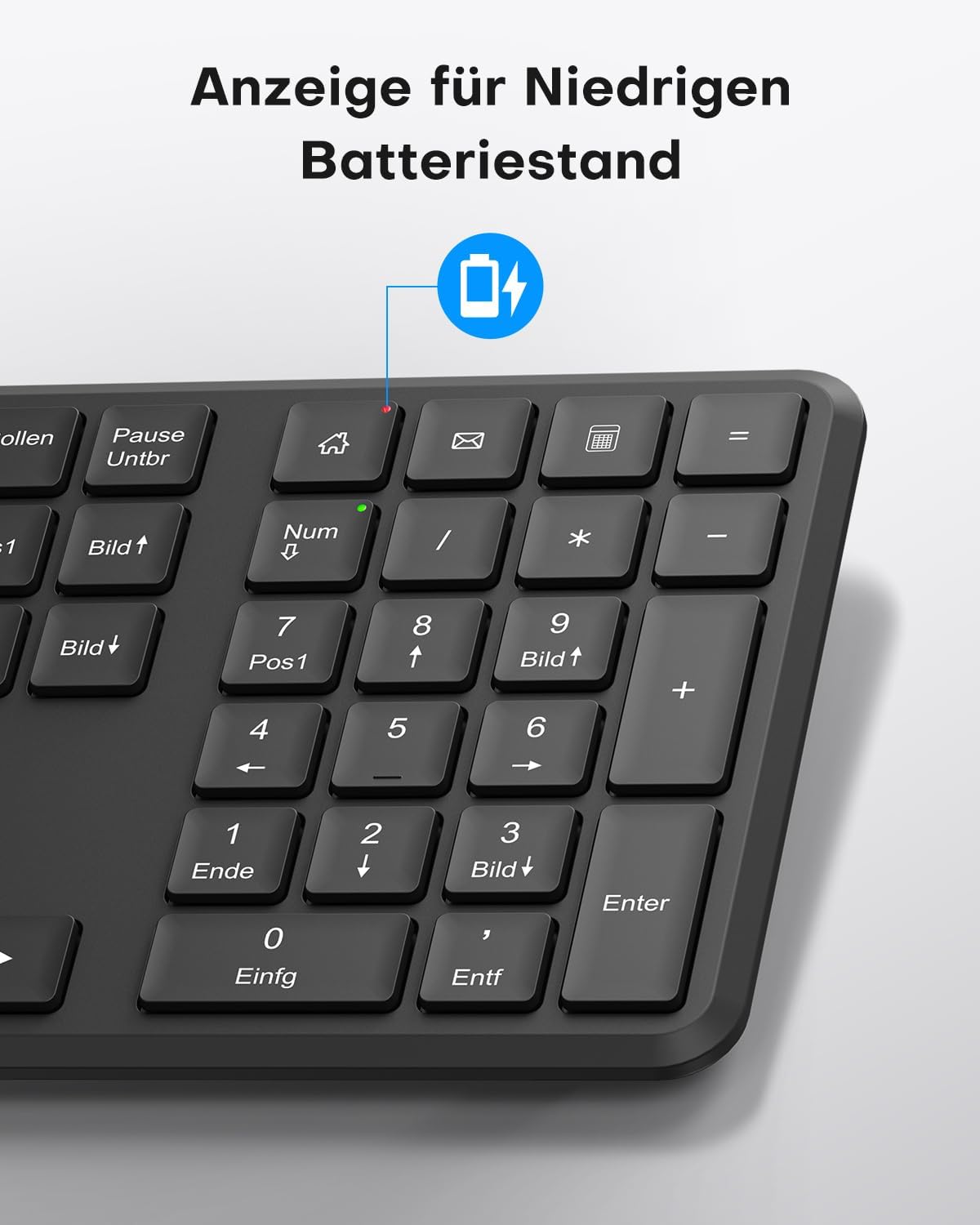
This image points out the low battery indicator on the OMOTON WK209 keyboard, which illuminates to alert the user when batteries need to be replaced.
6. Vzdrževanje
To ensure the longevity and optimal performance of your OMOTON WK209 set, follow these maintenance guidelines:
- Čiščenje: Za čiščenje površin tipkovnice in miške uporabite mehko, suho krpo. Za trdovratno umazanijo rahlo obrišiteamp Krpo lahko uporabite, vendar pazite, da v naprave ne pride vlaga.
- Zamenjava baterije: Replace batteries promptly when the low battery indicator appears or when performance degrades. Always use fresh, high-quality AAA batteries.
- Shranjevanje: When not in use for extended periods, remove the batteries to prevent leakage. Store the devices in a cool, dry place.
- Izogibajte se tekočinam: Tipkovnico in miško hranite stran od tekočin, da preprečite poškodbe.
7. Odpravljanje težav
If you encounter issues with your OMOTON WK209 set, try the following troubleshooting steps:
- Ni odziva tipkovnice/miške:
- Ensure batteries are correctly installed and not depleted. Replace them if necessary.
- Make sure the mouse's ON/OFF switch is in the 'ON' position.
- Preverite, ali je USB-sprejemnik varno priključen v delujoča USB-vrata na vašem računalniku. Poskusite z drugimi USB-vhodi.
- Znova zaženite računalnik.
- Zakasnitev ali občasna povezava:
- Tipkovnico in miško premaknite bližje USB-sprejemniku.
- Ensure there are no large metal objects or other wireless devices (e.g., Wi-Fi routers, cordless phones) interfering with the 2.4 GHz signal.
- Try plugging the USB receiver into a front USB port or using a USB extension cable to bring it closer to the devices.
- Tipke ne delujejo pravilno:
- Preverite, ali so pod tipkami kakšni odpadki.
- Ensure the keyboard layout setting on your computer matches the QWERTZ layout.
- Kazalec miške skače ali je netočen:
- Očistite optični senzor na spodnji strani miške.
- Miško uporabljajte na čisti, nebleščeči površini ali podlogi za miško.
8. Specifikacije
| Funkcija | Podrobnost |
|---|---|
| Znamka | OMOTON |
| Model | WK209 |
| barva | Črna |
| Tehnologija povezljivosti | 2.4 GHz brezžično |
| Razporeditev tipkovnice | Full-size QWERTZ (German Layout) |
| Posebne lastnosti | 2.4 GHz, Full-size, QWERTZ-layout, Battery-operated, Multimedia keys |
| Združljive naprave | Prenosni računalnik, PC |
| Združljivi operacijski sistemi | Windows 11/10/8/7/XP |
| Vir napajanja | Battery-Powered (2x AAA for keyboard, 1x AAA for mouse - not included) |
| Teža artikla (približno) | 514 Grams (total set, including packaging) |
| Dimenzije paketa | 44.79 x 13.9 x 5.3 cm |
| ASIN | B0FQNS3FFB |
9. Garancija in podpora
OMOTON products are designed for reliability and performance. For warranty information and customer support, please refer to the warranty card included with your purchase or visit the official OMOTON website. If you experience any issues that cannot be resolved using the troubleshooting guide, please contact OMOTON customer service for assistance.