
Uvod
This manual provides comprehensive instructions for the setup, operation, maintenance, and troubleshooting of your T-Wolf T60 Wired 60% Mechanical Keyboard. Please read this manual carefully before using the product to ensure proper function and longevity.
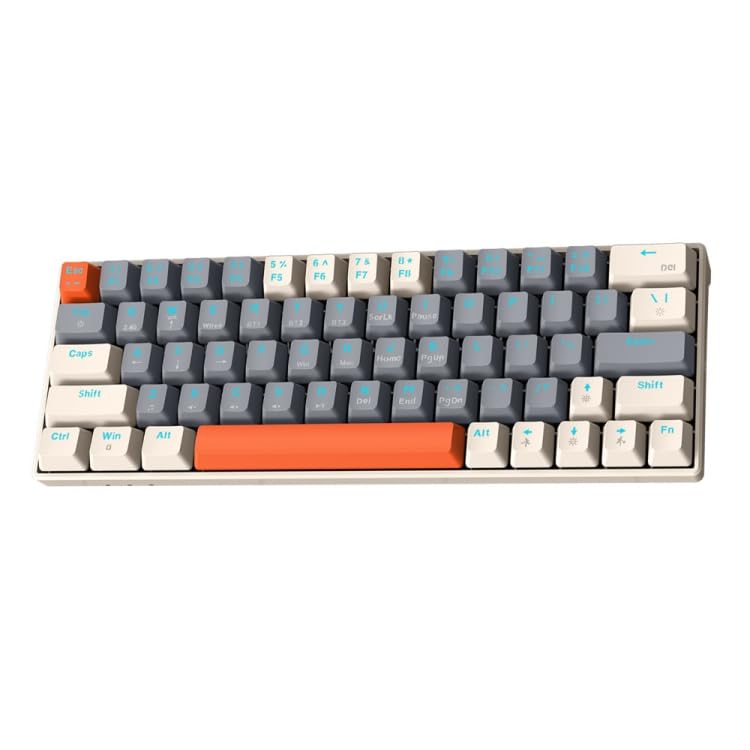
Image: T-Wolf T60 Wired 60% Mechanical Keyboard. This image displays the compact design of the keyboard, highlighting its 63-key layout and wired connectivity.
Nastavitev
- Razpakiranje: Carefully remove the keyboard and all included accessories from the packaging. Verify that all components are present: T-Wolf T60 keyboard and USB-C to USB cable.
- Priključitev tipkovnice:
- Poiščite vrata USB-C na tipkovnici.
- Insert the USB-C end of the provided cable into the keyboard's USB-C port.
- Insert the USB-A end of the cable into an available USB 2.0 port on your computer (PC, desktop, or laptop).
- Namestitev gonilnika: The T-Wolf T60 keyboard is plug-and-play. Your operating system should automatically detect and install the necessary drivers. No manual driver installation is typically required.
- Začetni test: Open a text editor or word processor and type to confirm the keyboard is functioning correctly.
Delovanje
The T-Wolf T60 is a 60% mechanical keyboard with 63 keys, designed for efficient typing and gaming. It features RGB backlighting and multi-key anti-ghosting.
- Osnovne ključne funkcije: All standard alphanumeric and symbol keys function as expected. Due to the compact 60% layout, some functions (like F-keys, arrow keys, and navigation keys) are accessed via a Function (Fn) key combination. Refer to the keyboard's keycap legends for specific Fn key combinations.
- RGB osvetlitev ozadja: Tipkovnica ima prilagodljivo RGB osvetlitev ozadja.
- To cycle through different lighting modes, use the designated Fn key combination (e.g., Fn + \ or Fn + P).
- To adjust brightness, use the designated Fn key combination (e.g., Fn + Up/Down arrow keys, if available via Fn layer).
- To change lighting speed, use the designated Fn key combination (e.g., Fn + Left/Right arrow keys, if available via Fn layer).
- Multi-Key Anti-Ghosting: This feature ensures that multiple simultaneous key presses are registered accurately, which is beneficial for fast-paced gaming and complex commands.
Vzdrževanje
Proper maintenance helps extend the lifespan of your keyboard.
- Čiščenje:
- Pred čiščenjem tipkovnico odklopite iz računalnika.
- Za odstranitev prahu in umazanije med tipkami uporabite pločevinko stisnjenega zraka.
- Tipke in površino tipkovnice obrišite z mehko, rahlo suho krpoamp, krpo, ki ne pušča vlaken. Izogibajte se prekomerni vlagi.
- Do not use harsh chemicals, abrasive cleaners, or solvents, as these can damage the keyboard's finish and keycap legends.
- Shranjevanje: Ko tipkovnice dalj časa ne uporabljate, jo shranite v čistem in suhem okolju, stran od neposredne sončne svetlobe in ekstremnih temperatur.
- Skrb za kabel: Avoid bending or twisting the USB-C cable excessively to prevent internal damage.
Odpravljanje težav
If you encounter issues with your T-Wolf T60 keyboard, refer to the following common solutions:
- Tipkovnica se ne odziva:
- Prepričajte se, da je kabel USB-C varno priključen na tipkovnico in računalnik.
- Poskusite tipkovnico priključiti na drug USB vhod na računalniku.
- Preizkusite tipkovnico na drugem računalniku, da ugotovite, ali je težava v tipkovnici ali v nastavitvi originalnega računalnika.
- Znova zaženite računalnik.
- Osvetlitev ozadja RGB ne deluje ali je napačna:
- Prepričajte se, da je tipkovnica pravilno priključena in da prejema napajanje.
- Try cycling through the RGB modes using the Fn key combinations mentioned in the Operation section.
- Check if the brightness is set to maximum.
- Tipke se ne registrirajo ali tipkajo dvakrat:
- Clean the keyboard thoroughly, especially around the affected keys, using compressed air.
- Prepričajte se, da pod tipkami ni umazanije.
- Če težava vztraja, lahko kaže na napako strojne opreme.
Specifikacije
| Funkcija | Podrobnost |
|---|---|
| Znamka | T-VOLK |
| Model | T60 |
| Tehnologija povezljivosti | USB-C (žični) |
| Združljive naprave | PC, desktop, laptop |
| Opis tipkovnice | Igranje iger, mehanski |
| Število ključev | 63 |
| Posebne lastnosti | RGB Backlighting, Multi-Key Anti-Ghosting |
| Material | Plastika |
| Razporeditev tipkovnice | QWERTY |
Garancija in podpora
Za informacije o garanciji in tehnično podporo glejte dokumentacijo, ki je bila priložena nakupu, ali se obrnite neposredno na prodajalca/proizvajalca. Shranite dokazilo o nakupu za uveljavljanje garancije.
Manufacturer: T-Wolf