
1. Uvod
This manual provides detailed instructions for the installation, configuration, and operation of your NEWFAST AC1200 Dual Band WiFi Repeater, model NF-RE523. This device is designed to extend the range of your existing wireless network, eliminate Wi-Fi dead zones, and provide stable, high-speed internet access throughout your home or office. Please read this manual carefully before using the product and retain it for future reference.
2. Vsebina paketa
Preverite, ali so v paketu vsi elementi:
- 1 x NEWFAST AC1200 WiFi Repeater (Model NF-RE523)
- 1 x RJ-45 Ethernet kabel
- 1 x uporabniški priročnik
3. Izdelek je končanview
The NEWFAST AC1200 WiFi Repeater features a compact design with adjustable antennas and an informative LCD display. Familiarize yourself with the device's components:
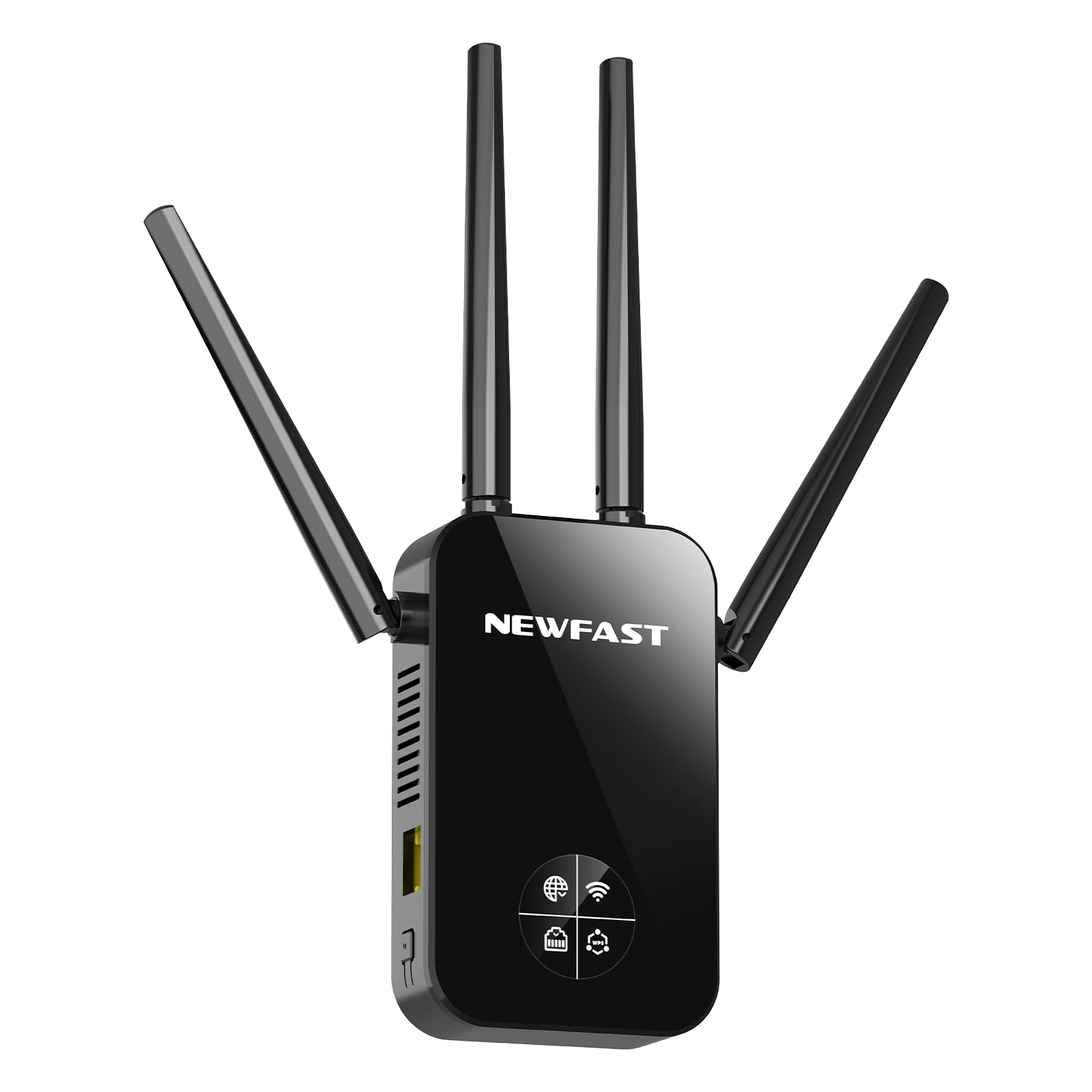
Slika 1: Spredaj view of the NEWFAST AC1200 WiFi Repeater NF-RE523. The device is black, featuring four adjustable external antennas, two on each side, and a central LCD screen. Below the screen, there are indicator lights and a WPS button. An RJ45 port is located at the bottom.
Ključne komponente:
- Adjustable Antennas (x4): Two dedicated to 2.4 GHz and two to 5 GHz, designed to maximize signal coverage and reduce interference.
- LCD zaslon: Provides real-time information on signal strength, connection status, and WPS status.
- Gumb WPS: For quick and secure connection to your router without manual password entry.
- Pristanišče RJ45: Functions as an Ethernet port for wired connections in Repeater/AP mode or as a WAN port in Router mode.
- Napajalni vtič: Integrated EU plug for direct wall outlet connection.
4. Nastavitev
The NEWFAST NF-RE523 offers two primary methods for setup: WPS (Wi-Fi Protected Setup) for quick configuration, and Web UI for more detailed settings.
4.1. Nastavitev WPS (priporočeno za način repetitorja)
- Vklop: Plug the NEWFAST Repeater into an electrical outlet near your main router. Wait for the device to power on and the LCD display to activate.
- Aktivirajte WPS na usmerjevalniku: Press the WPS button on your main Wi-Fi router. The WPS indicator on your router should start blinking.
- Activate WPS on Repeater: Within two minutes, press the WPS button on the NEWFAST Repeater. The WPS indicator on the repeater's LCD display will flash.
- Počakajte na povezavo: The repeater will automatically connect to your router. This process may take a few moments. Once connected, the LCD display will show a stable signal strength indicator.
- Preselitev (neobvezno): Unplug the repeater and move it to a location between your router and the Wi-Fi dead zone. Ensure the LCD display shows a good signal strength from your router.
Note: If WPS setup fails, try the Web Metoda nastavitve uporabniškega vmesnika.
4.2. Web UI Setup (For all modes and advanced configuration)
- Vklop: Plug the NEWFAST Repeater into an electrical outlet near your main router.
- Povežite se z omrežjem Wi-Fi repetitorja: On your computer or mobile device, connect to the Wi-Fi network broadcast by the repeater (e.g., "NEWFAST_Repeater" or similar, check the label on the device). No password is required for the initial connection.
- Dostop Web Vmesnik: Odpri a web brskalnik in vnesite privzeti IP-naslov (običajno
192.168.1.1or192.168.0.1, or a specific domain likerepeater.net). Refer to the device label or the included quick start guide for the exact address. - Prijava: Vnesite privzeto uporabniško ime in geslo (običajno
adminza oba). - Izberite način delovanja: Follow the on-screen wizard to select your desired operating mode (Repeater, Router, or Access Point).
- Konfiguriraj nastavitve:
- Reater Mode: Select your main Wi-Fi network from the list, enter its password, and choose a name for the extended network (or keep the default).
- Način usmerjevalnika: Configure WAN settings (e.g., PPPoE, Dynamic IP, Static IP) and set up your new Wi-Fi network name and password.
- Način dostopne točke: Connect the repeater to your main router via an Ethernet cable (RJ45 port). Configure the new Wi-Fi network name and password.
- Shrani in ponovno zaženi: Save your settings. The repeater will reboot to apply the changes.
- Preverite povezavo: Once rebooted, connect your devices to the new or extended Wi-Fi network.
5. Načini delovanja
The NEWFAST NF-RE523 supports three distinct operating modes to suit various networking needs:
- Način repetitorja (ojačevalnik dosega):
This is the most common mode. The device wirelessly connects to your existing router and extends its Wi-Fi signal to areas with weak or no coverage. It uses the same network name (SSID) or a new one, providing seamless roaming.
- Način usmerjevalnika:
In this mode, the device acts as a primary router. Connect your internet modem to the repeater's RJ45 port, and it will create a new wireless network for your devices. This is ideal for setting up a new network, especially with fiber optic connections.
- Način dostopne točke (AP):
The device converts a wired internet connection into a wireless one. Connect the repeater to your existing router or network switch via an Ethernet cable (RJ45 port). It then broadcasts a new Wi-Fi network, providing wireless access to the wired network.
6. Informacije o LCD zaslonu
The integrated LCD display provides crucial real-time status updates:
- Indikator moči signala: Shows the strength of the Wi-Fi signal received from your main router. Aim for a strong signal for optimal performance when placing the repeater.
- Stanje internetne povezave: Indicates whether the repeater has a stable internet connection.
- RJ45 Port Status: Shows if a device is connected to the Ethernet port and if data is being transmitted.
- Indikator WPS: Flashes during WPS pairing and remains steady when WPS is successfully connected.
7. Odpravljanje težav
If you encounter issues with your NEWFAST AC1200 WiFi Repeater, refer to the following common problems and solutions:
- Cannot connect to the repeater's Wi-Fi network during setup:
Ensure the repeater is powered on. Try unplugging and replugging the device. If using a mobile device, temporarily disable mobile data to ensure it connects to the repeater's Wi-Fi.
- WPS setup fails or does not connect:
Ensure your main router supports WPS and that its WPS function is enabled. Press the WPS buttons on both the router and repeater within two minutes of each other. If it still fails, try the Web Metoda nastavitve uporabniškega vmesnika.
- No internet access after setup:
Check the internet connection status on the repeater's LCD display. Ensure your main router has an active internet connection. Verify that you entered the correct Wi-Fi password for your main router during setup. If in Repeater mode, try relocating the repeater closer to your main router to ensure a strong signal.
- Slow internet speed or frequent disconnections:
The repeater might be too far from your main router, resulting in a weak signal. Relocate the repeater to a position where the LCD display shows a strong signal strength (at least 2-3 bars). Avoid placing the repeater near large metal objects, microwaves, or other devices that may cause interference. Ensure your main router's firmware is up to date.
- Forgot the repeater's login password or Wi-Fi password:
You can perform a factory reset. Locate the reset button (usually a small pinhole) on the device. With the repeater powered on, use a paperclip to press and hold the reset button for about 5-10 seconds until the lights flash or the device reboots. This will restore all settings to factory defaults, and you will need to set up the repeater again.
8. Specifikacije
| Funkcija | Podrobnost |
|---|---|
| Model | NF-RE523 |
| Znamka | NEWFAST |
| Brezžični standard | IEEE 802.11a/b/g/n/ac |
| Hitrost prenosa podatkov | Up to 1200 Mbps (300 Mbps 2.4 GHz + 867 Mbps 5 GHz) |
| Frekvenčni pasovi | 2.4 GHz in 5 GHz (dvojni pas) |
| Antene | 4 zunanje nastavljive antene |
| Ethernet vrata | 1 x RJ45 (10/100 Mbps) |
| Varnostni protokoli | WPS/WPA2-PSK/AES |
| Načini delovanja | Repeater, Router, Access Point |
| Posebne lastnosti | LCD Display, WPS Button, Beamforming Technology, MU-MIMO |
| Dimenzije (D x Š x V) | 86P x 45l x 197H mm |
| Vtič | EU vtič |
| Združljive naprave | Internet Box, Computers, Access Points, Routers |
9. Varnostne informacije
- Naprave ne izpostavljajte vodi, ognju, visokim temperaturam ali vlažnemu okolju.
- Naprave ne poskušajte razstaviti, popraviti ali spremeniti.
- Uporabljajte samo napajalnik, ki ga je priložil ali določil proizvajalec.
- Napravo hranite stran od medicinskih pripomočkov in srčnih spodbujevalnikov.
- Poskrbite za ustrezno prezračevanje okoli naprave, da preprečite pregrevanje.
- Ta naprava je samo za uporabo v zaprtih prostorih.
10. Garancija in podpora
NEWFAST products are covered by a limited warranty. For detailed warranty terms and conditions, please refer to the warranty card included with your product or visit the official NEWFAST website. For technical support, troubleshooting assistance, or to inquire about replacement parts, please contact NEWFAST customer service through the contact information provided on the official webspletno mesto ali vašo nakupovalno platformo.