
1. Uvod
This manual provides detailed instructions for the setup, operation, maintenance, and troubleshooting of your Muddy Pro Cam 20 MP Trail Camera. Please read this manual thoroughly before using the camera to ensure proper function and longevity of the device. The Muddy Pro Cam 20 MP is designed for capturing high-resolution images and videos of wildlife with its 20MP sensor and 720p video capabilities.

Slika 1: Spredaj view of the Muddy Pro Cam 20 MP Trail Camera.
2. Vsebina paketa
Preverite, ali so v vašem paketu priloženi vsi spodaj navedeni elementi:
- Muddy Pro Cam 20 Megapixel Trail Camera with Video Function
3. Ključne značilnosti
- Slikanje v visoki ločljivosti: 20MP camera with 850nm LEDs for clear day and night captures. Supports 20MP, 8MP, and 4MP resolution images.
- Video visoke ločljivosti: Captures 720p videos at 30 frames per second (FPS).
- Hitra hitrost sprožilca: 0.5-second trigger speed to capture quick movements.
- Versatile Burst Mode: Captures 1 to 3 images per triggering event.
- Extensive Detection Range: 80-foot detection range for broad coverage.
- vir energije: Operates on eight AA batteries.
- Varnost: Integrated Python lock latch for theft deterrence.
4. Nastavitev
4.1. Namestitev baterije
- Odprite zapah ohišja kamere.
- Poiščite prostor za baterije.
- Insert eight (8) AA batteries, ensuring correct polarity (+/-) as indicated inside the compartment.
- Varno zaprite predal za baterije.
4.2. Namestitev kartice SD
- Ko je fotoaparat izklopljen, poiščite režo za SD-kartico.
- Insert a standard SD card (up to 32GB, not included) into the slot with the metal contacts facing down, until it clicks into place.
- To remove, press the SD card gently to release it.
4.3. Namestitev kamere
The camera can be mounted using the included strap or a compatible mounting accessory.
- Select a suitable location, such as a tree or post, ensuring a clear view želenega območja.
- Pritrdilni trak napeljite skozi reže na zadnji strani fotoaparata.
- Securely fasten the strap around the mounting surface.
- Prilagodite kot kamere, da optimizirate polje view and detection zone.
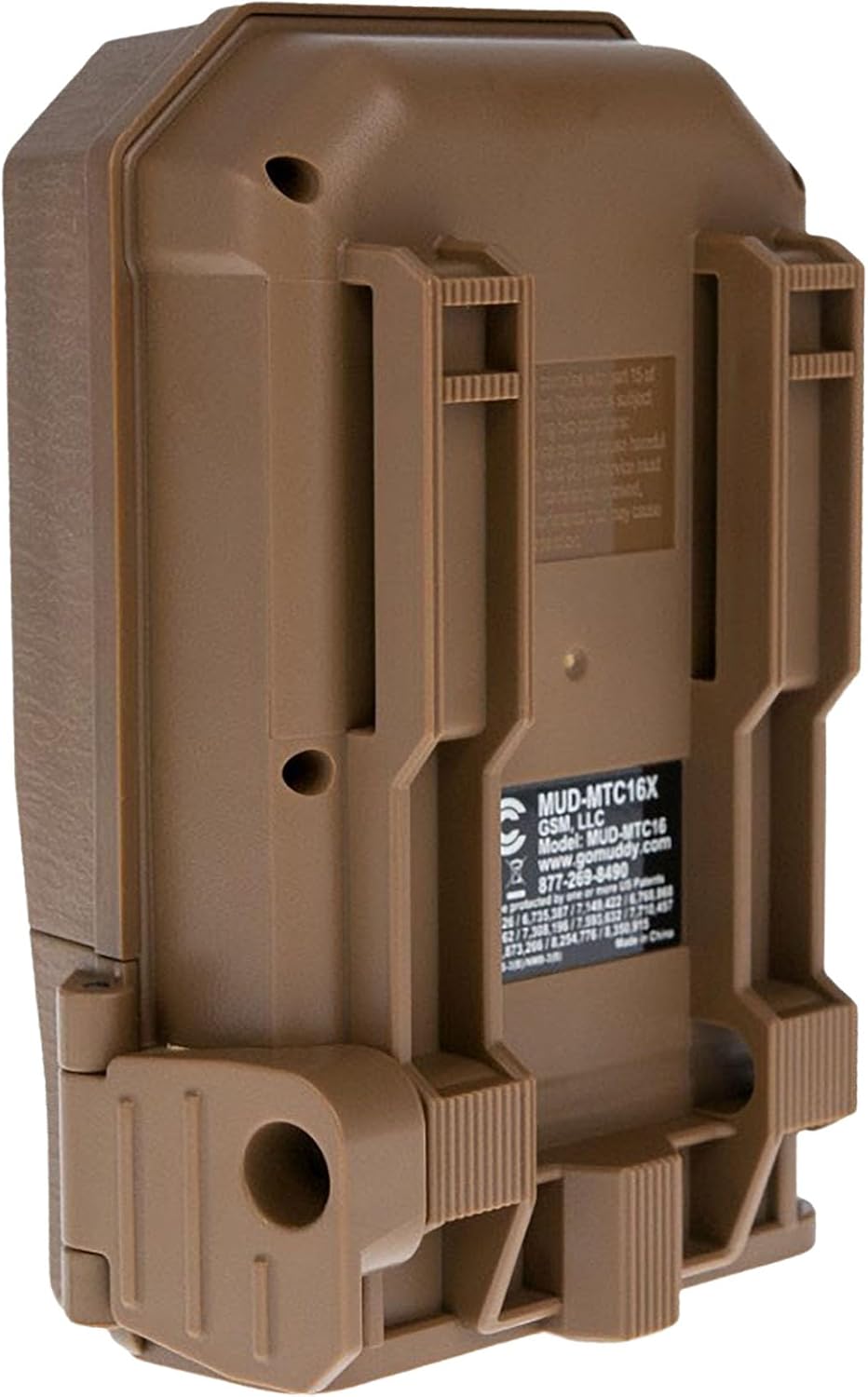
Slika 2: Zadaj view of the camera showing mounting slots and product label.
5. Navodila za uporabo
5.1. Vklop/izklop
- To power on, slide the power switch to the 'ON' position. The camera will perform a self-check.
- Za izklop potisnite stikalo za vklop v položaj »IZKLOP«.
5.2. Navigacija po meniju
Use the navigation buttons (Up, Down, Left, Right, OK) to move through the menu options and confirm selections. The display screen will show current settings.
5.3. Nastavitve načina fotografije
In the menu, navigate to 'Photo Settings' to adjust:
- Resolucija: Select 20MP, 8MP, or 4MP for image quality. Higher resolution results in larger file velikosti.
- Zaporedni način: Set the number of images captured per trigger (1 to 3 photos).
- Zakasnitev: Set the time interval between consecutive triggers.
5.4. Nastavitve video načina
In the menu, navigate to 'Video Settings' to adjust:
- Resolucija: Set to 720p for video capture.
- Dolžina videa: Specify the duration of each video clip.
- Avdio posnetek: Omogočite ali onemogočite zajem zvoka z videoposnetkom.
5.5. Detection and Trigger
The camera features an 80-foot detection range and a 0.5-second trigger speed. Ensure the detection area is clear of obstructions that might cause false triggers, such as swaying branches.
6. Vzdrževanje
6.1. Zamenjava baterije
When the battery indicator shows low power, replace all eight AA batteries with new ones to ensure optimal performance and prevent data loss.
6.2. Upravljanje SD-kartic
Regularly check the SD card capacity. Format the SD card periodically to maintain optimal performance and prevent corruption. Always power off the camera before inserting or removing the SD card.
6.3. Čiščenje
Use a soft, dry cloth to clean the camera lens and housing. Avoid using abrasive cleaners or solvents. Ensure the camera is dry before closing the housing.
7. Odpravljanje težav
- Kamera se ne vklopi: Preverite namestitev baterij in se prepričajte, da so nove.
- Ni posnetih slik/videoposnetkov: Verify SD card is inserted correctly and has sufficient space. Check camera settings for proper mode selection and trigger delay.
- Slaba kakovost slike/videoposnetka: Ensure the lens is clean. Check resolution settings.
- Lažni sprožilci: Adjust camera placement to avoid moving branches or excessive sunlight in the detection zone.
8. Specifikacije
| Funkcija | Specifikacija |
|---|---|
| Številka modela | MUD-MTC20X |
| Ločljivost slike | 20 MP, 8 MP, 4 MP |
| Video ločljivost | 720p @ 30 FPS |
| Obseg zaznavanja | 80 čevljev |
| Sprožilna hitrost | 0.5 sekund |
| Vrsta bliskovnega pomnilnika | SD (do 32 GB) |
| Vir napajanja | 8 x AA baterije |
| Tehnologija foto senzorja | CMOS |
| Tehnologija povezljivosti | Infrardeči |
| Teža predmeta | 12.3 unč |
| Dimenzije izdelka | 1 x 1 x 1 palcev |
9. Informacije o garanciji
For detailed warranty information, please refer to the official MUDDY website or contact customer support. Keep your purchase receipt as proof of purchase.
10. Podpora
If you require further assistance or have questions not covered in this manual, please visit the MUDDY support page on their official webspletno mesto ali se obrnite na njihovo službo za pomoč strankam. Kontaktne podatke običajno najdete na embalaži izdelka ali na proizvajalčevem webmesto.