
Uvod
Hvala za nakupasing the ROCAM Digital Radio Alarm Clock. This manual provides detailed instructions for setting up, operating, and maintaining your device. Please read this manual thoroughly before use to ensure proper function and longevity of the product.
Varnostne informacije
- Ensure the device is connected to a power source with the correct voltage.
- Naprave ne izpostavljajte vodi ali prekomerni vlagi.
- Naprave ne postavljajte v bližino virov toplote ali na neposredno sončno svetlobo.
- Naprave ne poskušajte razstavljati ali popravljati sami. Obrnite se na usposobljeno servisno osebje.
- Hraniti izven dosega otrok.
Konec izdelkaview
The ROCAM Digital Radio Alarm Clock features a clear display, intuitive controls, and multiple functions including FM radio, Bluetooth speaker, night light, and charging ports.

Spredaj view of the ROCAM Digital Radio Alarm Clock, showing the large digital display and speaker grille.
Ključne značilnosti:
- FM Radio (87.5 MHz - 108.0 MHz) with 20 presets.
- Bluetooth 5.0 speaker with 10m wireless range.
- Adjustable night light.
- USB and Type-C charging ports.
- Large, dimmable LED display (5 brightness levels).
- Dual alarm modes with classic beep or radio sound.
- 12/24 hour format and DST function.
- Battery backup for time and settings during power outages.
Nastavitev
1. Napajalni priključek:
Connect the provided power adapter to the DC input port on the back of the alarm clock and plug it into a wall outlet. The clock requires plug power to operate. The internal battery serves as a backup for settings during power interruptions.
2. Začetni vklop:
Once connected, the display will light up. You may need to set the time manually if it's the first use or after a prolonged power disconnection without battery backup.
Navodila za uporabo
Nastavitev časa in datuma:
- Pritisnite in držite Nastavitev časa button (or similar button, usually indicated by a clock icon). The hour digits will start flashing.
- Zavrtite Time/Volume knob za prilagoditev ure.
- Pritisnite Nastavitev časa ponovno pritisnite gumb , da potrdite uro in se premaknete na minute.
- Zavrtite Time/Volume knob za prilagoditev minut.
- Pritisnite Nastavitev časa button once more to save the time.
- Za preklop med 12-urnim in 24-urnim formatom časa pritisnite 12/24H gumb.
Nastavitev alarmov:
Ura podpira dva neodvisna alarma.
- Pritisnite in držite Alarm 1 or Alarm 2 gumb. Številke ure alarma bodo utripale.
- Zavrtite Time/Volume knob da nastavite želeno uro budilke.
- Pritisnite ustrezno Alarm ponovno pritisnite gumb , da potrdite uro in se premaknete na minute.
- Zavrtite Time/Volume knob za nastavitev želenih minut alarma.
- Pritisnite Alarm button again to select the alarm sound: classic beep or FM radio.
- Pritisnite Alarm button one last time to save the alarm setting.
- To activate/deactivate an alarm, short press the corresponding Alarm gumb. Na zaslonu se bo prikazala/izginila ikona alarma.
The alarm clock display showing the time and an active alarm icon, indicating the alarm function is set.
Funkcija dremeža:
Ko se oglasi alarm, pritisnite Dremež/svetloba button to temporarily silence the alarm for a few minutes (default snooze time). The alarm will sound again after the snooze period.
Delovanje FM radia:
- Pritisnite Način gumb za preklop v način FM radia.
- To perform an automatic scan for stations, press and hold the Skeniraj button. The radio will search for and save up to 20 available stations (87.5 MHz to 108.0 MHz).
- To manually tune, short press the Prejšnji/Naslednji gumbe za nastavitev frekvence.
- Zavrtite Time/Volume knob za nastavitev glasnosti radia (16 stopenj).

The alarm clock display showing an FM radio frequency, indicating it is in radio mode.
Bluetooth seznanjanje:
- Pritisnite Način button to switch to Bluetooth mode. The display will show a Bluetooth icon, usually flashing to indicate pairing mode.
- On your mobile device or computer, enable Bluetooth and search for "ROCAM Alarm Clock" (or similar device name).
- Select the device to pair. Once connected, the Bluetooth icon on the clock's display will stop flashing.
- You can now stream audio from your device to the alarm clock.
- Zavrtite Time/Volume knob to adjust the playback volume.

Notranji view of the ROCAM alarm clock highlighting its Bluetooth 5.0 capabilities and speaker components, demonstrating its audio features.
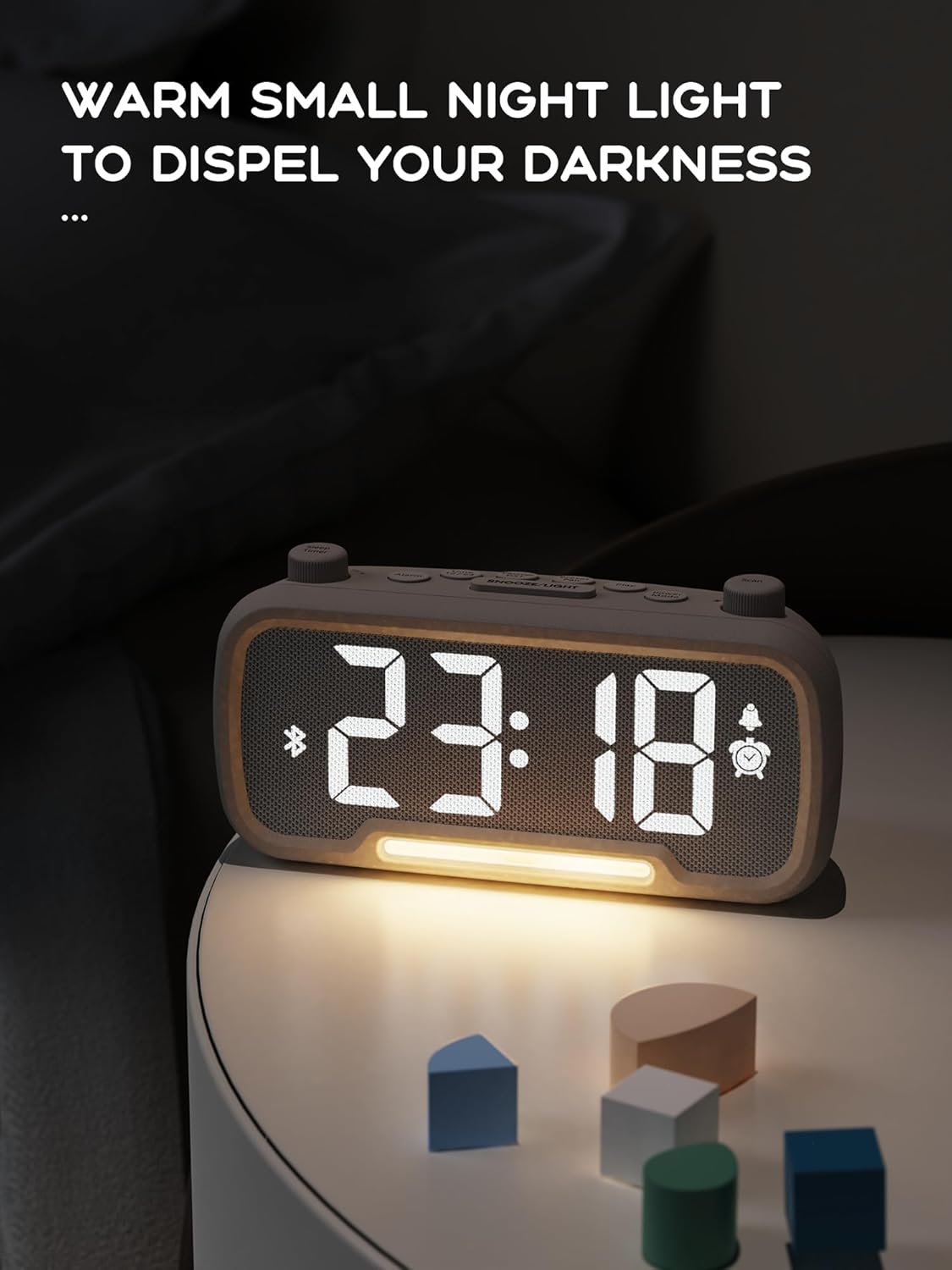
Funkcija nočne luči:
The alarm clock features an integrated night light.
- Kratek pritisk na Dremež/svetloba button to turn the night light on or off.
- The night light has adjustable brightness levels. Press and hold the Dremež/svetloba button to cycle through the brightness options.

The ROCAM alarm clock on a bedside table, with its warm night light illuminated, providing ambient lighting.
Prilagoditev svetlosti zaslona:
The main display has 5 adjustable brightness levels.
- Pritisnite Svetlost button (or similar, often combined with Snooze/Light) to cycle through the display brightness levels.
- Select the level that is most comfortable for your environment.
Daylight Saving Time (DST) Function:
Za prilagoditev poletnega časa:
- Kratek pritisk na poletni čas button (or similar, often indicated by a sun icon). The time will automatically adjust forward or backward by one hour.
- Press it again to revert the change.
USB and Type-C Charging Ports:
The alarm clock includes USB and Type-C ports for charging external devices.
- Connect your device's charging cable to the appropriate USB or Type-C port on the back of the alarm clock.
- Ensure the alarm clock is powered on for the charging ports to function.
Vzdrževanje
- Napravo očistite z mehko, suho krpo. Ne uporabljajte tekočih čistil ali abrazivnih materialov.
- Napravo hranite brez prahu in umazanije, da zagotovite ustrezno prezračevanje.
- Če naprave ne boste uporabljali dlje časa, jo izključite iz električne vtičnice.
Odpravljanje težav
| Težava | Možen vzrok | rešitev |
|---|---|---|
| Prikaz ure je izklopljen. | Ni elektrike, izklopljena elektrikatage, or device is off. | Check power connection. Ensure the power adapter is securely plugged in. If there was a power outage, the battery backup should maintain settings, but the display requires main power. |
| Alarm se ne oglasi. | Alarm is not activated, volume is too low, or incorrect time set. | Ensure the alarm icon is visible on the display. Increase alarm volume. Verify alarm time is set correctly. |
| Sprejem FM radia je slab. | Šibek signal, antena ni iztegnjena ali motnje. | Adjust the position of the device. Extend the FM antenna fully. Try auto-scanning for stations again. Avoid placing near other electronic devices. |
| Naprave Bluetooth ni mogoče seznaniti. | Clock not in Bluetooth mode, device too far, or already paired with another device. | Ensure the clock is in Bluetooth mode (flashing icon). Move your device closer to the clock. Disconnect from other Bluetooth devices. |
| USB/Type-C charging not working. | Clock not powered, cable faulty, or device not compatible. | Ensure the alarm clock is plugged into a wall outlet. Try a different charging cable. Verify your device is compatible with standard USB charging. |
Specifikacije
| Funkcija | Podrobnost |
|---|---|
| Znamka | ROCAM |
| Model | B0FNWB172Z |
| barva | siva |
| Dimenzije | 16.8 x 3.81 x 8.4 cm (6.6 x 1.5 x 3.3 palca) |
| Teža | 350 g (0.77 lbs) |
| Vir napajanja | Električni na kabel |
| Baterija | 1 Lithium-metal battery (included, for backup) |
| FM frekvenčno območje | 87.5 MHz - 108.0 MHz |
| Različica Bluetooth | 5.0 |
| Svetlost zaslona | 5 stopenj nastavljivih |
| Stopnje glasnosti | 16 stopenj nastavljivih |
Garancija in podpora
For warranty information or technical support, please refer to the contact details provided with your purchase or visit the official ROCAM webspletnega mesta. Shranite dokazilo o nakupu za uveljavljanje garancije.


