
1. Uvod
Thank you for choosing the RUIZU X55 64GB USB MP3 Player. This portable music player is designed for convenience and high-quality audio, featuring Bluetooth 5.3 connectivity, an integrated clip for active use, FM radio, voice recording, and direct phone file transfer capabilities. This manual provides detailed instructions to help you get the most out of your device.
The RUIZU X55 offers a seamless audio experience with its Bluetooth 5.3, ensuring quick pairing and stable connection to wireless headphones or speakers. Its clip-on design makes it ideal for sports and on-the-go activities. With 64GB of internal storage, you can carry thousands of songs. The device also supports various audio formats, including MP3, WMA, APE, FLAC, WAV, DRM, ACELP, and OGG, providing flexibility for your music library.
2. Kaj je v škatli
- 1 x RUIZU USB Stick MP3 Player with Bluetooth
- 1 x 3.5 mm žične stereo slušalke
- 1 x USB to USB-C Adapter Cable
- 1 x English & Japan User Manual
3. Izdelek je končanview
3.1 Razporeditev in upravljanje naprave
The RUIZU X55 features a compact design with a built-in clip and intuitive controls. The device includes a small LCD screen, touch-sensitive buttons for navigation and playback, and physical buttons for volume control and power.
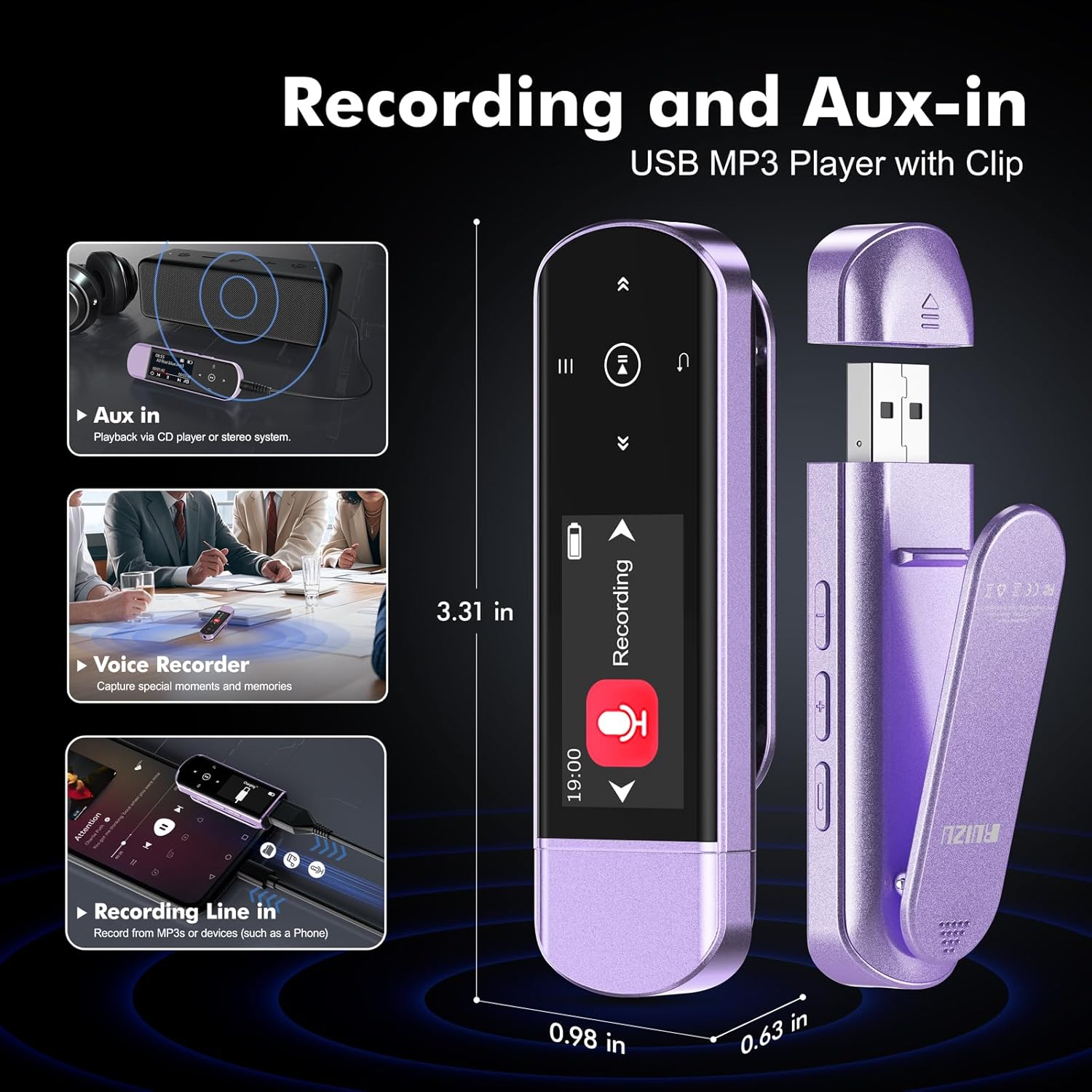
Slika: RUIZU X55 MP3 Player showing its compact size (3.31 inches long, 0.98 inches wide, 0.63 inches thick) and key features like Aux In, Voice Recorder, and Recording Line In.
3.2 Ključne lastnosti
- Bluetooth 5.3: For stable and quick connection to wireless headphones and speakers.
- Vgrajena sponka: Securely attach the player to clothing or bags for hands-free use during activities.
- 64 GB notranjega pomnilnika: Ample space for over 15,000 MP3 songs or 2,000 lossless FLAC files.
- Neposredni USB priključek: Integrated USB-A connector for direct connection to computers for file prenos in polnjenje.
- Telefon File Transfer (OTG): Transfer music directly from smartphones using an OTG cable/adapter (not included).
- FM radio: Enjoy local radio stations (requires wired headphones as antenna).
- Snemalnik zvoka: Capture audio with the built-in microphone.
- HiFi kakovost zvoka: Supports various audio formats for an immersive listening experience.
- Več načinov predvajanja: Shuffle, playlist loop, sequential play, folder repeat, and more.
- Dolga življenjska doba baterije: Up to 20 hours of playtime on a 2-hour charge.
4. Nastavitev
4.1 Polnjenje naprave
Before first use, fully charge your RUIZU X55 MP3 player. The device features a direct USB-A plug for convenient charging.
- Remove the protective cap from the USB-A connector.
- Plug the MP3 player directly into a USB port on your computer or a USB wall adapter.
- The screen will indicate 'Charging'. A full charge typically takes about 2 hours.

Slika: The RUIZU X55 MP3 Player connected to a laptop via its integrated USB plug, displaying 'Charging' on its screen. This image also illustrates the 64GB memory, 20 hours playing time, and 2 hours charging time.
4.2 Prenos glasbe Files
Glasbo lahko prenesete files from your computer or smartphone.
Iz računalnika:
- Plug the MP3 player directly into a USB port on your computer.
- Računalnik bo napravo prepoznal kot odstranljiv disk.
- Povlecite in spustite želeno glasbo files (MP3, WMA, APE, FLAC, WAV, DRM, ACELP, OGG) into the player's storage.
- Safely eject the device from your computer after transfer is complete.
From a Smartphone (OTG Function):
This feature allows direct transfer from your smartphone. Ensure your phone supports OTG (On-The-Go) functionality.
- Connect the MP3 player to your smartphone using an OTG cable or adapter (not included).
- Your phone should recognize the MP3 player as external storage.
- Use your phone's file manager to transfer music files to the MP3 player.
- Opomba: For best results, transfer filev paketih pod 1 GB.

Slika: The RUIZU X55 MP3 Player demonstrating file transfer capabilities from both a smartphone via an OTG adapter and a laptop via its direct USB connection.
5. Navodila za uporabo
5.1 Vklop/izklop in zaklepanje zaslona
- Vklop: Press and hold the Power button (usually the top physical button on the side) for a few seconds.
- Ugasniti: Press and hold the Power button. The device will display a countdown before shutting down.
- Zaklepanje/odklepanje zaslona: A quick press of the Power button will toggle the screen and touch controls active or inactive.
5.2 Predvajanje glasbe
Navigate to the 'Music' icon on the main menu to access your audio files.
- Select 'Music' from the main menu.
- Browse through 'All Songs', 'Artists', 'Albums', 'Genres', or 'Folders'. Using the 'Folders' option allows you to navigate your music as organized on your computer.
- Use the touch controls (Play/Pause, Next/Previous, Menu, Return) to manage playback.
- Adjust volume using the physical volume buttons on the side of the device.
Načini predvajanja:
The RUIZU X55 supports various playback modes to customize your listening experience:
- Enojna zanka: Ponavlja trenutno skladbo.
- Ponavljanje naključnega predvajanja: Plays songs in a random order and repeats the shuffled list.
- Zanka seznama: Ponavlja celoten seznam predvajanja.
- Zaporedno predvajanje: Predvaja pesmi po vrsti.
- Ponavljanje več map: Ponavlja pesmi znotraj več izbranih map.
- Ponavljanje ene mape: Ponavlja pesmi znotraj trenutne mape.

Slika: The RUIZU X55 MP3 Player screen showing various playback modes (Loop Single, Shuffle Repeat, List Loop, Sequential Play, Multiple Folder Repeat, Single Folder Repeat) and highlighting its HiFi Lossless Sound capability.
5.3 Povezava Bluetooth
The RUIZU X55 features Bluetooth 5.3 for connecting to wireless audio devices.
- V glavnem meniju izberite ikono »Bluetooth«.
- Prepričajte se, da so vaše slušalke ali zvočnik Bluetooth v načinu seznanjanja.
- Predvajalnik MP3 bo poiskal razpoložljive naprave. Na seznamu izberite svojo napravo za seznanitev.
- Once paired, audio will be routed to your Bluetooth device.
Important Note: The Bluetooth function of the RUIZU X55 CANNOT connect to computers, cars, or smartphones. It is designed for connecting to Bluetooth headphones or speakers only.

Slika: The RUIZU X55 MP3 Player demonstrating stable Bluetooth 5.3 connectivity with various audio devices, including over-ear headphones, earbuds, and a portable speaker.
5.4 FM radio
To use the FM radio, you must connect wired headphones, which act as the antenna.
- Plug the included 3.5mm wired headphones into the player's headphone jack.
- From the main menu, select the 'FM Radio' icon.
- Use the menu options to perform an auto-tune scan to find available stations.
- You can save up to 30 preset stations. Use the Play/Pause button to scan through presets and the Fast-Forward/Rewind buttons to manually search for stations.

Slika: A person using the RUIZU X55 MP3 Player with wired headphones, illustrating the FM radio function with a frequency range of 80.5-108MHz displayed on the player's screen.
5.5 Snemalnik zvoka
The RUIZU X55 includes a built-in voice recorder.
- From the main menu, select the 'Recording' icon.
- Pritisnite gumb Predvajaj/Pavza, da začnete snemati.
- Press the Play/Pause button again to pause/resume recording.
- Press the Back button to stop and save the recording. Recordings are automatically named by date and time.
- Recordings can be saved in MP3 or WAV format at different bit rates, configurable in the settings.
5.6 AUX and USB in Car
The RUIZU X55 can be used to play music in your car through its 3.5mm AUX port or standard USB plug.
AUX povezava:
- Connect the MP3 player to your car's audio system using a 3.5mm audio cable (not included).
- Select the AUX input on your car's stereo.
- Play music on the MP3 player, and it will output through your car's speakers.
USB povezava:
- Plug the MP3 player directly into your car's USB port.
- Your car's audio system may recognize the player as a USB drive and allow direct playback.
- If your car has a USB-C port, use the provided USB to USB-C adapter cable.
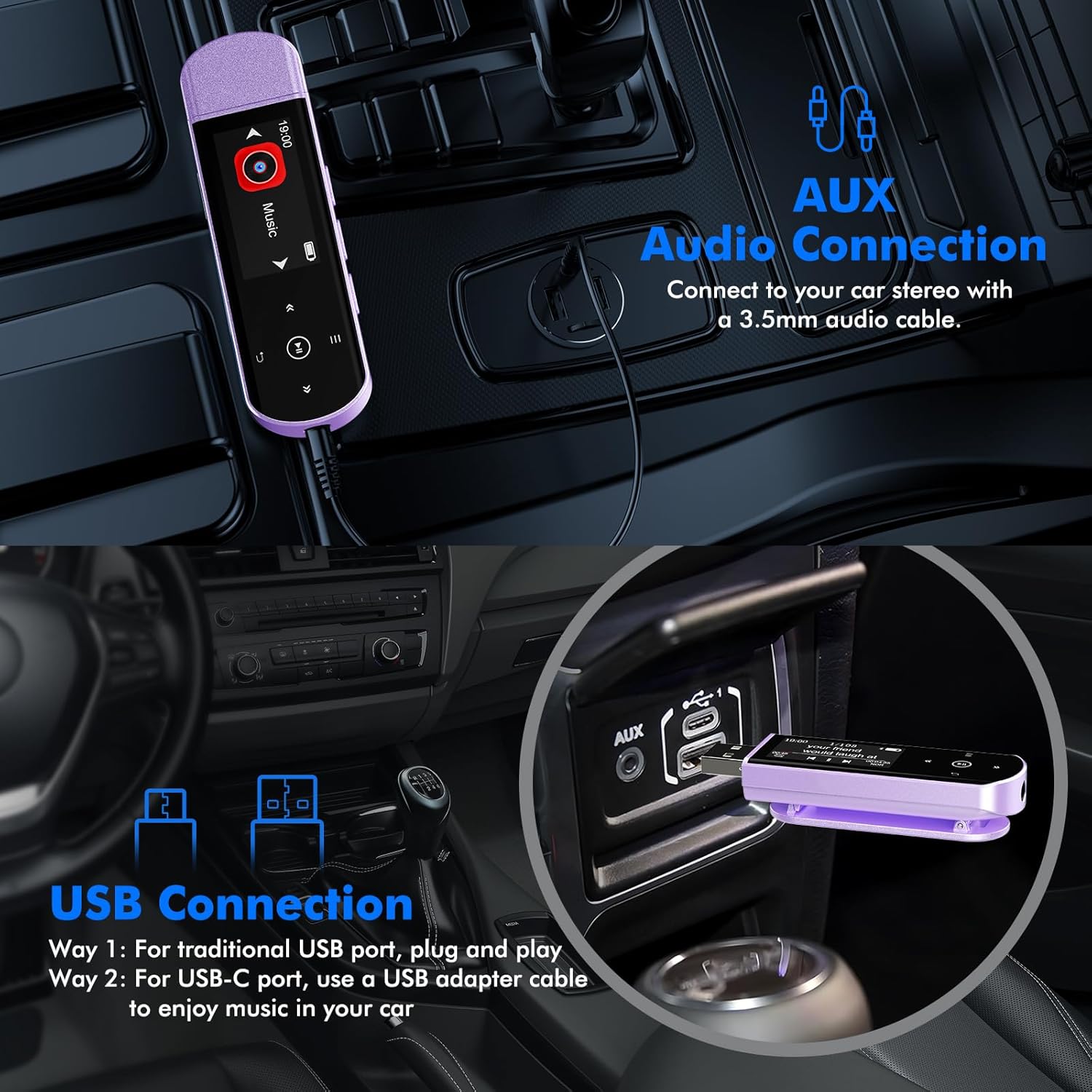
Slika: The RUIZU X55 MP3 Player demonstrating connectivity options in a car, showing both a 3.5mm AUX audio connection and a USB connection (direct plug and via USB-C adapter).
5.7 Druge funkcije
The RUIZU X55 offers additional features accessible through its menu:
- Izenačevalnik: Adjust audio settings for different sound profiles.
- Zaznamki: Mark specific points in audio files for easy return.
- Omejitev glasnosti: Set a maximum volume level.
- Line-in funkcija: Record music directly from a phone or other device to the MP3 player (requires appropriate cable, not included).
- Flash Drive: The device can also be used as a standard USB flash drive for data storage.
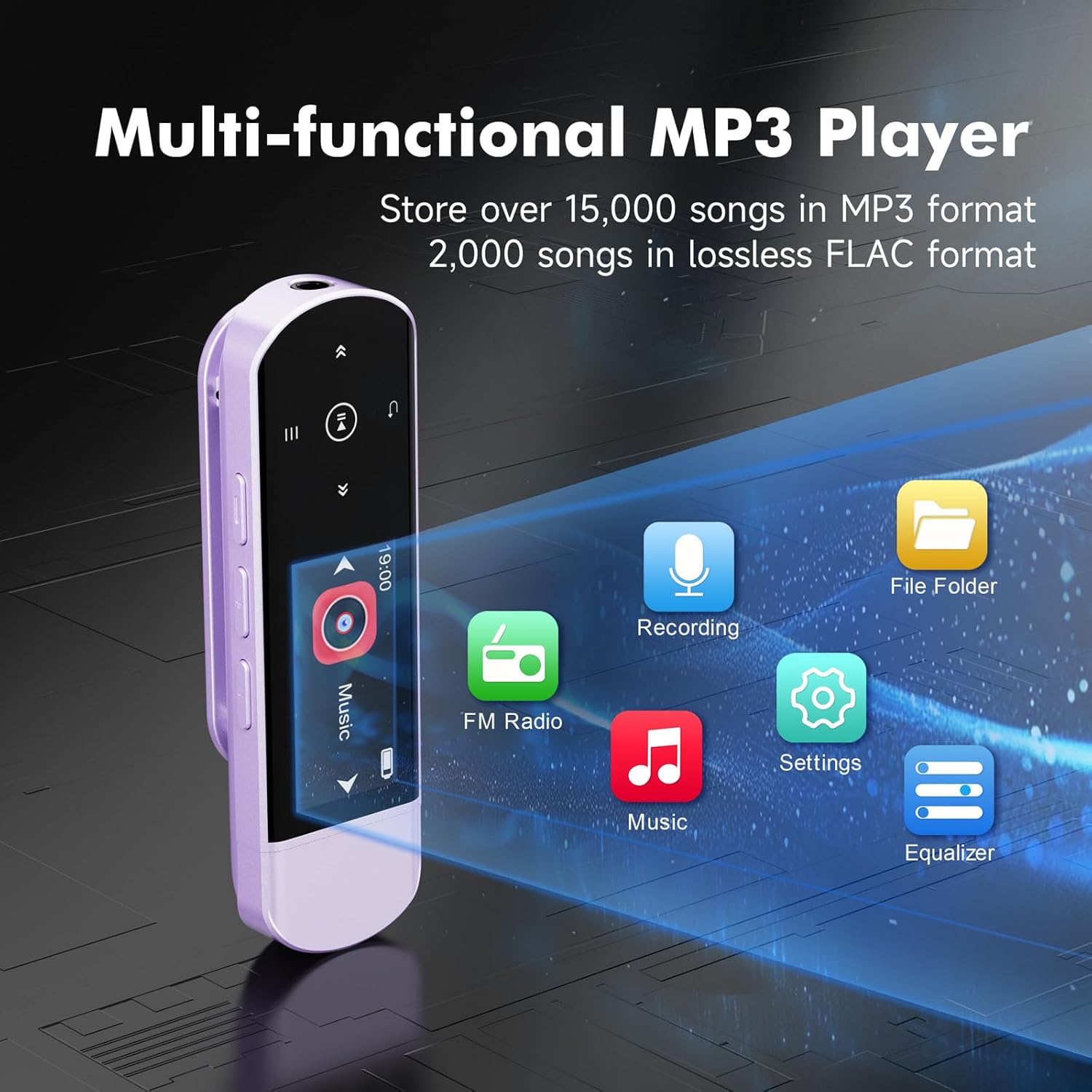
Slika: The RUIZU X55 MP3 Player displaying its main menu with icons for Music, FM Radio, Recording, Settings, File Folder, and Equalizer, indicating its multi-functional capabilities.
6. Vzdrževanje
- Napravo hranite suho. Vlaga lahko poškoduje elektronske komponente.
- Avoid extreme temperatures. High temperatures can shorten the life of electronic devices and distort plastic parts.
- Naprave ne spuščajte, udarjajte in ne tresite. Grobo ravnanje lahko poškoduje notranja vezja.
- Napravo očistite z mehko, suho krpo. Ne uporabljajte agresivnih kemikalij ali čistilnih topil.
- Protect the USB connector with its cap when not in use to prevent dust and damage.
7. Odpravljanje težav
Naprava se ne vklopi:
- Prepričajte se, da je naprava popolnoma napolnjena. Priključite jo na vir napajanja za vsaj 30 minut.
- Try resetting the device by pressing and holding the power button for an extended period (e.g., 10-15 seconds).
Povezave prek Bluetootha ni mogoče:
- Confirm that your target device (headphones/speaker) is in pairing mode.
- Ensure the MP3 player's Bluetooth is enabled and scanning.
- Remember, the MP3 player's Bluetooth cannot connect to computers, cars, or smartphones.
- Napravi premaknite bližje druga drugi, da zagotovite, da sta v dosegu.
Files Not Transferring or Appearing:
- Preverite, ali glasba files are in a supported format (MP3, WMA, APE, FLAC, WAV, DRM, ACELP, OGG).
- Ensure the device is properly connected to your computer or smartphone.
- When transferring from a phone, confirm your phone supports OTG and use an OTG cable/adapter.
- Poskusite s prenosom files in smaller batches, especially from a smartphone.
FM Radio Signal is Poor:
- Ensure wired headphones are securely plugged in, as they function as the antenna.
- Try moving to an open area or adjusting the position of the headphone cable to improve reception.
8. Specifikacije
| Funkcija | Podrobnost |
|---|---|
| Znamka | RUIZU |
| Ime modela | X55 |
| Zmogljivost pomnilnika | 64 GB |
| Tehnologija povezljivosti | Aux, Bluetooth 5.3, USB |
| Posebne lastnosti | Built-In Clip, Equalizer, FM Radio, Voice Recorder |
| Velikost zaslona | 1 palcev |
| Združljive naprave | Slušalke, zvočniki |
| Podprta vrsta medija | Micro SD (internal 64GB) |
| Podprti zvočni formati | MP3, WMA, APE, FLAC, WAV, DRM, ACELP, OGG |
| Povprečna življenjska doba baterije | 20 ur |
| Čas polnjenja | Pribl. 2 ure |
| Tehnologija zaslona | LCD |
9. Garancija in podpora
For warranty inquiries or technical support, please contact RUIZU customer service.
- Podpora po e-pošti: support@ruizutek.com
Please refer to the official RUIZU website or your purchase documentation for the most up-to-date warranty information.
10. Videoposnetki izdelkov
Watch these official videos for a visual guide on using your RUIZU X55 MP3 Player.
RUIZU 64GB USB MP3 Player with Bluetooth 5.3 Overview
Video: Ta videoposnetek ponuja konecview of the RUIZU 64GB USB MP3 Player with Bluetooth 5.3, highlighting its features and ease of use for daily activities and workouts.
RUIZU USB MP3 Player with Bluetooth, Clip Music Player
Video: This video showcases the RUIZU USB MP3 Player with Bluetooth, focusing on its clip design and suitability as a portable music player.