
1. Uvod
Thank you for choosing the Pisichen 24 inch Touch Screen Gaming Monitor. This manual provides essential information for setting up, operating, and maintaining your monitor. Please read it thoroughly before use to ensure optimal performance and safety.
This monitor features a 24-inch QHD (2560x1440P) display with a 165Hz refresh rate, 2ms response time, and 10-point projected capacitive touchscreen functionality. It supports FreeSync and HDR, offering a vibrant and responsive visual experience for both gaming and professional applications.

Image: The Pisichen 24-inch 2K 165Hz Touch Screen Monitor highlighting its key features like HDR, IPS Panel, and 10-point Touch.
2. Vsebina paketa
Preden nadaljujete z namestitvijo, preverite, ali so v paketu prisotne vse komponente:
- Pisichen 24 inch Touch Screen Monitor
- Stojalo za monitor (podstavek in vrat)
- DP kabel
- HDMI kabel
- Kabel USB B na dotik
- USB CC kabel
- DC napajalnik
- Uporabniški priročnik (ta dokument)
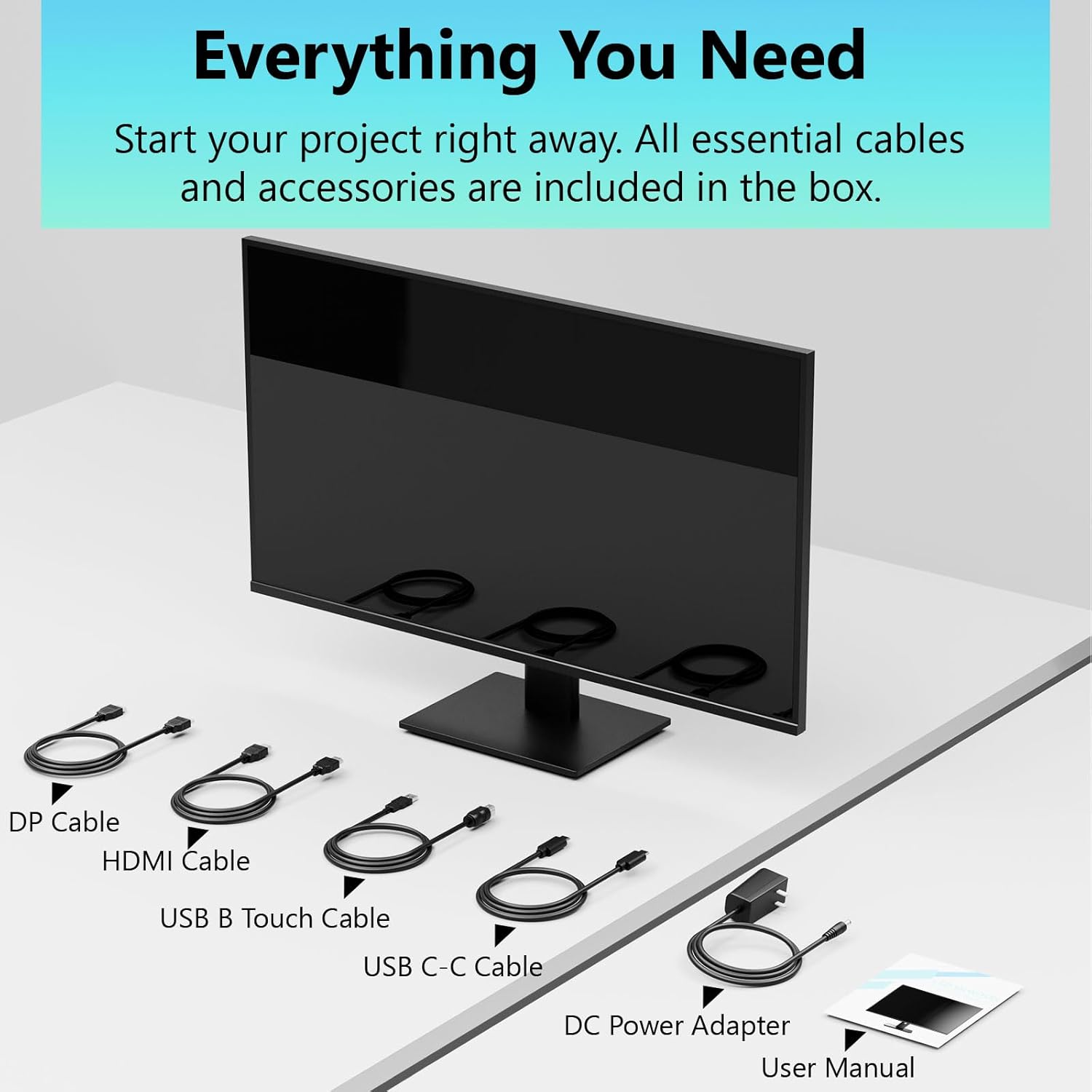
Image: All essential cables and accessories included in the box for the monitor setup.
3. Navodila za nastavitev
3.1 Sestavljanje stojala
- Monitor previdno vzemite iz embalaže in ga položite z zaslonom navzdol na mehko, čisto površino, da preprečite praske.
- Pritrdite vrat stojala na zadnjo ploščo monitorja.
- Podstavek stojala pritrdite na vrat stojala s priloženimi vijaki.
- Preden monitor postavite pokonci, se prepričajte, da so vse povezave trdne.
3.2 Namestitev nosilca VESA (izbirno)
This monitor supports VESA mounting. If you plan to use a VESA-compatible arm or wall mount, remove the stand and attach the VESA mount according to the mount's instructions. The VESA pattern is typically 75x75mm or 100x100mm (refer to specifications for exact details).
3.3 Povezovanje z napravo
Monitor ponuja več možnosti povezljivosti:
- HDMI: En konec kabla HDMI priključite na vrata HDMI na monitorju, drugi konec pa na izhod HDMI na računalniku.
- DisplayPort (DP): Connect one end of the DP cable to the monitor's DP port and the other end to your computer's DP output.
- USB Type-C: For compatible devices, connect the USB C-C cable to the monitor's USB Type-C port and your device's USB Type-C port. This single cable can transmit video, data, and power (charging).
- USB Type-B (for Touch Functionality): To enable the touch screen feature, connect the USB B Touch Cable from the monitor's USB Type-B port to an available USB Type-A port on your computer.

Image: The monitor's rear panel with various connectivity options, including HDMI, DisplayPort, and USB-C ports.
3.4 Napajalni priključek
Connect the DC Power Adapter to the monitor's power input port, then plug the adapter into a power outlet.
3.5 Initial Power On and Touch Compatibility
Press the power button on the monitor. The display should light up. If no image appears, ensure all cables are securely connected and the correct input source is selected on the monitor (via the OSD menu).
For touch functionality, ensure the USB B Touch Cable is connected to your computer. Touch compatibility may vary by operating system and device. Most Windows PCs support multi-touch. For Mac devices, single-touch click is generally supported, but multi-touch may require specific drivers or configurations. Game consoles (PS3/4/5, Xbox, Steam Deck) and some other devices (Fire TV, Apple products like iPhone/iPad) typically do not support touch functionality.

Image: A compatibility chart illustrating which devices support multi-touch or single-touch, and which devices do not support touch functionality with the monitor.
4. Navodila za uporabo
4.1 Vklop/izklop
Pritisnite gumb za vklop/izklop na monitorju, da ga vklopite ali izklopite. Indikatorska lučka napajanja bo prikazovala stanje monitorja.
4.2 Zaslonski meni (OSD)
The OSD menu allows you to adjust various monitor settings. Use the control buttons (usually located on the back or bottom of the monitor) to navigate the menu. Common menu options include:
- Nastavitve slike: Brightness, Contrast, Sharpness, Color Temperature, HDR mode.
- Nastavitve zaslona: Aspect Ratio, Input Source selection (HDMI, DP, USB-C).
- Nastavitve za igre: FreeSync, Response Time (Overdrive), Crosshair.
- Nastavitve zvoka: Volume (if internal speakers or audio output are present).
- Sistemske nastavitve: Language, OSD Transparency, Reset to Factory Defaults.
4.3 Funkcionalnost zaslona na dotik
The monitor supports 10-point multi-touch, allowing for intuitive interaction directly on the screen. Ensure the USB B Touch Cable is connected to your computer for this feature to work.
- Enkratni dotik: Enakovredno kliku z levo tipko miške.
- Tapnite in zadržite: Enakovredno kliku z desno tipko miške.
- Povečava s ščipanjem in ščipanjem prstov: Za povečavo ali pomanjšavo uporabite dva prsta.
- Povlecite: Navigate through content or scroll.

Image: A user interacting with the monitor's touch screen, highlighting its precision and responsiveness for creative tasks.
4.4 Ergonomske prilagoditve
The monitor stand allows for tilt adjustments to achieve the most comfortable viewing and touch angle. Gently adjust the screen to your preferred position.
4.5 Funkcije za nego oči
The monitor includes advanced eye-comfort features such as Flicker-Free technology and Low Bluelight mode to reduce eye strain during prolonged use. These settings can typically be adjusted within the OSD menu.

Image: Visual representation of the monitor's advanced eye-comfort features, including Flicker-Free and Low Bluelight technologies.
5. Vzdrževanje
5.1 Čiščenje monitorja
- Pred čiščenjem vedno izklopite monitor in izvlecite napajalni kabel.
- Narahlo uporabite mehko krpo, ki ne pušča vlaken dampz vodo ali blagim, neabrazivnim čistilom za zaslone.
- Čistila ne pršite neposredno na zaslon. Najprej ga nanesite na krpo.
- Avoid using benzene, thinner, ammonia-based cleaners, or abrasive materials, as these can damage the screen surface.
5.2 Shranjevanje
Če monitor shranjujete dlje časa, ga izklopite, izključite iz električnega omrežja in shranite na hladnem in suhem mestu, stran od neposredne sončne svetlobe in ekstremnih temperatur. Za najboljšo zaščito uporabite originalno embalažo, če je na voljo.
6. Odpravljanje težav
Če imate težave z monitorjem, si oglejte naslednje pogoste korake za odpravljanje težav:
- Brez napajanja: Prepričajte se, da je napajalnik varno priključen na monitor in delujočo električno vtičnico. Preverite, ali lučka za napajanje sveti.
- Ni slike/signala:
- Verify that the video cable (HDMI, DP, or USB-C) is securely connected to both the monitor and your computer.
- Prepričajte se, da je v zaslonskem meniju monitorja izbran pravilen vhodni vir.
- Check your computer's display settings to ensure the monitor is detected and enabled.
- Funkcionalnost brez dotika:
- Confirm the USB B Touch Cable is connected from the monitor to your computer.
- Check your computer's device manager to see if the touch screen driver is installed and functioning correctly.
- Refer to the "Initial Power On and Touch Compatibility" section for device-specific limitations.
- Utripajoča ali popačena slika:
- Preverite video kabel za poškodbe ali ohlapne povezave.
- Try a different video cable or port.
- Prilagodite hitrost osveževanja v nastavitvah zaslona računalnika.
- Mrtve slikovne pike: A small number of bright or dark pixels are common in LCD/LED technology and are not considered a defect unless they exceed manufacturer specifications.
Če težava po poskusu teh korakov še vedno obstaja, se obrnite na podporo strankam.
7. Specifikacije
| Funkcija | Specifikacija |
|---|---|
| Znamka | Pisichen |
| Številka modela | 24IN165HZ-QHD |
| Velikost zaslona | 23.8 palcev |
| Resolucija | QHD Wide 1440p (2560 x 1440) |
| Razmerje stranic | 16:9 |
| Hitrost osveževanja | 165 Hz |
| Odzivni čas | 2 milisekund |
| Vrsta zaslona | LED IPS |
| Svetlost | 400 kandel (cd/m²) |
| Kontrastno razmerje | 3000:1 |
| Viewkota | 178 stopinj |
| Barvna lestvica | 99 % |
| Picture Quality Enhancement | HDR |
| Prilagodljiva sinhronizacija | FreeSync |
| Tehnologija povezljivosti | DisplayPort, HDMI, USB Type-C, USB Type-B |
| Dodatne funkcije | Tilt Adjustment, 10-Point Touchscreen |
| Mere predmeta (D x Š x V) | 0.75"D x 21.5"Š x 12.7"V |
| Teža predmeta | 5.38 kilogramov |
| barva | Črna |
8. Informacije o garanciji
This product comes with a 1-year limited warranty from the date of purchase. The warranty covers manufacturing defects and workmanship under normal use. It does not cover damage caused by misuse, accidents, unauthorized modifications, or external factors. Please retain your proof of purchase for warranty claims.
9. Podpora strankam
For technical assistance, warranty claims, or further inquiries, please contact Pisichen customer support. You may find contact information on the official Pisichen webspletnem mestu ali prek vašega prodajalca.
Za dodatne vire in informacije o izdelkih obiščite Pisichen Store on Amazon.